

Tech
Tips for Keeping a Digital Diary and Why You Should


Keeping a daily diary doesn’t come easily to most people, but it takes less effort than you might imagine. It could also become a meaningful way to reflect and grow as a person.
For more than 10 years, I’ve written a few words every morning, and what I’ve learned from this practice has changed my life. My only regret is not starting sooner.
If you’re interested in adding a daily journaling practice to your life, these tips and tools can help you not only get started, but also stick with it.
Why Keep a Journal or Diary?
My diary is a tool for clearing out my thoughts, recording details of my life that are sometimes useful to know later, and reflecting. The value in reflecting, however, only became apparent after I’d been writing for several years and could look back on my life to see it from a different perspective.
I’ve always been very hard on myself. I don’t make excuses, and I look upon my failures with consternation. Whenever I’ve gone back and read a series of diary entries from low points in my life, I’ve been able to view them with an outsider’s perspective. I can see more clearly just how tough things were, or how many things went wrong at once, or the gravity of a single event that I might have downplayed in the moment. This reflection has led me to be more compassionate toward myself—and toward others. I have learned to cut myself some slack.
You might discover something else, whether a pattern of behavior or something you want to change. Or maybe with hindsight you realize the things you thought you wanted to change don’t need changing at all. Journaling sheds light on all these things.
Memory is fickle. The personal self-reflection that we do entirely in our heads differs wildly from what we can do with notes. In short, that’s why I’ve kept up my daily writing for more than 10 years.
What Should You Write in Your Journal?
Start every diary entry with the date and your location. Why bother if your computer or phone can add them automatically? A few reasons. First, you will never stare at a blank page, and you will always know how to start. Second, metadata can get bungled over time or during file transfers, so it’s more reliable to add them manually. Third, typing the date and location into the diary entry itself ensures that those very important pieces of information are searchable.
What else should you write? A diary entry can be a simple brain dump. That’s what I do. Other things worth mentioning are major events, strong emotions, and hopes and dreams.
If following a method helps, you could try gratitude journaling. Some parents I know ask their kids at the end of the day to reflect on their “rose, thorn, bud“—one highlight from the day, one difficulty, and something they’re looking forward to—which is an equally good diary formula.
How to Make It a Habit
The best trick I have for forming a new habit is to tie it to an existing one. Find a habit that you already have and combine it with a few minutes of daily writing.
I journal every morning as soon as I have coffee in front of me. My coffee-making routine is non-negotiable, immovable, set in stone, seven days a week. Even when I stay in a hotel, I bring a travel coffee maker with me, and I write in my diary while drinking the coffee.












Atlantic hurricane season is almost upon us, and the early signs indicate it might be less active than usual. But that’s no reason to delete your weather app and ignore the forecast.
The National Oceanic and Atmospheric Administration is predicting eight to 14 named tropical systems, of which three to six will become hurricanes and one to three will be Category 3 or higher.
“What’s driving this forecast is largely an El Niño event,” said NOAA administrator Neil Jacobs.
Characterized by a tongue of hot water stretching across the Pacific, El Niño is likely to emerge this summer. That stretch of warm ocean rearranges weather patterns around the world. In the case of the tropical Atlantic, El Niño stirs up winds that make it hard for hurricanes to spin up. Those that do can sometimes be torn apart by what’s going on in the upper atmosphere. (The opposite is true in the Pacific, and NOAA is predicting a very active season in that ocean basin.)
During the three past super El Niños, accumulated cyclone energy—a metric that factors in storms’ strength and longevity—was well below normal.
That said, El Niño, even an extremely strong one, is only one of many factors that impact hurricane season. Hot local ocean temperatures can help storms form and gain strength, and the Atlantic is currently warmer than normal.
At the same time, Sahara dust can gum up the atmosphere and inhibit storms from forming. It’s also notoriously hard to predict when plumes of it will kick up. That’s what happened last year, when a below-average number of named storms formed despite an active forecast. Despite the lower-than-expected activity, last year still spawned Hurricane Melissa, one of the strongest storms to ever make landfall in the Atlantic basin.
All of which is to say that the seasonal forecast is a handy guide for what to expect, and it’s great for federal and state agencies to preposition supplies and resources. But it’s what happens with individual storms that ultimately matters.
“Even though we’re expecting a below average season in the Atlantic, it’s important to understand it only takes one,” Jacobs said, noting that even in quiet years, Category 5 storms have still made landfall.
The Trump administration has slashed staffing at NOAA and reduced the collection of some data, such as weather balloons, that can impact forecasts. Jacobs touted the value of new observations, including aerial drones that will be deployed operationally for the first time.
NOAA has also ramped up the use of artificial intelligence weather models trained on historical data. During the 2025 hurricane season, the agency tested an experimental hurricane model developed with Google DeepMind. Late last year, it also rolled out a suite of AI weather models to use in operational forecasting, in addition to traditional weather models that use equations to forecast the weather.
The agency says that the AI version of its flagship model provides better prediction of the tracks of tropical cyclones—the generic name for hurricanes—though it lags traditional weather models in predicting their intensity.

It is indeed a weird time to be an automaker, as US federal incentives disappear and support dwindles for newer electric-powered cars. “Manufacturers would really like to know what the future will be and what are the rules,” says Mike Finnern, the senior vice president and zero-emission fleet lead at WSP, a consulting firm. Guarantees of large, future orders from fleet managers like city governments, but also private businesses, “will help them be stable for a while.”
EVs are a nice fit for government fleets, Finnern says. Surveys suggest that regular car buyers are still plenty apprehensive about shifting to a plug-in from gas cars they’re used to, and they want cars with even longer ranges, even if they seldom use the whole battery. But governments know exactly how their vehicles are used, can more precisely control charging, and are able to see that today’s ranges of 250 to 400 miles per charge fit their needs fine. Plus, EVs might help governments save money on fueling and maintenance. Private operators like Amazon aren’t stopping their forays into EVs, and “they wouldn’t do it if it didn’t pencil out,” he says.
“I regret every electric and hybrid vehicle we haven’t bought yet,” says Kerman. “It would’ve shielded us from the doubling of fuel costs that we’re now enduring.” By partnering with the US Department of Transportation, his agency has found that switching to battery electrics improves New York City’s vehicle energy economy by 6 percent.
Still, both governments say they have plenty to learn about how and where EVs fit best and that the partnership will help them share and create best practices so that other cities might eventually follow.
One big takeaway from the government’s experience so far is that officials need to be proactive and mindful about getting city workers on board. There are technical challenges—maintenance workers need to be retrained to maintain EVs instead of gas-powered vehicles, and everyone needs to remember to plug them in—and trickier morale ones, too.
Workers don’t always appreciate sudden changes. And while New York’s data suggests that the intelligent speed assistance built into many of its new EVs reduces speeding and possibly crash severity in city vehicles, employees have lingering worries about workplace surveillance. (In March, the city workers’ union reached an agreement outlining how data collected from city vehicles might be used in disciplinary actions.)
A workforce that’s enthusiastic about EVs can make all the difference. “We’ve seen some deployments be really successful and some, not so much. They have the exact same problems, but some were able to overcome them because their people were excited about it and trained,” Finnern says.
Courtesy of California Internal Services Department
Haynes, who used to work with Kerman in New York before moving to Los Angeles, recalls that he was once an EV skeptic but changed his mind once Kerman coaxed him into trying out a Tesla. It was, above all, fun.
“I will tell you, no one goes into these electric cars, walks out and says, ‘I hate this car,’” Kerman says. “They all say, ‘I love the car.”

If one were to ask most people what they know about Kazakhstan, it wouldn’t be much of a surprise if they were to describe it as a fossil fuel-rich former Soviet republic. Indeed, that is what the world’s ninth-largest country by land area and largest landlocked nation is.
Yet while that is accurate to say right now, the Kazakhstan government is planning a future that looks rather different. A digital transformation across the nation is in play, looking to take advantage of the country’s natural resources and its strategic geographic position between Russia and China to create a land where critical infrastructure encompasses data networks and connectivity lines in addition to oil pipelines. And where telcos are already primed to plug in to the opportunity coming from a national story that a global audience is ready to hear.
This story begins at Kazakhstan’s Ministry of Artificial Intelligence and Digital Development, also home to a digital government, where the minister of the department and the country’s deputy prime minister, Zhaslan Madiyev, is keen to show the country’s high-tech transitions and just how advanced technology will play a part in the nation’s future. This process has been 10 years in the making.
Digital ambitions
Madiyev is helming what is claimed to be one of the most ambitious digital transformation programmes in Central Asia, where artificial intelligence (AI), aerospace and infrastructure will underpin daily life for 20 million people. Freedom Holding Group – a leading retail brokerage and investment bank in Central Asia and Eastern Europe, which has a variety of assets including one of Kazakhstan’s leading telcos – believes that under Madiyev’s watch, Kazakhstan has already boosted AI from a buzzword into international policy, making it part of life in restaurants, public services and the general economy alike.
Explaining the current state of transformation, Madiyev reveals that at the beginning of April 2026, more than 90% of government public services were available online – 1,300 in total – almost 40 official documents are now available in digital format, and Kazakh law regards digital documents as the equivalent of physical documents. This spans travel, trains, flights, public government services and banking services.
In the latter use case, service creation has been done in collaboration between the government and the private sector, especially banking institutions, which typically develop products and then share them with the national authority to extend them to the broader marketplace, such as the whole banking system.
The net result has been quick commerce. “For example, through the bank application, you can register a client and sell a car in a matter of three to five minutes, without going to any windows outside,” says Madiyev. “You just register and sell the car online through the [digital] application. You can [do the same] to apply for a mortgage approval. This is the Freedom bank’s product, and through the smart bridge platform … the private sector can get access to all public services and databases.”
Creating a cashless economy is another key objective. The minister notes that 90% of transactions in Kazakhstan are currently cashless, and he praises the banking industry for assisting the wider development of the industry after the Central Bank of Kazakhstan became one of the first central banks in the world to not only pilot a national digital currency but also to optimise blockchain programming.
Tech hub
Madiyev also claims that Kazakhstan is already running the largest IT hub in the region. Capital city Astana is home to more than 2,000 companies – spanning startups to big tech – and calculations show Kazakhstan exports surpassed €1bn in 2025, around 65% to 70% of which accounted for by companies in the Astana region.
Looking at the global potential of the country’s IT sector, Madiyev emphasises the contribution of the country’s offices and teams in Silicon Valley and that from new facilities opened in Shanghai and Dubai over the past 12 months, and just how investment is being used to facilitate growth.
“This is the infrastructure that our startups can use to expand to global markets, to go through the acceleration programmes there, to meet with the VCs [venture capitalists], to have co-working spaces there and to expand markets. Also, last year, we launched the venture fund of funds with the target size of US$1bn – $150m is already committed,” he says.
“We have used those funds to support local [firms] because we see that our startups are growing, and perceived [startup]-level financing requires amounts less than $1m. It’s available for the stages like Series A, B and C [where] there is not enough financing,” adds Madiyev.
“But to become a unicorn, most of the companies need six to seven rounds of financing. And that’s why we need larger cheques – one million, five million, 10 million cheques – which [to date are] not available. But we created a large venture fund, and now we will be developing the regulation, and we will try to involve the banking sector. We think this VC market is so important.”
National strategy
As it goes forward, the country is pursuing a national digital strategy based on three constituent parts: an institutional framework, new infrastructure and data, and advances in human capital.
The institutional framework takes the form of an AI development council under the chairmanship of the president of the Republic of Kazakhstan, Kassym-Jomart Tokayev, with 17 members of the global technology community.
The latter include American theoretical computer scientist John Hopcroft and compatriot computer scientist Peter Norvig; Taiwanese computer scientist, investor and author Kai-Fu Lee; American economist Laura D’Andrea Tyson, who was formerly an adviser to Bill Clinton when he was US president; UAE minister of state for artificial intelligence, digital economy and remote work applications Omar Sultan Al Olama; American AI and robotics scientist and entrepreneur Cynthia Breazeal; Joseph Ito, a leading AI policy adviser in Japan and expert in crypto industry; and Olaf Groth, a futurist and strategist for transformations of economies, industries and organisations driven by AI, data, compute and cyber.
AI is indeed the key focus and driver of the venture, and in 2024, the ministry approved a five-year AI development programme. In addition to technological developments, the programme also encompasses AI law and a digital code. Yet Madiyev stressed that the aim was not to over-regulate AI, but instead to take into account ethical standards, terminology and labelling of AI components. Such a framework is particularly necessary given that AI is extending into all areas of the digital programme, such as being embedded into the educational system.
As regards the essential infrastructure on which the digital transformation will be based, the programme boasts that it has launched the two largest supercomputer clusters in the region.
The Alem.Cloud and AL-Farabium supercomputers were launched in 2025, both based on an Nvidia H200 graphics processing unit (GPU), which is designed with high-bandwidth memory capacity to accelerate generative models and large language models (LLMs). These are used to support the Kaz national LLM on Llama 3.1 with 70 billion parameters, the AlemLLM with Yi-Lightning DeepSeek with 246 billion parameters, and Sherkala on Llama 3.2 for eight billion parameters.
This technical capability is said to have ultimately allowed the infrastructure to have a “Kazakhstani context”, embedding local cultural aspects in the language models, and being able to use them in a closed on-premise format. Yet in this regard, Madiyev is also keen to point out that the framework does not geo-politicise sensitive data to external datacentres.
Kazakh public sector employees have access to the GPUs, the supercomputer resources, datasets, LLMs and training through a national AI platform. The AI ministry takes responsibility for developing AI agents and adopting them throughout the government, and then trains people to use AI in their specific industries.
Datacentre valley
One key future infrastructure project is the creation of a datacentre valley, which will be offered to leading hyperscalers and big tech companies. In this, Madiyev stresses that the project will leverage Kazakhstan’s “abundance” of cheap energy, which is leading the ambition to offer at least 1GW (gigawatt) of computing power. The programme has already allocated 300MW (megawatts) of capacity available at the price of 2.5 cents per kilowatt. Added to these technical capabilities, the Kazakhstan government says it is ready to provide zero tax and other regulatory incentives and offer services on a one-stop shop format.
From a networking perspective, the infrastructure offers low latency to Europe, ranging from 57ms (milliseconds) to 70ms, which is said to be enough for inference work. There is also a commitment to a national fibre optic network, and the ambition is for 92% of the country’s villages to have fibre access coverage by 2027. At the same time, the government plans to have 60% to 75% national 5G mobile connectivity, for smaller conurbations and large cities respectively.
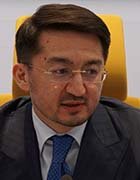
“Our startups can use [the new infrastructure] to expand to global markets, to go through the acceleration programmes there, to meet with the VCs, to have co-working spaces there and to expand markets”
Zhaslan Madiyev, Ministry of Artificial Intelligence and Digital Development
The Kazakh government is launching two major transit projects: a trans Caspian diversified internet traffic route and a west-east backbone. Madiyev stresses that having such connectivity with low latencies is an absolute necessity to attract the hyperscalers to the country.
The government is also accelerating satellite connectivity, something wholly logical given the place that the Baikonur Cosmodrome has in the history of space travel, being the launch site of Sputnik 1 and Yuri Gagarin’s Vostok 1. It is still the world’s largest operational space launch facility, and Madiyev proudly observes that Kazakhstan is almost vertically integrated in terms of the space industry. He remarks that, in addition to the launch facilities, it also has a satellite production facility in partnership with Airbus, it is building an international satellite constellation and, since 2025, the country is exporting satellites.
Eutelsat’s OneWeb and Starlink are already available, and the next 12 months will see the availability of Chinese state-owned Shanghai Spacecom and Amazon Leo, which has been ramping up its footprint in recent months. To underline the commitment of these companies to the country, Madiyev notes that they are all building gateway stations and ground infrastructure in Kazakhstan to service not only the local territory but also the broader Central Asian region.
Digital heart
Another key aspect of the programme is Astana Hub, a tech cluster regarded officially as the heart of the country’s technology ecosystem. Located in the next block from the Kazakhstan’s Ministry of Artificial Intelligence and Digital Development, the facility – employing more than 32,000 people – has the stated mission to “foster a startup culture and support high-tech projects to strengthen the country’s economy”.
There are four strategic goals: train 10,000 AI talents by 2030, create a startup culture and support high-tech projects, create five unicorns (startups valued at over $1bn) by 2030, and achieve $5bn of annual tech services and product exports by 2030. In 2025, the hub generated $1.7bn in total revenues and $634m in expert revenues. It has also raised investment of more than $910m.
There are five technology development centres in the hub. These encompass defence, drone technology, blockchain, space tech and game development. The Astana Hub Cloud looks to accelerate AI development by providing access to next-generation GPU infrastructure. Key features include Nvidia H100 and H200 GPUs optimised for deep learning and generative AI, an AI datacentre, 64 GPUs (eight per server), an InfiniBand Network, and an infrastructure-as-a-service (IaaS) model offering flexible access to resources.
Already, the hub hosts offices of major tech companies such as Playrix, TikTok, Telegram, Yandex, Glovo, in Drive, Damumed and Presight. In terms of startup developments, the hub also has the Google-backed Sılkway Accelerator. Claimed to be the leading programme of its kind in Central Eurasia, it supports startups that have reached the product-market fit stage – those that already meet market demand and have an established user base. The programme helps them scale, solidify their market position and prepare for investments.
Talent acquisition forms the nub of the hub’s success. The Kazakh government says it has created special conditions for digital nomads, in particular as regards arrangements for the entry and stay of foreign specialists. Indeed, there is what is described as a “simplified procedure” for obtaining a residence permit for specialists and their family members from Visa category countries.
Partnering for success
Yet while there is no doubt about the ambition regarding the programme, it is equally clear that there are challenges for the government and the Astana Hub to overcome. Will they be technological, such as connecting a national infrastructure in such a vast country? Will they be social? Will they be educational? Will there be regulatory headwinds?
Speaking with Computer Weekly, Madiyev accepts the existence of regulation and infrastructure issues and also highlights development, which he says should also be taken into account, something he says is a common challenge for many countries.
“Fraud and scams are happening more and more, and they are growing. It’s becoming more difficult to cope with that and to catch up with the regulations and measures against this. Also, with SMEs [small and medium-sized enterprises], we should take seriously how to teach them and how to embed AI in their [sector]. SMEs make up around 40% of national GDP, and there are around three million SMEs. That’s why we are launching those educational programmes.
“Another challenge is that in the government, public sector and social services, it’s easier to measure AI because of the huge collection of data. But if you take the [private] economy sectors, the digitalisation of the data in those industries is somewhat around 50% to 53% in the energy sector, agriculture, industries and so on. This year, we’ll [also] be concentrating on issuing proper regulations on establishing the internet of things and the various tech solutions that will help to generate data. This is another challenge.”
As seen with the activities at the Astana Hub, partnerships will be the key to overcoming challenges and headwinds – whatever form they take. And from a communications and connectivity perspective, Freedom Telecom, the comms division of the aforementioned holding group, will be a key player in realising the connectivity ambitions of the government, not only in terms of regular fixed and wireless offerings, but also in terms of realising the west-east fibre optic backbone.
In part two of our look at Kazakhstan’s digital transformation, we will find out which telecoms operator could be at the vanguard of this process.


Stephen Colbert hosts “The Late Show” one last time tonight as franchise ends after 33 years

Full list of Quiz stores to close in UK as fashion retailer falls into administration

Russia flexes nuclear muscles as tensions rise with Nato

-

 Entertainment1 week ago
Conan O’Brien hat tricks as Oscar host
-

 Fashion1 week ago
Italy’s Zegna Group’s Q1 growth boosted by strong organic performance
-

 Entertainment5 days ago
Where Pete Davidson, Elsie Hewitt stand after breakup: Details revealed
-
 Business1 week ago
Tui issues update on summer jet fuel shortage fears
-
 Business1 week ago
Jersey Election 2026: Cost of living concern in St Helier Central
-

 Entertainment7 days ago
Emilia Clarke recalls near-death incident while filming ‘Game of Thrones’
-

 Entertainment1 week ago
OpenAI chief Altman says Elon Musk wanted control of ChatGPT maker, denies betrayal
-

 Fashion1 week ago
US’ Kontoor Brands’ posts strong Q1, plans Lee divestiture