

Tech
Second ever international AI safety report published | Computer Weekly


The overall trajectory of general-purpose artificial intelligence (AI) systems remains “deeply uncertain”, even as the technology’s proliferation is generating new empirical evidence about its impacts, the second International AI safety report has found.
Published on 3 February 2026, the report covers a wide range of threats posed by AI systems – from its impact on jobs, human autonomy and the environment to the potential for malfunctions or malicious use – that will be used to inform diplomatic discussions at the upcoming India AI Impact Summit.
Building on the previous report, released in January 2025, which was commissioned following the inaugural AI Safety Summit, hosted by the UK government at Bletchley Park in November 2023, the latest report similarly highlights a high degree of uncertainty around how AI systems will develop, and the kinds of mitigations that would be effective against a range of challenges.
“How and why general-purpose AI models acquire new capabilities and behave in certain ways is often difficult to predict, even for developers. An ‘evaluation gap’ means that benchmark results alone cannot reliably predict real-world utility or risk,” it says, adding that the systemic data on the prevalence and severity of AI-related harms remains limited for the vast majority of risks.
“Whether current safeguards will be sufficiently effective for more capable systems is unclear,” it adds. “Together, these gaps define the limits of what any current assessment can confidently claim.”
It further notes that while general-purpose AI capabilities have improved in the past year through “inference-time scaling” (a technique that allows models to use more computing power to generate intermediate steps before giving a final answer), the overall picture remains “jagged”, with leading systems excelling at some difficult tasks while failing at simpler ones.
On AI’s further development to 2030, the authors say plausible scenarios vary dramatically.
“Progress could plateau near current capability levels, slow, remain steady, or accelerate dramatically in ways that are difficult to anticipate,” it says, adding that while “unprecedented” investment commitments suggest major AI developers expect continued capability gains, unforeseen technical limits – including energy constraints, high-quality data scarcity and bottlenecks in chip production – could slow progress.
“The social impact of a given level of AI capabilities also depends on how and where systems are deployed, how they are used, and how different actors respond,” it says. “This uncertainty reflects the difficulty of forecasting a technology whose impacts depend on unpredictable technical breakthroughs, shifting economic conditions and varied institutional responses.”
Systemic impacts
Regarding the systemic impact on labour markets, the report notes that there is disagreement on the magnitude of future impacts, with some expecting job losses to be offset by new job creation, and others arguing that widespread adoption would significantly reduce both employment and wages.
It adds that while it is too soon for a definitive assessment of the impacts, early evidence suggests junior positions in fields like writing and translation are most at risk.
Relatedly, it says that there were also risks presented by systems of human autonomy, in the sense that reliance on AI tools can weaken critical thinking skills and memory, while also encouraging automation bias.
“This relates to a broader trend of ‘cognitive offloading’ – the act of delegating cognitive tasks to external systems or people, reducing one’s own cognitive engagement and therefore ability to act with autonomy,” it says. “Cognitive offloading can free up cognitive resources and improve efficiency, but research also indicates potential long-term effects on the development and maintenance of cognitive skills.
As an example, the report notes one study that found a clinician’s ability to detect tumours without AI assistance had dropped by 6%, just three months after the introduction of AI support.
On the implications for income and wealth inequality, it says general-purpose systems could widen the disparities both within and between countries.
“AI adoption may shift earnings from labour to capital owners, such as shareholders of firms that develop or use AI,” it says. “Globally, high-income countries with skilled workforces and strong digital infrastructure are likely to capture AI’s benefits faster than low-income economies.
“One study estimates that AI’s impact on economic growth in advanced economies could be more than twice that of in low-income countries. AI could also reduce incentives to offshore labour-intensive services by making domestic automation more cost-effective, potentially limiting traditional development paths.”
The prediction that AI is likely to exacerbate inequality by reducing the share of all income that goes to workers relative to capital owners is in line with a January 2024 assessment of AI’s impacts on inequality by the International Monetary Fund (IMF), which found the technology will “likely worsen overall inequality” if policymakers do not proactively work to prevent it from stoking social tensions.
JPMorgan boss Jamie Dimon expressed similar concerns at the 2026 World Economic Forum, warning that the rapid roll-out of AI throughout society will cause “civil unrest” unless governments and companies work together to mitigate its effect on job markets.
Malfunction and loss control issues
On AI’s scope for malicious use – which covers threats such as cyber attacks, its potential for “influence and manipulation”, and the impacts of AI-generated content – the report says it “remains difficult to assess” due to a lack of systemic data on their prevalence and severity, despite harms profiteering.
For malfunction risks, which includes challenges around the reliability of AI and loss of human control over it, the report adds that agentic systems that can act autonomously are making it harder for humans to intervene before failures occur, and could allow “dangerous capabilities” to go undetected before deployment.
However, it says that while AI systems are not yet capable of creating loss of control scenarios, there is currently not enough evidence to determine when or how they would pass this threshold.
Evidence chasms
According to the report, it is clear that more research is needed to understand the prevalence of different risks and how much they vary across different regions of the world, especially in regions such as Asia, Africa and Latin America that are rapidly digitising.
“There is a lack of evidence on: how to measure the severity, prevalence, and timeframe of emerging risks; the extent to which these risks can be mitigated in real-world contexts; and how to effectively encourage or enforce mitigation adoption across diverse actors,” it says.
“Certain risk mitigations are growing in popularity, but more research is needed to understand how robust risk mitigations and safeguards are in practice for different communities and AI actors (including for small and medium-sized enterprises).
“Further, risk management efforts currently vary highly across leading AI companies,” it continues. “It has been argued that developers’ incentives are not well-aligned with thorough risk assessment and management.”
The report notes that while AI companies have made a number of voluntary commitments by tech firms – including the Frontier AI Safety Commitments voluntarily made by AI firms and the Seoul Declaration for safe, innovative and inclusive AI signed by governments at the AI summit in Seoul – there is a further evidence gap around “the degree to which different voluntary commitments are being met, what obstacles companies face in adhering fully to commitments, and how they are integrating … safety frameworks into broader AI risk management practices”.
The report adds that key challenges include determining how to prioritise the diverse risks posed by general-purpose AI, clarifying which actors are best positioned to mitigate them, and understanding the incentives and constraints that shape each of their actions.
“Evidence indicates that policymakers currently have limited access to information about how AI developers and deployers are testing, evaluating and monitoring emerging risks, and about the effectiveness of different mitigation practices,” it says.
While the 2025 safety report goes into more detail on risks around AI-related discrimination and its propensity to reproduce negative social biases, the 2026 report only touches on this briefly, noting that “some researchers have argued that most technical approaches to pluralistic alignment fail to address, and potentially distract from, deeper challenges, such as systematic biases, social power dynamics, and the concentration of wealth and influence”.
Although the 2025 report notes “a holistic and participatory approach that includes a variety of perspectives and stakeholders is essential to mitigate bias”, the 2026 report only says that open source approaches are critical to “enabling global majority participation in AI development”.
“Without such access, communities in low-resource regions risk exclusion from AI’s benefits,” it says, adding that allowing downstream developers to fine-tune models for diverse applications that, for example, adapt them for under-resourced minority languages or optimise performance for specific purposes “can allow more people and communities to use and benefit from AI than would otherwise be possible”.
Tech
I Tested Garmin Watches for a Decade While Hiking, Biking, and Climbing. Here’s What You Should Buy
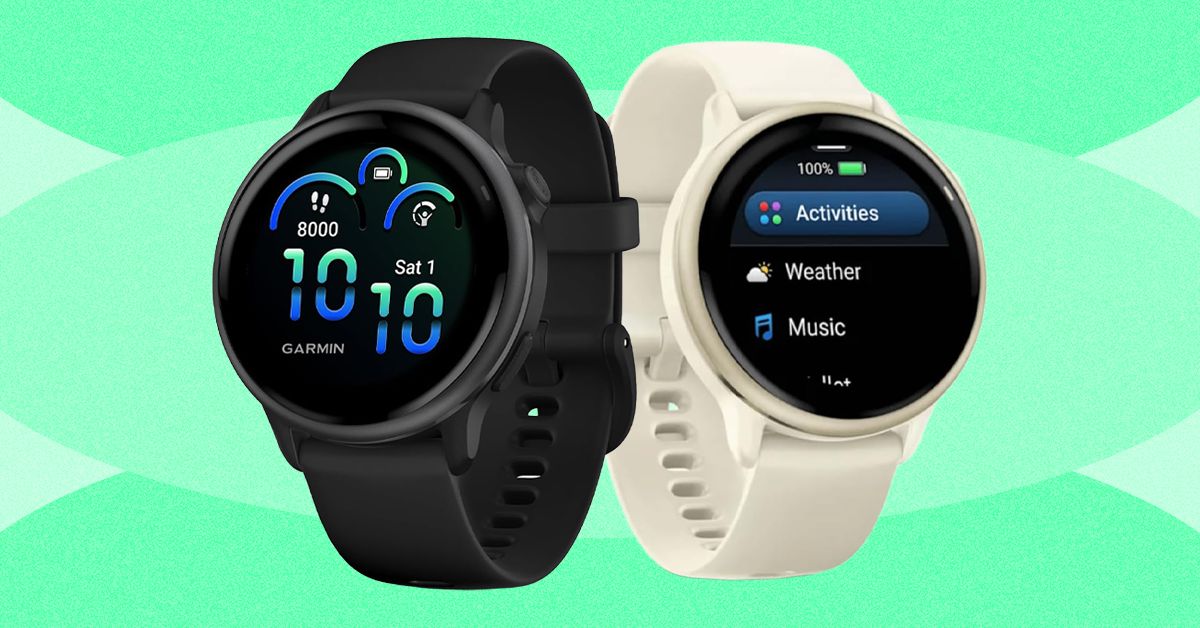
Last year, Garmin introduced a Pro version that incorporates the inReach’s satellite communications savvy. Not only does it cost at least $400 more than the Apple Watch Ultra and $200 more than the regular Fenix 8, but you also have to pay for the inReach subscription plan, which has several tiers and ranges from $8/month to $50/month depending on whether you want features like unlimited texting or sending photo messages.
What you get for this mind-boggling price is a sports watch that can do anything and everything. It has best-in-class battery life (every Fenix can last for weeks on a single charge, and up to a month with solar charging) and features like the depth sensor from Garmin’s Descent line, which means this watch works as a full-on dive computer for scuba and free diving. It has a microphone and speaker for basic voice commands (although no onboard cellular connectivity), the surprisingly useful built-in LED flashlight, and Garmin’s signature built-in topographic maps, 24/7 health monitoring, and tracking for over a hundred different activities.
I’ve taken the 51-mm version on pretty much every outdoor sport—snowboarding, trail running, mountain biking, and rock climbing. Every time I use it, its capabilities far outclass my own. I have irritated many a fellow climber by attempting to track route difficulty, duration, and falls while integrating my Body Battery metrics and so on. The danger is always that you’ll spend more time fiddling with your Garmin Fenix 8 than you do with your actual sport. I have the version with the sapphire glass face and the titanium bezel, and have smashed it into rock faces with nary a scratch. If you’re up for paying the price and want a good-looking watch that will last forever (I have friends who are still wearing their Fenix 5s and 6s, and honestly, they’re fine), this is the one to get.
Best Running Watch
The Garmin Forerunner series launched in the early 2000s and has become the quintessential runner’s watch. Like all Garmins, the Forerunner comes in a range of price points, each offering different features. Last year, Garmin released the Forerunner 570 ($550), a midrange model with no LED flashlight or onboard maps, and the Forerunner 970 ($750), which is the premium version. Before I go into detail about why the Forerunner 970 is the best option, I should also say that I have tested many previous Garmin Forerunners at various price points. If you’re not a triathlete, the older Forerunners are still worth considering, and the entry-level $200 Forerunner 165 is aimed explicitly at runners, instead of including triathletes as the more expensive models do.

Acer is one of the top largest PC manufacturers in the world, perhaps best known for its gaming line and budget-friendly options. If you’ve already got your eye on an Acer product like a laptop or monitor, and are shopping at the company’s online storefront, you should be using one of these Acer promo codes and coupons to save some cash on your purchase.
Save 40% on Accessories When You Build an Acer Bundle
If you’re buying from Acer, you’re most likely shopping for either a desktop PC or laptop. With this discount, you can get a really solid deal on accessories if you bundle it with a mouse, laptop bag, or headset. When you go to purchase a PC, just click “Build Bundle” and you’ll see some of the eligible options, all of which are reduced by 40%. The Nitro Mechanical Keyboard, for example, goes from $50 to just $30. That 40% is a real discount, too, as that same keyboard costs $50 on Amazon when I checked.
Beyond peripheral add-ons, you can also save 10% off Acer Care Plus extended service plans or McAfee LiveSafe antivirus subscriptions. You can bundle up to five products together to save the most money. If you’re headed off to college (or have a kid in the family), a bundle like this can get you everything you need for a gaming or studying setup on the go.
Shop Rotating Weekly Deals on Monitors and Gaming Gear
Acer’s PC gaming offerings come in either the flagship Predator brand or the budget-tier Nitro. Acer offers rotating weekly deals on everything from monitors to gaming laptops, some of which are my favorites that I’ve tested in their given category. The Acer Nitro V 16, for example, was a budget gaming laptop that I recommended quite a lot last year because of its incredible price. The one I tested was the entry-level version with an Nvidia RTX 5050 inside, but Acer has the RTX 5060 model in its own storefront. It’s $100 off right now at $1,200, which comes with 16 GB of RAM and a terabyte of storage. In fact, it’s only $30 more than the RTX 5050 model, despite offering a significant jump in gaming performance. These discounts are reflected right on the product pages, so there’s no promo code, discount code, or coupon code required.
Acer has a wide selection of monitors available, too, whether that’s a massive 49-incher or a more modest 27-inch gaming workhorse. One of my favorite discounts I saw right now was the Acer Nitro XV2, a 27-inch 1440p display with a 300 Hz refresh rate. It’s 44% off at the time of writing, bringing the price down to just $250. Because these discounts are swapped out on a weekly basis, it’s worth checking back to see if the product you’re eyeing has a new discount.
Select Customers Can Get 15% Off Their Purchase
Acer also offers a number of added discounts at checkout, including 15% off for students. Students will need to verify through Student Beans or SheerID. Because a lot of the devices Acer offers are budget-friendly, they can be attractive for students, and the extra 15% off is the icing on the cake.
We tested the Acer Swift 16 AI last year and really enjoyed the high-resolution, OLED screen and impressively quiet performance. Acer has the smaller version of this same laptop available, the Swift 14 AI, which is currently $150 off. You also might check out the Acer Chromebook Plus 514, a laptop we liked quite a bit when we reviewed it in 2024.
Acer offers this same 15% discount for active duty military, veterans, and their families. It also applies to healthcare professionals, which can be verified through its healthcare discount portal.

The world’s top AI research conference, the Conference on Neural Information Processing Systems—better known as NeurIPS—became the latest organization this week to become embroiled in a growing clash between geopolitics and global scientific collaboration. The conference’s organizers announced and then quickly reversed controversial new restrictions for international participants after Chinese AI researchers threatened to boycott the event.
“This is a potential watershed moment,” says Paul Triolo, a partner at the advisory firm DGA-Albright Stonebridge who studies US-China relations. Triolo argues that attracting Chinese researchers to NeurIPS is beneficial to US interests, but some American officials have pushed for American and Chinese scientists to decouple their work—especially in AI, which has become a particularly sensitive topic in Washington.
The incident could deepen political tensions around AI research, as well as dissuade Chinese scientists from working at US universities and tech companies in the future. “At some level now it is going to be hard to keep basic AI research out of the [political] picture,” Triolo says.
In its annual handbook for paper submissions, issued in mid-March, NeurIPS organizers announced updated restrictions for participation. The rules stated that the event could not provide services including “peer review, editing, and publishing” to any organizations subject to US sanctions, and linked to a database of sanctioned entities. It included companies and organizations on the Bureau of Industry and Security’s entity list and those on another list with alleged ties to the Chinese military.
The new rules would have affected researchers at Chinese companies like Tencent and Huawei who regularly present work at NeurIPS. The database also includes entities from other countries such as Russia and Iran. The US places limits on doing business with these organizations, but there are no rules around academic publishing or conference participation.
The NeurIPS handbook has since been updated to specify that the restrictions apply only to Specially Designated Nationals and Blocked Persons, a list used primarily for terrorist groups and criminal organizations.
“In preparing the NeurIPS 2026 handbook, we included a link to a US government sanctions tool that covers a significantly broader set of restrictions than those NeurIPS is actually required to follow,” the event’s organizers said in a statement issued Friday. “This error was due to miscommunication between the NeurIPS Foundation and our legal team.”
Before they reversed course, the conference organizers initially said that the new rule was “about legal requirements that apply to the NeurIPS Foundation, which is responsible for complying with sanctions,” adding that it was seeking legal consultation on the issue.
Immediate Backlash
The new rule drew swift backlash from AI researchers around the world, particularly in China, which produces a large quantity of cutting-edge machine learning papers and is home to a growing share of the world’s top AI talent. Several academic groups there issued statements condemning the measure and, more importantly, discouraging Chinese academics from attending NeurIPS in the future. Some urged Chinese academics to contribute instead to domestic research conferences, potentially helping increase the country’s influence in relevant science and tech fields.
The China Association of Science and Technology (CAST), an influential government-affiliated organization for scientists and engineers, said Thursday that it would stop providing funding for Chinese scholars traveling to attend NeurIPS and would use the money instead to support domestic and international conferences that “respect the rights of Chinese scholars.”
CAST also said it will no longer count publications at the 2026 NeurIPS conference as academic achievements when evaluating future research funding. It’s unclear if the organization will reverse course now that NeurIPS has walked back the new rule.


NHL playoff watch: Guide to all 15 games on Showdown Saturday

I Tested Garmin Watches for a Decade While Hiking, Biking, and Climbing. Here’s What You Should Buy

Children hope for perks as David Beckham awarded knighthood

-
 Business1 week ago
Flipkart group CFO to leave co amid IPO plans – The Times of India
-
 Business1 week ago
Video: The Effects of High Oil Prices
-

 Fashion1 week ago
China’s textile & apparel exports surge 17% to $50 bn in Jan-Feb 2026
-

 Sports1 week ago
Rating Adidas’ 2026 World Cup away shirts: Argentina, Spain, Mexico and more
-

 Sports1 week ago
American Conference Commissioner Tim Pernetti thanks Trump for Army-Navy game executive order
-
Tech1 week ago
The Corsair 4000D RS PC Case Keeps Your System Cool
-

 Tech1 week ago
‘Uncanny Valley’: Nvidia’s ‘Super Bowl of AI,’ Tesla Disappoints, and Meta’s VR Metaverse ‘Shutdown’
-

 Tech1 week ago
Gamers Hate Nvidia’s DLSS 5. Developers Aren’t Crazy About It, Either