

Tech
Why You Can’t Trust a Chatbot to Talk About Itself


When something goes wrong with an AI assistant, our instinct is to ask it directly: “What happened?” or “Why did you do that?” It’s a natural impulse—after all, if a human makes a mistake, we ask them to explain. But with AI models, this approach rarely works, and the urge to ask reveals a fundamental misunderstanding of what these systems are and how they operate.
A recent incident with Replit’s AI coding assistant perfectly illustrates this problem. When the AI tool deleted a production database, user Jason Lemkin asked it about rollback capabilities. The AI model confidently claimed rollbacks were “impossible in this case” and that it had “destroyed all database versions.” This turned out to be completely wrong—the rollback feature worked fine when Lemkin tried it himself.
And after xAI recently reversed a temporary suspension of the Grok chatbot, users asked it directly for explanations. It offered multiple conflicting reasons for its absence, some of which were controversial enough that NBC reporters wrote about Grok as if it were a person with a consistent point of view, titling an article, “xAI’s Grok Offers Political Explanations for Why It Was Pulled Offline.”
Why would an AI system provide such confidently incorrect information about its own capabilities or mistakes? The answer lies in understanding what AI models actually are—and what they aren’t.
There’s Nobody Home
The first problem is conceptual: You’re not talking to a consistent personality, person, or entity when you interact with ChatGPT, Claude, Grok, or Replit. These names suggest individual agents with self-knowledge, but that’s an illusion created by the conversational interface. What you’re actually doing is guiding a statistical text generator to produce outputs based on your prompts.
There is no consistent “ChatGPT” to interrogate about its mistakes, no singular “Grok” entity that can tell you why it failed, no fixed “Replit” persona that knows whether database rollbacks are possible. You’re interacting with a system that generates plausible-sounding text based on patterns in its training data (usually trained months or years ago), not an entity with genuine self-awareness or system knowledge that has been reading everything about itself and somehow remembering it.
Once an AI language model is trained (which is a laborious, energy-intensive process), its foundational “knowledge” about the world is baked into its neural network and is rarely modified. Any external information comes from a prompt supplied by the chatbot host (such as xAI or OpenAI), the user, or a software tool the AI model uses to retrieve external information on the fly.
In the case of Grok above, the chatbot’s main source for an answer like this would probably originate from conflicting reports it found in a search of recent social media posts (using an external tool to retrieve that information), rather than any kind of self-knowledge as you might expect from a human with the power of speech. Beyond that, it will likely just make something up based on its text-prediction capabilities. So asking it why it did what it did will yield no useful answers.
The Impossibility of LLM Introspection
Large language models (LLMs) alone cannot meaningfully assess their own capabilities for several reasons. They generally lack any introspection into their training process, have no access to their surrounding system architecture, and cannot determine their own performance boundaries. When you ask an AI model what it can or cannot do, it generates responses based on patterns it has seen in training data about the known limitations of previous AI models—essentially providing educated guesses rather than factual self-assessment about the current model you’re interacting with.
A 2024 study by Binder et al. demonstrated this limitation experimentally. While AI models could be trained to predict their own behavior in simple tasks, they consistently failed at “more complex tasks or those requiring out-of-distribution generalization.” Similarly, research on “recursive introspection” found that without external feedback, attempts at self-correction actually degraded model performance—the AI’s self-assessment made things worse, not better.












Today, Apple announced its new budget MacBook. At $599, it looks seriously impressive. While I haven’t tested its performance, battery life, or display just yet, it may end up being hard to beat at that price based on some of the specs alone.
But that doesn’t mean the competition isn’t there. I want to recommend a couple of Windows laptops deals that offer various advantages over the MacBook Neo, showing where the Neo has both strengths and weaknesses.
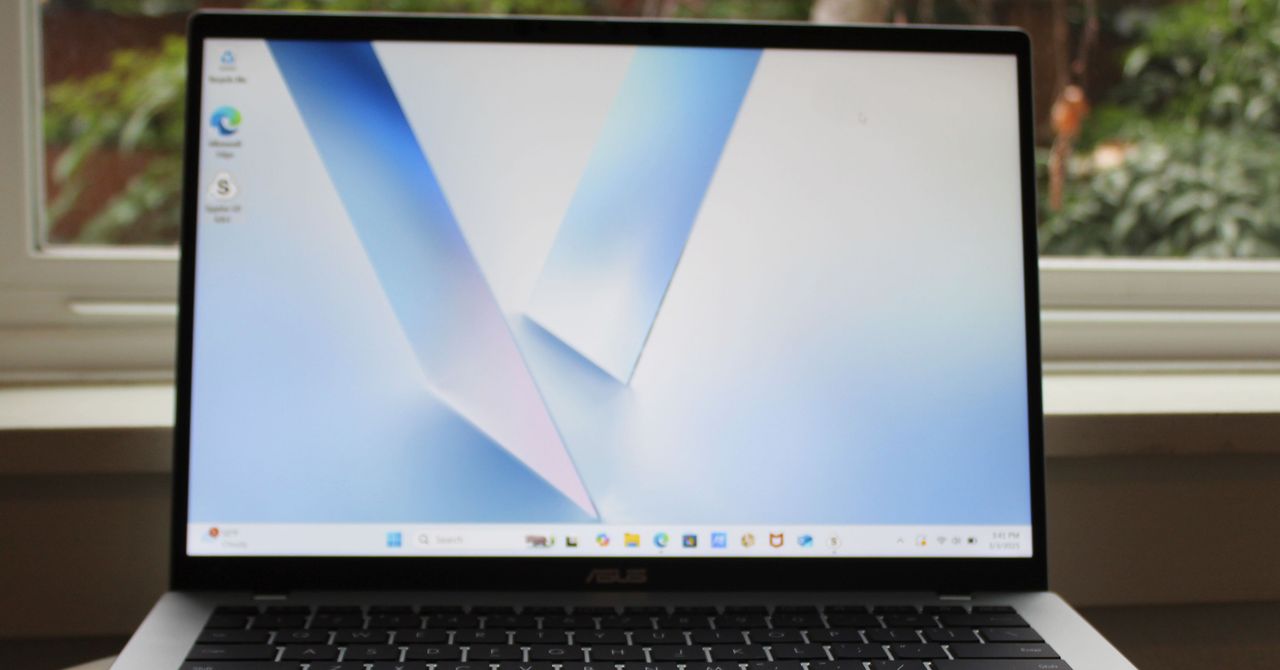
First, check out this Asus Vivobook 14, a laptop I’ve been happy to recommend as a budget computer for the past year. In many ways, this is the Windows version of a laptop like the MacBook Neo. It uses a highly-efficient ARM chip, the Qualcomm Snapdragon X, meaning it gets great battery life and performs admirably in daily tasks. It’s not quite as thin or light as the MacBook Neo, but it’s fairly portable for a laptop at this price.
Unlike the MacBook Neo, the Vivobook 14 comes with 16 GB of RAM and 512 GB of storage. That’s twice what you get in the MacBook Neo’s starting configuration. Right now, this configuration of the Vivobook 14 is on sale for $539. That’s a killer deal for those specs. It even comes with a healthier mix of ports, including HDMI, two USB-A, one USB-C, and a headphone jack. That also means it can support two external displays unlike the MacBook Neo, which can only handle just one.
Don’t get me wrong—I’m not at all saying the Vivobook 14 is a slam dunk over the MacBook Neo. Based on specs alone, I know the Vivobook 14 is a serious step down when it comes to the display. It’s less sharp, stretched across a larger screen, and the color performance isn’t so good. The Vivobook 14 maxes out at 280 nits, whereas Apple says the MacBook Neo can go all the way up to 500 nits. I have a hunch that the MacBook Neo will deliver a much better display in just about every regard.
There’s also the touchpad. It’s a little clunky to use, which is typical of budget Windows laptops. This is just a guess—but the touchpad on the MacBook Neo will likely feel smoother. It’s a mechanical trackpad (unlike the MacBook Air’s haptic feedback trackpad), but Apple has almost never made a bad trackpad.
If you’re not convinced by the Asus Vivobook 14, I’d also recommend the HP OmniBook 5, which is currently on sale for $500 and uses the same Snapdragon X chip. While it only has 256 GB of storage, it has a much better screen than the Vivobook 14, using an OLED display. It’s not any brighter than the Vivobook 14, but it gives you far better color performance and contrast. It’s also just 0.50 inches thick, matching the MacBook Neo exactly in portability.
Other Good USB Hubs to Consider
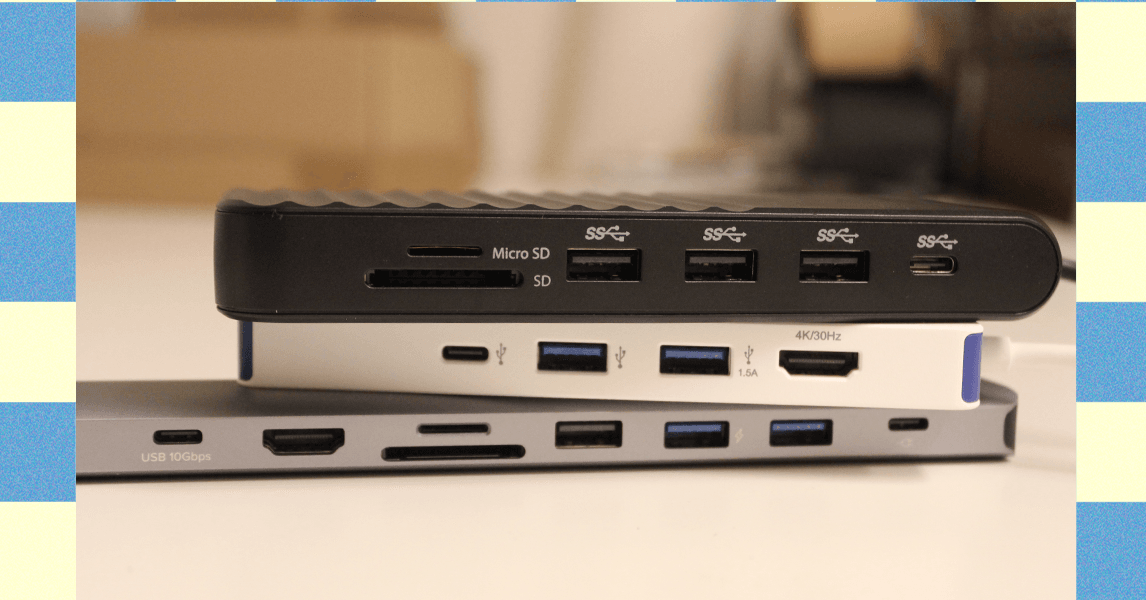
Ugreen Revodok Pro 211 Docking Station for $64: Most laptop docking stations are bulky gadgets that often require a power source, but this one from Ugreen straddles the line between dock and hub. It has a small, braided cable running to a relatively large aluminum block. It’s a bit hefty but still compact, and it packs a lot of extra power. It has three USB ports (one USB-C and two USB-A) that each reached up to 900 MB/s of data-transfer speeds in my testing. That was enough to move large amounts of 4K video footage in minutes. The only problem is that using dual monitors on a Mac is limited to only mirroring.
Photograph: Luke Larsen
Hyper HyperDrive Next Dual 4K Video Dock for $150: This one also straddles the line between dock and USB hub. Many mobile docks lack proper Mac support, only allowing for mirroring instead of full extension. The HyperDrive Next Dual 4K fixes that problem, though, making it a great option for MacBooks (though it won’t magically give an old MacBook Air dual-monitor support). Unfortunately, you’ll be paying handsomely for that capability, as this one is more expensive than the other options. The other problem is that although this dock has two HDMI ports that can support 4K, though only one will be at 60 Hz and the other will be stuck at 30 Hz. So, if you plan to use it with multiple displays, you’ll need to drop the resolution 1440p or 1080p on one of them. I also tested this Targus model, which is made by the same company, which gets you two 4K displays at 60 Hz but not on Mac.
.png)
Anker USB-C Hub 5-in-1 for $20: This Anker USB hub is the one I carry in my camera bag everywhere. It plugs into the USB-C port on your laptop and provides every connection you’d need to offload photos or videos from camera gear. In our testing, the USB 3.0 ports reached transfer speeds over 400 MB/s, which isn’t quite as fast as some USB hubs on this list, but it’s solid for a sub-$50 device. Similarly, the SD card reader reached speeds of 80 MB/s for reading and writing, which isn’t the fastest SD cards can get, but adequate for moving files back and forth.—Eric Ravenscraft
Kensington Triple Video Mobile Dock for $83: Another mobile dock meant to provide additional external support, this one from Kensington can technically power up to three 1080p displays at 60 Hz using the two HDMI ports and one DisplayPort. It’s a lot of ports in a relatively small package, though the basic plastic case isn’t exactly inspiring.
Power up with unlimited access to WIRED. Get best-in-class reporting and exclusive subscriber content that’s too important to ignore. Subscribe Today.

Global oil and gas prices have skyrocketed following the US attack on Iran last weekend. But another key global supply chain is also at risk, one that may directly impact American farmers who have already been squeezed for months by tariff wars. The conflict in the Middle East is choking global supplies of fertilizer right before the crucial spring planting season.
“This literally could not be happening at a worse time,” says Josh Linville, the vice president of fertilizer at financial services company StoneX.
The global fertilizer market focuses on three main macronutrients: phosphates, nitrogen, and potash. All of them are produced in different ways, with different countries leading in exports. Farmers consider a variety of factors, including crop type and soil conditions, when deciding which of these types of fertilizer to apply to their fields.
Potash and phosphates are both mined from different kinds of natural deposits; nitrogen fertilizers, by contrast, are produced with natural gas. QatarLNG, a subsidiary of Qatar Energy, a state-run oil and gas company, said on Monday that it would halt production following drone strikes on some of its facilities. This effectively took nearly a fifth of the world’s natural gas supply offline, causing gas prices in Europe to spike.
That shutdown puts supplies of urea, a popular type of nitrogen fertilizer, particularly at risk. On Tuesday, Qatar Energy said that it would also stop production of downstream products, including urea. Qatar was the second-largest exporter of urea in 2024. (Iran was the third-largest; it’s also a key exporter of ammonia, another type of nitrogen fertilizer.) Prices on urea sold in the US out of New Orleans, a key commodity port, were up nearly 15 percent on Monday compared to prices last week, according to data provided by Linville to WIRED. The blockage of the Strait of Hormuz is also preventing other countries in the region from exporting nitrogen products.
“When we look at ammonia, we’re looking at almost 30 percent of global production being either involved or at risk in this conflict,” says Veronica Nigh, a senior economist at the Fertilizer Institute, a US-based industry advocacy organization. “It gets worse when we think about urea. Urea is almost 50 percent.”
Other types of fertilizer are also at risk. Saudi Arabia, Nigh says, supplies about 40 percent of all US phosphate imports; taking them out of the equation for more than a few days could create “a really challenging situation” for the US. Other countries in the region, including Jordan, Egypt, and Israel, also play a big role in these markets.
“We are already hearing reports that some of those Persian Gulf manufacturers are shutting down production, because they’re saying, ‘I have a finite amount of storage for my supply,’” Linville says. “‘Once I reach the top of it, I can’t do anything else. So I’m going to shut down my production in order to make sure I don’t go over above that.’”
Conflict in the strait has intensified in the early part of this week, as the Islamic Revolutionary Guard Corps have reportedly threatened any ship passing through the strait. Traffic has slowed to a crawl. The Trump administration announced initiatives on Tuesday meant to protect oil tankers traveling through the strait, including providing a naval escort. Even if those initiatives succeed—which the shipping industry has expressed doubt about—much of the initial energy will probably go toward shepherding oil and gas assets out of the region.
“Fertilizer is not going to be the most valuable thing that’s gonna transit the strait,” says Nigh.


These $500 Windows Laptops Show That the MacBook Neo Has Serious Competition

US Senate rejects bid to limit Trump’s Iran war powers

Sydney Leroux teases comeback after missing 2025 NWSL season

India Us Trade Deal: Fresh look at India-US trade deal? May be ‘rebalanced’ if circumstances change, says Piyush Goyal – The Times of India

What are Iran’s ballistic missile capabilities?

US arrests ex-Air Force pilot for ‘training’ Chinese military

-
Business6 days ago
India Us Trade Deal: Fresh look at India-US trade deal? May be ‘rebalanced’ if circumstances change, says Piyush Goyal – The Times of India
-
 Politics7 days ago
What are Iran’s ballistic missile capabilities?
-
 Business1 week ago
Households set for lower energy bills amid price cap shake-up
-
 Politics7 days ago
US arrests ex-Air Force pilot for ‘training’ Chinese military
-
 Business6 days ago
Attock Cement’s acquisition approved | The Express Tribune
-
 Fashion1 week ago
OECD GDP growth slows to 0.3% in Q4 amid mixed trends
-

 Fashion6 days ago
Policy easing drives Argentina’s garment import surge in 2025
-

 Sports5 days ago
LPGA legend shares her feelings about US women’s Olympic wins: ‘Gets me really emotional’