

Tech
Best Buy’s Pre-Black Friday Sales Have Already Begun. Here’s What to Buy


Whether you like it or not, Black Friday is coming up fast. The holiday shopping season is upon us, and it’s when some of the best deals of the year make their appearance. Ahead of Black Friday, Best Buy has offered really solid tech deals on some of our favorite products we’ve tested and reviewed, ranging from laptops and gaming mice to cordless vacuums. So, whether you’re shopping for the perfect gift for that tech lover in your life or if you’ve been waiting all year for prices to drop on something for yourself, there are a few great options below.
For more great discounts, check out our Best Early Black Friday Deals roundup and all of our deals coverage here.
Updated November 26: We’ve added a Satechi dual dock stand, an iPad, and the Alienware Aurora gaming desktop.
The Latest MacBook Pro
-
Photograph: Luke Larsen
-
Photograph: Luke Larsen
-
Photograph: Luke Larsen
-
Photograph: Luke Larsen


The M5 MacBook Pro (8/10, WIRED Recommends) is only a month old, and it’s already on sale. It’s the only Mac so far to receive the upgrade to the latest M5 chip, benefiting from improved performance across the board. In my testing, there was a significant step forward everywhere you looked, including the GPU, the CPU, and the Neural Engine for AI tasks. It’s the GPU that’s seen the biggest leap, though, which should speed up both gaming and creative applications. Other than that, this is the same MacBook Pro you probably already know and love, with its bright mini-LED screen, robust speakers, and extra ports (over the MacBook Air, at least).
This base 14-inch model doesn’t have the incredible value of the MacBook Air or the powerhouse performance of the M4 Pro and M4 Max MacBook Pro. Ultimately, when it comes to which MacBook you should buy, the answer is still the Air. But the M5 versions of these laptops aren’t coming until next year, so if you’re after the latest Apple Silicon in one of the best laptops you can buy, this deal on the M5 MacBook Pro is solid.
The Best Bluetooth Speaker
-
Photograph: Ryan Waniata
-
Photograph: Ryan Waniata
-
Photograph: Ryan Waniata
-Reviewer-Photo-SOURCE-Ryan-Waniata.jpg)


The JBL Flip 7 (9/10, WIRED Recommends) is a Bluetooth speaker that has it all. As our A/V reviewer Ryan Waniata says, “JBL’s Flip strikes the perfect compromise between mobility and sound quality, offering clean detail with plenty of punch.” Waniata also praises the durability of the Flip 7, which is important in a Bluetooth speaker meant to be used outdoors. There are tons of different color options to match your vibe, and it gets up to 16 hours of battery life. The increased water resistance means it’ll bring the party to wherever you need it. Put simply, it’s the best Bluetooth speaker you can buy, and it’s at a great price.
Our Favorite Dyson Vacuum
-
Photograph: Nena Farrell
-
Photograph: Nena Farrell
-
Courtesy of Dyson


Everyone wants a cordless Dyson vacuum, but they tend to be exorbitantly expensive. It’s still not cheap, but at $300 off, this is as good a deal as we’ve seen on this vacuum. The V15 Detect is our vacuum expert’s favorite Dyson. In her testing, Nena Farrell says she was impressed by how much dust and dirt it sucked up from her carpet, as well as from hard floors. The V15 Detect also comes with an extra sensor that can actually count the number of dust particles. That’s overkill for most people, but if you have severe allergies (or have friends or family that do), the Dyson V15 Detect can actually verify what you’re picking up.
The Best TV Deal Right Now

Photograph: Ryan Waniata
OLED TVs might be the best TVs you can buy, but if you’re shopping for a TV under $1,000 like most people are, the TCL QM6K QLED (8/10, WIRED Recommends) is what you should be eyeing. It’s a 4K mini-LED screen, and our TV reviewers call it “a versatile display that does just about everything well, from naturalistic colors to rich black levels and impressive clarity.” It’s not the brightest TV in the world, but it does come with a 144-Hz refresh rate for gaming and a smart Google TV interface for your streaming needs. There are screen options ranging from 55 inches up to 98 inches, all of which are on sale ahead of Black Friday, with the happy-medium 65-inch model starting at $500.
The Best MagSafe Power Bank
.jpg)
Photograph: Simon Hill
Anker
MagGo Power Bank (10K) (Qi2)
Most people aren’t using the wireless charging on their iPhone to its full extent. Picking up a MagSafe power bank is a great way to do that, and this one from Anker is our favorite. With a 10,000-mAh battery, it can power up an iPhone to full charge nearly twice. It even works on Android phones because it supports the Qi2 standard. We also like that it comes with a built-in kickstand and a helpful LED light on the side that tells you how much charge is left. It’s $35 off for Black Friday, bringing it to its lowest price so far.
A Brilliant USB-C Hub

Photograph: Eric Ravenscraft
One of the biggest upgrades you can make to your remote work setup is a solid USB hub or laptop docking station. Most laptops don’t have enough ports, especially not if you’re trying to connect multiple, high-resolution monitors. The plug-and-play nature of this is super helpful too, as you can have all of your peripherals and accessories connected via USB-C.
While you could just go out and buy any old USB hub, the Satechi Dual Dock Stand has some secrets up its sleeve. First off, it’s designed to prop up your laptop slightly with its wedge shape. My favorite feature, though, is the built-in storage slot. It doesn’t come with an SSD included, but any M.2 SSD will work. It’s a handy feature to have. The best part is the price, which is down to $105, a new low at Best Buy for Black Friday.
The Best Windows Laptop Deal
-Reviewer-Photo-SOURCE-Christopher-Null.jpg)
Photograph: Christopher Null
Just last week, this laptop cost $1,000. Now it’s down to $550. That’s a 45 percent drop in price. And while I wouldn’t say this laptop is worth $1,000, it’s an absolute steal for $550. The Zenbook A14’s calling card is its weight of just 2.16 pounds. It’s light enough that it’ll make you do a double-take when you pick it up off the table. That makes it an ideal travel companion to lug across campus or on airplanes. Unlike ultra-light laptops in the past, the Zenbook A14 doesn’t have any major compromises in battery life, performance, or keyboard. It even has an OLED screen, as so many Asus laptops do.
A Cheaper, Better iPad
-
Photograph: Brenda Stolyar
-
Photograph: Brenda Stolyar


This is a great price for the base iPad. But a cheaper iPad is only so good if it’s limited by its software. But with the iPadOS 26 update, you’re also getting a better iPad than ever before. With a more accurate cursor and resizable windows, the iPad is now more like a MacBook than ever before. Multitasking on an iPad has always been a nightmare, but now that you can pull up multiple windows side by side and resize them to your heart’s content. Connect it up with a wireless mouse and keyboard, and you’ve got something that could replace a laptop in a pinch.
The Best Phone Under $300

Photograph: Julian Chokkattu
Motorola
Moto G Stylus 2025
No one is calling the Moto G Stylus 5G the best phone in the world. In fact, our phone expert (and tech editor extraordinaire, Julian Chokkattu) recommends Nothing’s Phone 3a as the better cheap phone. But the 2025 Moto G Stylus is not only the best Moto G phone you can buy, it also has a lot of high-end features, such as a large 6.7-inch AMOLED screen with a 120-Hz refresh rate. It even has a beautiful blue back, a built-in stylus, and a headphone jack. That’s a lot of uncommon features in a remarkably cheap phone, especially at its discounted pre–Black Friday price.
The Perfect Travel Partner

Courtesy of Sony
These earbuds came out a couple of years ago, but they remain some of the best you can buy. When they came out, Sony’s fifth-generation of high-end wireless earbuds were trimmed down to around 25 percent smaller and 20 percent lighter than the previous generation. You also get two extra full charges from the case, for a total of up to 36 hours of listening. That all makes it the best pair of earbuds for traveling in particular. There’s no compromise in noise canceling either. In fact, our A/V experts say the XM5 has “some of the most advanced functionality in terms of EQ, touch controls, and adaptive noise canceling available on the market.” They’re $100 off the retail price ahead of Black Friday, which is the best discount we’ve ever seen on them.
An Incredible OLED Gaming Monitor

Courtesy of Samsung
Samsung
Odyssey G6 OLED Gaming Monitor
Samsung makes some of the prettiest gaming monitors, especially in the past couple of years. Within its Odyssey lineup, there’s now just about every size and form factor of monitor you can imagine. The Odyssey G6 (8/10, WIRED Recommends) is a 27-inch OLED with a resolution of 2560 x 1440 and a 360-Hz refresh rate, which should be great no matter what game you’re playing. Want extreme frame rates for competitive shooters? You can drop the resolution to 1080p and explore the higher echelon of the 360-Hz refresh rate. For slower-paced single-player games, the 1440p resolution is crisp, and the OLED panel gets you gorgeous HDR in games. It’s $250 off the full price ahead of Black Friday, down now to $650.
A Dirt-Cheap Chromebook
-
Photograph: Luke Larsen
-
Photograph: Luke Larsen
-
Photograph: Luke Larsen
-
Photograph: Luke Larsen


You can’t expect a laptop this cheap to be without compromises. But when it comes to budget Chromebooks, this is as good as it gets. It’s a reasonably affordable and attractive laptop, with lots of ports, decent performance, and a comfortable keyboard. For a Chromebook, the specs aren’t bad either, coming with 8 GB of RAM and 128 GB of storage. Unfortunately, the touchpad isn’t the best, nor is the display. It’s not bright enough, and the colors look off. For a laptop under $300, though, the CX14 should do the trick, especially for a student or a first-time laptop owner.
An Excellent Prebuilt Gaming Desktop
-
Photograph: Luke Larsen
-
Photograph: Luke Larsen
-
Photograph: Luke Larsen
-
Photograph: Luke Larsen


Alienware
Aurora Gaming Desktop
With RAM prices skyrocketing, just buying a prebuilt gaming desktop feels like an increasingly smart move, especially at this price. The Alienware Aurora Gaming Desktop is down to just $1,225, coming with an Nvidia RTX 5060 Ti, Intel Core Ultra 7 265F, 32 GB of memory, and 1 TB of storage. That’s cheaper than Dell’s own price for that configuration, but I wouldn’t recommend buying this particular model, as it comes with only a 500-watt power supply. While that’s enough power for the RTX 5060 Ti, you’ll be limited from upgrading to any GPUs more powerful in the future. So, I’d highly recommend buying one of the configurations with the 1,000-watt power supplies, such as the RTX 5070 configuration. Before buying, I’d also recommend comparing prices with Dell.com, as it has some strong deals on particular configurations, such as this RTX 5070 Ti model for just $1,450.
A Gaming Mouse

Photograph: Henri Robbins
Corsair
Scimitar Elite Wireless SE
If you play MMOs, you know how useful it is to map various actions to buttons on your keyboard or mouse. Well, this gaming mouse from Corsair gives you a ton of options to customize your gameplay. There are 12 reprogrammable side buttons, but the mouse also has a high 33,000-dpi optical sensor and 1,000-Hz polling for low input lag and high responsiveness. It can connect via a 2.4-GHz dongle instead of Bluetooth, too.
Power up with unlimited access to WIRED. Get best-in-class reporting and exclusive subscriber content that’s too important to ignore. Subscribe Today.









ISC2, the non-profit cyber professional membership association, has joined the UK government’s recently launched Software Security Ambassador Scheme as an expert adviser.
Set up at the beginning of the year by the National Cyber Security Centre (NCSC) and the Department for Science, Innovation and Technology (DSIT), the scheme forms part of a wider £210m commitment by Westminster to remodel approaches to public sector cyber resilience from the ground up, acknowledging that previous approaches to the issue have basically gone nowhere and that previously set targets for resilience are unachievable.
It is designed to incentivise organisations to pay more attention to the security of software products, and supports the wider adoption of the Software Security Code of Practice, a set of voluntary principles defining what secure software looks like.
ISC2 joins a number of tech suppliers, including Cisco, Palo Alto Networks and Sage; consultancies and service providers including Accenture and NCC Group; and financial services firms including Lloyds Banking Group and Santander. Fellow cyber association ISACA is also involved.
“Promoting secure software practices that strengthen the resilience of systems underpinning the economy, public services and national infrastructure is central to ISC2’s mission,” said ISC2’s executive vice-president for advocacy and strategic engagement, Tara Wisniewski.
“The code moves software security beyond narrow compliance and elevates it to a board-level resilience priority. As supply chain attacks continue to grow in scale and impact, a shared baseline is essential and through our global community and expertise, ISC2 is committed to helping professionals build the skills needed to put secure-by-design principles into practice,” she said.
Software vulns a huge barrier to resilience
A study of wider supply chain risks conducted last year by ISC2 found that a little over half of organisations worldwide reported that vulnerabilities in their software suppliers’ products represented the most disruptive cyber security threat to their overall supply chain.
And the World Economic Forum’s (WEF’s) Global Cybersecurity Outlook report, published on 12 January, revealed that third-party and supply chain vulnerabilities were seen as a huge barrier to building cyber resilience by C-suite executives.
A total of 65% of respondents to the WEF’s annual poll flagged such flaws as the greatest challenge their organisation faced on its pathway to resilience, compared to 54% at the beginning of 2025. This outpaced factors such as the evolving threat landscape and emerging AI technology, use of legacy IT systems, regulatory compliance and governance, and cyber skills shortages.
Pressed on the top supply chain cyber risks, respondents were most concerned about their ability to assure the integrity of software and other IT services, ahead of a lack of visibility into their supplier’s supply chains and overdependence on critical third-party suppliers.
The UK’s Code of Practice seeks to answer this challenge by establishing expectations and best practices for tech providers and any other organisations that either develop, sell or buy software products. It covers aspects such as secure design and development, the security of build environments, deployment and ongoing upkeep, and transparent communication with customers and users.
As part of its role as an ambassador, ISC2 will assist in developing and improving the Code of Practice, while championing it by embedding its guiding principles into its own cyber education and professional development services – the organisation boasts 10,000 UK members and associates.
It will also help to drive adoption of the Code of Practice through various awareness campaigns, incorporating it into its certifications, training and guidance, engaging with industry stakeholders and members to encourage implementation, and incorporating its provisions into its work with its own commercial suppliers.
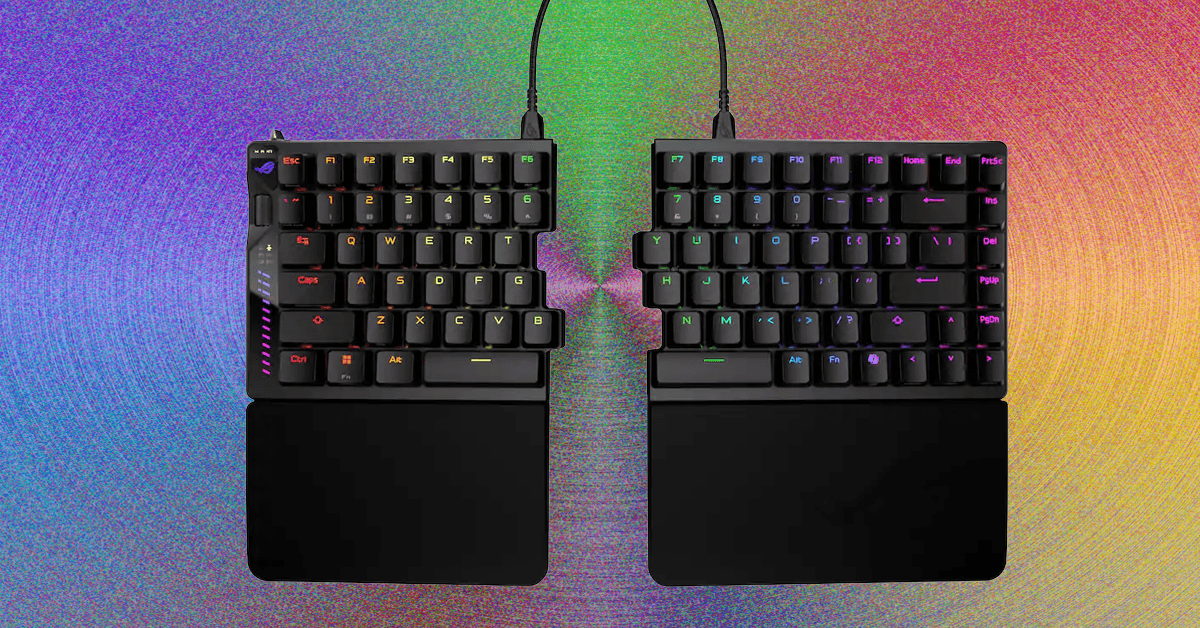
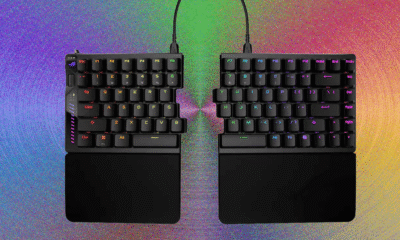
The wheel on the left side has options to adjust actuation distance, rapid-trigger sensitivity, and RGB brightness. You can also adjust volume and media playback, and turn it into a scroll wheel. The LED matrix below it is designed to display adjustments to actuation distance but feels a bit awkward: Each 0.1 mm of adjustment fills its own bar, and it only uses the bottom nine bars, so the screen will roll over four times when adjusting (the top three bars, with dots next to them, illuminate to show how many times the screen has rolled over during the adjustment). The saving grace of this is that, when adjusting the actuation distance, you can press down any switch to see a visualization of how far you’re pressing it, then tweak the actuation distance to match.
Alongside all of this, the Falcata (and, by extension, the Falchion) now has an aftermarket switch option: TTC Gold magnetic switches. While this is still only two switches, it’s an improvement over the singular switch option of most Hall effect keyboards.
Split Apart
Photograph: Henri Robbins
The internal assembly of this keyboard is straightforward yet interesting. Instead of a standard tray mount, where the PCB and plate bolt directly into the bottom half of the shell, the Falcata is more comparable to a bottom-mount. The PCB screws into the plate from underneath, and the plate is screwed onto the bottom half of the case along the edges. While the difference between the two mounting methods is minimal, it does improve typing experience by eliminating the “dead zones” caused by a post in the middle of the keyboard, along with slightly isolating typing from the case (which creates fewer vibrations when typing).
The top and bottom halves can easily be split apart by removing the screws on the plate (no breakable plastic clips here!), but on the left half, four cables connect the top and bottom halves of the keyboard, all of which need to be disconnected before fully separating the two sections. Once this is done, the internal silicone sound-dampening can easily be removed. The foam dampening, however, was adhered strongly enough that removing it left chunks of foam stuck to the PCB, making it impossible to readhere without using new adhesive. This wasn’t a huge issue, since the foam could simply be placed into the keyboard, but it is still frustrating to see when most manufacturers have figured this out.

Don’t call them hearing aids. They’re hearpieces, intended as a blurring of the lines between hearing aid and earbuds—or “earpieces” in the parlance of Lizn, a Danish operation.
The company was founded in 2015, and it haltingly developed its launch product through the 2010s, only to scrap it in 2020 when, according to Lizn’s history page, the hearing aid/earbud combo idea didn’t work out. But the company is seemingly nothing if not persistent, and four years later, a new Lizn was born. The revamped Hearpieces finally made it to US shores in the last couple of weeks.
Half Domes
Photograph: Chris Null
Lizn Hearpieces are the company’s only product, and their inspiration from the pro audio world is instantly palpable. Out of the box, these look nothing like any other hearing aids on the market, with a bulbous design that, while self-contained within the ear, is far from unobtrusive—particularly if you opt for the graphite or ruby red color scheme. (I received the relatively innocuous sand-hued devices.)
At 4.58 grams per bud, they’re as heavy as they look; within the in-the-ear space, few other models are more weighty, including the Kingwell Melodia and Apple AirPods Pro 3. The units come with four sets of ear tips in different sizes; the default mediums worked well for me.
The bigger issue isn’t how the tip of the device fits into your ear, though; it’s how the rest of the unit does. Lizn Hearpieces need to be delicately twisted into the ear canal so that one edge of the unit fits snugly behind the tragus, filling the concha. My ears may be tighter than others, but I found this no easy feat, as the device is so large that I really had to work at it to wedge it into place. As you might have guessed, over time, this became rather painful, especially because the unit has no hardware controls. All functions are performed by various combinations of taps on the outside of either of the Hearpieces, and the more I smacked the side of my head, the more uncomfortable things got.


Skincare brand Genaura promotes marketer Young to MD

Trident accelerates European home textiles expansion

Fiza Ali extends heartwarming wishes to ex-husband on his second marriage

-

 Politics1 week ago
UK says provided assistance in US-led tanker seizure
-

 Entertainment1 week ago
Does new US food pyramid put too much steak on your plate?
-

 Entertainment1 week ago
Why did Nick Reiner’s lawyer Alan Jackson withdraw from case?
-
 Business1 week ago
Trump moves to ban home purchases by institutional investors
-

 Sports5 days ago
Clock is ticking for Frank at Spurs, with dwindling evidence he deserves extra time
-

 Sports1 week ago
PGA of America CEO steps down after one year to take care of mother and mother-in-law
-
 Business1 week ago
Bulls dominate as KSE-100 breaks past 186,000 mark – SUCH TV
-
Sports6 days ago
Commanders go young, promote David Blough to be offensive coordinator