

Tech
The 16 Best EVs Coming in 2026


The usual bells and whistles such as electric windows and a central touchscreen are gone (instead you use your phone as the infotainment hub), and the truck comes unpainted in composite gray, but owners can personalize it with wraps. You can also add more than 100 custom accessories, from body panels and wheel options to kits that transform the pickup into a five-seat SUV, all designed for DIY installation. Power comes from a straightforward rear-motor, rear-wheel-drive setup, producing around 200 hp. A 52.7-kWh battery gives 150 miles of range, while an 84.3-kWh pack is good for 240 miles.
Sony Honda Mobility Afeela 1
Courtesy of Sony/Honda
In what feels like the culmination of the longest tease campaign in automotive history, in 2026 the Afeela 1 will finally be with us. The joint venture combining Sony’s software, sensor, and entertainment might with Honda’s automotive manufacturing know-how will, in the latter half of this year, deliver the first Afeela 1s in California before expanding to other states and, eventually, international markets.
A dual-motor, all-wheel-drive setup yields about 480 hp drawing from a 91-kWh battery that should be good enough for roughly 300 miles of EPA range. Sony and Honda want the Afeela to stand out in the tech stakes: the car bristles with 40 sensors—including 18 cameras, lidar and radars, and 12 ultrasonic sensors—to support the driver-assist systems and future hands-off autonomous modes. Sony’s been at work on the entertainment, too, adding 360-degree immersive audio, integrated gaming, and the ability to stream PlayStation content during charging sessions. All this doesn’t come cheap, however, as the initial Signature model will cost around $90,000.
Xiaomi SU7

Courtesy of Xiaomi
When Xiaomi launched the SU7 electric sedan in March 2024, in China, such was the fervor greeting the release that the company took 50,000 orders in the first 27 minutes of sales. That’s about the same number as all the Cybertrucks sold to date. Two years on, Xiaomi is giving the EV more than just a mild facelift (we’re looking at you, Tesla), as the 2026 SU7 comes with significant upgrades. Lidar-based advanced driving assistance comes on every trim level as standard, computing power has been vastly increased (to 700 trillions of operations per second), and a 900-volt architecture will bring dramatically faster charging. With that battery comes remarkable range claims: a reported 560-plus miles on China’s kinder CLTC cycle, but still making it one of the longest-range EVs in the country. The exterior sees more subtle enhancements: wider rear tires, bigger brake calipers, and refined grille details. All this for $32,800 in its local market. Watch out, Tesla Model 3.









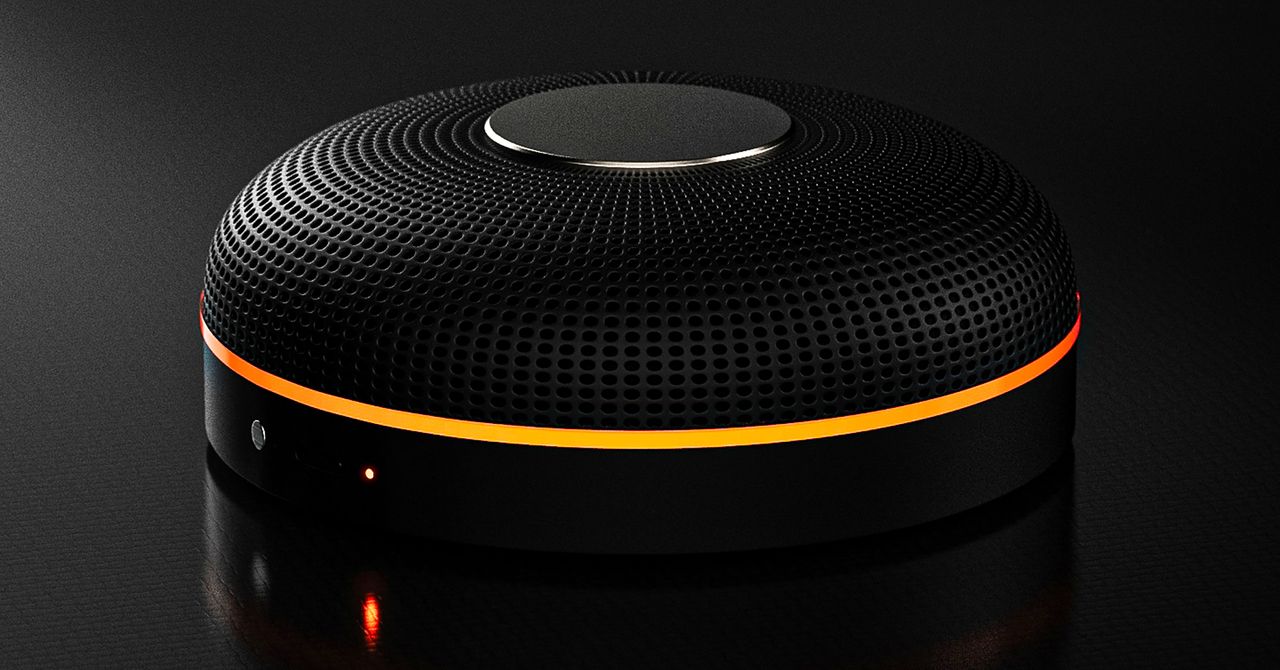
Deveillance also claims the Spectre can find nearby microphones by detecting radio frequencies (RF), but critics say finding a microphone via RF emissions is not effective unless the sensor is immediately beside it.
“If you could detect and recognize components via RF the way Spectre claims to, it would literally be transformative to technology,” Jordan wrote in a text to WIRED after he built a device to test detecting RF signatures in microphones. “You’d be able to do radio astronomy in Manhattan.”
Deveillance is also looking at ways to integrate nonlinear junction detection (NLJD), a very high-frequency radio signal used by security professionals to find hidden mics and bugs. NLJD detectors are expensive and used primarily in professional contexts like military operations.
Even if a device could detect a microphone’s exact location, objects around a room can change how the frequencies spread and interact. The emitted frequencies could also be a problem. There haven’t been adequate studies to show what effects ultrasonic frequencies have on the human ear, but some people and many pets can hear them and find them obnoxious or even painful. Baradari acknowledges that her team needs to do more testing to see how pets are affected.
“They simply cannot do this,” engineer and YouTuber Dave Jones (who runs the channel EEVblog) wrote in an email to WIRED. “They are using the classic trick of using wording to imply that it will detect every type of microphone, when all they are probably doing is scanning for Bluetooth audio devices. It’s totally lame.” Baradari reiterates that the Spectre uses a combination of RF and Bluetooth low energy to detect microphones.
WIRED asked Baradari to share any evidence of the Spectre’s effectiveness at identifying and blocking microphones in a person’s vicinity. Baradari shared a few short videoclips of people putting their phones to their ears listening to audioclips—which were presumably jammed by the Spectre—but these videos do little to prove that the device works.
Future Imperfect
Baradari has taken the critiques in stride, acknowledging that the tech is still in development. “I actually appreciate those comments, because they’re making me think and see more things as well,” Baradari says. “I do believe that with the ideas that we’re having and integrating into one device, these concerns can be addressed.”
People were quick to poke fun at the Spectre I online, calling the technology the cone of silence from Dune. Now, the Deveillance website reads, “Our goal is to make the cone of silence become reality.”
John Scott-Railton, a cybersecurity researcher at Citizen Lab, who is critical of the Spectre I, lauded the device’s virality as an indication of the real hunger for these kinds of gadgets to win back our privacy.
“The silver lining of this blowing up is that it is a Ring-like moment that highlights how quickly and intensely consumer attitudes have shifted around pervasive recording devices,” says Scott-Railton. “We need to be building products that do all the cool things that people want but that don’t have the massive privacy- and consent-violation undertow. You need device-level controls, and you need regulations of the companies that are doing this.”
Cooper Quintin, a senior staff technologist at the Electronic Frontier Foundation, echoed those sentiments, even if critics believe Deveillance’s efforts to be flawed.
“If this technology works, it could be a boon for many,” Quintin wrote in an email to WIRED. “It is nice to see a company creating something to protect privacy instead of working on new and creative ways to extract data from us.”
Portrait Light: You can change up the lighting in your portrait selfies after you take them by opening them up in Google Photos, tapping the Edit button, and heading to Actions > Portrait Light. This adds an artificial light you can place anywhere in the photo to brighten up your face and erase that 5 o’clock shadow. Use the slider at the bottom to tweak the strength of the light. It also works on older Portrait mode photos you may have captured. It works only on faces.
Health and Accessibility Features
Cough & Snore Detection (Tensor G2 and newer): On the Pixel 7 and newer, you can have your Pixel detect if you cough and snore when sleeping, provided you place your Pixel near your bed before you nod off. This will work only if you use Google’s Bedtime mode function, which you can turn on by heading to Settings > Digital Wellbeing & Parental Controls > Bedtime Mode.
Guided Frame (Tensor G2 and newer): For blind or low-vision people, the camera app can now help take a selfie with audio cues (it works with the front and rear cameras). You’ll need to enable TalkBack for this to work (Settings > Accessibility > TalkBack). Then open the camera app. It will automatically help you frame the shot.
Simple View: This mode makes the font size bigger, along with other elements on the screen, like widgets and quick-settings tiles. It also increases touch sensitivity, all of which hopefully makes it easier to see and use the screen. You can enable it by heading to Settings > Accessibility > Simple View.
Safety and Security Features
Theft Protection: This is a broader Android 15 feature, but essentially, Google’s algorithms can figure out if someone snatches your Pixel out of your hands. If they’re trying to get away, the device automatically locks. Additionally, with another device, you can use Remote Lock to lock your stolen Pixel with your phone number and a security answer. To toggle these features on, go to Settings > Security & privacy > Device unlock > Theft protection.
Identity Check: If your Pixel detects you’re in a new location, Identity Check will require your fingerprint or face authentication before you can make any changes to sensitive settings, offering extra peace of mind in case you lose your phone or if it’s stolen. You can enable this in Settings > Security & privacy > Device unlock > Theft protection > Identity Check.
Courtesy of Google
Private Space: Another Android 15 addition, Pixel phones finally have a feature that lets you hide and lock select apps. You can use a separate Google account, set a lock, and install any app to hide away. To set it all up, head to Settings > Security & privacy > Private space.
Satellite eSOS (Pixel 9 and Pixel 10 series, excluding Pixel 9a): Like Apple’s SOS feature on iPhones, you can now reach emergency contacts or emergency services even when you don’t have cell service or Wi-Fi connectivity. It’s not just available in the continental US, but also in Hawaii, Alaska, Canada, and even Europe.
Portrait Light: You can change up the lighting in your portrait selfies after you take them by opening them up in Google Photos, tapping the Edit button, and heading to Actions > Portrait Light. This adds an artificial light you can place anywhere in the photo to brighten up your face and erase that 5 o’clock shadow. Use the slider at the bottom to tweak the strength of the light. It also works on older Portrait mode photos you may have captured. It works only on faces.
Health and Accessibility Features
Cough & Snore Detection (Tensor G2 and newer): On the Pixel 7 and newer, you can have your Pixel detect if you cough and snore when sleeping, provided you place your Pixel near your bed before you nod off. This will work only if you use Google’s Bedtime mode function, which you can turn on by heading to Settings > Digital Wellbeing & Parental Controls > Bedtime Mode.
Guided Frame (Tensor G2 and newer): For blind or low-vision people, the camera app can now help take a selfie with audio cues (it works with the front and rear cameras). You’ll need to enable TalkBack for this to work (Settings > Accessibility > TalkBack). Then open the camera app. It will automatically help you frame the shot.
Simple View: This mode makes the font size bigger, along with other elements on the screen, like widgets and quick-settings tiles. It also increases touch sensitivity, all of which hopefully makes it easier to see and use the screen. You can enable it by heading to Settings > Accessibility > Simple View.
Safety and Security Features
Theft Protection: This is a broader Android 15 feature, but essentially, Google’s algorithms can figure out if someone snatches your Pixel out of your hands. If they’re trying to get away, the device automatically locks. Additionally, with another device, you can use Remote Lock to lock your stolen Pixel with your phone number and a security answer. To toggle these features on, go to Settings > Security & privacy > Device unlock > Theft protection.
Identity Check: If your Pixel detects you’re in a new location, Identity Check will require your fingerprint or face authentication before you can make any changes to sensitive settings, offering extra peace of mind in case you lose your phone or if it’s stolen. You can enable this in Settings > Security & privacy > Device unlock > Theft protection > Identity Check.
Courtesy of Google
Private Space: Another Android 15 addition, Pixel phones finally have a feature that lets you hide and lock select apps. You can use a separate Google account, set a lock, and install any app to hide away. To set it all up, head to Settings > Security & privacy > Private space.
Satellite eSOS (Pixel 9 and Pixel 10 series, excluding Pixel 9a): Like Apple’s SOS feature on iPhones, you can now reach emergency contacts or emergency services even when you don’t have cell service or Wi-Fi connectivity. It’s not just available in the continental US, but also in Hawaii, Alaska, Canada, and even Europe.


Stephanie Buttermore, fitness influencer dies suddenly aged 36: What actually happened

Canada & EU push to modernise trade deal amid global shifts

Dubai: The banker Iran bombed

Attock Cement’s acquisition approved | The Express Tribune

What are Iran’s ballistic missile capabilities?

India Us Trade Deal: Fresh look at India-US trade deal? May be ‘rebalanced’ if circumstances change, says Piyush Goyal – The Times of India

-
Business1 week ago
Attock Cement’s acquisition approved | The Express Tribune
-
Business1 week ago
India Us Trade Deal: Fresh look at India-US trade deal? May be ‘rebalanced’ if circumstances change, says Piyush Goyal – The Times of India
-

 Fashion1 week ago
Policy easing drives Argentina’s garment import surge in 2025
-
 Politics1 week ago
What are Iran’s ballistic missile capabilities?
-

 Sports1 week ago
LPGA legend shares her feelings about US women’s Olympic wins: ‘Gets me really emotional’
-

 Entertainment1 week ago
Bobby J. Brown, “The Wire” and “Law & Order: SUV” actor, dies of smoke inhalation after reported fire
-

 Fashion1 week ago
South Korea’s Misto Holdings completes planned leadership transition
-

 Entertainment1 week ago
Pakistan’s semi-final qualification scenario after England defeat New Zealand