

Tech
Police intercept evidence from Sky ECC cryptophone network ‘unreliable’, Antwerp court told | Computer Weekly

A court in Belgium has refused to allow defence lawyers in a high-profile drugs case extra time after a forensic expert found that digital evidence obtained by police in a hacking operation against the Sky ECC encrypted phone network and relied on by prosecutors was “unreliable”.
The Antwerp Regional Court heard evidence from a British forensic expert that raised new doubts over the digital evidence supplied by Belgian police to prosecute multiple criminal cases linked to a high-profile drugs kingpin, Nordin El Hajjioui, who is accused of importing narcotics through Antwerp.
Defence lawyers presented evidence from forensic expert Duncan Campbell that found errors and inconsistencies in data analysed by Belgian investigators that had not been explained or highlighted to the court. His report suggested the data was processed by people who may not have understood how to process it correctly.
‘Identical’ datasets were not identical
The court heard that there were significant differences between datasets submitted in 2022 and 2025 that prosecutors had claimed were “identical”. It found that 108,000 messages had been added to the most recent dataset.
Prosecution claims that the new messages had only recently been decrypted did not stand up to scrutiny, as the unencrypted versions of the new messages did not exist in the original data, and a large proportion of the new messages had yet to be decrypted.
The court was told that the processes used to provide Sky ECC data to the court were not transparent or verifiable, and that there was no indication that police data analysis conformed with internationally accepted forensic standards.
The data files were not certified by digital fingerprints, file hashes or digital signatures which are used to verify that no accidental or deliberate changes could have been made to digital evidence.
Belgium developed web tool to analyse data
The Belgian police used previously undisclosed web software, known as Edge, developed by Belgium’s directorate for the fight against serious and organised crime (DJSOC) as a platform to analyse data from Sky ECC, it emerged.
According to Reisinger, Campbell’s analysis showed that the Edge tool was not fit for purpose, had produced significant errors, and did not produce evidence to the standard required for criminal trials.
Evidence presented in spreadsheets had gone through filtering processes, which had led to messages being duplicated or changed, or being linked to different Sky ECC identities or different times and content.
Defence refused raw intercept data
Defence lawyers said that to complete their investigation into the reliability of the data, they would need access to the raw intercepted data from Sky ECC and information about the chain of custody of the data, which has not been disclosed to the court by police.
“There are problems and we need to establish the reliability of the data. We asked for the raw data and an explanation from the police of the chain of evidence, but in the end, the court decided not to do it,” said Reisinger.
Prosecutors claimed that Campbell, who acted as an expert witness in trials against drug gangs that used the EncroChat encrypted phone network and produced joint reports with a forensic expert from the UK’s National Crime Agency, was not independent.
The court said it would take Campbell’s findings into consideration, but would not postpone the trial to allow further expert analysis of the reliability of the data.
French interception operation
The prosecution against El Hajjioui, known as Dikke Nordin, relies on messages intercepted by French, Dutch and Belgian police from a hacking operation into the Vancouver-based encrypted phone network, Sky ECC, in 2020.
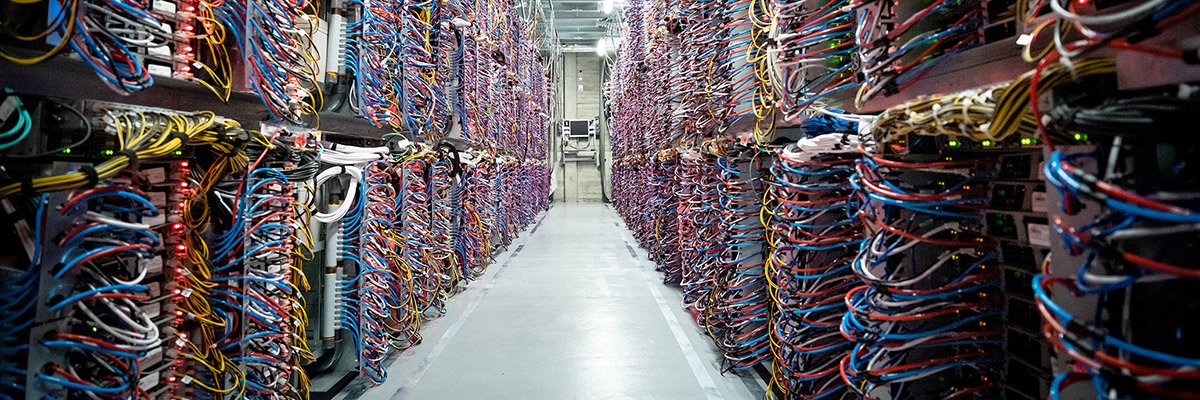
The operation provided police with “real-time” access to messages exchanged between members of organised criminal groups, after they attached a “man-in-the-middle” server to the Sky ECC infrastructure at the OVH Datacentre in Roubaix, France (pictured above), to intercept messages and encryption keys.
Some 1,600 Belgian law enforcement officers took part in raids in March 2021 on premises linked to drugs, money laundering and bribery, after police infiltrated Sky ECC’s servers in France and decrypted “hundreds of millions” of supposedly encrypted messages.
Spain and Italy question Sky ECC reliability
The reliability of Sky ECC evidence was called into question last week by courts in Italy and Spain. The provincial court in València acquitted 14 people after finding that prosecutors could not rely on digital evidence to prove their case, unless the defence was provided with access to the raw intercepted Sky ECC data.
An Italian court separately ordered prosecutors to make raw intercept data available to defendants to allow them to conduct independent checks into the reliability of the evidence.
The case against Nordin El Hajjioui is due to resume tomorrow.
In 1985, the Innovative Design Fund placed an ad in Scientific American offering up to $10,000 to support clever prototypes for clothing, home decor, and textiles. William Freeman PhD ’92, then an electrical engineer at Polaroid and now an MIT professor, saw it and submitted a novel idea: a three-sided zipper. Instead of fastening pants, it’d be like a switch that seamlessly flips chairs, tents, and purses between soft and rigid states, making them easier to pack and put together.
Freeman’s blueprint was much like a regular zipper, except triangular. On each side, he nailed a belt to connect narrow wooden “teeth” together. A slider wrapping around the device could be moved up to fasten the three strips into place, straightening them into a triangular tube. His proposal was rejected, but Freeman patented his prototype and stored it in his garage in the hopes it might come in handy one day.
Nearly 40 years later, MIT Computer Science and Artificial Intelligence Laboratory (CSAIL) researchers wanted to revive the project to create items with “tunable stiffness.” Prior attempts to adjust that weren’t easily reversible or required manual assembly, so CSAIL built an automated design tool and adaptable fastener called the “Y-zipper.” The scientists’ software program helps users customize three-sided zippers, which it then builds on its own in a 3D printer using plastics. These devices can be attached or embedded into camping equipment, medical gear, robots, and art installations for more convenient assembly.
“A regular zipper is great for closing up flat objects, like a jacket, but Freeman ideated something more dynamic. Using current fabrication technology, his mechanism can transform more complex items,” says MIT postdoc and CSAIL researcher Jiaji Li, who is a lead author on an open-access paper presenting the project. “We’ve developed a process that builds objects you can rapidly shift from flexible to rigid, and you can be confident they’ll work in the real world.”
Why zippers?
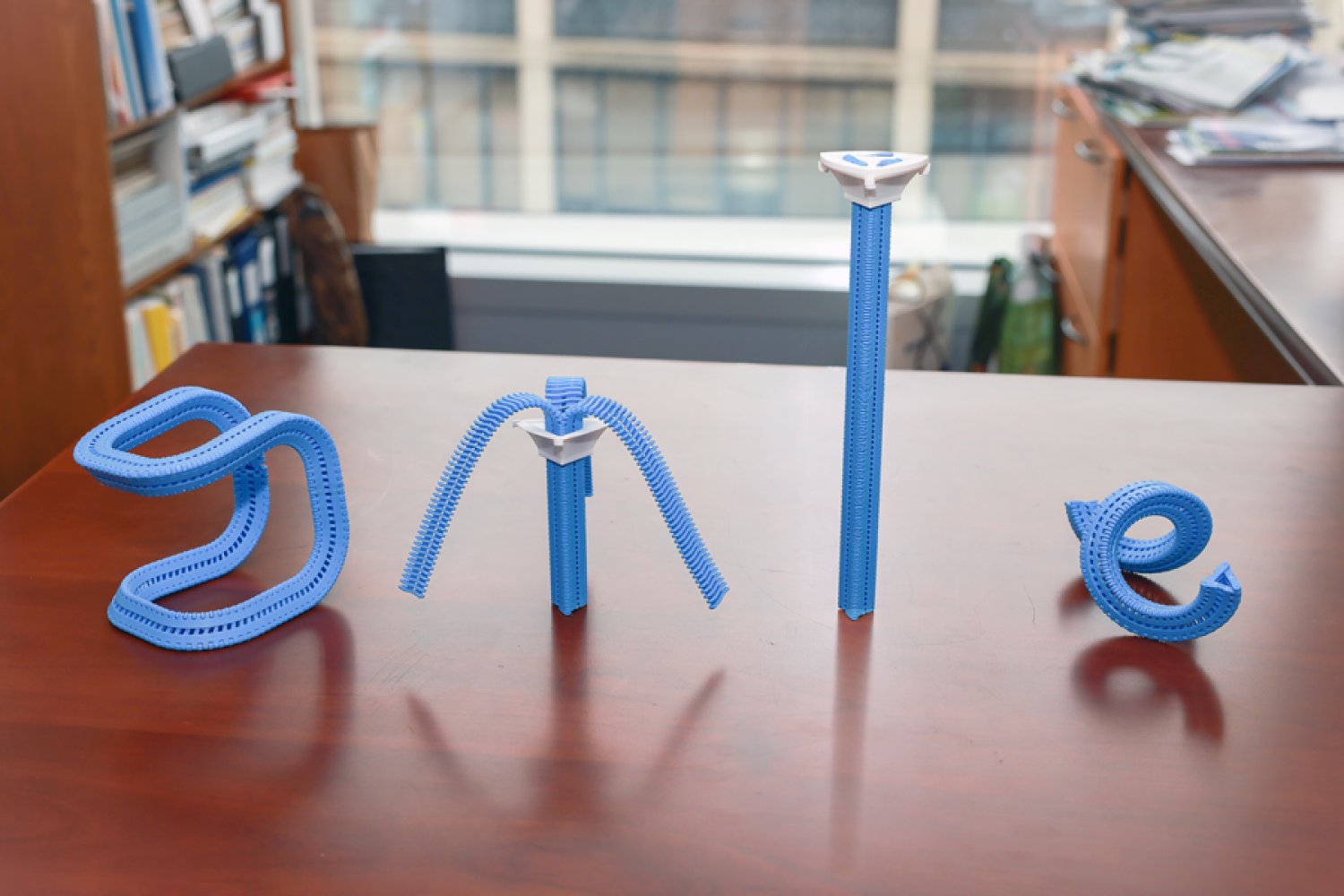
Users can customize how the fasteners look when they’re zipped up in CSAIL’s software program; they can select the length of each strip, as well as the direction and angle at which they’ll bend. They can also choose from one of four motion “primitives” to select how the zipper will appear when it’s zipped up: straight, bent (similar to an arch), coiled (resembling a spring), or twisted (looks like screws).
The Y-zipper that results will appear to “shape-shift” in the real world. When unzipped, it can look like a squid with three sprawling tentacles, and when you close it up, it becomes a more compact structure (like a rod, for instance). This flexibility could be useful when you’re traveling — take pitching a tent, for example. The process can take up to six minutes to do alone, but with the Y-zipper’s help, it can be done in one minute and 20 seconds. You simply attach each arm to a side of the tent, supporting the structure from the top so that the zipper seemingly pops the canopy into place.
This seamless transition could also unlock more flexible wearables, often useful in medical scenarios. The team wrapped the Y-zipper around a wrist cast, so that a user could loosen it during the day, and zip it up at night to prevent further injuries. In turn, a seemingly stiff device can be made more comfortable, adjusting to a patient’s needs.
The system can also aid users in crafting technology that moves at the push of a button. One can attach a motor to the Y-zipper after fabrication to automate the zipping process, which helps build things like an adaptive robotic quadruped. The robot could potentially change the size of its legs, tightening up into taller limbs and unzipping when it needs to be lower to the ground. Eventually, such rapid adjustments could help the robot explore the uneven terrain of places like canyons or forests. Actuated Y-zippers can also build dynamic art installations — for example, the team created a long, winding flower that “bloomed” thanks to a static motor zipping up the device.
Mastering the material
While Li and his colleagues saw the creative potential of the Y-zipper, it wasn’t yet clear how durable it would be. Could they sustain daily use?
The team ran a series of stress tests to find out. First, they evaluated the strength and flexibility of polylactic acid (PLA) and thermoplastic polyurethane (TPU), two plastics commonly used in 3D printing. Using a machine that bent the Y-zippers down, they found that PLA could handle heavier loads, while TPU was more pliable.
In another experiment, CSAIL researchers used an actuator to continuously open and close the Y-zipper to see how long it’d take to snap. Some 18,000 cycles of zipping and unzipping later, they finally broke. Y-zipper’s secret to durability, according to 3D simulations: its elastic structure, which helps distribute the stress of heavy loads.
Despite these findings, Li envisions an even more durable three-sided zipper using stronger materials, like metal. They may also make the zippers bigger for larger-scale projects, but that’s not yet possible with their current 3D printing platform.
Jiaji also notes that some applications remain unexplored, like space exploration, wherein Y-zipper’s tentacles could be built into a spacecraft to grab nearby rock samples. Likewise, the zippers could be embedded into structures that can be assembled rapidly, helping relief workers quickly set up shelters or medical tents during natural disasters and rescues.
“Reimagining an everyday zipper to tackle 3D morphological transitions is a brilliant approach to dynamic assembly,” says Zhejiang University assistant professor Guanyun Wang, who wasn’t involved in the paper. “More importantly, it effectively bridges the gap between soft and rigid states, offering a highly scalable and innovative fabrication approach that will greatly benefit the future design of embodied intelligence.”
Li and Freeman wrote the paper with Tianjin University PhD student Xiang Chang and MIT CSAIL colleagues: PhD student Maxine Perroni-Scharf; undergraduate Dingning Cao; recent visiting researchers Mingming Li (Zhejiang University), Jeremy Mrzyglocki (Technical University of Munich), and Takumi Yamamoto (Keio University); and MIT Associate Professor Stefanie Mueller, who is a CSAIL principal investigator and senior author on the work. Their research was supported, in part, by a postdoctoral research fellowship from Zhejiang University and the MIT-GIST Program.
The researchers’ work was presented at the ACM’s Computer-Human Interaction (CHI) conference on Human Factors in Computing Systems in April.

The Department of Homeland Security tried to obtain a Canadian man’s location information, activity logs, and other identifying information from Google after he criticized the Trump administration online following the killings of Renee Good and Alex Pretti by federal immigration agents in Minneapolis early this year.
Lawyers for the man, who has not been named, are alarmed in part because they say that the man has not entered the United States in more than a decade. “I don’t know what the government knows about our client’s residence, but it’s clear that the government isn’t stopping to find out,” says Michael Perloff, a senior staff attorney at the American Civil Liberties Union of the District of Columbia who is representing the man in a lawsuit against Markwayne Mullin, the secretary of DHS, over the summons. The lawsuit alleges that DHS violated the customs law that gives the agency the power to request records from businesses and other parties.
Perloff argues that the government is using the fact that big tech companies are based in the US to request information it would not otherwise be able to get. “It’s using that geographic fact to get information that otherwise would be totally outside of its jurisdiction,” he says. “I mean, we’re talking about the physical movements of a person who lives in Canada.”
DHS and Google did not immediately respond to a request for comment.
The demand for the man’s location data was included in a request DHS issued to Google called a customs summons, which is supposed to be used to investigate issues related to importing goods and collecting customs duties.
“It says right in the statute, it’s for records and testimony about the correctness of an entry, the liability of a person for duties, taxes, and fees, you know, compliance with basic customs laws,” says Chris Duncan, a former assistant chief counsel for US Customs and Border Protection who now works as a private-practice attorney representing importers and exporters. “And that’s all it was ever envisioned to be used for.”
A customs summons is a type of administrative subpoena and is not reviewed by a judge or grand jury before being sent out. According to the complaint, Google alerted the man about the request on February 9, despite an ask included in the summons “not to disclose the existence of this summons for an indefinite period of time.”
Through his attorneys, the man told WIRED he initially mistook the notification for a joke or scam before realizing it was real.
The summons, which is included in the complaint, does not give a specific reason for why the man was under investigation beyond citing the Tariff Act of 1930. The man’s lawyers contend that he did not export or import anything from the United States between September 1, 2025, to February 4, 2026, the time frame the government requested information about.
Instead, the man’s lawyers allege, the summons was filed in response to the man’s online activities, including posts that he made condemning immigration enforcement agents after the killings of Good and Pretti in January.
The man tells WIRED that watching members of the Trump administration “smear these two souls as terrorists was absolutely disgusting and enraging. People were being asked to disbelieve our own eyes so that the men responsible for killing two good Americans would go free.”
The man says of his online activity, “I felt I needed to do something that would stand out and be seen by despairing Americans to show them they had support and that they were not alone.”

When you think of Star Wars, you think of lightsabers. Right? What could be better, from a movie-making standpoint, than a futuristic sword that lets you create awesome fencing duels like in old-time Errol Flynn swashbucklers. (So much better than watching Stormtroopers fire their blasters into walls and ceilings and anything else except their targets.)
Lightsabers come in a cosmic rainbow of hues (color-coded blue or green for good guys, red for bad) and a variety of shapes. There’s even a double-bladed version in Phantom Menace. (I don’t want to start a nerd fight—yet—but the best lightsaber battle in the canon has to be the “Duel of the Fates” in that movie, thanks to the skills and scariness of Darth Maul actor Ray Park.)
So … exactly what are lightsabers? Of course, they aren’t real, so nobody really knows how they work. Even the characters in the movies seem a little confused about it. In Phantom Menace, Anakin calls it a “laser sword.” Yeah, he was a kid, but both Din Djarin (the Mandalorian) and Luke Skywalker also refer to it as a laser sword—though I suspect Luke was being sarcastic.
Anyway, that’s just wrong: It can’t be a laser. For starters, lasers beams are invisible from the side, so you wouldn’t see a thing unless you staged the duels in a disco with fog machines to scatter the beams. Second, the beams go on forever; they don’t have an end. Third, laser beams can’t clank together like swords—they’d just pass through each other when you try to parry.
But what is it then? We can greatly narrow the possibilities by asking if the blade has mass. If it’s some kind of light (as you’d think from the name “lightsaber”), then the answer is no—light, or electromagnetic radiation, has no mass. If we can determine that it has mass, then it’s not light.
This is a question we can answer, by analyzing how lightsabers move when you wave them around. In other words, it’s time for some physics!
Mass and Motion
Don’t confuse mass and weight. Mass is a measure of how much “stuff” like protons, neutrons, and electrons are in an object, and weight is the amount of gravitational force acting on an object. Here we want to see what impact the mass of a lightsaber would have on its motion. But let’s start with something simpler.
Instead of a lightsaber, say we have a “lightball” made of the same buzzy substance. Since it’s symmetrical, we can describe its motion without worrying about rotation. If we want to move this ball back and forth, we call on Newton’s second law of motion. This says the acceleration (a) of an object depends on its mass (m) and the amount of force (F) applied to it.


Iran says it forced US warship back from Strait of Hormuz

It took 40 years for technology to catch up to this zipper design

Britney Spears case ends with guilty plea in reckless driving matter

-
 Tech1 week ago
A Brain Implant for Depression Is About to Be Tested in Humans
-

 Tech1 week ago
Almost 90% of women leave tech industry within 10 years | Computer Weekly
-
 Business7 days ago
‘I had £20,000 stolen and had to fight a 13-month fraud reporting rule to get it back’
-
 Business1 week ago
Pakistan’s oil market is fuelling the crisis | The Express Tribune
-

 Sports6 days ago
Pro wrestling star Steph De Lander reveals how colleague’s advice helped lead her to title triumph at ACW
-

 Tech6 days ago
This Ambitious Laptop Doesn’t Leave Much Room for Your Hands
-

 Entertainment1 week ago
Norway joins Type 26 Frigate Programme to boost NATO naval power
-

 Entertainment1 week ago
Melania Trump says ABC should ‘take a stand’ on late-night host Kimmel