

Tech
Latam-GPT: The Free, Open Source, and Collaborative AI of Latin America


Latam-GPT is new large language model being developed in and for Latin America. The project, led by the nonprofit Chilean National Center for Artificial Intelligence (CENIA), aims to help the region achieve technological independence by developing an open source AI model trained on Latin American languages and contexts.
“This work cannot be undertaken by just one group or one country in Latin America: It is a challenge that requires everyone’s participation,” says Álvaro Soto, director of CENIA, in an interview with WIRED en Español. “Latam-GPT is a project that seeks to create an open, free, and, above all, collaborative AI model. We’ve been working for two years with a very bottom-up process, bringing together citizens from different countries who want to collaborate. Recently, it has also seen some more top-down initiatives, with governments taking an interest and beginning to participate in the project.”
The project stands out for its collaborative spirit. “We’re not looking to compete with OpenAI, DeepSeek, or Google. We want a model specific to Latin America and the Caribbean, aware of the cultural requirements and challenges that this entails, such as understanding different dialects, the region’s history, and unique cultural aspects,” explains Soto.
Thanks to 33 strategic partnerships with institutions in Latin America and the Caribbean, the project has gathered a corpus of data exceeding eight terabytes of text, the equivalent of millions of books. This information base has enabled the development of a language model with 50 billion parameters, a scale that makes it comparable to GPT-3.5 and gives it a medium to high capacity to perform complex tasks such as reasoning, translation, and associations.
Latam-GPT is being trained on a regional database that compiles information from 20 Latin American countries and Spain, with an impressive total of 2,645,500 documents. The distribution of data shows a significant concentration in the largest countries in the region, with Brazil the leader with 685,000 documents, followed by Mexico with 385,000, Spain with 325,000, Colombia with 220,000, and Argentina with 210,000 documents. The numbers reflect the size of these markets, their digital development, and the availability of structured content.
“Initially, we’ll launch a language model. We expect its performance in general tasks to be close to that of large commercial models, but with superior performance in topics specific to Latin America. The idea is that, if we ask it about topics relevant to our region, its knowledge will be much deeper,” Soto explains.
The first model is the starting point for developing a family of more advanced technologies in the future, including ones with image and video, and for scaling up to larger models. “As this is an open project, we want other institutions to be able to use it. A group in Colombia could adapt it for the school education system or one in Brazil could adapt it for the health sector. The idea is to open the door for different organizations to generate specific models for particular areas like agriculture, culture, and others,” explains the CENIA director.








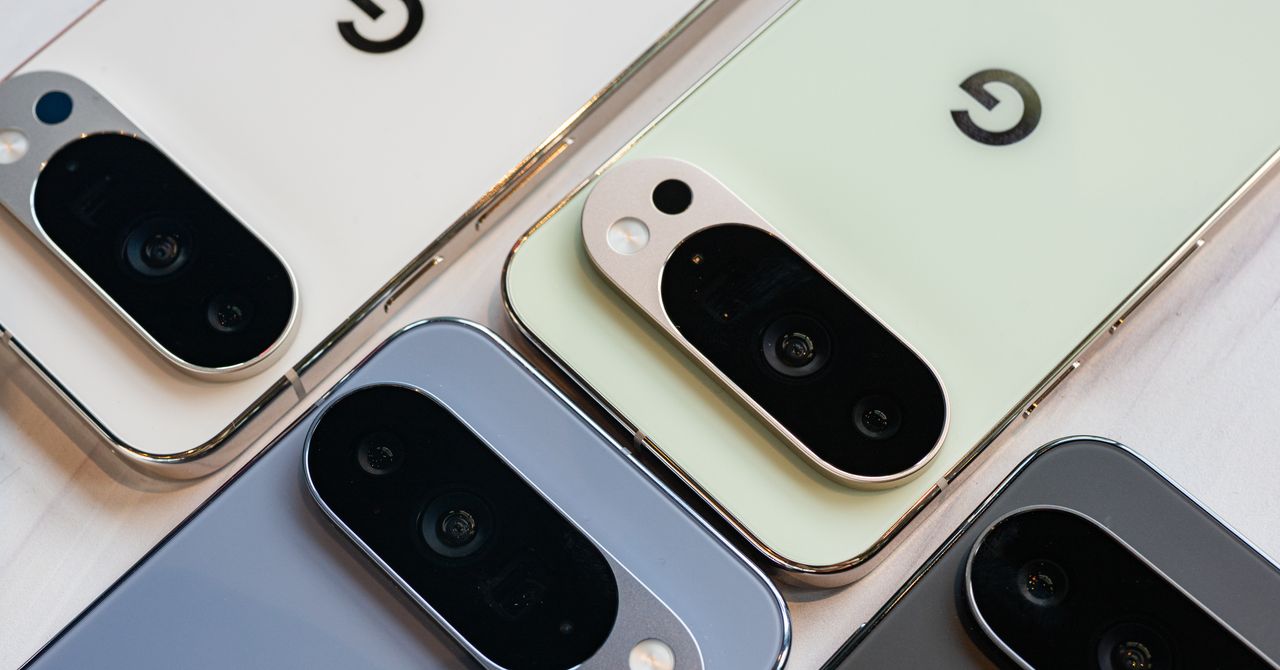
Portrait Light: You can change up the lighting in your portrait selfies after you take them by opening them up in Google Photos, tapping the Edit button, and heading to Actions > Portrait Light. This adds an artificial light you can place anywhere in the photo to brighten up your face and erase that 5 o’clock shadow. Use the slider at the bottom to tweak the strength of the light. It also works on older Portrait mode photos you may have captured. It works only on faces.
Health and Accessibility Features
Cough & Snore Detection (Tensor G2 and newer): On the Pixel 7 and newer, you can have your Pixel detect if you cough and snore when sleeping, provided you place your Pixel near your bed before you nod off. This will work only if you use Google’s Bedtime mode function, which you can turn on by heading to Settings > Digital Wellbeing & Parental Controls > Bedtime Mode.
Guided Frame (Tensor G2 and newer): For blind or low-vision people, the camera app can now help take a selfie with audio cues (it works with the front and rear cameras). You’ll need to enable TalkBack for this to work (Settings > Accessibility > TalkBack). Then open the camera app. It will automatically help you frame the shot.
Simple View: This mode makes the font size bigger, along with other elements on the screen, like widgets and quick-settings tiles. It also increases touch sensitivity, all of which hopefully makes it easier to see and use the screen. You can enable it by heading to Settings > Accessibility > Simple View.
Safety and Security Features
Theft Protection: This is a broader Android 15 feature, but essentially, Google’s algorithms can figure out if someone snatches your Pixel out of your hands. If they’re trying to get away, the device automatically locks. Additionally, with another device, you can use Remote Lock to lock your stolen Pixel with your phone number and a security answer. To toggle these features on, go to Settings > Security & privacy > Device unlock > Theft protection.
Identity Check: If your Pixel detects you’re in a new location, Identity Check will require your fingerprint or face authentication before you can make any changes to sensitive settings, offering extra peace of mind in case you lose your phone or if it’s stolen. You can enable this in Settings > Security & privacy > Device unlock > Theft protection > Identity Check.
Courtesy of Google
Private Space: Another Android 15 addition, Pixel phones finally have a feature that lets you hide and lock select apps. You can use a separate Google account, set a lock, and install any app to hide away. To set it all up, head to Settings > Security & privacy > Private space.
Satellite eSOS (Pixel 9 and Pixel 10 series, excluding Pixel 9a): Like Apple’s SOS feature on iPhones, you can now reach emergency contacts or emergency services even when you don’t have cell service or Wi-Fi connectivity. It’s not just available in the continental US, but also in Hawaii, Alaska, Canada, and even Europe.
Portrait Light: You can change up the lighting in your portrait selfies after you take them by opening them up in Google Photos, tapping the Edit button, and heading to Actions > Portrait Light. This adds an artificial light you can place anywhere in the photo to brighten up your face and erase that 5 o’clock shadow. Use the slider at the bottom to tweak the strength of the light. It also works on older Portrait mode photos you may have captured. It works only on faces.
Health and Accessibility Features
Cough & Snore Detection (Tensor G2 and newer): On the Pixel 7 and newer, you can have your Pixel detect if you cough and snore when sleeping, provided you place your Pixel near your bed before you nod off. This will work only if you use Google’s Bedtime mode function, which you can turn on by heading to Settings > Digital Wellbeing & Parental Controls > Bedtime Mode.
Guided Frame (Tensor G2 and newer): For blind or low-vision people, the camera app can now help take a selfie with audio cues (it works with the front and rear cameras). You’ll need to enable TalkBack for this to work (Settings > Accessibility > TalkBack). Then open the camera app. It will automatically help you frame the shot.
Simple View: This mode makes the font size bigger, along with other elements on the screen, like widgets and quick-settings tiles. It also increases touch sensitivity, all of which hopefully makes it easier to see and use the screen. You can enable it by heading to Settings > Accessibility > Simple View.
Safety and Security Features
Theft Protection: This is a broader Android 15 feature, but essentially, Google’s algorithms can figure out if someone snatches your Pixel out of your hands. If they’re trying to get away, the device automatically locks. Additionally, with another device, you can use Remote Lock to lock your stolen Pixel with your phone number and a security answer. To toggle these features on, go to Settings > Security & privacy > Device unlock > Theft protection.
Identity Check: If your Pixel detects you’re in a new location, Identity Check will require your fingerprint or face authentication before you can make any changes to sensitive settings, offering extra peace of mind in case you lose your phone or if it’s stolen. You can enable this in Settings > Security & privacy > Device unlock > Theft protection > Identity Check.
Courtesy of Google
Private Space: Another Android 15 addition, Pixel phones finally have a feature that lets you hide and lock select apps. You can use a separate Google account, set a lock, and install any app to hide away. To set it all up, head to Settings > Security & privacy > Private space.
Satellite eSOS (Pixel 9 and Pixel 10 series, excluding Pixel 9a): Like Apple’s SOS feature on iPhones, you can now reach emergency contacts or emergency services even when you don’t have cell service or Wi-Fi connectivity. It’s not just available in the continental US, but also in Hawaii, Alaska, Canada, and even Europe.

On the hunt for a fresh pair of headphones that stand out in the style department? Until the end of the weekend, Best Buy has the Beats Studio Pro marked down to just $200, a $150 discount from the usual price.
While this headset isn’t nearly as fancy as some of our other favorite over-ear headsets, it makes up for it with classic Beats styling and a sound profile that the brand has become known for among its fans. They’re bass-forward and punchy, a fact you’ll just have to live with whether you like it or not, because they lack a dedicated equalizer. Thankfully they aren’t as bold and brash as the Beats of old, but it’s still something to keep in mind if your normal beat isn’t hip-hop or rock.
They’re technically produced by Apple, but the Beats Studio Pro have a feature set that’s decidedly cross-platform, with one-touch pairing for both Apple and Android mobile devices, and an impressively large wireless range in case you like to leave your phone on the porch while working in the yard. If you don’t mind being physically connected to your device, you can even use the USB-C mode to enjoy some high-resolution audio. There’s also head tracking for spatial audio, a trick we’ve seen on some other headsets that sometimes ends up being more of a gimmick, although it is neat to use while watching movies in apps that support it like Disney+ and Netflix.
They get up to 24 hours of battery life with the ANC on, or closer to 40 without, which is fine, but not quite as good as some of its more expensive counterparts. Speaking of active noise-canceling, our reviewer Ryan Waniata said “it holds its own against competitors from Sony and Bose, and outdoes rivals like Sennheiser’s Momentum 4 Wireless.” It works just as well for calling as it does for catching some tunes, and has a microphone that folks on the other hand of the call described as clear and detailed.
If you’re interested in scooping this deal on the Beats Studio Pro, make sure to head over to Best Buy to save $150, or check out our guide to the best wireless headphones we’ve head the pleasure of testing.


Oil price at two-year high after Qatar minister warns all Gulf production could stop

Miami (OH) AD David Sayler Rips Bruce Pearl, Suggests TV ‘Disclaimer’ Over Auburn Bias In NCAA Tournament

I’ve Tried Every Pixel Phone Ever Made—Here Are the Best to Buy Right Now

Attock Cement’s acquisition approved | The Express Tribune

India Us Trade Deal: Fresh look at India-US trade deal? May be ‘rebalanced’ if circumstances change, says Piyush Goyal – The Times of India

Policy easing drives Argentina’s garment import surge in 2025

-
Business1 week ago
Attock Cement’s acquisition approved | The Express Tribune
-
Business1 week ago
India Us Trade Deal: Fresh look at India-US trade deal? May be ‘rebalanced’ if circumstances change, says Piyush Goyal – The Times of India
-
 Fashion1 week ago
Policy easing drives Argentina’s garment import surge in 2025
-

 Politics1 week ago
What are Iran’s ballistic missile capabilities?
-

 Politics1 week ago
US arrests ex-Air Force pilot for ‘training’ Chinese military
-

 Sports1 week ago
LPGA legend shares her feelings about US women’s Olympic wins: ‘Gets me really emotional’
-

 Sports1 week ago
Sri Lanka’s Shanaka says constant criticism has affected players’ mental health
-

 Fashion7 days ago
South Korea’s Misto Holdings completes planned leadership transition