The Investigatory Powers Tribunal had dismissed Apple’s legal appeal against a government order requiring it to provide intelligence services and law enforcement with the capability to access encrypted data of Apple users worldwide.
The tribunal has ruled that the case would no longer proceed following a “change in circumstances,” according to court documents obtained by Computer Weekly.
The decision effectively brings Apple’s legal action against the Home Office to a halt, although a separate legal claim brought by campaign groups Privacy International and Liberty is expected to continue.
It comes days after disclosures that the Home Office has issued a new order against Apple to restrict UK government access to encrypted data and messages stored on Apple’s iCloud service only for British users.
The move by the Home Office ends a growing diplomatic row between the UK and the Trump administration over fears that the UK could use the order to access the communications of US citizens.
Claim dismissed
According to a court order obtained by Computer Weekly, Apple and the Home Office have agreed that Apple’s appeal should no longer go ahead.
“This claim is dismissed on the basis of a change in circumstances which, the tribunal has decided, means the claim should no longer proceed,” the order on 6 October stated.
We are gravely disappointed that the protections provided by ADP are not available to our customers in the UK, given the continuing rise of data breaches and other threats to customer privacy Apple spokesperson
Apple did not comment on the withdrawal of its legal case and declined to say whether it would issue a new legal challenge against the Home Office’s revised order.
However, a company spokesperson confirmed that Apple would still not be able to offer its Advanced Data Protection (ADP) service, which it withdrew from the UK rather than comply with the Home Office’s order – to its UK customers.
“We are gravely disappointed that the protections provided by ADP are not available to our customers in the UK, given the continuing rise of data breaches and other threats to customer privacy,” the spokesperson added.
Backdoor order
The row between Apple and the Home Office came after the government issued a secret technical capability notice (TCN) to Apple in January, requiring it to provide warranted backdoor access to messages and data stored by Apple users worldwide.
The notice extended the ability of UK law enforcement to access encrypted data stored by users on Apple’s iCloud to include users of its secure ADP service, which is fully end-to-end encrypted.
The government argued that it needed to be able to obtain warrants to access individuals’ private encrypted data on Apple’s iCloud service, including data protected by ADP, in the interests of national security and tackling crime.
Apple has opposed the order on the grounds that it needs to offer its users the “highest levels of security” for their personal data to protect their privacy and secure them against data breaches and hacking.
The Home Office’s actions sparked a diplomatic row with the US, after the existence of the secret TCN order was leaked to the Washington Post.
US director of national intelligence Tulsi Gabbard publicly raised concerns that the UK’s order against Apple could “undermine Americans’ privacy and civil liberties”. President Donald Trump described the move as “something that you hear about with China”.
Legal action by NGOs expected to continue
A separate case brought against the Home Office by Privacy International, Liberty and two individuals, which challenges the lawfulness of the technical capability notice, is expected to continue.
The IPT has refused an application by the campaign groups to disclose the terms of any revised TCN issued by the government in the light of agreements reached with the US, according to documents obtained by Computer Weekly.
The IPT ruled that although public notices issued by President Trump, the vice-president and the US director of national security implied that the Home Office had served a new TCN on Apple, neither Apple nor the Home Office had publicly confirmed or denied that this was the case.
The IPT is due to hear the case on the basis of “assumed facts” – which allow the case to be heard in open court – in January 2026.
According to the court documents, the TCN allows the interception of communications and multiple categories of data stored in Apple’s iCloud backup service.
It requires Apple to remove electronic protection applied to the data where it is “reasonably practicable” and to provide access to data stored on Apple’s Advanced Data Protection and iCloud services under a warrant.
Bernard Keenan, a lecturer in law at UCL and a specialist in the Investigatory Powers Act, said that the withdrawal of Apple’s appeal by mutual consent, indicated that Apple and the UK government have come to an arrangement acceptable for both sides.
“If reports that the TCN has been limited to UK users are accurate, then the government will have maintained the capability to intercept communications sent or stored via encrypted Apple services in the UK, while Apple will have decided that they are unlikely to win an appeal against an order in those terms in court,” he added.
Apple did not comment on the decision to discontinue its case.
An Apple spokesperson said it was “gravely disappointed” not to be able to offer Apple customers its secure ADP service in the UK.
“Enhancing the security of cloud storage with end-to-end encryption is more urgent than ever before. Apple remains committed to offering our users the highest level of security for their personal data and are hopeful that we will be able to do so in the future in the United Kingdom,” the spokesperson said.
“As we have said many times before, we have never built a backdoor or master key to any of our products or services, and we never will,” the spokesperson added.
ADP protects iCloud data with end-to-end encryption, which means the data can only be decrypted by the user who owns the data on their own trusted devices. Apple, which does not have access to ADP encryption keys, is unable to read messages stored on the service.
A Home Office spokesperson said, “we do not comment on operational matters, including for example confirming or denying the existence of any such notices.”
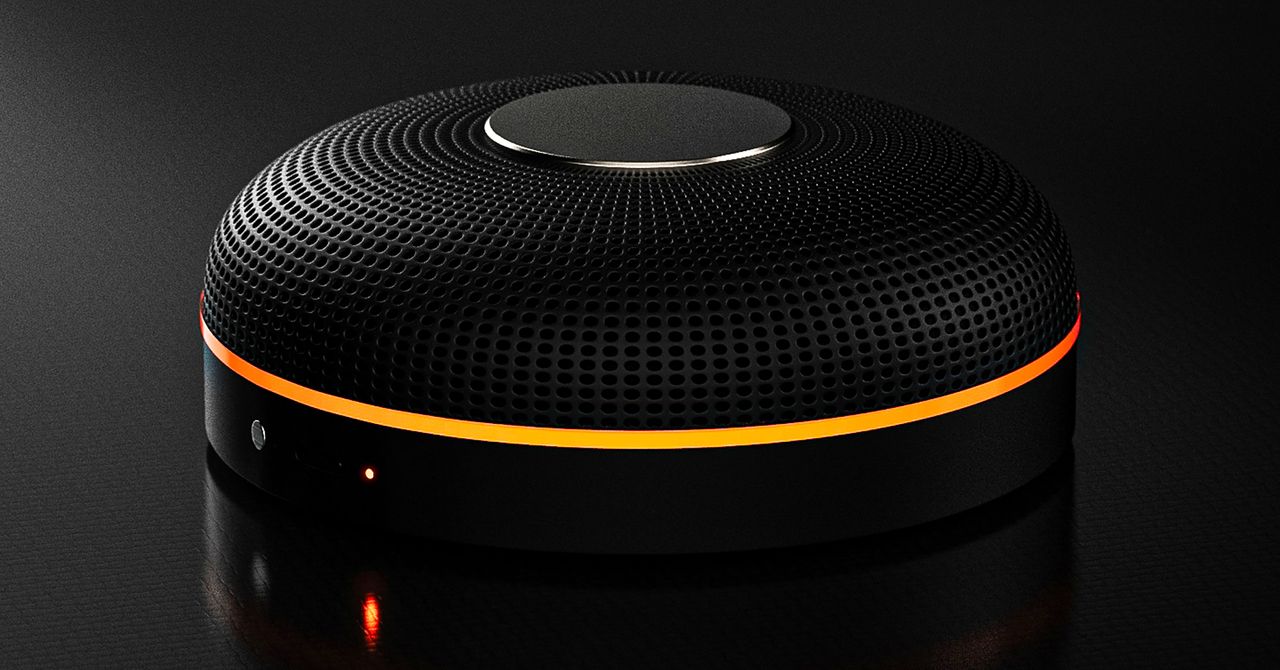
Deveillance also claims the Spectre can find nearby microphones by detecting radio frequencies (RF), but critics say finding a microphone via RF emissions is not effective unless the sensor is immediately beside it.
“If you could detect and recognize components via RF the way Spectre claims to, it would literally be transformative to technology,” Jordan wrote in a text to WIRED after he built a device to test detecting RF signatures in microphones. “You’d be able to do radio astronomy in Manhattan.”
Deveillance is also looking at ways to integrate nonlinear junction detection (NLJD), a very high-frequency radio signal used by security professionals to find hidden mics and bugs. NLJD detectors are expensive and used primarily in professional contexts like military operations.
Even if a device could detect a microphone’s exact location, objects around a room can change how the frequencies spread and interact. The emitted frequencies could also be a problem. There haven’t been adequate studies to show what effects ultrasonic frequencies have on the human ear, but some people and many pets can hear them and find them obnoxious or even painful. Baradari acknowledges that her team needs to do more testing to see how pets are affected.
“They simply cannot do this,” engineer and YouTuber Dave Jones (who runs the channel EEVblog) wrote in an email to WIRED. “They are using the classic trick of using wording to imply that it will detect every type of microphone, when all they are probably doing is scanning for Bluetooth audio devices. It’s totally lame.” Baradari reiterates that the Spectre uses a combination of RF and Bluetooth low energy to detect microphones.
WIRED asked Baradari to share any evidence of the Spectre’s effectiveness at identifying and blocking microphones in a person’s vicinity. Baradari shared a few short videoclips of people putting their phones to their ears listening to audioclips—which were presumably jammed by the Spectre—but these videos do little to prove that the device works.
Future Imperfect
Baradari has taken the critiques in stride, acknowledging that the tech is still in development. “I actually appreciate those comments, because they’re making me think and see more things as well,” Baradari says. “I do believe that with the ideas that we’re having and integrating into one device, these concerns can be addressed.”
People were quick to poke fun at the Spectre I online, calling the technology the cone of silence from Dune. Now, the Deveillance website reads, “Our goal is to make the cone of silence become reality.”
John Scott-Railton, a cybersecurity researcher at Citizen Lab, who is critical of the Spectre I, lauded the device’s virality as an indication of the real hunger for these kinds of gadgets to win back our privacy.
“The silver lining of this blowing up is that it is a Ring-like moment that highlights how quickly and intensely consumer attitudes have shifted around pervasive recording devices,” says Scott-Railton. “We need to be building products that do all the cool things that people want but that don’t have the massive privacy- and consent-violation undertow. You need device-level controls, and you need regulations of the companies that are doing this.”
Cooper Quintin, a senior staff technologist at the Electronic Frontier Foundation, echoed those sentiments, even if critics believe Deveillance’s efforts to be flawed.
“If this technology works, it could be a boon for many,” Quintin wrote in an email to WIRED. “It is nice to see a company creating something to protect privacy instead of working on new and creative ways to extract data from us.”
Portrait Light: You can change up the lighting in your portrait selfies after you take them by opening them up in Google Photos, tapping the Edit button, and heading to Actions >Portrait Light. This adds an artificial light you can place anywhere in the photo to brighten up your face and erase that 5 o’clock shadow. Use the slider at the bottom to tweak the strength of the light. It also works on older Portrait mode photos you may have captured. It works only on faces.
Health and Accessibility Features
Cough & Snore Detection (Tensor G2 and newer): On the Pixel 7 and newer, you can have your Pixel detect if you cough and snore when sleeping, provided you place your Pixel near your bed before you nod off. This will work only if you use Google’s Bedtime mode function, which you can turn on by heading to Settings > Digital Wellbeing & Parental Controls > Bedtime Mode.
Guided Frame (Tensor G2 and newer): For blind or low-vision people, the camera app can now help take a selfie with audio cues (it works with the front and rear cameras). You’ll need to enable TalkBack for this to work (Settings > Accessibility > TalkBack). Then open the camera app. It will automatically help you frame the shot.
Simple View: This mode makes the font size bigger, along with other elements on the screen, like widgets and quick-settings tiles. It also increases touch sensitivity, all of which hopefully makes it easier to see and use the screen. You can enable it by heading to Settings > Accessibility > Simple View.
Safety and Security Features
Theft Protection: This is a broader Android 15 feature, but essentially, Google’s algorithms can figure out if someone snatches your Pixel out of your hands. If they’re trying to get away, the device automatically locks. Additionally, with another device, you can use Remote Lock to lock your stolen Pixel with your phone number and a security answer. To toggle these features on, go to Settings > Security & privacy > Device unlock > Theft protection.
Identity Check: If your Pixel detects you’re in a new location, Identity Check will require your fingerprint or face authentication before you can make any changes to sensitive settings, offering extra peace of mind in case you lose your phone or if it’s stolen. You can enable this in Settings > Security & privacy > Device unlock > Theft protection > Identity Check.
Courtesy of Google
Private Space: Another Android 15 addition, Pixel phones finally have a feature that lets you hide and lock select apps. You can use a separate Google account, set a lock, and install any app to hide away. To set it all up, head to Settings > Security & privacy > Private space.
Satellite eSOS (Pixel 9 and Pixel 10 series, excluding Pixel 9a): Like Apple’s SOS feature on iPhones, you can now reach emergency contacts or emergency services even when you don’t have cell service or Wi-Fi connectivity. It’s not just available in the continental US, but also in Hawaii, Alaska, Canada, and even Europe.
Portrait Light: You can change up the lighting in your portrait selfies after you take them by opening them up in Google Photos, tapping the Edit button, and heading to Actions >Portrait Light. This adds an artificial light you can place anywhere in the photo to brighten up your face and erase that 5 o’clock shadow. Use the slider at the bottom to tweak the strength of the light. It also works on older Portrait mode photos you may have captured. It works only on faces.
Health and Accessibility Features
Cough & Snore Detection (Tensor G2 and newer): On the Pixel 7 and newer, you can have your Pixel detect if you cough and snore when sleeping, provided you place your Pixel near your bed before you nod off. This will work only if you use Google’s Bedtime mode function, which you can turn on by heading to Settings > Digital Wellbeing & Parental Controls > Bedtime Mode.
Guided Frame (Tensor G2 and newer): For blind or low-vision people, the camera app can now help take a selfie with audio cues (it works with the front and rear cameras). You’ll need to enable TalkBack for this to work (Settings > Accessibility > TalkBack). Then open the camera app. It will automatically help you frame the shot.
Simple View: This mode makes the font size bigger, along with other elements on the screen, like widgets and quick-settings tiles. It also increases touch sensitivity, all of which hopefully makes it easier to see and use the screen. You can enable it by heading to Settings > Accessibility > Simple View.
Safety and Security Features
Theft Protection: This is a broader Android 15 feature, but essentially, Google’s algorithms can figure out if someone snatches your Pixel out of your hands. If they’re trying to get away, the device automatically locks. Additionally, with another device, you can use Remote Lock to lock your stolen Pixel with your phone number and a security answer. To toggle these features on, go to Settings > Security & privacy > Device unlock > Theft protection.
Identity Check: If your Pixel detects you’re in a new location, Identity Check will require your fingerprint or face authentication before you can make any changes to sensitive settings, offering extra peace of mind in case you lose your phone or if it’s stolen. You can enable this in Settings > Security & privacy > Device unlock > Theft protection > Identity Check.
Courtesy of Google
Private Space: Another Android 15 addition, Pixel phones finally have a feature that lets you hide and lock select apps. You can use a separate Google account, set a lock, and install any app to hide away. To set it all up, head to Settings > Security & privacy > Private space.
Satellite eSOS (Pixel 9 and Pixel 10 series, excluding Pixel 9a): Like Apple’s SOS feature on iPhones, you can now reach emergency contacts or emergency services even when you don’t have cell service or Wi-Fi connectivity. It’s not just available in the continental US, but also in Hawaii, Alaska, Canada, and even Europe.











 Politics1 week ago
 Politics1 week ago

 Fashion1 week ago
 Sports1 week ago
 Sports1 week ago
 Entertainment1 week ago