DevOps adoption has been going on for a decade and shows no signs of slowing. In Forrester’s 2024 developer experience survey, 87% of developers indicated that their organisation had already adopted DevOps practices or planned to do so in the coming year.
But for many organisations, scaling their DevOps practice has been complicated, expensive and, in the end, insufficient in delivering the value leaders had expected. These organisations start with a grassroots approach to DevOps adoption, with each team self-selecting its toolchain, creating its best practices and infusing its institutional knowledge.
Forrester clients tell us this team-based approach breaks down at scale. It creates as many problems as it solves and does not deliver the results the C-suite was expecting.
For instance, bespoke toolchains create headaches. Organisations that took this approach are now saddled with too many unique toolchains, each requiring nurturing by the same developers who are supposed to be building customer-focused products. These toolchains also require unique automation, create trapped institutional knowledge, contribute to tool sprawl and limit any chance for volume DevOps tool pricing.
All these factors create headaches for IT leaders trying to reduce overheads while improving productivity and efficiency.
Many organisations now understand that improving the developer experience increases efficiency by removing impediments to the development process. High among those impediments is unnecessary context switching, which breaks the concentration of developers and decreases flow.
Disconnected automation tools, multiple systems of record and multiple platforms slow developers down by forcing them to play hopscotch with numerous tools. Without a common platform as the backbone, when developers change projects, they may go through entirely new onboarding procedures to get access to repositories and commit their first pull request.
The lack of standardised practices causes governance issues as well. Without a standard approach to software delivery, you end up with ad hoc governance implemented differently depending on the toolchain. This creates trust barriers between developers and enterprise governance teams, can add manual oversight and red tape that slows processes down, and works against efforts to improve productivity and efficiency at scale.
Another issue software developers face is that the traditional IT service catalogue is a heavyweight solution. Many organisations have had service portals for years, grounded in IT and enterprise service management practices and based on products such as ServiceNow, Atlassian’s Jira Service Management or BMC Helix.
These tools remain because they often serve non-technical users and may be leveraged by traditional infrastructure organisations for ticketed offerings. However, developers find ticket ops to be too slow and unresponsive, which is why a market emerged for dedicated internal developer platforms (IDPs).
A scaled platform for services
IDPs provide a framework for creating an IT platform where services can be defined, automated and exposed across the enterprise.
Examples of IT services that can be incorporated into an IDP include allocating a new piece of infrastructure, such as a new virtual machine, instantiating an automated continuous integration/continuous delivery (CI/CD) pipeline to build and deliver code, or creating the scaffolding for a new microservice project using organisational best practices.
Internal developer platforms provide a framework for creating an IT platform where services can be defined, automated and exposed across the enterprise Forrester
IDPs facilitate management and access to service automations by providing a framework to manage and expose automation at scale.
IDPs can provide visibility into tools and frameworks. One feature of IDPs is scorecards, which provide information about both the technical and business performance of technologies. This helps developers make the right choice when faced with multiple frameworks, and also gives leaders insight into adoption.
New tool adoption becomes apparent to leadership, as does abandonment of older technologies, enabling leaders to deprecate and remove older components when it makes sense for the business.
At a high level, IDPs can serve a similar role to traditional platform as a service (PaaS) by providing an abstraction layer to IT infrastructure services. However, whereas many PaaS implementations have opaque abstraction layers, IDPs offer a transparent layer via service definition files that enable developers and infrastructure engineers to view, reuse and improve upon the underlying abstraction mechanisms.
Platform builders need to understand these differences to determine which abstraction model will serve their needs best.
There are several reasons for its adoption. Spotify has a reputation for transformational engineering processes. Many organisations have adopted the now-famous Spotify model, featuring squads, tribes and guilds. Having Backstage reside in the CNCF ensures governance and a healthy community of contributors and adopters. A growing number of commercial DevOps tool suppliers support Backstage plug-ins. And most importantly, because it’s open source, Backstage is free for developers to download and try, further accelerating interest in platforms in general.
Before committing to an IDP, IT leaders should build a compelling business case outlining which benefits the IDP will bring to the organisation and how it will measure these Forrester
Many teams had assumed, or hoped, that Backstage was a ready-to-use platform, but soon became overwhelmed by its complexity. This has created an opportunity for commercial software providers to differentiate their offerings from Backstage. These commercial tools providers claim their products are easier to get started with, have a lower learning curve and offer technological advantages to Backstage, such as providing a service orchestration layer.
Spotify also offers Backstage as a paid commercial subscription that includes product support, additional plugins and no-code capabilities to help companies get started faster with greater confidence. Users see these commercial add-ons, such as Soundcheck (a plug-in that helps teams visualise quality, security and reliability checks on services), as value-adds.
Before committing to an IDP, Forrester recommends IT leaders build a compelling business case outlining which benefits the IDP will bring to the organisation and how it will measure these. Developing a comprehensive business plan will ensure alignment between the stakeholders funding the platform initiative and those responsible for its creation.
Forrester has found that nearly every IDP company and end user who has successfully built an IDP started small by building a proof of concept (PoC). The first implementation can take several weeks to months.
Forrester recommends that IT leaders first identify a team that is collaborative and sees the benefit of an IDP approach. Then, build the PoC around a few of members’ crucial needs while engaging with them for additional suggestions and even their own contributions to improve the IDP. This approach can be built upon and used as a springboard for other teams to continue to grow the IDP in a sustainable way.
I’m looking at Volume 1,536 of the Epstein files, page 311. It’s an early 2016 email thread between Jeffrey Epstein and a woman whose name is redacted by the Department of Justice.
In the thread, Epstein asks the unidentified woman for a “naughty selfie” and later sends her a camera. In late February, he replies with a different ask: “Do you have any friends that might want to work for me?…I will give you money if you find someone willing to travel, 22-25, educated. Personable.”
The exchange carries extra resonance when you consider that Epstein is accused of sex trafficking minors, with the Department of Justice estimating that he had more than 1,200 potential victims. But I just happen to flip to it randomly during my recent visit to the newly opened Donald J. Trump and Jeffrey Epstein Memorial Reading Room.
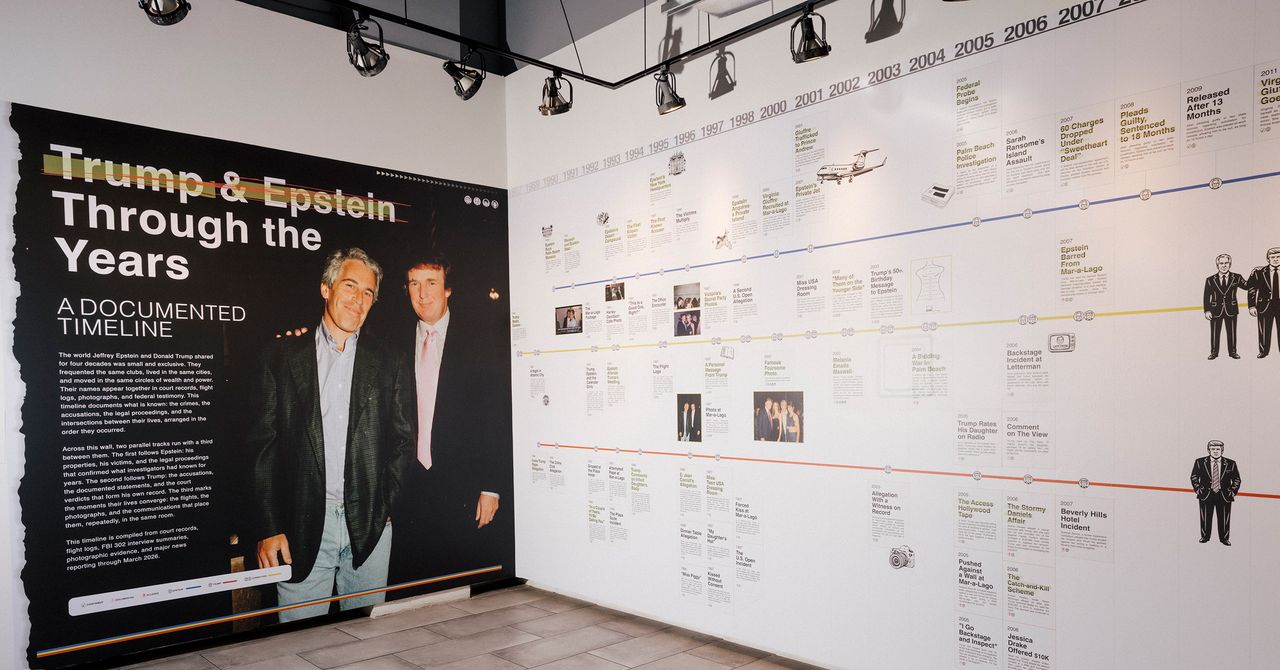
Photograph: Anna Maria Lopez/Courtesy of BPI Group
Tucked away in a nondescript gallery in New York City’s Tribeca neighborhood, the reading room is a massive library of all 3.5 million pages of Epstein-related records released by the Department of Justice earlier this year, compiled into more than 3,700 individual volumes. From May 8 to 21, the reading room will be open to the public by appointment only.
The library—essentially, the Epstein files in analog—is intended to represent the staggering scale of Epstein’s crimes, as well as the impunity with which he carried them out. More than 17,000 pounds of evidence is on display at the library, says David Garrett, the main organizer of the exhibit at the Institute for Primary Facts, a nonprofit intended to promote transparency and accountability in the US government.
“The evidence in this room is evidence of one of the most horrific crimes in American history,” Garrett says. “When people come through this room, I hope they realize that in America, we have the rule of law, and if they stand up they can take action and demand accountability for the crimes that were committed.”
Epstein, who died in prison in 2019, is now synonymous with systemic corruption and abuse, particularly in light of his ties to President Donald Trump. The installation features a detailed timeline of Epstein’s relationship with Trump, from their purported initial meeting in Palm Beach in 1987 to Epstein’s 1993 attendance at Trump’s wedding to Marla Maples to the end of Epstein’s membership at Mar-a-Lago in 2007, when Trump allegedly witnessed him behaving inappropriately toward the teenage daughter of another member. The shelves are organized around an exhibit in support of Epstein’s survivors, with candles laid out on the ground to represent the more than 1,200 victims. In response to a request for comment, White House spokesperson Abigail Jackson said Trump has “been totally exonerated on anything relating to Epstein,” claiming that he “has done more for Epstein’s victims than anyone.”
Neo Smartpen M1+ for $129: Skip the tablet and write directly on paper with a smart pen instead. The Neo Smartpen M1+ is the thinnest and lightest of all the pens I tried, which makes it feel a bit more like your standard pen. Importantly, it’s comfortable to hold and use. You should be able to find whatever size and style of notebook you need as well as planners. The Neo Studio app (iOS, Android) is nice, with an easy-to-navigate notebook system and the ability to search for pages by page number or date. You can change the color of the ink and thickness of the lines right on the page as you go, or you can switch them up later and edit the colors of what you’ve written. —Medea Giodiano
Moleskine Smart Writing Set for $251: Moleskine has garnered a devoted following for its classic notebooks and journals, but it has also moved into smart territory. The Smart Writing Set gets you a notebook and pen bundle, so this is the best option for most people starting out. Write in the notebook, and it’ll appear in the companion app! But you can buy the pen on its own, as well as the smart notebooks and planners in various sizes. The Moleskine Notes 2.0 app (iOS, Android) was easy to use once I settled into it. An older version of the app is available for download, but the 2.0 version is more streamlined. A pop-up let me know that 2.0 is still a work in progress and I might need to switch back to the older version if my device is having trouble, but my iPhone 11 didn’t have any issues. I tested the $149 2018 version of the Smart Writing Set, which is no longer available, but we plan to test the latest version soon. —Medea Giordano
Honorable Mentions
The 3rd Gen Kindle Scribe (left) and the Kindle Scribe Colorsoft.
Photograph: Nena Farrell
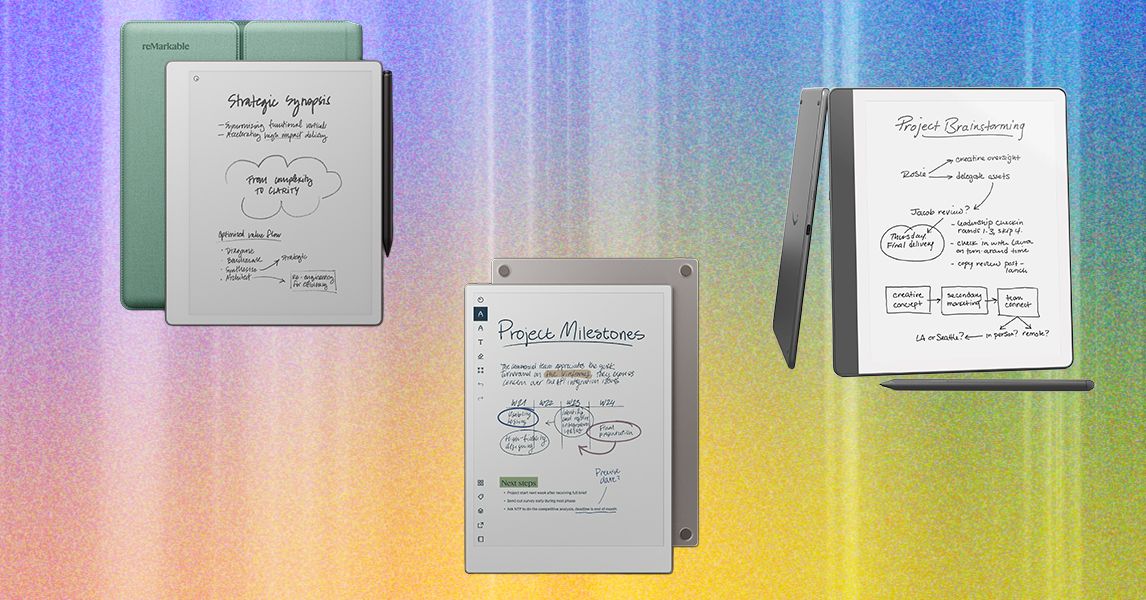
Kindle Scribe Colorsoft ($630) and Kindle Scribe (3rd Gen) ($500): The new versions of the Kindle Scribe are still solid all-around devices that have a good mix of e-reader and digital notebook features, but I still prefer the older model. While the new Scribe Colorsoft is a nice option if you want color, I think both are too expensive for what they are. The price comes from all the AI features packed into the device, but I don’t think any reader or digital notetaker was asking for more of those. Our picks above are a better price for similar features, though the Scribe does have the most impressive battery life of any digital notebook device I’ve tried (and that’s still true for the older model that I recommend above, too, so you don’t need the newest model for the best battery life).
Montblanc Digital Paper for $935: Yes, that Montblanc, the one with the famous pens, now has a digital notebook of its own. It’s no surprise that I’d call its digital pen one of the best. It’s got a super-lightweight feel while sporting three different buttons, two of which you can customize. (There’s no eraser, but I’ll give it up for that end of the pen to instead be a home button). I really like this device overall, but it’s pricey for what you get—aside from the customizable pen buttons, there’s not much to differentiate it from my top picks.
Neo Smartpen Dimo for $59: This is the cheapest smart pen option and uses replaceable batteries. It isn’t compatible with Google Calendar, iCal, or Outlook like our other picks.
ReMarkable 2 for $569 (with Marker Plus and Book Folio): This is the older ReMarkable digital notebook from 2020, and it’s still a great device with a great range of accessories (while they’re still available, that is). It feels similar to real paper with its matte screen, and works on the same platform as ReMarkable’s newer tablets. But the performance isn’t as snappy as newer models, and ReMarkable is no longer making it after launching the ReMarkable Paper Pure. I do really like using it with a Keyboard Folio as an e-paper tablet, though.
Rocketbook Fusion Plus for $30: If you really prefer the paper experience and don’t want something you need to charge, then Rocketbook is for you. Rocketbook makes several reusable notebooks, planners, and accessories like index cards and sticky notes. I like the Rocketbook Fusion Plus since it comes with a ton of different template styles, from your classic monthly and weekly pages to project management layouts and meeting notes, making it feel closer to the variety a digital notebook can offer you. Take notes with an erasable Pilot Frixion Pen (one comes with whichever item you buy), scan photos of the pages into the Rocketbook app, and erase the whole thing with the damp microfiber cloth (also included). The app is designed to keep everything organized and easily send things off to Google Drive, Slack, Trello, OneNote, and a handful of other options.
Supernote A6 X2 Nomad for $394 (with Standard Pen): This is a smaller version of the Supernote A5 X2 Manta, measuring almost 6 inches on one side and 7.5 inches on the other. Supernote designed it with travel in mind, but I find it to be a great size for a daily digital to-do list or writing down quick notes from a meeting. It’s too small for anything major, but if you’re looking for something compact, this is a good option with Supernote’s software (and with the same fantastic pens!). Like the Manta above, this model rose in price due to the tariffs, though it only went up $30.
FAQs
Do You Need a Digital Note-Taking Device?
The short answer is no. These devices are expensive, usually costing several hundred dollars when a simple notebook and pen costs a few bucks. But if you like the physical act of writing but need to have digital copies, they’re worth considering.
Pros:
Digital notebooks are thin and light but hold hundreds of notes.
You can transcribe your notes into text files, making them easier to read and manipulate.
Depending on the device, you can export files as PDFs, Google Docs, Evernote files, and more.
Instantly digitizes your art too.
Cons:
Expensive.
Need to be charged.
Have a learning curve.
Most smart pens need to be paired with an accompanying notebook. The upcoming Nuwa Pen promises smart notes on any paper.
E Ink notebooks are easier on the eyes and feel closer to paper than a glass-screened tablet. But in some cases, you might spend less getting an iPad and an Apple Pencil (and a keyboard if you also want to type sometimes). You can also do more on them thanks to the thousands of apps in the App Store. An iPad is pretty intuitive if you’re familiar with the Apple ecosystem (though both ReMarkable and Supernote’s ecosystems are also very intuitive). Former WIRED reviewer Jaina Grey recommended using her 11-inch iPad Pro with the GoodNotes and Notability apps for her writing, but there are other models that should work fine, including our top pick, the 2025 iPad. Check out our guide to the Best iPads for more advice on which to buy.
I also have an iPad, and I’ll say the upside of a digital notebook is that the battery tends to last longer, especially if you’re the type to use it for a day or two and then forget about it for a few days. My trusty Kindle Scribe usually manages to have plenty of battery available for whenever I feel the note-taking itch, even if it’s been a week or two since I last touched it.
Why Are Digital Notebooks So Expensive?
Just because these devices look like paper doesn’t mean they’re as cheap to make as a sheet of paper. Like any tablet or smartphone, these devices are packed with features, a special ecosystem, and the E Ink technology is no small feat to perfect, along with a sensation similar to writing on paper. It’s an impressive piece of technology.
Prices haven’t gotten cheaper for this category in the wake of tariffs’ causing technology prices to rise. ReMarkable recently raised the price of our top pick, the ReMarkable Paper Pro. Another favorite of ours from Supernote has gone up a little less than $50, and Kobo also slightly raised its prices, though the $10 increase is pretty minor compared to other increases we’ve seen. We’ll continue to monitor prices and flag if more price changes are to come.
Apple has agreed to pay $250 million to settle a false advertising class-action lawsuit accusing the company of overhyping its Apple Intelligence features—specifically a promised AI overhaul of Siri that plaintiffs say never materialized and, according to their lawyers, may not arrive for years.
The announcement comes just before Apple is supposedly set to finally unveil some form of AI-enhanced Siri at its developer conference in June, which would mark another swing at detailing a radically improved digital assistant for the iPhone.
The legal complaint says that Apple allegedly saturated the market with deceptive ads, inducing consumers to purchase iPhones based on “the promise of certain Enhanced Siri features” that Apple had first announced at its Worldwide Developers Conference in 2024, a few months ahead of the release of the iPhone 16.
The proposed settlement, filed Tuesday in California federal court, is one of the largest Apple has ever reached. It covers only US customers who bought any model of an iPhone 15 or iPhone 16 between June 10, 2024 and March 29, 2025. Depending on the claim, those who qualify could possibly receive up to $95 per device.
Court documents state that a $250 million common fund will provide successful claimants with “a presumptive per-device payment of $25 for each eligible device, which may decrease or increase up to $95 per device depending on claim … The Settlement also reflects that Apple anticipates delivering additional Siri Apple Intelligence features in future software updates at no additional cost.”
The documentation goes on to cite that Apple’s advertising also drew the attention of the Better Business Bureau’s National Advertising Division, which found that “Apple’s claim that Apple Intelligence is ‘available now’ conveyed that the updated Siri was available at launch, when it was not.” In March 2025, Apple told consumers that Enhanced Siri features would not be delivered until a future date.
The settlement, which is still awaiting a judge’s approval, includes no admission of fault by the company. Marni Goldberg, an Apple spokesperson, gave a statement to The New York Times, claiming that with “the launch of Apple Intelligence,” Apple has “introduced dozens of features across many languages that are integrated across Apple’s platforms,” but the company has “resolved this matter to stay focused on doing what we do best, delivering the most innovative products and services to our users.”
Apple acknowledged last year that its AI upgrades to Siri were falling behind schedule. In a statement to Daring Fireball in March 2025, Apple spokesperson Jacqueline Roy said the company had “been working on a more personalized Siri, giving it more awareness of your personal context, as well as the ability to take action for you within and across your apps,” but confirmed that it was going to take the company “longer than we thought to deliver on these features and we anticipate rolling them out in the coming year.”
The next day, Apple reportedly pulled an advertisement starring Bella Ramsey showing the actor using a version of Siri that is capable of answering the query “What’s the name of the guy I had a meeting with a couple of months ago at Cafe Grenel?”
The is the second time in as many years Apple’s voice assistant has cost the company dearly. In May last year, Apple agreed to pay out $95 million to settle a class-action lawsuit over claims Siri listened in on private conversations.















 Tech1 week ago
 Tech6 days ago

 Sports1 week ago