The Home Office’s refusal to issue alternative proof of immigration status outside of its electronic visa (eVisa) system could be deemed unlawful in 2026 if a judicial review against the policy is successful.
On 31 December 2024, the immigration documents of millions of people living in the UK expired after being replaced by the Home Office with a real-time, online-only immigration status.
While the department has been issuing eVisas for several years – including to European Union (EU) citizens who applied to the European Union Settlement Scheme (EUSS) after Brexit, those applying for Skilled Worker visas, and people from Hong Kong applying for the British National (Overseas) visa – paper documents have now been completely phased out.
Instead, people are now expected to use a UK Visas and Immigration (UKVI) digital account to generate “share codes”, which they must use to prove their immigration status when dealing with a range of third parties, including employers and letting agencies.
As a result, a number of individuals experiencing issues with their eVisas have instructed law firm Deighton Pierce Glynn (DPG) to challenge the Home Office over the system.
“Two of our clients, BSC and JS … have now been appointed as Lead Claimants in the policy challenge which continues,” wrote the law firm in a blog post about the action.
This [court case] is a significant development … which will mean that individuals … are no longer left at the mercy of the eVisa system to prove their lawful immigration status in the UK Deighton Pierce Glynn
“In the case of BSC, a recognised refugee and survivor of trafficking, the eVisa displayed her trafficking name and date of birth. The consequences of this were wide-ranging, but most significantly, they were retraumatising, and put her at risk of losing public funds she relied on to survive.
“Whilst for JS, a vulnerable adult, the eVisa incorrectly stated that she had no recourse to public funds. As a consequence, she was denied access to public funds and had to rely on limited asylum support payments for months longer than she should have. In both cases, the eVisas were fixed months later after we issued the claims.”
DPG added that its clients were granted permission to proceed with the challenge in October 2025 by the Cardiff Administrative Court, on the basis that the grounds are arguable and that it is in the public interest for the legality of the Home Office’s policy to be determined.
The case will be heard in the Cardiff High Court on 3 and 4 March 2026.
“This is a significant development which has taken our clients a step closer to establishing a much-needed safeguard in the eVisa system, which will mean that individuals such as our clients are no longer left at the mercy of the eVisa system to prove their lawful immigration status in the UK,” it wrote.
No alternatives
Highlighting the Home Office’s refusal to issue alternative proof of immigration status despite the well-documented issues individuals are having with the system, DPG said the challenge will focus on the fact that the statutory framework does, in fact, give the home secretary the discretion to allow alternatives where appropriate.
“Her refusal to do so is therefore arguably unlawful as it is a fetter of her discretion and irrational,” it wrote, adding that while the Home Office has implemented several “workarounds” for those experiencing issues – including ways for landlords, employers and others to verify immigration status using the system, as well as means to report eVisa issues via an online form and helpline – such avenues are often “inadequate”.
DPG said this was largely due to delays on the Home Office’s end, “which leaves individuals without proof of their lawful status and exposed to the full force of the hostile/compliant environment”.
Speaking with Computer Weekly, DPG solicitor Unkha Banda said although the firm had been receiving a high volume of referrals related to the eVisa system before the phasing out of paper documents on 1 January 2025, there was a notable uptick in referrals after that date as people started facing real consequences of not having a working eVisa.
Banda added that a successful case could “open the doors for everyone to be able to benefit from it”, particularly if the Home Office is legally forced to start issuing and accepting alternative proof of status.
“That means if there are problems with an eVisa that the Home Office are taking a long time to fix, for whatever reason, then people will have something else to rely on, so there isn’t that gap in terms of access to rights and entitlements,” she said, highlighting that the case could also reduce similar gaps that may spring up with the government’s roll-out of mandatory digital ID.
“Digital IDs are going to be implemented for everyone, and I imagine the system will probably be similar to this, so if we can find ways of fixing this system before it’s rolled out to 70 million people, it would be fantastic.”
Over 10 million eVisas have now been issued, and the vast majority of people with an eVisa continue to use them without any problems Home Office spokesperson
“The Home Office can take immediate steps to reduce the anxiety that migrants are experiencing by giving them the safety of a physical or digital backup that will allow them to prove their status in any circumstances,” said Sara Alsherif, migrants digital justice programme manager at Open Rights Group (ORG), at the time, which collaborated with the authors on creating the report.
“However, root and branch reform of this system is also needed, and lessons must be learnt, especially as the government intends to roll digital ID out to everyone in the UK.”
Responding to the issues raised by the judicial review, a Home Office spokesperson said: “Over 10 million eVisas have now been issued, and the vast majority of people with an eVisa continue to use them without any problems.
“They cannot be lost, stolen, or tampered with, and provide a secure digital way to prove someone’s right to work or enter this country lawfully. We stand ready to support any users who encounter difficulties creating or using their eVisa accounts.”
While groups like ORG and the3million have directly proposed alternatives to the Home Office, such as the use of QR code or “stable token” systems, the department’s eVisa policy team insisted as far back as December 2023 that it would not “compromise on the real-time aspect” of the eVisa checks, as “any check of an individual’s immigration status must be done in real time to reflect the current immigration status held” on its systems.
“As we warned, people are having problems using eVisas to travel back to the UK,” said the ORG at the time. “We asked the Home Office to make the simple change of allowing people to have a QR code. This could be saved or printed without having to rely on a flawed online-only system.
“Many refugees are still waiting for their eVisas,” it said. “Without them, they cannot work, set up a bank account, rent somewhere to live or claim benefits. The Home Office needs to sort out this mess urgently.”
The Home Office also states in the eVisa terms and conditions that it will take no liability for any problems or disruptions, and direct or indirect losses, when using a UKVI account – including for “any information that is lost or corrupted while data is being transmitted, processed or downloaded from the UKVI account” – which ORG said implies the department “is already aware of the many technical issues with the eVisa scheme and is pre-emptively protecting itself against legitimate legal claims”.
ORG and others have said the use of eVisas should be seen in the context of the UK’s “hostile environment” approach, which is intended to make life in the UK as difficult as possible for people choosing to live there.
For Banda, the fact that the Home Office has known about all of these issues with digital-only visas for so long, without taking meaningful action to resolve them, is “quite concerning”.
She also said that despite DPG and many other organisations trying to get a sense of how widespread the problem is, the department is refusing to provide figures on the number of people reporting issues or how long it takes on average to get problems solved.
Given that millions of people are now required to prove their immigration status via the system, even a 1% error rate would mean tens of thousands of people are affected at the very least.
Computer Weekly contacted the Home Office about error rates with the eVisa system, but received no on-the-record response.
Speaking on condition of anonymity, those affected variously told Computer Weekly that the entire experience had been “anxiety-inducing,” and described how their lives had been thrust into “uncertainty” by the transition.
Each also described how the “inordinate amount of stress” associated with not being able to reliably prove their immigration status had been made worse by a lack of responsiveness and help from the Home Office, which they accused of essentially leaving them in the lurch.
According to Banda, while clients are instructed to report their issues to the Home Office first before DPG takes them on, unless the case is particularly urgent, the vast majority are given vague responses without time frames.
“Most of the time, by the time the case gets to us, nothing has changed, but we found that once we get involved and start sending pre-action letters, then they start fixing the eVisas,” she said, adding that sometimes clients’ eVisa issues are being resolved after a case has already been issued.
On the legal recourse available to people once their problems have been fixed, Banda noted that while a judicial review can only be taken forward if the issues are still active, those affected can still make civil claims for compensation if they were negatively impacted in the interim by, for example, losing out on employment or being denied benefits.
“In cases where we send pre-letters and then the Home Office fixes it, you can’t then go to court,” she said. “Or, for example, if you go to court and they fix it before the judge looks at it, then the government would start arguing that the whole case is academic because the eVisa has been fixed.”
It should be noted that even if people’s eVisa issues are resolved once, Computer Weekly has heard concerns that, because of how the system is set up to trawl dozens of disparate government databases in real time, every time a status is needed, the same people could once again find themselves without access to a working eVisa.
In a follow-up Freedom of Information request to the ICO about the volume of eVisa-related data protection complaints made in the past year, the regulator said that searching through the approximately 425 cases linked to the Home Office in that time would exceed the cost limit.
The ICO added that it does not record the requested information in a way that is easily reportable, meaning it would be required to manually search hundreds of records to identify the information requested.
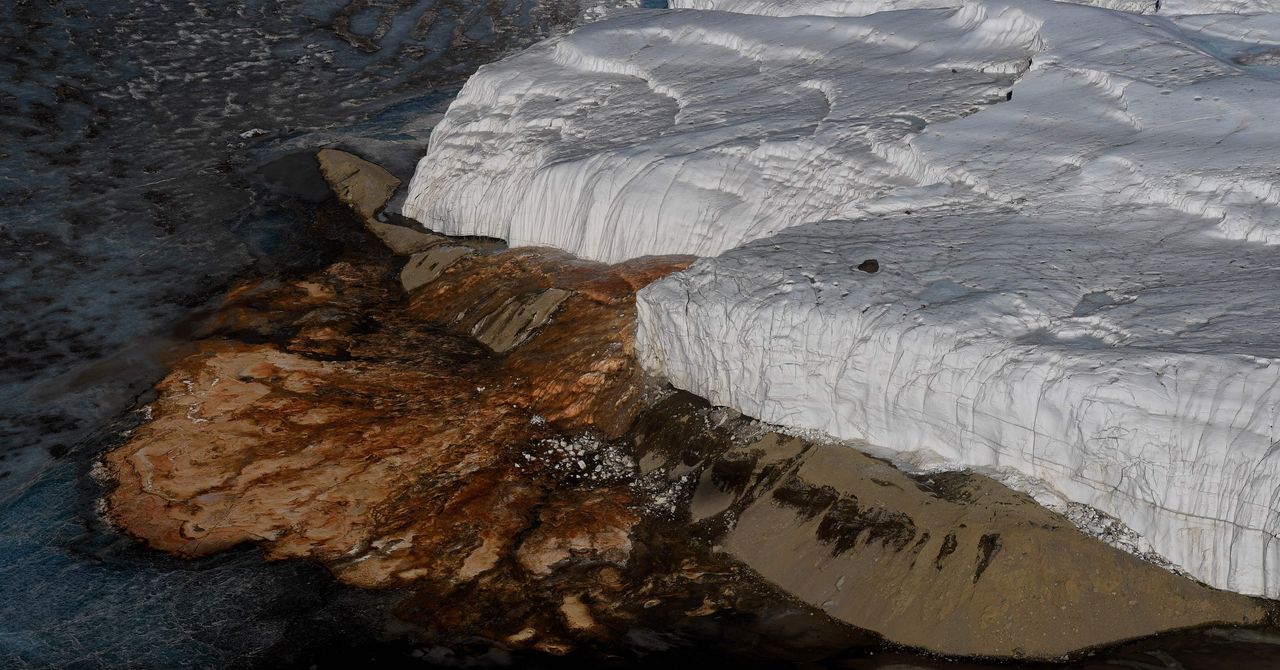
There is a corner of Antarctica that looks like something out of a David Cronenberg movie. It’s located in the dry valleys of McMurdo, an immense frozen desert where, periodically, a jet of crimson liquid suddenly gushes from the dazzling white of the Taylor Glacier. They’re called the Blood Falls, and since their discovery in 1911 by geologist Thomas Griffith Taylor, they’ve fueled a century of scientific speculation.
Recently, a series of observations conducted since 2018 have clarified several mysteries, such as the nature of their reddish color and what keeps them liquid at almost –20 degrees Celsius. New research published this week in the journal Antarctic Science adds the final piece to the puzzle, clarifying what phenomena drive the falls to gush from underground.
The Science Behind the Blood Falls
At the time of their discovery, Taylor attributed the color to the presence of red microalgae. More than a century later, scientists have determined that the red is due to iron particles trapped in nanospheres along with other elements such as silicon, calcium, aluminum, and sodium. These were likely produced by ancient bacteria trapped underground in the area: Once in contact with air, the iron oxidizes, giving the mixture its characteristic rust color.
As for the presence of liquid water, it is actually a hypersaline brine, formed about 2 million years ago when the waters of the Antarctic Ocean receded from the valleys. The very high salinity of this brine prevents the water from freezing, thus allowing it to gush out periodically.
The New Discovery
With the temperature puzzle solved, the question remained as to what physically drove the fluid to erupt. The answer came from cross-referencing GPS data, thermal sensors, and high-resolution images collected in 2018 during an eruption. The analysis demonstrated that the Blood Falls are the result of pressure variations affecting the brine deposits beneath the glacier.
As Taylor Glacier slides downstream, the overlying ice mass compresses the subglacial channels, building up tremendous pressure. When the strain becomes unbearable, the ice gives way: Pressurized brine seeps into the crevices and is shot out in short bursts. Curiously, this release acts as a hydraulic brake, temporarily slowing the glacier’s march. With this discovery, the mysteries of the Blood Falls should finally have been solved, at least for now. The impact of global warming on this complex system in the coming decades remains unknown.
This story originally appeared on WIRED Italia and has been translated from Italian.
Laundry is a $100 billion business. It can also be a real time suck, what with all the washing, drying, and folding. Detergent company Tide has found great success with its Pods that let you pop detergent right into a washing machine without having to measure and pour liquid or powder. Now, the next evolution is an exhaustively engineered single-use detergent called Tide Evo Tiles—a dry, fibery, single-use tile that can dissolve in cold water. It looks a lot less tasty than the bright, colorful Tide Pods, so hopefully, fewer people will try to eat this one.
Tide Evo Tiles have been in product development for over a decade. After spending a year in test markets, Tide and its parent company, Procter & Gamble, announced last week that Evo Tiles are now rolling out more broadly across the US. Prices range from $5 to $20 per box, depending on the retailer, with the price roughly 50 cents per tile.
“This is really a feat of engineering,” says Marcello Puddu, senior director of research and development at Tide. “There is a lot of very complicated engineering and formulation work that has gone to create that one single sleek tile that looks relatively simple.”
The primary hope for Tide Evo is simplicity. Single-use detergent pods are lauded for being more accessible to people who may struggle with the motor skills required to pour liquid soap or powders. Evo Tiles have a small ridge around the edges that makes them easier to pull out of the box. Deploying them is easy—just plop them (one tile for regular loads, two for heavy) into the washer as close to where the water comes out as possible, then toss the fabrics on top.
After the tile breaks apart, the ingredients work together to create a very high pH level in the water that cleans the fabrics. (Because of the high pH, Tide Evo does not use lipase, an enzyme that breaks down stains and is a popular ingredient in other detergents.)
Evo Tiles look like white, diamond-shaped Uncrustables. Instead of a Tide Pod’s colorful liquid pouches, these tiles are made of dry layers of interwoven detergent fibers—about 10,000 of them, which Tide says is enough to stretch for 15 miles, if you were inclined to do such a thing. The result is a looping, webbed lattice of tiny fibers, woven together into six layers that stay in place while on the shelf but break down quickly when they get wet, allowing separate releases of stain and odor fighters, brighteners, and fresheners.
“The structure of an assembled product allows us to do that, because we can separate things that don’t like to be together,” Puddu says. “We can put an enzyme between two layers so the two don’t attack each other. You can’t really do that as easily in other matrices.”
The goal is to combine the benefits of Tide Pods and laundry sheets and make something that packs in enough detergent to sufficiently clean a load of wash while also being lightweight and able to dissolve quickly. And, as Tide is eager to point out, it also makes things more eco-friendly.
Tide Evo tiles are specifically designed to dissolve in cold water, the idea being that washing fabrics without having to heat up water helps save energy. Packaging is also part of Tide’s ecological efforts. Unlike the plastic boxes Pods tend to come in, Tide Evo tiles are packaged in a recyclable cardboard box that is certified by the Forest Stewardship Council.
Still, Tide Evo does use polyvinyl alcohol (PVA) plastics to help the fibrous structure hold together. These are the same kind of plastics used to form the casing around Tide Pods. PVA plastics have been the subject of much debate about whether the polymers used in detergent casing can create microplastics when dissolved. They likely do not, but the products are still created within the broader plastics ecosystem and can lead to clogging of waterways if not treated properly.
Framework Laptop 12 for $549: The Framework Laptop 12 (7/10, WIRED Recommends) isn’t just the smallest, cheapest, and most repairable Framework Laptop to come out. It’s also a 2-in-1. The device has a 360-degree hinge that lets you flip the screen all the way around. That’s fitting for a smaller device that’s meant to go everywhere with you. The Framework Laptop 12 is much more than that. Its accessibility is unbeatable, allowing you to upgrade and swap out virtually every component imaginable. That even includes the CPU and motherboard. The starting configuration is just $549, too.
Lenovo Chromebook Duet Gen 9 for $244: The Lenovo Chromebook Duet Gen 9 (8/10, WIRED Recommends) was one of my favorite pieces of tech when it came out for one reason: its size. This diminutive detachable laptop is only 11 inches, which sounds painful at first. But this isn’t a productivity machine. Rather, it’s better viewed as a companion you can take anywhere for light web browsing, writing, and watching videos.
Lenovo IdeaPad 5i 2-in-1 for $650: You might think a 16-inch 2-in-1 laptop sounds silly. It’s not portable enough to use as a tablet, that’s for sure. But if you need a large touchscreen on your laptop, there’s reason to pick up something like the Lenovo IdeaPad 5i 2-in-1 (6/10, WIRED Review). The flexibility of having a 360-degree hinge is useful in all sorts of scenarios too. This 16-inch 2-in-1 balances price, portability, and performance with just enough finesse to be worth it.
Asus ProArt PZ13 for $1,300: Another detachable, the Asus ProArt PZ13 (6/10, WIRED Recommends) veers toward mimicking Microsoft’s Surface Pro playbook but at a much more affordable price. For $1,100, you get a Copilot+ PC that can go up to around 19 hours on a single charge. Unfortunately, the performance leaves much to be desired, and its three-piece design is confounding. Still, it’s a nice alternative to the Surface Pro if you’re dead set on the style.








 Entertainment1 week ago
 Tech1 week ago
 Politics1 week ago
 Entertainment1 week ago

 Politics1 week ago
 Tech1 week ago
 Sports1 week ago