

Tech
I Turned My Backyard Into a Nature Documentary With a Flock of Smart Bird Feeders

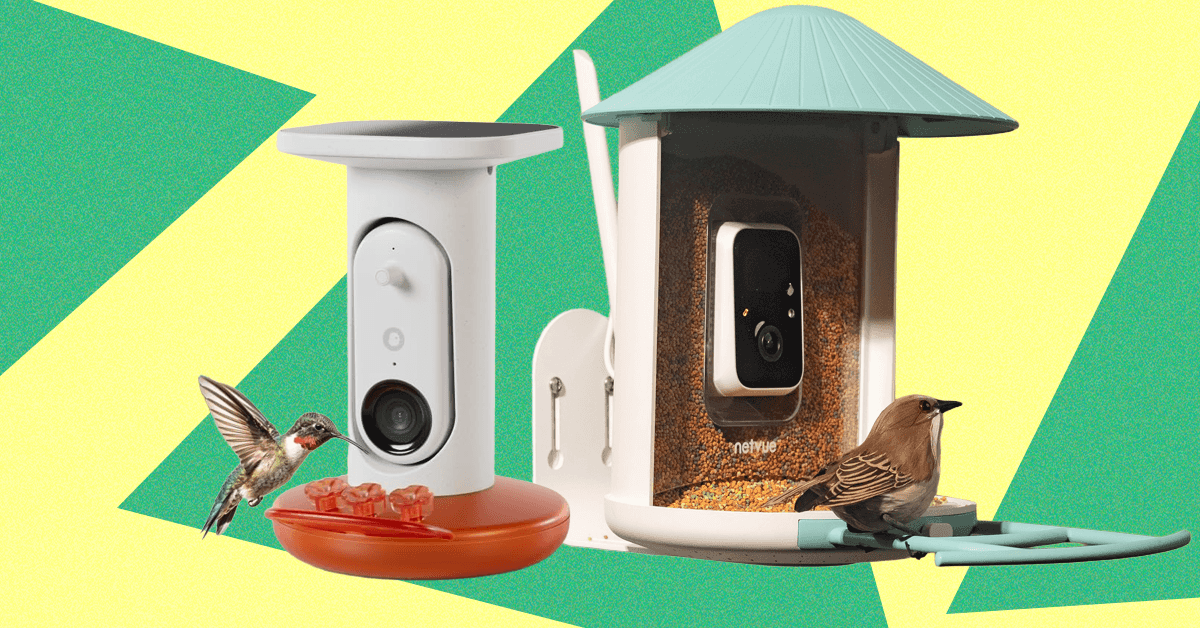
you’ve probably seen a smart bird feeder or know someone who has one. They’re fairly recognizable from a distance with their clear housing, cameras, and solar panels, and perhaps a friend or family member has sent you a photo or video of a bright goldfinch or handsome woodpecker (guilty). The question at this point, then, is whether these things are really worth the $100-plus price tag. Are they actually durable? And what about the squirrel problem?
Lucky for you, we’ve been testing the most popular smart bird feeder models, including Netvue’s original Birdfy Lite feeder ($140) and Birdbuddy’s Pro ($179), for over a year—in rain, snow, and heat, and in a yard with persistent squirrels. We’ve explored the apps and notification settings, examined the photo and video quality, noted which features are hidden behind a subscription paywall, and used Cornell Lab’s All About Birds—as well as Google Lens and our own local expertise—to verify the accuracy of AI identifications.
Updated January 2026: I’ve added the solar-roof version of Kiwibit’s Beako as a new pick and new testing notes for both Birdbuddys, added a feeder from Detiko to Others Tested, and ensured up-to-date links and prices. Next up is the Coolfly Aura, a feeder with a unique modular camera system, which debuted at CES this week.
Featured in this article
Jump to Section
Best Overall
-
-
Photograph: Medea Giordano


Netvue
Birdfy Plastic Smart Bird Feeder
WIRED
- Reliable and easy to set up
- User-friendly app
- Decently wide field of view
TIRED
- Not the best video resolution
- Lightweight construction
This cheery blue- or yellow-roofed feeder, from security company Netvue, is the first smart feeder WIRED tested, back in 2022. At that time, we gave it a 6/10 rating for its high price and wonky AI. Both metrics have improved dramatically since then—Birdfy’s app is now the second-most user-friendly on the market, behind only Birdbuddy, and this feeder is often on sale for $150 or less. If you pay $20 more, you get a lifetime subscription for AI identification, which is a solid deal, especially since the AI’s success rate is fairly decent. Without it, it’ll cost you $5 a month, but it’s not required to get plenty of enjoyment. This is the feeder I bought my elderly parents for Christmas during an Amazon Prime Day sale for its reliability, easy setup, and easy-to-navigate app, and it’s still going strong two years later.
The 1080p camera has one of the widest viewing angles of any smart feeder, at 155 degrees, and it offers color night vision. The IP65 plastic construction also makes this feeder durable and easier to clean, and the 50-ounce seed reservoir is super easy to fill with its convenient flip-up top. Not all bundles come with a solar panel, but you can buy it separately. Unlike other feeders, the solar panel is not built in and will have to be mounted and connected separately with the included 9.8-foot charging cable. (The Birdfy can be mounted on a pole, wall, or tree, though if you mount it on a pole using the 5-7-9 siting rule, you won’t be able to mount the solar panel.)
Best Upgrade


Kiwibit
Beako (With Solar Roof)
WIRED
- Thoughtful engineering makes for easy maintenance
- Solar panel works great in all weather
- Very sturdy construction
- 8 MP photos and 4K HD video
TIRED
- Pricey for a smart feeder and rarely on sale
- Only works on 2.4 GHz Wi-Fi
- Requires a subscription for all features
This Beako model is not only one of the most thoughtfully designed feeders on the market, it’s also what I use in my own yard when I’m not testing feeders for work. The 1.5L dual-hopper plastic seed reservoir is removable from the body for refilling, so you don’t have to take the whole feeder down; the 8 MP photos and 4K HD video are much better quality than you’ll find from most competitors; and the components come apart for easy cleaning. I also tested the original version with a separate solar panel, and my only complaint was that the panel stopped charging the camera after about six weeks. There’s now a version with a built-in solar roof, which has done an excellent job keeping things charged during its six-week-long test, even in cloudy weather. The IP65 plastic body is extremely thick and sturdy, and unlike lighter-weight models, it’s designed to hold up in more extreme weather.
The app is easy to navigate, and the whole setup is fully functional without a Kiwibit Plus subscription ($4/month or $47/year, purchasable through the Kiwibit app)—it even includes AI identification as a base feature, and it’s pretty decent. However, Kiwibit Plus is necessary to access all features, mainly extended 60-day storage and the ability to record up to three minutes of video if a bird is doing something interesting, which is a unique feature among smart feeders and one I discovered I love. (Nothing more frustrating than having a video cut off right as a bird is about to do something funny.) If you’ve tried other smart feeders and found them lacking, this one costs a bit more for what it is, and it’s almost never on sale, but if you know you like having a smart feeder, I think it’s worth the investment. Note, however, that it only works on 2.4 GHz Wi-Fi, and the warranty is half the length you get from competitors.
Best Connectivity

WIRED
- Runs on 2.4 5 GHz and 5 GHz
- 4K Ultra HD video
- Solar panel stays charged even in cloudy weather
TIRED
- Heavier than most smart feeders
- AI is still just OK
- Subscription now required for all features
Camojojo’s original Hibird feeder has long been a reliable model in my testing stable, unique for its ability to run on both 2.4-GHz and 5-GHz Wi-Fi bands—almost all smart feeders are 2.4 GHz only—and this year saw the debut of an upgraded model, the Hibird Pro. This one has built-in solar panels, an option for pole mounting, and supposedly improved AI identification, though it still frequently misidentifies even common birds in my West Coast backyard as East Coast species. The app is not as streamlined or user-friendly as Birdfy’s or Birdbuddy’s, but it’s still easy enough to navigate, with options for changing video length (default is 10 seconds) or viewing in slo-mo. Video is the default media type it saves, though this is 4K Ultra HD. Without a subscription, you can’t search past videos by bird, and cloud storage is capped at 5 GB over 60 days, though the feeder does come with a 128-GB SD card. You’ll also get “smarter” chats with the app’s AI Q&A function, “Dr. Bird,” and the ability to share across two devices ($45 year/$4 month).
I appreciate the generous 1.5L seed hopper, though this, combined with the solar panel and battery, makes this one heavy feeder. When filled, it tips the scales at 5 pounds, so if you do pole mount, you will need to use both included hose clamps. I also wouldn’t attempt to mount it on anything unstable. Other Hibird features transferred to the Pro are the assembly screws having little handles on them, so you won’t need a screwdriver, and a chunky IP66 plastic body. It was subjected to a little bit of squirrel chewing during my test, but still held up well.
Best Smart Hummingbird Feeder


Birdbuddy
Pro Smart Solar Hummingbird Feeder
WIRED
- Fun and feature-rich app usable without a subscription
- Built-in solar panel works great
- Easy to clean and refill
TIRED
- Camera doesn’t always capture all birds
Birdbuddy is known for its user-friendliness and thoughtful and fun app, and its new Pro Smart Hummingbird Feeder is no exception. Everything about its use is intuitive and easy. AI identification, 5 MP photos, 2K HD video with slo-mo—everything you need is included out of the box. A subscription is optional to unlock features like family sharing and a higher bit rate, but the feeder is perfectly usable without it. There’s also no auxiliary solar panel to worry about, as it’s built into the roof. Pairing with your phone is a cinch, integrating it into the Birdbuddy app with other feeders is a snap, and even filling it is no problem—unlike other hummingbird feeders that have weirdly cavernous capacities and/or need to be filled upside down, the Birdbuddy’s bottom screws off and holds a reasonable 1.75 cups of liquid. This is more important than you’d think, as Cornell Lab of Ornithology points out that the easier it is to clean a hummingbird feeder, the more likely you are to do it often and well.
It also comes with extra plastic flowers and a little brush to clean them with, and the app sends reminders as to when it’s time to clean. You’ll also find fun, seasonal touches in the app, like the ability to send digital bird holiday cards with your pics, or a tool to superimpose hats, clothes, and various accessories on the birds, which is actually funnier than it sounds. However, as with the Birdbuddy Pro seed feeder, below, the big downside is that the feeder’s sensor doesn’t always pick up every bird that visits, which can definitely be a bummer when you see something interesting out the window but it doesn’t show up in the app.
A Unique Smart Birdhouse
Birdfy’s Polygon Smart Birdhouse isn’t the first smart birdhouse on the market, but it is the most interesting-looking. The parallelogram-esque, turquoise-paneled shape won a Gold award at 2024’s French Design Awards, and it’s easy enough to mount on a pole, fence, or tree. All the camera equipment is located in an easy-to-open rear hatch, and there’s even a remote control at the end of a 10-foot cord to be able to charge (though it has a built-in solar panel, so you likely won’t need to) or reset the 1080p camera.
It’s simple to integrate with the easy-to-use Birdfy app, which is ready and waiting to assemble a bird’s shareable “story,” from assembly of the nest to hatching to fledgling, and finally “the end,” when the nest is abandoned for the season. Note that the camera does emit an audible click whenever it’s triggered by movement or the app, and the inside is a little larger than most birds would naturally gravitate to, though I did like that it comes with interchangeable hole sizes to interest different species. We did have a few assorted connectivity issues, and our test house didn’t attract any visitors this year, but a project director for Cornell Lab of Ornithology’s NestWatch said it should only be a matter of time.
Best App
-
-
Screenshot courtesy of Kat Merck


Birdbuddy
Smart Bird Feeder Pro
WIRED
- Fun and feature-rich app
- Built-in solar panel works great
TIRED
- Camera doesn’t always capture all birds
Birdbuddy’s Pro model sports a snazzy new HDR camera that can also shoot 2K HD video with slow-motion capability. In addition to having a visibly larger and more advanced lens, the camera’s now got a larger focus range, 122-degree field of view, and high-fidelity microphone. (A subscription to Birdbuddy Premium for $70 a year unlocks 2K Ultra with a higher video bit rate, allowing for richer colors, sharper images, and less background noise—plus the ability to set alerts for sick or injured birds, among other things—but it’s perfectly usable without this. )
The photos aren’t nearly as impressive as those by competitors like the Birdfy Pro Duo, Camojojo Hibird, or Kiwibit Beako, and the camera, frustratingly, only captures a handful of the birds that visit. (The non-solar version is occasionally flagged as a frequently returned item on Amazon due to both this and charging issues, so I recommend the solar version.) However, Birdbuddy’s app is a consistent standout, with a user-friendly design and plenty of helpful alerts, like if a cat is detected nearby, or if it’s time to clean the feeder.
It also serves you insights gathered over time, like what time certain species seem to prefer to visit. (Finches apparently like to visit my yard at 10 am daily.) The Birdbuddy also “sleeps” at night and does not seem to emphasize capturing photos of people, so it wouldn’t make a good choice to double as a security camera, and there are also unique seasonal features like the ability to send holiday cards or “dress up” visiting birds with hats, glasses, and sweaters. (It is funnier than it sounds, really!) Both Birdbuddys work with 2.4-GHz Wi-Fi only.
Another Birdbuddy downside is the infuriatingly small, hinged opening for filling the 4 cups’ worth of seed. The feeder comes with its own spouted cup, but I have yet to fill the feeder without making an enormous mess. I also tested the 3-in-1 Nutrition Set ($39), which includes a screw-on tray that can variably become a water fountain, jelly dish, or fruit stake for fruit-loving species like orioles. I’ve used it as a jelly dish and water fountain and found that it blocks enough of the perch area that birds tend to shift out of camera view to avoid it. However, this feeder is still worth it for those who like a more streamlined app experience and/or want to take advantage of some of its unique sharing features, especially Premium’s ability to share your feeder livestream with others.
If You Want to Use an Existing Bird Feeder


WIRED
- Flexible design allows you to use an existing bird feeder
- High-quality photo and video
- Works with 5 GHz Wi-Fi
TIRED
- Only has 90-degree field of view
- Only comes with a wall mount
- Solar panel has to be mounted separately
If you have an existing bird feeder you like, or are interested in building your own and are just looking for a camera, Hibird’s stand-alone DIY feeder camera is for you. It’s compatible with both 2.4-GHz and 5-GHz Wi-Fi bands—a rarity for bird feeder cameras—and the cute green owl face streams the same 4K HD video and 1080p pics as the bigger Hibird feeder, above. There is a subscription tier with features like increased storage, but the camera is still usable without it. There’s an auxiliary solar panel included for charging, and you can mount it via its ¼-inch nut on the included bendable arm and bracket, or jury-rig a custom solution. It pairs seamlessly with the Hibird app, with access to AI (which is just OK), livestreaming, and the Dr. Bird ChatGPT-like feature, where you can ask bird-related questions. (The answers are corny and not as granular as they could be, but it still could be useful for some.)
A Truly Squirrel-Proof Design


TT Nature
Squirrel-Proof Metal Bird Feeder
WIRED
- Design really deters squirrels
- Can be pole-mounted
TIRED
- Design also deters larger and even medium-sized birds
- App is not user-friendly and requires a subscription
- Solar panel must be mounted separately
Let’s get the bad news out of the way first—the app for this feeder is not good. Not only is it suspiciously called “Birdty,” it’s not intuitive to navigate and requires a subscription to access all features—including AI identification, which is terrible. I have also seen this feeder body (TT Nature offers it in green or red) sold from time to time under other Amazon insignias, so it’s not unique to this brand. However, those usually have solar panels attached to the roofs, from which squirrels can hang upside down to avoid tripping the spring-loaded perch. This one leaves off the panel (there is one that can be mounted separately, but it’s not possible when the feeder is pole-mounted, which is what I recommend), but it doesn’t need it, as the charge from the 5,200-mAh battery lasts well over a month.
I had my test unit sited on a pole with a baffle far from fences and overhanging branches, and though an occasional squirrel would still manage to find the feeder, the spring-loaded perch mechanism worked as intended—a squirrel tries to sit, and a bar flips up to block access to the seed. (There’s also a squirrel alarm feature that can be toggled on and off in the app, but in my experience, those never work.) I have seen squirrels try to chew through the sides, but given that the body is metal, their efforts are fruitless.









Honorable Mentions
During the winter, a whole WIRED crew tests ski clothes almost constantly. Here are a few other items that we like.
Courtesy of REI
Hestra Fall Line 3-Finger Gloves for $190: I’ve long admired Hestra gloves from across the lift line, impressed by the Swedish company’s elegant stitchwork and thoughtful design touches. This was the year I finally got to try a pair for myself, and the Fall Line are exactly what they look like. There are six sizes available so you can get the perfect fit in this glove. The cowhide is buttery smooth and has already broken in a bit with five days’ use. The wrist strap means you never have to fret about dropping your glove from the lift when checking your phone, and they’re very warm without making me sweat. If you do sweat, the lining is removable so you can wash it without damaging the leather. —Martin Cizmar

Courtesy of Crab Grab
Crab Grab Snuggler Mitts for $89: These mini sleeping bags for your fingers are packed full of Primaloft insulation and benefitting from a sherpa fleece lining, they are toasty warm, and with a 15K membrane, impressively waterproof too. All-season mittens with durable construction for under $100? Yes Please!

Courtesy of Mons Royale
Mons Royale Yotei Merino Classic Long Sleeve for $98: As I type this, I’m nowhere near a mountain, but I’m still wearing the Mons Royale Yotei long sleeve top. It is ridiculously comfortable, made from 190-gsm-weight, 100 percent merino wool, and has a mercifully relaxed cut, so I remain warm, but don’t feel like a sausage. On the mountain however, the merino wool works its magic, wicking away sweat—especially on a hike up to some fresh powder—and keeping me comfortable. Paired with a shell and the Patagonia R1 Thermal Hoodie, I’m warm enough during a bitter arctic blast.

Seniq Powder Puff Down Jacket for $498 and Bib for $398: Seniq is another all-women’s outdoor brand that launched in 2024. It’s styled a little more Gen Z, leaning into fun color blocking over the monochromatic look. The Seniq Powder Puff Down Jacket has a dry-touch finish. It’s meant for drier days on the mountain, but a PFC-free DWR coating and YKK AquaGuard zippers do provide water resistance. The asymmetric front zipper helps you avoid chin rub when you have the jacket fully zipped. It also features cool asymmetrical quilting lines, side pockets-in-pockets that provide access to your bib (their bibs have a pocket on the front, so you can get in there without unzipping your jacket), an oversized removable hood, a forearm pass pocket, soft and stretchy wrist gaiters, and a large internal pocket that can absolutely handle a sandwich. This jacket was warm, pillowy, and comforting, like a super-soft hug.
The silky shell bibs are slightly barrel cut, which gives them a flattering shape without being fitted. The adjustable racer back-style straps and low back (with a stretchy waist) also provide a nice shape and breathability. There are two pockets on the front chest, pockets on either leg, two-way zip thigh vents, and a butt zipper for bathroom breaks. These fit easily over my boots, and the instep guards were a nice touch. With a durable three-layer membrane and a 20,000-mm waterproof rating, these will hold up against any and all weather the mountain throws at you. When I wore them on a wet snowy day, they beaded and sloughed off moisture well. —Kristin Canning
-Reviewer-Photo-SOURCE-Kristin-Canning.jpg)
Mammut Sender In Hooded Jacket for $259: This puffy hoodie is a great mid-layer for under a shell jacket. The insulation is made from recycled rope scraps, and the outer is coated in wind-resistant PFC-free DWR coating. The hem falls at the hips, and the high collar and tight hood keep most of the face covered. I like wearing this piece under shells for snowboarding, but I know it’ll pull double duty as a comfy hiking and camping jacket, too, so it’s a solid multipurpose investment. It’s exceptionally lightweight and warm, though from a volume standpoint, it is on the bulkier side for a mid-layer and isn’t the most packable piece. —Kristin Canning
Helly Hansen Evolved Air Half Zip for $112: This fleece pullover has a waffle-like texture that traps heat and wicks moisture. With a high zippered collar and cinchable hem, you can adjust the fit to make it more air-tight or breathable. This mid-layer felt wonderfully lightweight while still keeping my toasty. It’s not bulky at all, only a little thicker than a base layer, laid comfortably under my jackets, and moved with me on the mountain. —Kristin Canning
Helly Hansen Lifa Base Layer Long-Sleeve Crew for $115 and Pants for $115: These base layers hit the weight sweet spot; they’re not too thick or thin, but just right. They’re slightly looser than other options on this list, so if you prefer something that isn’t so fitted, these are a great pick (but note that they run long too). These combine merino wool with Helly Hansen’s LIFA fibers, which add more moisture-wicking capabilities. They’re soft, lightweight, warm, and don’t hold onto smells. I love the cute designs and how well they regulate my temperature under insulated jackets and pants. The waist digs in a bit but doesn’t roll, and they stay in place and move well. —Kristin Canning
We have a full guide on how to layer, but here are your essentials.
Base layer: A good set of thermals is essential in the fight against cold, especially when you’re working hard. The best fabrics wick away sweat as you heat up, which helps regulate your temperature. Merino wool is the best at this, but also the most expensive. Synthetic fabrics are getting better, though, and please avoid cotton at all costs, as it gets wet and stays that way, making you cold and uncomfortable.
Mid layer: Whether you choose a hooded fleece or puffer-style jacket, this layer does the bulk of the work in cold conditions. Combined with the base layer, it traps warm air in, while also allowing moisture to be expelled. Synthetic insulation such as Primaloft Gold is brilliant and doesn’t lose its properties if it gets wet. Down jackets offer the best warmth-to-weight ratio, but they don’t pack down as small, and should never get wet. A fleece with an insulated vest is a great option if you really feel the cold.
Jacket: While ski jackets with insulation offer bonus warmth in Arctic-like conditions, for most people a waterproof shell will be enough, as it offers protection from both the snow and the wind. A cold wind will chill you to your bones faster than a bit of wet snow. Ideally choose a jacket with a waterproof membrane such as Gore-Tex (make sure it is free from PFAS, or forever chemicals), but also check for taped seams for added waterproofing, plus plenty of pockets for snacks and lift passes, and wrist cuffs and ski skirts to help keep out the snow.
Socks: As with your base layer, socks keep you warm and maintain your temperature when you’re building up a sweat. Natural fabrics work well, but a blend of merino wool with synthetic stretchy fibers is the way to go, as they stay up better and can be used for more than a day. Avoid cotton again, and never wear two pairs, as you’ll almost certainly get colder feet.
Gloves: You’ll be surprised by how wet ski gloves get when it’s snowing, even if you don’t fall very often. As a result, waterproof options work best in most cases, although well-made leather designs can be almost as waterproof as a pair with Gore-Tex. Mittens are generally warmer than gloves, but what you gain in toasty fingers you lose in dexterity. Check out our Best Ski Gloves and Mittens guide for more information.
Waterproofing and breathability ratings: Waterproofing is measured with a hydrostatic head rating, or HH. That means if you put a 1-inch, endlessly long square tube on top of the fabric, you could pour 20,000 millimeters of water before it would seep through. Breathability is rated in how many grams of vapor per square meter can can pass through the fabric in 24 hours.
I’ve been reviewing winter sports gear for more than 15 years. In that time, I have worn an untold number of jackets, pants, mid-layers, thermals, gloves, and mittens. I called on industry experts and professional skiers, and solicited opinions from fellow winter sport enthusiasts on the WIRED team. While a basic fit check can be done in the office, nothing replaces on-mountain testing in variable conditions. We put in the time on various trips to the French Alps, as well as in resorts in Vermont, Colorado, Arizona, and Oregon.
Power up with unlimited access to WIRED. Get best-in-class reporting and exclusive subscriber content that’s too important to ignore. Subscribe Today.
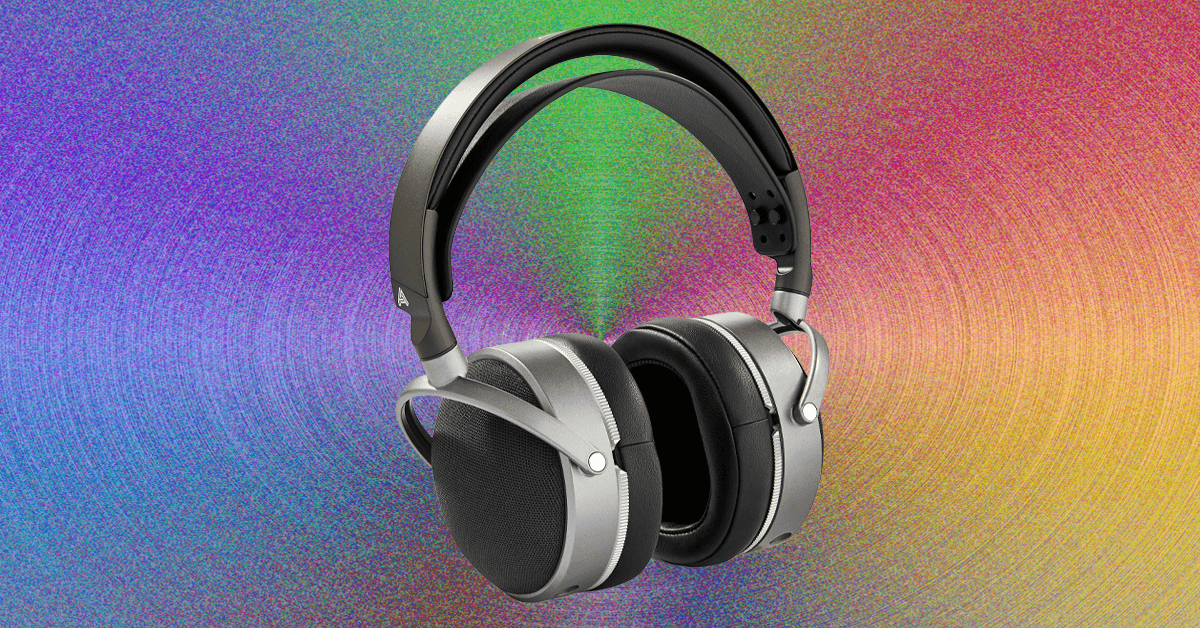
You might think you’ve got enough headphones. Most of us have accrued at least two or three pairs over the years, and might have a few more half-working pairs stuck in a drawer somewhere. But I’m here to tell you, if you haven’t fully explored the fabulous world of specialized headphones that has exploded in the past decade, from open earbuds to sports and travel cans, you’re not maximizing your sonic potential. The best headphones are now so varied that they often depend entirely on what you intend to use them for. That means the best headphones for you probably come in many shapes and sizes, and you might actually want more than one pair.
Balling out on lots of headphones for every one of life’s situations doesn’t necessarily mean spending a lot of money. Unless you’re successfully riding the “boomcession,” there’s a fair chance spare cash is tight right now. Luckily, there’s a veritable explosion of impressive budget brands making great stuff, alongside household brands pitching to the cheap seats.
As an audio reviewer for well over a decade, I’ve tried hundreds of models across every color in the headphone rainbow. Here’s how to shop right so you can get the most out of any and all of them, as well as the best headphones I can think of in every category right now.
Noise-Canceling Earbuds: The 2026 Baseline
-
-
Review: Apple AirPods Pro 3
-
Review: Apple AirPods Pro 3


Let’s start with the modern one-and-done choice: Noise-canceling earbuds are the ultimate jack-of-all-trades. If you only want to own one pair, this is it. The best noise-canceling earbuds sound great, fit neatly in your pocket, and are equally adept at letting in or blocking out environmental sounds to adapt to any situation.
It’s probably no surprise that the wildly popular AirPods Pro are the best headphones for iPhone owners, thanks to impressive performance, loads of features, and seamless integration with all things Apple. They’re a massive step up from the standard AirPods, which offer similar Apple-friendly features and a touch of noise canceling, but don’t perform nearly as well as even most budget earbuds.

For more phone-agnostic options, Bose’s QuietComfort Ultra 2 are the ultimate noise killers, while Sony’s new WF-1000XM6 offer great sound and utterly natural transparency mode. Technics’ EAH AZ100 are among my favorites for sound quality.
If those are too pricey, fear not! Budget earbud options are varied and plentiful, from Android-optimized midrangers like the Google Pixel Buds 2a to the stylish Nothing Ear (a) or highly affordable Soundcore Space A40. If you’re keeping to one pair, I’d put in all your chips for better performance, but there’s no shortage of great affordable options, and new pairs at all prices keep rolling in.
Noise-Canceling Over-Ears: Comfort Meets Performance

Anyone who’s taken a long flight can probably relate to the fact that sticking something in your ears for five hours-plus isn’t an exercise in comfort. Enter travel headphones like the best noise-canceling over-ears, which have adapted from early models like Bose’s stalwart QC 25 to become among the most advanced and downright luxurious audio products for your money. They’re great for other tasks too, from working in a busy office to commuting or simply chilling at home in tranquil reverie.

The latest and greatest, like Sony’s WH-1000XM6 and Bose’s QuietComfort Ultra, apply uncompromising noise cancellation, plush comfort for long listening, and a pile of advanced features like pausing when you speak or automatic sleeping and waking. The Ultra are my favorite for sheer comfort, but there are plenty of rivals like Sonos’ equally comfy Ace, the iconic (and heavy) AirPods Max, or the utterly immersive B&W Px7 S3. Cheaper options abound, but some of my favorites include Sony’s high-punching WH-CH720, the crazy-affordable Soundcore Life Q30, or its newer cousin, the Space One. These won’t bring the same level of performance or tranquility, but they still work great for long flights and beyond.
Open Earbuds: For Keeping Alert

Soundcore by Anker
Aeroclip
Here’s where things get really fun: Open earbuds have exploded faster than any other audio segment in recent memory, with a kaleidoscope of options from virtually every audio brand. Designed to keep your ears open while delivering satisfying sound, the best open earbuds aren’t ideal for everything you do, but they’re fantastic for specialized activities like ebike riding, where wind resistance renders artificial transparency modes useless. Over time, I’ve found tons of other cool use cases, from walking the dog to sneaking in some Olympics at the bar.
Open Earbuds come in various design types, from wacky bone-conductors to wraparound models and—my personal favorite—clip-ons. Their light and ergonomic housings aim to essentially disappear on your ears for all-day listening, and it works better than you might think.
You could spend a lot on pairs like Bose’s excellent Open Ultra, but you really don’t have to, since even the best models are limited in performance. Soundcore’s Aeroclip are my favorite value-to-performance pair, but plenty of cheaper options get the job done, like Acefast’s nearly free Acefit Air or Soundpeat’s Pearclip Pro. Open earbuds are easily my favorite new audio trend.
Workout Headphones: Keep Moving
-Reviewer-Photo-SOURCE-Ryan-Waniata.jpg)
There’s an obvious Venn diagram overlap between open earbuds and workout headphones, but if you don’t like the idea of keeping your ears open, traditional sports models are a great alternative. My favorite is the revamped Beats Powerbeats Pro 2, which offer tons of features in a wraparound design that’s nearly unshakeable. I like that they’re optimized for Apple devices, but still work well for Android, and they come with great noise canceling and transparency mode, but also a high price.

Like open earbuds, there are plenty of cheap options, including the similarly unshakeable (but much more basic) Jlab Go Air Sport, which run a mere $30 or less on sale. If you’re not into the minimalist thing, WIRED editor Adrienne So swears by the BlueAnt Pump X over-ear headphones for weightlifting, in large part due to their cooling-gel earpads that go in the fridge overnight to keep sweat at bay. They’ve also got noise canceling and plenty of battery life at over 50 hours per charge. For jogging or cycling, open earbuds are likely a better fit, while some folks simply use the AirPods Pro, but it can be nice to just have a dedicated pair in your gym bag.
Wired Headphones: Plug It In

The youth delight in resurrecting old tech that the more seasoned among us have long left for dead (cassette tapes?!). In the case of wired headphones, there’s good reason to plug in, starting with improved performance for your dollars. If you’re a content creator, musician, or simply a cash-savvy sound connoisseur, you can get an impressive return from wired options that avoid the sound degradation of many wireless options.
Some of our favorite affordable options include affordable and classic-looking earbuds like Shure’s iconic SE-112 and Sennheiser’s impressive IE200, and studio-friendly over-ears like Audio-Technica’s ATH-M20x, If you’re willing to spend a bit more, the fantastic Sennheiser HD6XX offer the best sound for the money I’ve heard in any headphone segment. Based on the much pricier HD 650, these are open-back headphones that let in exterior sounds, but the performance is incredible. If you want even better sound and design, there are tons of options, but they’ll cost you.
Fancy Headphones: The Audiophile Angle
If you really want to optimize the wired connection, there’s a whole segment of audiophile headphones made with high-quality materials, innovative speaker technologies, elevated designs, and accordingly elevated pricing. There are a whole bunch of varieties, but for the sake of levity I’ll break them down into two categories: in-ear monitors (IEMs), the fancy version of in-ear headphones, and over-ears.
IEMs generally use dynamic drivers, the traditional driver type in most headphones and speakers, balanced armatures, much smaller and more accurate speakers, or a mix of both. My favorite pairs come from Ultimate Ears, like the UE 18+ Pro, which are customized for your ears using 3D printing and other techniques. (You’ve likely seen these on TV for musicians and broadcasters.) Other IEMs we like include Sennheiser’s IE 900 and models from Campfire Audio.

For over-ear headphones, Audeze’s planar magnetic headphones are among my favorites, starting as low as $500 (yeah, I know) in the excellent LCD-S20 closed-back headphones. Another incredible pair I recently tested are Meze’s Poet, which are not only the most gorgeous-looking pair I’ve reviewed, but also offer among the clearest and most articulate sound I’ve laid ears on. There are dozens more to try, as audiophilia is its own journey, but this is a good starting point. We recently reviewed the Grado Signature S750, which have an effortlessly expansive sound that feels like it can’t possibly be coming from mere centimeters away from your eardrums.
Other Headphone Types and Upcoming Features


SteelSeries
Arctis Nova 3P Wireless
As I’m sure some of you have already noted, there are still more types of specialty headphones, including Gaming Headsets, which are another animal altogether, and even TV Headphones, which quickly transition from the screen’s internal speakers to let you listen in silence without latency. I’m currently testing a new TV headphones bundle from Sennheiser, the RS 275, which includes a dedicated pair of headphones in the HDR 275 and Sennheiser’s new BTA1 Auracast transmitter (verdict to come).
Speaking of Auracast, it’s an increasingly cool new type of Bluetooth protocol that allows connection of an infinite number of devices at up to 100 meters, like an FM radio signal. Its implementation is still in its early stages, but it’s a good feature to look for in new headphones. Other features to consider include an app with an EQ and presets (which the majority of my recommendations include), multipoint pairing to connect to two or more devices at once (again, pretty ubiquitous), and spatial audio features for video formats like Dolby Atmos.

I should probably add the disclaimer that I like to cook, was a professional chef for many years, and my family of five rarely eats anything other than home cooked meals. But I get it. Many people are looking for a way to eat healthier in the midst of busy schedules, and maybe have never learned how to cook, or want to follow some specific diet like keto that requires a lot of research, planning, and effort.
In those situations I can see the appeal of a solution like Factor. Dial in what you want, it shows up, you microwave it, eat, and you’re on your way without caving and ordering pizza for the third time this week.
While Factor’s meals are generally enjoyable and reasonably tasty—for whatever reason, the dishes tending toward Mexican food seemed to be better than the rest—there’s just no denying that eating food out of segmented plastic tray is, um, uninspiring. At the very least, put your heated results on a real plate. It’ll taste better that way. Trust me, there’s a reason your plate is carefully arranged when it reaches your table at the fancy restaurant. Aesthetics matter.
Photograph: Scott Gilbertson
Factor’s proteins, especially the meats, were the highlight of most of the meals. Options I tried included a meatball and pasta dish with green beans, a bunless burger, shrimp pasta with some zucchini, a faux grits meal (cauliflower grits), and a chicken taco bowl. In every case, the protein was quite tasty, the sauces were a mixed bag, while the vegetables fared less well in the whole, cook it, pack it, ship it, reheat it process. Green beans were especially what I could call “grim”, rather than the “vibrant and fresh” that I suspect Factor was going for.
But you need to step back from the aesthetic experience and remember the context in which these meals exist. This is not fine dining or even a home cooked meal, but a healthy alternative to frozen microwavable meals high in artificial ingredients and often with unnecessary added sugars. When you remember that, Factor start to look not only better, but downright appealing.


Australia’s $2 bn home textile imports in 2025 reflect steady demand

Stay Warm in the Lodge or Half-Pipe with the Best Ski Clothes

Who has the advantage at WWE Elimination Chamber? Notes, stats and history to consider

-

 Entertainment1 week ago
Queen Camilla reveals her sister’s connection to Princess Diana
-

 Politics1 week ago
Ramadan moon sighted in Saudi Arabia, other Gulf countries
-

 Entertainment1 week ago
Robert Duvall, known for his roles in "The Godfather" and "Apocalypse Now," dies at 95
-

 Fashion1 week ago
Philippines expands logistics network to address supply chain issues
-
 Business1 week ago
Air India and Lufthansa Group sign MoU to expand India-Europe flight network
-

 Fashion1 week ago
France’s Kering’s FY25 sales fall; eyes growth & margin recovery
-

 Fashion1 week ago
HSBC Egypt backs Hong Kong textile business mission in Cairo
-

 Sports1 week ago
Nepal wrap up T20 World Cup campaign with Scotland triumph