

Tech
I Turned My Backyard Into a Nature Documentary With a Flock of Smart Bird Feeders

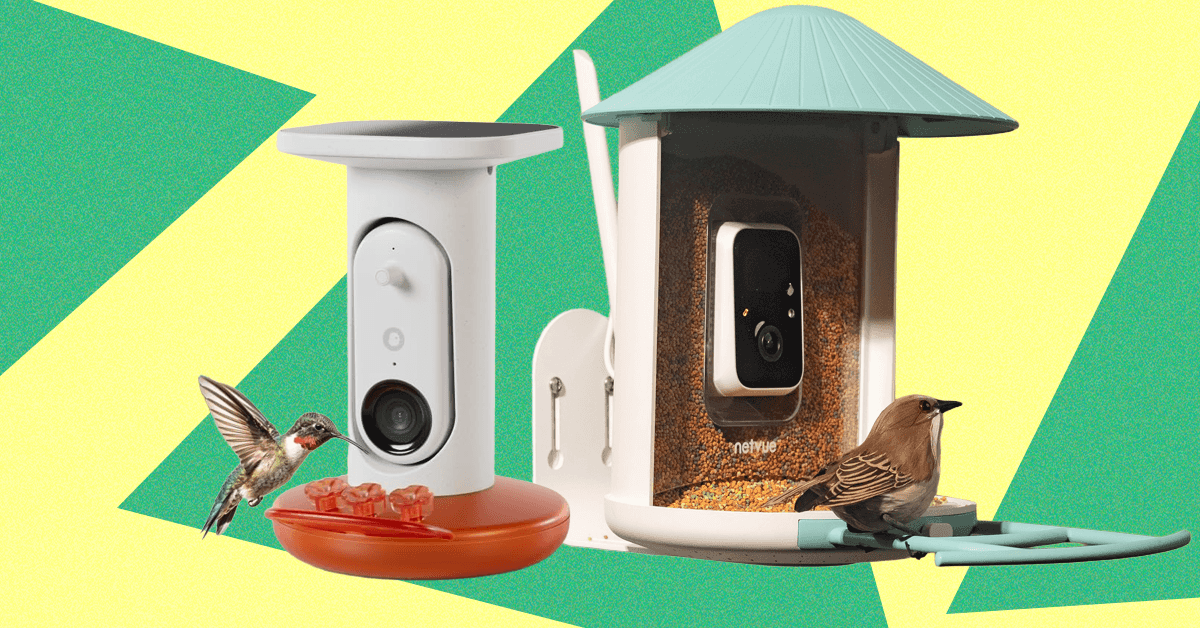
you’ve probably seen a smart bird feeder or know someone who has one. They’re fairly recognizable from a distance with their clear housing, cameras, and solar panels, and perhaps a friend or family member has sent you a photo or video of a bright goldfinch or handsome woodpecker (guilty). The question at this point, then, is whether these things are really worth the $100-plus price tag. Are they actually durable? And what about the squirrel problem?
Lucky for you, we’ve been testing the most popular smart bird feeder models, including Netvue’s original Birdfy Lite feeder ($140) and Birdbuddy’s Pro ($179), for over a year—in rain, snow, and heat, and in a yard with persistent squirrels. We’ve explored the apps and notification settings, examined the photo and video quality, noted which features are hidden behind a subscription paywall, and used Cornell Lab’s All About Birds—as well as Google Lens and our own local expertise—to verify the accuracy of AI identifications.
Updated January 2026: I’ve added the solar-roof version of Kiwibit’s Beako as a new pick and new testing notes for both Birdbuddys, added a feeder from Detiko to Others Tested, and ensured up-to-date links and prices. Next up is the Coolfly Aura, a feeder with a unique modular camera system, which debuted at CES this week.
Featured in this article
Jump to Section
Best Overall
-
-
Photograph: Medea Giordano


Netvue
Birdfy Plastic Smart Bird Feeder
WIRED
- Reliable and easy to set up
- User-friendly app
- Decently wide field of view
TIRED
- Not the best video resolution
- Lightweight construction
This cheery blue- or yellow-roofed feeder, from security company Netvue, is the first smart feeder WIRED tested, back in 2022. At that time, we gave it a 6/10 rating for its high price and wonky AI. Both metrics have improved dramatically since then—Birdfy’s app is now the second-most user-friendly on the market, behind only Birdbuddy, and this feeder is often on sale for $150 or less. If you pay $20 more, you get a lifetime subscription for AI identification, which is a solid deal, especially since the AI’s success rate is fairly decent. Without it, it’ll cost you $5 a month, but it’s not required to get plenty of enjoyment. This is the feeder I bought my elderly parents for Christmas during an Amazon Prime Day sale for its reliability, easy setup, and easy-to-navigate app, and it’s still going strong two years later.
The 1080p camera has one of the widest viewing angles of any smart feeder, at 155 degrees, and it offers color night vision. The IP65 plastic construction also makes this feeder durable and easier to clean, and the 50-ounce seed reservoir is super easy to fill with its convenient flip-up top. Not all bundles come with a solar panel, but you can buy it separately. Unlike other feeders, the solar panel is not built in and will have to be mounted and connected separately with the included 9.8-foot charging cable. (The Birdfy can be mounted on a pole, wall, or tree, though if you mount it on a pole using the 5-7-9 siting rule, you won’t be able to mount the solar panel.)
Best Upgrade


Kiwibit
Beako (With Solar Roof)
WIRED
- Thoughtful engineering makes for easy maintenance
- Solar panel works great in all weather
- Very sturdy construction
- 8 MP photos and 4K HD video
TIRED
- Pricey for a smart feeder and rarely on sale
- Only works on 2.4 GHz Wi-Fi
- Requires a subscription for all features
This Beako model is not only one of the most thoughtfully designed feeders on the market, it’s also what I use in my own yard when I’m not testing feeders for work. The 1.5L dual-hopper plastic seed reservoir is removable from the body for refilling, so you don’t have to take the whole feeder down; the 8 MP photos and 4K HD video are much better quality than you’ll find from most competitors; and the components come apart for easy cleaning. I also tested the original version with a separate solar panel, and my only complaint was that the panel stopped charging the camera after about six weeks. There’s now a version with a built-in solar roof, which has done an excellent job keeping things charged during its six-week-long test, even in cloudy weather. The IP65 plastic body is extremely thick and sturdy, and unlike lighter-weight models, it’s designed to hold up in more extreme weather.
The app is easy to navigate, and the whole setup is fully functional without a Kiwibit Plus subscription ($4/month or $47/year, purchasable through the Kiwibit app)—it even includes AI identification as a base feature, and it’s pretty decent. However, Kiwibit Plus is necessary to access all features, mainly extended 60-day storage and the ability to record up to three minutes of video if a bird is doing something interesting, which is a unique feature among smart feeders and one I discovered I love. (Nothing more frustrating than having a video cut off right as a bird is about to do something funny.) If you’ve tried other smart feeders and found them lacking, this one costs a bit more for what it is, and it’s almost never on sale, but if you know you like having a smart feeder, I think it’s worth the investment. Note, however, that it only works on 2.4 GHz Wi-Fi, and the warranty is half the length you get from competitors.
Best Connectivity

WIRED
- Runs on 2.4 5 GHz and 5 GHz
- 4K Ultra HD video
- Solar panel stays charged even in cloudy weather
TIRED
- Heavier than most smart feeders
- AI is still just OK
- Subscription now required for all features
Camojojo’s original Hibird feeder has long been a reliable model in my testing stable, unique for its ability to run on both 2.4-GHz and 5-GHz Wi-Fi bands—almost all smart feeders are 2.4 GHz only—and this year saw the debut of an upgraded model, the Hibird Pro. This one has built-in solar panels, an option for pole mounting, and supposedly improved AI identification, though it still frequently misidentifies even common birds in my West Coast backyard as East Coast species. The app is not as streamlined or user-friendly as Birdfy’s or Birdbuddy’s, but it’s still easy enough to navigate, with options for changing video length (default is 10 seconds) or viewing in slo-mo. Video is the default media type it saves, though this is 4K Ultra HD. Without a subscription, you can’t search past videos by bird, and cloud storage is capped at 5 GB over 60 days, though the feeder does come with a 128-GB SD card. You’ll also get “smarter” chats with the app’s AI Q&A function, “Dr. Bird,” and the ability to share across two devices ($45 year/$4 month).
I appreciate the generous 1.5L seed hopper, though this, combined with the solar panel and battery, makes this one heavy feeder. When filled, it tips the scales at 5 pounds, so if you do pole mount, you will need to use both included hose clamps. I also wouldn’t attempt to mount it on anything unstable. Other Hibird features transferred to the Pro are the assembly screws having little handles on them, so you won’t need a screwdriver, and a chunky IP66 plastic body. It was subjected to a little bit of squirrel chewing during my test, but still held up well.
Best Smart Hummingbird Feeder


Birdbuddy
Pro Smart Solar Hummingbird Feeder
WIRED
- Fun and feature-rich app usable without a subscription
- Built-in solar panel works great
- Easy to clean and refill
TIRED
- Camera doesn’t always capture all birds
Birdbuddy is known for its user-friendliness and thoughtful and fun app, and its new Pro Smart Hummingbird Feeder is no exception. Everything about its use is intuitive and easy. AI identification, 5 MP photos, 2K HD video with slo-mo—everything you need is included out of the box. A subscription is optional to unlock features like family sharing and a higher bit rate, but the feeder is perfectly usable without it. There’s also no auxiliary solar panel to worry about, as it’s built into the roof. Pairing with your phone is a cinch, integrating it into the Birdbuddy app with other feeders is a snap, and even filling it is no problem—unlike other hummingbird feeders that have weirdly cavernous capacities and/or need to be filled upside down, the Birdbuddy’s bottom screws off and holds a reasonable 1.75 cups of liquid. This is more important than you’d think, as Cornell Lab of Ornithology points out that the easier it is to clean a hummingbird feeder, the more likely you are to do it often and well.
It also comes with extra plastic flowers and a little brush to clean them with, and the app sends reminders as to when it’s time to clean. You’ll also find fun, seasonal touches in the app, like the ability to send digital bird holiday cards with your pics, or a tool to superimpose hats, clothes, and various accessories on the birds, which is actually funnier than it sounds. However, as with the Birdbuddy Pro seed feeder, below, the big downside is that the feeder’s sensor doesn’t always pick up every bird that visits, which can definitely be a bummer when you see something interesting out the window but it doesn’t show up in the app.
A Unique Smart Birdhouse
Birdfy’s Polygon Smart Birdhouse isn’t the first smart birdhouse on the market, but it is the most interesting-looking. The parallelogram-esque, turquoise-paneled shape won a Gold award at 2024’s French Design Awards, and it’s easy enough to mount on a pole, fence, or tree. All the camera equipment is located in an easy-to-open rear hatch, and there’s even a remote control at the end of a 10-foot cord to be able to charge (though it has a built-in solar panel, so you likely won’t need to) or reset the 1080p camera.
It’s simple to integrate with the easy-to-use Birdfy app, which is ready and waiting to assemble a bird’s shareable “story,” from assembly of the nest to hatching to fledgling, and finally “the end,” when the nest is abandoned for the season. Note that the camera does emit an audible click whenever it’s triggered by movement or the app, and the inside is a little larger than most birds would naturally gravitate to, though I did like that it comes with interchangeable hole sizes to interest different species. We did have a few assorted connectivity issues, and our test house didn’t attract any visitors this year, but a project director for Cornell Lab of Ornithology’s NestWatch said it should only be a matter of time.
Best App
-
-
Screenshot courtesy of Kat Merck


Birdbuddy
Smart Bird Feeder Pro
WIRED
- Fun and feature-rich app
- Built-in solar panel works great
TIRED
- Camera doesn’t always capture all birds
Birdbuddy’s Pro model sports a snazzy new HDR camera that can also shoot 2K HD video with slow-motion capability. In addition to having a visibly larger and more advanced lens, the camera’s now got a larger focus range, 122-degree field of view, and high-fidelity microphone. (A subscription to Birdbuddy Premium for $70 a year unlocks 2K Ultra with a higher video bit rate, allowing for richer colors, sharper images, and less background noise—plus the ability to set alerts for sick or injured birds, among other things—but it’s perfectly usable without this. )
The photos aren’t nearly as impressive as those by competitors like the Birdfy Pro Duo, Camojojo Hibird, or Kiwibit Beako, and the camera, frustratingly, only captures a handful of the birds that visit. (The non-solar version is occasionally flagged as a frequently returned item on Amazon due to both this and charging issues, so I recommend the solar version.) However, Birdbuddy’s app is a consistent standout, with a user-friendly design and plenty of helpful alerts, like if a cat is detected nearby, or if it’s time to clean the feeder.
It also serves you insights gathered over time, like what time certain species seem to prefer to visit. (Finches apparently like to visit my yard at 10 am daily.) The Birdbuddy also “sleeps” at night and does not seem to emphasize capturing photos of people, so it wouldn’t make a good choice to double as a security camera, and there are also unique seasonal features like the ability to send holiday cards or “dress up” visiting birds with hats, glasses, and sweaters. (It is funnier than it sounds, really!) Both Birdbuddys work with 2.4-GHz Wi-Fi only.
Another Birdbuddy downside is the infuriatingly small, hinged opening for filling the 4 cups’ worth of seed. The feeder comes with its own spouted cup, but I have yet to fill the feeder without making an enormous mess. I also tested the 3-in-1 Nutrition Set ($39), which includes a screw-on tray that can variably become a water fountain, jelly dish, or fruit stake for fruit-loving species like orioles. I’ve used it as a jelly dish and water fountain and found that it blocks enough of the perch area that birds tend to shift out of camera view to avoid it. However, this feeder is still worth it for those who like a more streamlined app experience and/or want to take advantage of some of its unique sharing features, especially Premium’s ability to share your feeder livestream with others.
If You Want to Use an Existing Bird Feeder


WIRED
- Flexible design allows you to use an existing bird feeder
- High-quality photo and video
- Works with 5 GHz Wi-Fi
TIRED
- Only has 90-degree field of view
- Only comes with a wall mount
- Solar panel has to be mounted separately
If you have an existing bird feeder you like, or are interested in building your own and are just looking for a camera, Hibird’s stand-alone DIY feeder camera is for you. It’s compatible with both 2.4-GHz and 5-GHz Wi-Fi bands—a rarity for bird feeder cameras—and the cute green owl face streams the same 4K HD video and 1080p pics as the bigger Hibird feeder, above. There is a subscription tier with features like increased storage, but the camera is still usable without it. There’s an auxiliary solar panel included for charging, and you can mount it via its ¼-inch nut on the included bendable arm and bracket, or jury-rig a custom solution. It pairs seamlessly with the Hibird app, with access to AI (which is just OK), livestreaming, and the Dr. Bird ChatGPT-like feature, where you can ask bird-related questions. (The answers are corny and not as granular as they could be, but it still could be useful for some.)
A Truly Squirrel-Proof Design


TT Nature
Squirrel-Proof Metal Bird Feeder
WIRED
- Design really deters squirrels
- Can be pole-mounted
TIRED
- Design also deters larger and even medium-sized birds
- App is not user-friendly and requires a subscription
- Solar panel must be mounted separately
Let’s get the bad news out of the way first—the app for this feeder is not good. Not only is it suspiciously called “Birdty,” it’s not intuitive to navigate and requires a subscription to access all features—including AI identification, which is terrible. I have also seen this feeder body (TT Nature offers it in green or red) sold from time to time under other Amazon insignias, so it’s not unique to this brand. However, those usually have solar panels attached to the roofs, from which squirrels can hang upside down to avoid tripping the spring-loaded perch. This one leaves off the panel (there is one that can be mounted separately, but it’s not possible when the feeder is pole-mounted, which is what I recommend), but it doesn’t need it, as the charge from the 5,200-mAh battery lasts well over a month.
I had my test unit sited on a pole with a baffle far from fences and overhanging branches, and though an occasional squirrel would still manage to find the feeder, the spring-loaded perch mechanism worked as intended—a squirrel tries to sit, and a bar flips up to block access to the seed. (There’s also a squirrel alarm feature that can be toggled on and off in the app, but in my experience, those never work.) I have seen squirrels try to chew through the sides, but given that the body is metal, their efforts are fruitless.












Long before we had Amazon or Facebook marketplace, or thousands of other online retailers, we had eBay. And now, we have an eBay coupon to help you save on basics like vacuums and phones, to even your most niche need—because eBay has everything from haunted objects to ironic landline phones to retro gaming consoles. One of the first and most enduring online shopping platforms, eBay has stood the test of time, providing us with the old-school feel of estate sales, complete with bidding wars and gently used items of quite literally every type.
Save up to 60% on Your Next Purchase at eBay
eBay has rotating deals, like 20% off up-and-coming brands, so be sure to check their page often to know which deals are next. They have huge savings on essentials, like Dyson vacuums—an enduring titan in the home cleaning realm. There’s also discounts on like-new refurbished Apple MacBooks and iPads so you can work or study for so much less. It’s not only office tech they have deals on, but even kitchen essentials, like the forever-popular KitchenAid Stand Mixer. eBay has deals on everything from clothing and jewelry to power tools, so check eBay’s deals page often.
How to Use an eBay Coupon (If you Have one Handy)
Once you’ve perused the nearly endless options of items on eBay, here’s how you can redeem the eBay discount code or offer at checkout: first, make sure your code isn’t expired (I know it sounds like a no-brainer, but you don’t want to be disappointed when that dreaded ‘invalid’ pop-up comes on the screen). Enter the code in the ‘Add coupons’ section, or check the box if the coupon is displayed. When you select ‘apply,’ you should see the discounted total, and then you’ll be prompted to pay.
Save More With Free Shipping
Once you find the special item of your dreams, go to the “shipping and pickup” search filter and check the “free shipping” box to get free shipping. Make sure you choose eBay free shipping on a multitude of items like motor parts, books, golf clubs, Pokemon cards, haunted objects, tech, and virtually anything else you can imagine.
Shop These Rotating eBay Deals
eBay has rotating deals, like 20% off up-and-coming brands, so be sure to check their page often to know which deals are next. They also have spotlighted, trending, and featured deals for huge savings on a myriad of products like auto parts, golf clubs, shoes, and more. eBay has a money-back guarantee to ensure you get the item you ordered or you get your money back.
Shop With eBay Mastercard to Get More Rewards
Have you heard of an eBay Mastercard? I hadn’t either, but if you’re a collector or frequent eBay shopper, an eBay Mastercard is a smart way to save on purchases you were already planning to make. You’ll earn five times the amount of points for the rest of the year after you spend $1,000 on eBay in a calendar year. Until then, you’ll earn three times the points per $1 spent, up to $1,000, on eBay in a calendar year. You can also earn twice as many points per $1 spent on gas, restaurant, and groceries, and 1 times as many points per $1 spent on all other Mastercard purchases.
Get Daily Deals With the eBay App
If you’re someone who shops or sells on eBay often, I’d suggest downloading the eBay app for even more perks. The eBay mobile app makes it easy to find the best rotating deals on various items and access to the hottest deals and discounts of the day before they leave. Through the app, you can browse everything from trendy items, to power tools, to tech gadgets, and then choose whatever price looks best. There’s also app-only discounts and special offers exclusively for eBay app users. Plus, eBay will help you figure out when’s the best time to buy, with price notifications to let you know when the price has dropped.

Taara has announced its light-based wireless optical connectivity technology will power Cintegral’s ST 2110 Fiber-over-Air, enabling real-time TV and media production workflows on remote sets where cable-based infrastructure is unfeasible.
A graduate of X and Google’s Moonshot Factory, Taara has developed technology that uses beams of light to extend high-speed internet to places where traditional infrastructure is difficult to deploy.
Its first system, Taara Lightbridge, is designed to deliver high-speed, secure connectivity across long-range and challenging terrain, helping networks reach farther.
It is claimed to be constructed to deliver bi-directional communication at speeds of up to 20Gbps, and securely transmit data across distances up to 20km while keeping connections “strong and consistent” all the time, “using the energy of a lightbulb” without digging, spectrum licensing or right-of-way permitting. It has already been deployed in more than 20 countries, with operators including Airtel, Digicel, T-Mobile, SoftBank and Liquid.
In addition, Taara’s core Beam technology is designed for operators, enterprises and next-generation data infrastructure, and is attributed with bringing fibre-like speeds to environments where traditional infrastructure is too slow, costly or impractical to build. This is claimed to mark a shift from fixed, physical networks to infrastructure that can evolve at the pace of demand.
In this industry, video footage often has to be stored locally and physically carried to post for transfer, processing and archive. Taara Lightbridge is now being used to create a high-capacity wireless bridge between those locations, allowing production teams to move data in real time across sites without laying an inch of cable.
Cintegral is a production technology specialist working with leading studios and streaming platforms such as Disney, Netflix and Amazon Studios. It has been validating Taara Lightbridge as part of the new ST 2110 fiber over the air offering.
According to Cintegral, Lightbridge enables real-time streaming of high-resolution 4K JPEGXS and 8K RAW video data between on-location and production crews elsewhere on site, helping directors, DOPs, DITs, dailies, editors, VFX, broadcasters and technical teams collaborate during a shoot rather than waiting until each day has wrapped.
“Our goal with ST 2110 Fiber-over-Air is to bring high-performance production workflows to any environment, without being limited by location,” said Cintegral CEO Dane Brehm. “What Taara’s technology enables us to do is extend that capability to places where connectivity would normally be a bottleneck, allowing real-time collaboration between crews, directors and editors on set.”
The collaboration also builds on momentum from the 2026 HPA Tech Retreat, a forum for leaders across media technology, engineering and content creation to explore emerging technologies and trends. At the event, Cintegral showcased Taara Lightbridge and claims to have generated early interest in the use of wireless optical connectivity for advanced production workflows.
For its part, Taara regards the collaboration with Cintegral as marking an important step in its commercial story, showing how wireless optical connectivity can move beyond traditional telecom use cases and into enterprise environments with what it said were “intense demands” for throughput, mobility and real-time collaboration.
Looking at media production, Taara noted that in this use case, teams increasingly need to move large volumes of high-resolution video between locations quickly and reliably, without waiting for fixed-line buildouts or relying on physically transporting storage media.
“You shouldn’t have to dig or lay miles of fiber just to tell a great story,” said Taara founder and CEO Mahesh Krishnaswamy. “With Taara, we aren’t building networks, we’re beaming them. We’re giving production teams the power to deploy fiber-class connectivity out of thin air, exactly when and where the shoot demands it.”

The MacBook Neo made quite a splash when it landed in March. $599 for a MacBook felt groundbreaking, and it was easy for casual onlookers to declare that Windows laptops had no true answer to it.
But what if I told you there was a Windows option that was better in almost every way? That’s the HP OmniBook 5, a laptop you’ve probably never heard of unless you watch the space closely. I’ve been recommending it ever since I tested it last month. The price has been fluctuating, but more often than not, the 14-inch model was selling for $500. You read that right: $500. Today, the cheapest, most consistent price you’ll find it for is $730 over at Walmart, but I’ve seen the HP frequently drop the price from $1,050 down to around $500.
And just take a look at what you get for the price, because it’s absolutely stacked. It comes with 16 GB of RAM and 512 GB of storage, double what you get on the $599 MacBook Neo. There’s a 16-inch version as well, if you like the idea of having a bit more screen real estate work with.
The HP OmniBook 5 is powered by the Qualcomm Snapdragon X, a highly efficient chip that gets great, all-day battery life that’s at least on par with the MacBook Neo. If you haven’t used a Windows laptops in a few years and still think they can’t compete with MacBooks in battery life, you’re sorely mistaken.
The 16 GB of memory on the OmniBook 5 is particularly important to note, as it’s one of the big points of contention with the MacBook Neo. Being stuck at 8 GB in 2026 feels cruel on principle, and while testing it I was able to load up the MacBook Neo and easily find its breaking point. The 16 GB of memory on the HP OmniBook 5 is enough that you’ll never have to worry about how many tabs, applications, installations, or downloads you have going simultaneously. Combined with the better multicore performance of the Snapdragon X, it enables a kind of freedom that lets you forget about the hardware and focus on the task at hand. Don’t get me wrong—the MacBook Neo has its place, but calling it the undisputed king of budget laptops just isn’t right.
The HP OmniBook 5 Is Only $500
Now, I know what you’re thinking. Specs and performance don’t tell the whole story, and Apple has never been known for offering tons of specs for cheap. But the OmniBook 5 14 is also an attractive design in a highly portable package. At 0.5 inches, it’s exactly the same thickness as the MacBook Neo and right around the same weight too. Does the MacBook Neo have a bit more style and personality? Absolutely—especially if you fancy one of the bolder color options. But I’d say the OmniBook 5 is a very pretty laptop in its own right. It’s also made of aluminum, sturdy and well-built in your hands. The hinge is balanced nicely, allowing you to open the lid with one finger. It doesn’t feel cheap.


Australian business confidence plunges in March amid uncertainty: NAB

Transfer rumors, news: Bayern eye move for Newcastle’s Gordon

India-US trade deal back in focus: Indian delegation to visit Washington next week for talks – The Times of India

-

 Fashion1 week ago
India’s exports face reset as EU links trade to carbon metrics: EY
-

 Entertainment1 week ago
Queen Elizabeth II emotional message for Archie, Lilibet sparks speculation
-

 Tech7 days ago
As the Strait of Hormuz Reopens, Global Shipping Will Take Months to Recover
-

 Entertainment1 week ago
Lamar Odom shocking response to Khloé Kardashian account of his overdose
-

 Tech7 days ago
Azure customers up in arms over ‘full’ UK South region | Computer Weekly
-

 Fashion1 week ago
CII submits 20-pt agenda to Indian govt to back firms hit by Iran war
-

 Tech6 days ago
This AI Button Wearable From Ex-Apple Engineers Looks Like an iPod Shuffle
-

 Tech1 week ago
A Single Strike Won’t Shut Off the Gulf’s Desalination System