

Tech
Inserting AI into cyber awareness | Computer Weekly


The concept of security awareness training is traditionally one of static procedures, including online training and tests, phishing simulations, and physical elements such as posters and displays.
This is all practical for compliance, but does this concept move with the times? In a world where AI is king, how does awareness training fit with this technology trend? As an example, delegates at KnowBe4’s recent user conference in London heard how the company’s more AI-driven direction is taking shape.
Increase in agents
CEO Bryan Palma predicts that AI would lead to an increase in the number of people and agents saying that “AI makes us more productive”, and with the number of agents being deployed in cyber security increasing. This could result in fewer people being employed; however, the attitude at KnowBe4 is to train the workforce regardless of whether they are man or machine.
“We don’t care as, ultimately, we’re going to prepare your organisation and your workforce to be trained correctly and be an advantage for you in the market,” he says. “Now it is probably 100% humans we train and zero agents, tomorrow it may be 60 humans and 65 agents – we’re not going to care.”
That movement towards agents, and supporting them as much as employees, is particularly forward-looking as the adoption of AI-based options increases. Palma claims that this adoption of support for agents is “about security culture, and that is really the outcome that we’re trying to build”.
He says: “The reality is that agents will be part of your security culture, and bots will be part of your world. If we turn the clock forward a few years, you will have multiple bots that work for you, and you’re going to tell them to do things, and they will work independently, and instead of managing only people, you’re going to need to manage bots as well.”
This move is all about culture, and agents have to be part of that culture “just as humans would be”, he explains.
Workforce trust management
Palma states that the company’s direction is towards the concept of “workforce trust management”, an extension of the original security awareness training and the more commonly used term “human risk management”.
He explains that workforce trust management considers autonomous security, which governs and trains both humans and AI agents, as the workforce will be diverse: “You need to protect them all, as each can be a vulnerability.”
The obvious question is how AI and automated functions are changing both workforce trust management and KnowBe4’s core awareness and training mission? Sitting with Palma, Computer Weekly had the opportunity to ask him about this move towards automation and if there was enough of a grasp of the roll-out of automated tasks in the way that KnowBe4’s technology works.
Palma says the company was thinking about it and developing around it, and then when he joined the firm, he realised both the impact of this from other things that he has done and the need to accelerate development.
“I’ve put more focus on it; I’m putting more investment behind it. I want to accelerate what we’re doing, but we have six agents in the market – we were already doing this, and it becomes critical because it just allows our system to run better,” he says.
Is there more demand from customers for that kind of automation in a workforce trust management offering? He explains that one of its agents creates a phishing landing page to save time for the IT and cyber security teams to build new versions of the phishing tests continually.
Donna Huggett, information security education and awareness manager at Belron – the parent organisation of Autoglass and Safelite – tells Computer Weekly that she uses KnowBe4 for phishing simulations. The AI-enabled technology “actually helps us massively cut down quite a huge chunk of work”, as time was previously spent on developing templates and choosing the right one to use, the options in the AIDA technology do the work for you.
She also said this determines the level of phishing message to be sent to an employee, for those who need to be challenged more and who will receive slightly harder emails. “And that’s all automated now, so that’s a massive help,” she says.
Paul Maxwell, cyber security engineer at retailer Poundland, says he primarily uses KnowBe4 for phishing simulation, and used 115 templates, but found that some were no longer working. This required new templates to be built, and it “was adding 35 hours a month” to his workload as users became savvier, and he needed to create new emails.
“I spent a good couple of hours at night, just thinking ‘That’s a good one, that’s going to catch people out’. With that kind of stuff, you can’t just go half measure, you’ve really got to try and catch them out,” he says. “Because if you don’t catch them out, you don’t help them learn.”
He explains that the most effective options were those that appeared to come from HR, such as clicking to claim annual leave, and finance and IT issues, including updating to Windows 11. However, the staff engagement has seen an increase in reported phishing attacks. While Maxwell admits that each alert takes time to investigate, he acknowledges that the platform has been really helpful.
“This is exactly what I need: firstly to help me move security forward in the business, but also to be able to take a step back and look at other areas I need to focus on,” he adds.
Automated agents
In terms of automated agents, Computer Weekly asked Palma if the intention was to add machine learning to enable the examples above, and if it could get to the level where it could replace the practitioner’s need to do awareness training by determining the right campaign for employees?
Palma explains that people are overlooking this link and are moving directly to AI, while the human link is vital; there is machine learning involved. “Everybody wants to think GenAI, everybody wants to think next generation: we’ve had lots of machine learning and regular vanilla AI for a long time, and that’s still very meaningful and that still does a lot of the work, but conceptually it will absolutely look and say, ‘Hey, these are the mistakes you’re making’, or ‘These are the mistakes the system is making’ and how you solve that.”
Palma says that the development of agents has increased over the past year, and he sees a future where “our email, our training, our compliance is all going to be in one single platform”, which will allow KnowBe4 to add in components and capabilities as it moves forward.
Different-sized businesses
Palma also discussed whether small- and medium-sized enterprises (SMEs) are more adaptable to a changing technology concept, compared to a large organisation that has been retrospectively building in security since the 1990s.
“I think the bigger organisations have more people, they have more process, they tend to move slower,” he says. “The smaller organisations are going to be very efficient – among many of our SMEs, they don’t have a CISO, and they don’t have an information security department.
“Now, if they have three or four agents that can help them around workforce trust, they’re going to be really happy about that. So, I think adoption at that part of the market is going to be faster and quicker.”
This move to offer automated technologies is one where the company can move with the times, but the question is how adaptive are the practitioners to this new form of technology to do this straightforward task? Creating phishing templates is time-consuming, and creating new emails takes time and effort, and we have not really begun considering the energy required to filter through the phishing simulation results.
It is interesting to see this adoption of the newer ways of working, and perhaps the next step will be for practitioners to go all in on an agentic approach. Being able to offload a cumbersome task and see the results without hours of extra work would surely be worth the effort.
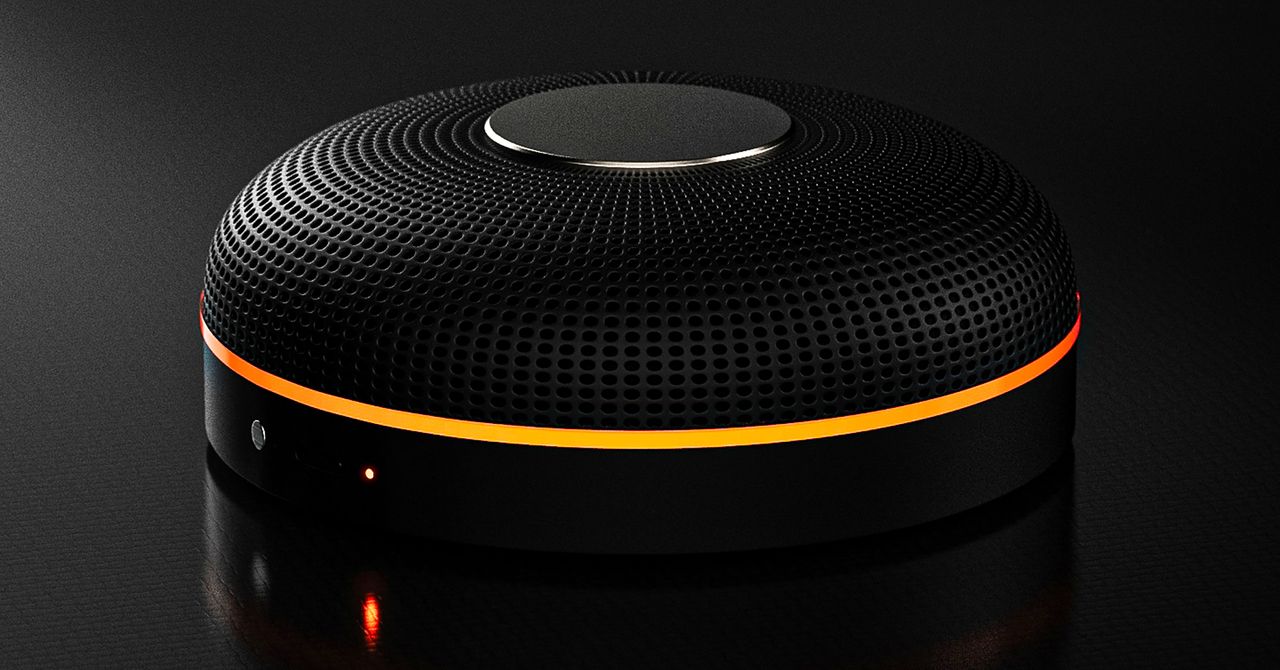
Deveillance also claims the Spectre can find nearby microphones by detecting radio frequencies (RF), but critics say finding a microphone via RF emissions is not effective unless the sensor is immediately beside it.
“If you could detect and recognize components via RF the way Spectre claims to, it would literally be transformative to technology,” Jordan wrote in a text to WIRED after he built a device to test detecting RF signatures in microphones. “You’d be able to do radio astronomy in Manhattan.”
Deveillance is also looking at ways to integrate nonlinear junction detection (NLJD), a very high-frequency radio signal used by security professionals to find hidden mics and bugs. NLJD detectors are expensive and used primarily in professional contexts like military operations.
Even if a device could detect a microphone’s exact location, objects around a room can change how the frequencies spread and interact. The emitted frequencies could also be a problem. There haven’t been adequate studies to show what effects ultrasonic frequencies have on the human ear, but some people and many pets can hear them and find them obnoxious or even painful. Baradari acknowledges that her team needs to do more testing to see how pets are affected.
“They simply cannot do this,” engineer and YouTuber Dave Jones (who runs the channel EEVblog) wrote in an email to WIRED. “They are using the classic trick of using wording to imply that it will detect every type of microphone, when all they are probably doing is scanning for Bluetooth audio devices. It’s totally lame.” Baradari reiterates that the Spectre uses a combination of RF and Bluetooth low energy to detect microphones.
WIRED asked Baradari to share any evidence of the Spectre’s effectiveness at identifying and blocking microphones in a person’s vicinity. Baradari shared a few short videoclips of people putting their phones to their ears listening to audioclips—which were presumably jammed by the Spectre—but these videos do little to prove that the device works.
Future Imperfect
Baradari has taken the critiques in stride, acknowledging that the tech is still in development. “I actually appreciate those comments, because they’re making me think and see more things as well,” Baradari says. “I do believe that with the ideas that we’re having and integrating into one device, these concerns can be addressed.”
People were quick to poke fun at the Spectre I online, calling the technology the cone of silence from Dune. Now, the Deveillance website reads, “Our goal is to make the cone of silence become reality.”
John Scott-Railton, a cybersecurity researcher at Citizen Lab, who is critical of the Spectre I, lauded the device’s virality as an indication of the real hunger for these kinds of gadgets to win back our privacy.
“The silver lining of this blowing up is that it is a Ring-like moment that highlights how quickly and intensely consumer attitudes have shifted around pervasive recording devices,” says Scott-Railton. “We need to be building products that do all the cool things that people want but that don’t have the massive privacy- and consent-violation undertow. You need device-level controls, and you need regulations of the companies that are doing this.”
Cooper Quintin, a senior staff technologist at the Electronic Frontier Foundation, echoed those sentiments, even if critics believe Deveillance’s efforts to be flawed.
“If this technology works, it could be a boon for many,” Quintin wrote in an email to WIRED. “It is nice to see a company creating something to protect privacy instead of working on new and creative ways to extract data from us.”
Portrait Light: You can change up the lighting in your portrait selfies after you take them by opening them up in Google Photos, tapping the Edit button, and heading to Actions > Portrait Light. This adds an artificial light you can place anywhere in the photo to brighten up your face and erase that 5 o’clock shadow. Use the slider at the bottom to tweak the strength of the light. It also works on older Portrait mode photos you may have captured. It works only on faces.
Health and Accessibility Features
Cough & Snore Detection (Tensor G2 and newer): On the Pixel 7 and newer, you can have your Pixel detect if you cough and snore when sleeping, provided you place your Pixel near your bed before you nod off. This will work only if you use Google’s Bedtime mode function, which you can turn on by heading to Settings > Digital Wellbeing & Parental Controls > Bedtime Mode.
Guided Frame (Tensor G2 and newer): For blind or low-vision people, the camera app can now help take a selfie with audio cues (it works with the front and rear cameras). You’ll need to enable TalkBack for this to work (Settings > Accessibility > TalkBack). Then open the camera app. It will automatically help you frame the shot.
Simple View: This mode makes the font size bigger, along with other elements on the screen, like widgets and quick-settings tiles. It also increases touch sensitivity, all of which hopefully makes it easier to see and use the screen. You can enable it by heading to Settings > Accessibility > Simple View.
Safety and Security Features
Theft Protection: This is a broader Android 15 feature, but essentially, Google’s algorithms can figure out if someone snatches your Pixel out of your hands. If they’re trying to get away, the device automatically locks. Additionally, with another device, you can use Remote Lock to lock your stolen Pixel with your phone number and a security answer. To toggle these features on, go to Settings > Security & privacy > Device unlock > Theft protection.
Identity Check: If your Pixel detects you’re in a new location, Identity Check will require your fingerprint or face authentication before you can make any changes to sensitive settings, offering extra peace of mind in case you lose your phone or if it’s stolen. You can enable this in Settings > Security & privacy > Device unlock > Theft protection > Identity Check.
Courtesy of Google
Private Space: Another Android 15 addition, Pixel phones finally have a feature that lets you hide and lock select apps. You can use a separate Google account, set a lock, and install any app to hide away. To set it all up, head to Settings > Security & privacy > Private space.
Satellite eSOS (Pixel 9 and Pixel 10 series, excluding Pixel 9a): Like Apple’s SOS feature on iPhones, you can now reach emergency contacts or emergency services even when you don’t have cell service or Wi-Fi connectivity. It’s not just available in the continental US, but also in Hawaii, Alaska, Canada, and even Europe.
Portrait Light: You can change up the lighting in your portrait selfies after you take them by opening them up in Google Photos, tapping the Edit button, and heading to Actions > Portrait Light. This adds an artificial light you can place anywhere in the photo to brighten up your face and erase that 5 o’clock shadow. Use the slider at the bottom to tweak the strength of the light. It also works on older Portrait mode photos you may have captured. It works only on faces.
Health and Accessibility Features
Cough & Snore Detection (Tensor G2 and newer): On the Pixel 7 and newer, you can have your Pixel detect if you cough and snore when sleeping, provided you place your Pixel near your bed before you nod off. This will work only if you use Google’s Bedtime mode function, which you can turn on by heading to Settings > Digital Wellbeing & Parental Controls > Bedtime Mode.
Guided Frame (Tensor G2 and newer): For blind or low-vision people, the camera app can now help take a selfie with audio cues (it works with the front and rear cameras). You’ll need to enable TalkBack for this to work (Settings > Accessibility > TalkBack). Then open the camera app. It will automatically help you frame the shot.
Simple View: This mode makes the font size bigger, along with other elements on the screen, like widgets and quick-settings tiles. It also increases touch sensitivity, all of which hopefully makes it easier to see and use the screen. You can enable it by heading to Settings > Accessibility > Simple View.
Safety and Security Features
Theft Protection: This is a broader Android 15 feature, but essentially, Google’s algorithms can figure out if someone snatches your Pixel out of your hands. If they’re trying to get away, the device automatically locks. Additionally, with another device, you can use Remote Lock to lock your stolen Pixel with your phone number and a security answer. To toggle these features on, go to Settings > Security & privacy > Device unlock > Theft protection.
Identity Check: If your Pixel detects you’re in a new location, Identity Check will require your fingerprint or face authentication before you can make any changes to sensitive settings, offering extra peace of mind in case you lose your phone or if it’s stolen. You can enable this in Settings > Security & privacy > Device unlock > Theft protection > Identity Check.
Courtesy of Google
Private Space: Another Android 15 addition, Pixel phones finally have a feature that lets you hide and lock select apps. You can use a separate Google account, set a lock, and install any app to hide away. To set it all up, head to Settings > Security & privacy > Private space.
Satellite eSOS (Pixel 9 and Pixel 10 series, excluding Pixel 9a): Like Apple’s SOS feature on iPhones, you can now reach emergency contacts or emergency services even when you don’t have cell service or Wi-Fi connectivity. It’s not just available in the continental US, but also in Hawaii, Alaska, Canada, and even Europe.


Inside the booming business of wellness third spaces and membership clubs

Harry Styles kicks off new era with ‘One Night Only’ comeback show

‘Goal is to silence the crowd’: Santner makes bold statement ahead of World Cup final

Attock Cement’s acquisition approved | The Express Tribune

India Us Trade Deal: Fresh look at India-US trade deal? May be ‘rebalanced’ if circumstances change, says Piyush Goyal – The Times of India

Policy easing drives Argentina’s garment import surge in 2025

-
Business1 week ago
Attock Cement’s acquisition approved | The Express Tribune
-
Business1 week ago
India Us Trade Deal: Fresh look at India-US trade deal? May be ‘rebalanced’ if circumstances change, says Piyush Goyal – The Times of India
-
 Fashion1 week ago
Policy easing drives Argentina’s garment import surge in 2025
-

 Sports1 week ago
LPGA legend shares her feelings about US women’s Olympic wins: ‘Gets me really emotional’
-

 Entertainment1 week ago
Bobby J. Brown, “The Wire” and “Law & Order: SUV” actor, dies of smoke inhalation after reported fire
-

 Fashion1 week ago
South Korea’s Misto Holdings completes planned leadership transition
-

 Fashion1 week ago
Texwin Spinning showcasing premium cotton yarn range at VIATT 2026
-

 Entertainment1 week ago
Pakistan’s semi-final qualification scenario after England defeat New Zealand