Ian Ruffle, head of data and insight at the RAC, says the key to exploiting data assets is twofold – understanding the business problem and having a great team that’s capable of finding the right technological solutions.
“I need people who are empowered, keen, enthusiastic and willing to share knowledge,” he says, outlining the importance of talent to the effective deployment of data-hungry systems and services in the digital age. Rather than finding a suitable challenge for a technology that’s already been procured, Ruffle wants his team to engage with their functional peers.
“As a data leader in business, success is all about people coming to us and saying, ‘We’ve got a problem. Can you find the solution?’” he says.
“I can then go to my team and say, ‘Has anyone got a solution?’ It’s their job to be aware of the capabilities. So, it’s a problem-led approach, but you need to make sure you’ve got the answers up your sleeve, which, for me, is all about the people.”
It’s an approach to technology implementation that Ruffle has refined during his career. He’s been with the motoring services provider since February 2013. Having cut his teeth in a range of marketing roles, he joined the organisation as customer relationship management (CRM) capability manager. In this role, he managed the company’s core marketing technology, working closely with the campaign team and the firm’s analysts.
As Ruffle proved his capabilities, he took on elevated roles, becoming head of marketing technology before assuming his current role as head of data and insight, where he reports to the RAC’s marketing chief, Alex Heath. Ruffle says it is a fast-paced role, and the speed of change suits him well.
“People say you get the absolute most out of me when time is tight,” he says. “Working at the RAC isn’t for everyone, because it’s fast-paced. We move very quickly. We make decisions quickly. It’s all about failing fast to be able to move on and make changes. The aim is to come up with a proof of concept and embed it.”
Working at the RAC is fast-paced. We move very quickly. We make decisions quickly. It’s all about failing fast to be able to move on and make changes. The aim is to come up with a proof of concept and embed it Ian Ruffle, RAC
Ruffle says his team’s ability to deliver data projects has transformed over the past five years. “We’re looking at using data and insight to drive and change the organisation,” he says. “And that focus, alongside my more senior roles, is exciting. I’m rubbing shoulders with some incredibly talented people.”
Transforming front-end systems
While Ruffle has always ensured his technical capabilities are up to date, he recognises that the pace of digital and data innovation has quickened over the past few years.
It’s a tough challenge for any individual to keep abreast of all the changes in the IT industry, let alone someone who’s spent a big proportion of their working life in marketing. Ruffle’s answer is to lean on trusted lieutenants in his team.
“It’s important to get the right people around you,” he says. “As a modern data leader, you need to be encouraging people to be learning and growing and empowering them to do a great job. I can’t do everything across a broad breadth of disciplines.”
Ruffle says being a great boss and attracting the right talent is the way forward. “You want staff to be motivated and encouraged to feel like they can drive the agenda,” he says.
“It’s important to get the right people around you. As a modern data leader, you need to be encouraging people to be learning and growing, and empowering them to do a great job. I can’t do everything across a broad breadth of disciplines”
Ian Ruffle, RAC
“I love working with my people. If you’ve got an idea, you can sow the seed in someone, and then they come back and play their theory back, and you can say, ‘Yeah, we’ll do that’.”
One of the team’s priority projects is a transformation of the RAC’s front-end marketing technology. The company uses a legacy system with a relational data model.
“It’s very batch-based,” he says. “There are some real-time use cases associated with the system, but it’s become prohibitive from a cost perspective to do everything that we need to do.”
Ruffle says the transformation process involves moving to a new supplier called Bloomreach. This agentic personalisation technology will sit on top of the RAC’s existing Snowflake AI Data Cloud platform. His organisation will be working with technology specialist Caci to deploy the Bloomreach technology over the next nine months. The result of this work should be a modern system that offers real-time and AI capabilities.
“That is quite a major project for us,” says Ruffle. “We’re consolidating four different suppliers in total, and probably six pieces of technology across those suppliers, into one central solution. The back end will be Snowflake, and Bloomreach will be dealing with a lot of the front-end stuff, which should mean the seamless integration of data is so much easier.”
Creating great experiences
Another important area of work is boosting operational efficiency. Many of these efforts are focused on two of the biggest cost areas of the business – the call centre and traffic patrols.
A large proportion of the organisation’s enterprise information is now held in Snowflake, using a robust data model. Ruffle says in-house developed application programming interfaces (APIs) stream data on real-time use cases back to the platform and the people in the call centre.
“It’s about the ability to know someone’s broken down at the roadside and to send them a real-time communication, with more accurate updates than we were ever capable of before. We’ve revolutionised the whole dispatch process on the other side of the call centre,” he says.
“We’ve built a single screen for users, powered by the data in Snowflake and via various web services to make the call centre experience seamless, rather than having three or four different operational systems.”
Ruffle says the joined-up approach makes it much easier for operational staff dealing with customers to answer important questions, such as whether an individual at the roadside has RAC cover. Before bringing data together, staff had to log in to different systems to confirm a customer was covered. Now, staff benefit from the single-screen approach.
We’ve got a platform powered by modern technology. The focus on technology and data driving change in the call centre and at roadside operations has been immense, and it’s been the backbone to the last few years of evolution at the RAC Ian Ruffle, RAC
“We’ve got a platform powered by modern technology,” he says. “So the focus on technology and data driving change in the call centre and at roadside operations has been immense, and it’s been the backbone to the last few years of evolution at the RAC.”
Managing complex scenarios
After evaluating potential solutions, the organisation deployed its first Snowflake platform for the marketing department in early 2020.
Ruffle says the AI Data Cloud’s scalability and its integration with the company’s existing Microsoft Azure architecture were important success factors. Since 2020, the RAC has expanded its use of the Snowflake platform beyond the marketing department.
Now, in addition to providing a single source of truth for the business, the company uses the Snowflake Marketplace, which is an online platform where users can access third-party data to augment their own insights. Ruffle explains how his organisation uses this data to enrich its own insights and decision-making processes.
“There’s a whole bunch of events data that we get, which includes things as simple as bank holidays, but also includes things like Glastonbury and other events where you might see gatherings of people in specific areas,” he says.
“Having easy access to information that’s comprehensive and maintained is great, because trying to gather that data manually is almost impossible, and to get the level of detail around the scale of the event is transformational.”
The RAC has also developed its own unified insights platform. This pane-of-glass application, known as Mavis, uses Snowflake’s Cortex AI tool to summarise data insights. Agents working in the RAC’s operations hub can use Mavis to find important customer information, such as cover entitlements.
“We’ve got all the information in one place now, which is easy, so the application will help you find the customer and fully understand their entitlement, which is more complicated than you’d think. There are a lot of nuances to the cover that people are entitled to,” says Ruffle.
“It’s about being able to get that level of detail and having accurate information at your fingertips. When you get to the much more complex scenarios, we’re helping an agent to make decisions. Our agents can see the recommendations and make decisions. That type of recommendation wasn’t possible just a few years ago.”
Being an empathetic organisation
While AI is already impacting customer service, Ruffle says breakdown specialists like the RAC must keep humans in the loop. People contact his organisation at moments of need, and technology should be an adjunct rather than a replacement for human assistance.
“People can be quite panicked, they can be unsure, and I don’t think we’d ever want to take away the humanity of dealing with people at that moment of need,” he says. “Technology plays a significant part in being operationally efficient, but we need to be really sensitive about our service being authentic and human.”
For example, customers stranded at the roadside will be looking for an estimated time of arrival (ETA) for the RAC patrol team. Ruffle says his team will continue using AI and data science to hone the accuracy of ETAs. However, great assistance is also about emotion and engagement, such as prioritising service for people who are pregnant or disabled.
“The digital evolution for us will be about leveraging technology. Data science and AI are improving, and, in the future, I think technology will be front and centre for us when making choices. However, it’s crucial that our agents can manage situations effectively and be a human face to the organisation,” he says.
“Our approach should be data-led in the background when making decisions. Automation is great, but there always needs to be an ability to manage the things you can’t predict and to manage scenarios where you really need to be an empathetic organisation.”
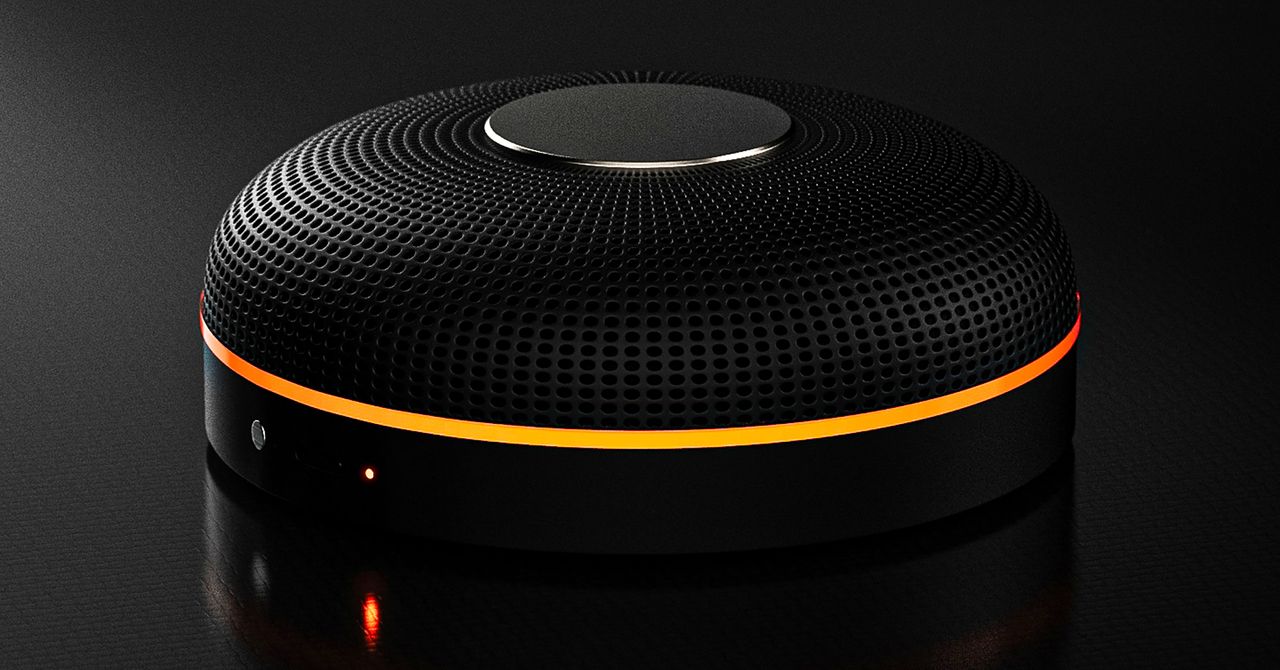
Deveillance also claims the Spectre can find nearby microphones by detecting radio frequencies (RF), but critics say finding a microphone via RF emissions is not effective unless the sensor is immediately beside it.
“If you could detect and recognize components via RF the way Spectre claims to, it would literally be transformative to technology,” Jordan wrote in a text to WIRED after he built a device to test detecting RF signatures in microphones. “You’d be able to do radio astronomy in Manhattan.”
Deveillance is also looking at ways to integrate nonlinear junction detection (NLJD), a very high-frequency radio signal used by security professionals to find hidden mics and bugs. NLJD detectors are expensive and used primarily in professional contexts like military operations.
Even if a device could detect a microphone’s exact location, objects around a room can change how the frequencies spread and interact. The emitted frequencies could also be a problem. There haven’t been adequate studies to show what effects ultrasonic frequencies have on the human ear, but some people and many pets can hear them and find them obnoxious or even painful. Baradari acknowledges that her team needs to do more testing to see how pets are affected.
“They simply cannot do this,” engineer and YouTuber Dave Jones (who runs the channel EEVblog) wrote in an email to WIRED. “They are using the classic trick of using wording to imply that it will detect every type of microphone, when all they are probably doing is scanning for Bluetooth audio devices. It’s totally lame.” Baradari reiterates that the Spectre uses a combination of RF and Bluetooth low energy to detect microphones.
WIRED asked Baradari to share any evidence of the Spectre’s effectiveness at identifying and blocking microphones in a person’s vicinity. Baradari shared a few short videoclips of people putting their phones to their ears listening to audioclips—which were presumably jammed by the Spectre—but these videos do little to prove that the device works.
Future Imperfect
Baradari has taken the critiques in stride, acknowledging that the tech is still in development. “I actually appreciate those comments, because they’re making me think and see more things as well,” Baradari says. “I do believe that with the ideas that we’re having and integrating into one device, these concerns can be addressed.”
People were quick to poke fun at the Spectre I online, calling the technology the cone of silence from Dune. Now, the Deveillance website reads, “Our goal is to make the cone of silence become reality.”
John Scott-Railton, a cybersecurity researcher at Citizen Lab, who is critical of the Spectre I, lauded the device’s virality as an indication of the real hunger for these kinds of gadgets to win back our privacy.
“The silver lining of this blowing up is that it is a Ring-like moment that highlights how quickly and intensely consumer attitudes have shifted around pervasive recording devices,” says Scott-Railton. “We need to be building products that do all the cool things that people want but that don’t have the massive privacy- and consent-violation undertow. You need device-level controls, and you need regulations of the companies that are doing this.”
Cooper Quintin, a senior staff technologist at the Electronic Frontier Foundation, echoed those sentiments, even if critics believe Deveillance’s efforts to be flawed.
“If this technology works, it could be a boon for many,” Quintin wrote in an email to WIRED. “It is nice to see a company creating something to protect privacy instead of working on new and creative ways to extract data from us.”
Portrait Light: You can change up the lighting in your portrait selfies after you take them by opening them up in Google Photos, tapping the Edit button, and heading to Actions >Portrait Light. This adds an artificial light you can place anywhere in the photo to brighten up your face and erase that 5 o’clock shadow. Use the slider at the bottom to tweak the strength of the light. It also works on older Portrait mode photos you may have captured. It works only on faces.
Health and Accessibility Features
Cough & Snore Detection (Tensor G2 and newer): On the Pixel 7 and newer, you can have your Pixel detect if you cough and snore when sleeping, provided you place your Pixel near your bed before you nod off. This will work only if you use Google’s Bedtime mode function, which you can turn on by heading to Settings > Digital Wellbeing & Parental Controls > Bedtime Mode.
Guided Frame (Tensor G2 and newer): For blind or low-vision people, the camera app can now help take a selfie with audio cues (it works with the front and rear cameras). You’ll need to enable TalkBack for this to work (Settings > Accessibility > TalkBack). Then open the camera app. It will automatically help you frame the shot.
Simple View: This mode makes the font size bigger, along with other elements on the screen, like widgets and quick-settings tiles. It also increases touch sensitivity, all of which hopefully makes it easier to see and use the screen. You can enable it by heading to Settings > Accessibility > Simple View.
Safety and Security Features
Theft Protection: This is a broader Android 15 feature, but essentially, Google’s algorithms can figure out if someone snatches your Pixel out of your hands. If they’re trying to get away, the device automatically locks. Additionally, with another device, you can use Remote Lock to lock your stolen Pixel with your phone number and a security answer. To toggle these features on, go to Settings > Security & privacy > Device unlock > Theft protection.
Identity Check: If your Pixel detects you’re in a new location, Identity Check will require your fingerprint or face authentication before you can make any changes to sensitive settings, offering extra peace of mind in case you lose your phone or if it’s stolen. You can enable this in Settings > Security & privacy > Device unlock > Theft protection > Identity Check.
Courtesy of Google
Private Space: Another Android 15 addition, Pixel phones finally have a feature that lets you hide and lock select apps. You can use a separate Google account, set a lock, and install any app to hide away. To set it all up, head to Settings > Security & privacy > Private space.
Satellite eSOS (Pixel 9 and Pixel 10 series, excluding Pixel 9a): Like Apple’s SOS feature on iPhones, you can now reach emergency contacts or emergency services even when you don’t have cell service or Wi-Fi connectivity. It’s not just available in the continental US, but also in Hawaii, Alaska, Canada, and even Europe.
Portrait Light: You can change up the lighting in your portrait selfies after you take them by opening them up in Google Photos, tapping the Edit button, and heading to Actions >Portrait Light. This adds an artificial light you can place anywhere in the photo to brighten up your face and erase that 5 o’clock shadow. Use the slider at the bottom to tweak the strength of the light. It also works on older Portrait mode photos you may have captured. It works only on faces.
Health and Accessibility Features
Cough & Snore Detection (Tensor G2 and newer): On the Pixel 7 and newer, you can have your Pixel detect if you cough and snore when sleeping, provided you place your Pixel near your bed before you nod off. This will work only if you use Google’s Bedtime mode function, which you can turn on by heading to Settings > Digital Wellbeing & Parental Controls > Bedtime Mode.
Guided Frame (Tensor G2 and newer): For blind or low-vision people, the camera app can now help take a selfie with audio cues (it works with the front and rear cameras). You’ll need to enable TalkBack for this to work (Settings > Accessibility > TalkBack). Then open the camera app. It will automatically help you frame the shot.
Simple View: This mode makes the font size bigger, along with other elements on the screen, like widgets and quick-settings tiles. It also increases touch sensitivity, all of which hopefully makes it easier to see and use the screen. You can enable it by heading to Settings > Accessibility > Simple View.
Safety and Security Features
Theft Protection: This is a broader Android 15 feature, but essentially, Google’s algorithms can figure out if someone snatches your Pixel out of your hands. If they’re trying to get away, the device automatically locks. Additionally, with another device, you can use Remote Lock to lock your stolen Pixel with your phone number and a security answer. To toggle these features on, go to Settings > Security & privacy > Device unlock > Theft protection.
Identity Check: If your Pixel detects you’re in a new location, Identity Check will require your fingerprint or face authentication before you can make any changes to sensitive settings, offering extra peace of mind in case you lose your phone or if it’s stolen. You can enable this in Settings > Security & privacy > Device unlock > Theft protection > Identity Check.
Courtesy of Google
Private Space: Another Android 15 addition, Pixel phones finally have a feature that lets you hide and lock select apps. You can use a separate Google account, set a lock, and install any app to hide away. To set it all up, head to Settings > Security & privacy > Private space.
Satellite eSOS (Pixel 9 and Pixel 10 series, excluding Pixel 9a): Like Apple’s SOS feature on iPhones, you can now reach emergency contacts or emergency services even when you don’t have cell service or Wi-Fi connectivity. It’s not just available in the continental US, but also in Hawaii, Alaska, Canada, and even Europe.













 Sports1 week ago
 Entertainment1 week ago
 Fashion1 week ago
 Fashion1 week ago
 Entertainment1 week ago