

Tech
The Baby Died. Whose Fault Is It?


Bi understood how far-fetched her allegations sounded. “If it were not for all the hard evidence, it’s too shocking to believe [Rebecca Smith] did what she did to kill my son,” Bi wrote on Facebook, using Smith’s real name. Perhaps a kind friend could have suggested to Bi that there were other explanations. Instead, Bi had a set of legal adversaries and a supportive echo chamber. On Facebook, GCs and IPs alike expressed sympathy for Bi’s tragic posts: Everyone knew bad surrogates existed, and based on Bi’s claims, it sounded like Smith was one. Aimee Eyvazzadeh, a Bay Area fertility doctor and influencer, called Smith “a criminal” and “a psycho.” Bi’s $1,275-an-hour lawyer, Elizabeth Sperling, wondered whether digging through social media posts might show Smith engaging in “strenuous activity” that could explain the death.
Bi’s husband focused on stabilizing the family, a move he credits with saving their marriage. He blamed the hospital, not Smith, but told me that the litigation is “her grieving process.” He tried to stay out of the legal stuff so that Bi couldn’t blame him too.
Smith had planned to go back to work shortly after giving birth. Instead, she couldn’t stop bleeding. Even though SAI had determined she hadn’t breached the contract, the escrow stopped paying, leaving Smith reliant on disability benefits as she faced an increasing pile of terrifying bills.
When Smith was finally cleared to return to work, a month after Leon died, Bi emailed Smith’s HR department to ask about her health plan. Bi also reported Smith to a federal agency, claiming that Smith was committing fraud. The stress on Smith was already high: Her supervisor at work had found her crying on and off for a day.
Smith hadn’t heard from Bi since her terse reply to the condolence email. Then, Bi texted her a screenshot of a Facebook post about another GC who’d had an abruption at almost 32 weeks—but that GC had called 911 and the baby had lived.
Next, Bi iMessaged a photo of Leon’s corpse to Smith’s 7-year-old son’s iPad.
In the months after Leon died, Bi:
Called the FBI 12 times. Reported Smith, SAI, the hospital, and Clarity escrow to more than a dozen state and federal regulators and numerous professional organizations. Launched a new round of her $30 million venture fund, backed by Marc Andreessen and David Sacks, President Trump’s “AI and crypto czar,” on Leon’s due date. Posted Leon’s ChatGPT-written endorsement from heaven, offering his “eternal blessings” for her work. Created TikToks, Instagram Reels, Facebook posts, X threads, LinkedIn Updates, and a website for her advocacy. Posted links disclosing Smith’s full name, photo, address, employer, mortgage license number, and son’s first name to her website. Asked her husband, again and again, how it was possible that Smith had carried her son but felt “nothing” about his death.
Bi has abandonment issues that she traces back to her twenties, when her father divorced her mom for the mistress who’d conceived his long-awaited son. She got on lithium for her bipolar disorder in early 2021 and began looking for surrogates as soon as she stopped feeling “sedated.” I spoke to the therapist Bi hired to consult with her and Valdeiglesias. She told me that, of the 792 intended parents she has evaluated for surrogacy or gamete donation in the last decade, she has declined to recommend only about a dozen. “I’m not gatekeeping,” she said. When it comes to serious mental illness, she added, it’s up to them to disclose. One of Bi’s fertility doctors, meanwhile, told me it’s not his place to scrutinize intended parents. He defers to the recommendation of the psychological interviewer.
If an intended parent gets turned down, they can usually find another therapist, another clinic, another agency. But without anyone questioning her plans, Bi seemed betrayed by the challenges of third-party reproduction. “Surrogacy is supposed to be the safest route,” she wrote on Instagram. It wasn’t just Leon’s death that pushed Bi into her spiral of legal action and social media posts. It was the apparent lack of control of having her child inside another woman’s body—the most basic fact of surrogacy.












Coffee is the original office biohack and the nation’s most popular productivity tool. As we lose sleep to the changeover to daylight saving time, the caffeine-addicted WIRED Reviews team is writing about our favorite coffee brewing routines and devices that’ll keep us alert and maybe even happy in the morning. Today, reviewer Matthew Korfhage expounds on his lasting love for drip coffee—and why the Ratio Four never leaves his counter. In the days after, we’ll add other Java.Base stories about other WIRED writers’ favorite brewing methods.
As with any vice worth having, a morning coffee routine can take on the character of religion. And like a lot of religion, it’s often born as much accident as moral conviction. My denomination is good, old-fashioned drip coffee. That’s what I drink first thing, before I even think about crafting a shot of espresso.
I’m WIRED’s lead coffee writer and I’ve developed a deep fondness for coffee’s many variations, from espresso to Aeropress to cold brew. But “coffee” to me, in my deepest soul, still means a steaming mug of unadulterated drip. Luckily, that’s also the coffee arena that has been transformed the most by technology in recent years. The drip coffee from the Ratio Four coffee maker (now quietly on its second generation) feels to me like coffee’s purest form, the liquid distillation of what my coffee beans smell like fresh off the grinder.
-
Photograph: Matthew Korfhage
-
Photograph: Matthew Korfhage
-
Photograph: Matthew Korfhage


Ratio
Four Small-Batch Brewer (Series 2)
My love of filter coffee began as a teenager traveling and studying in India—perhaps my first glimpse of adult freedom. This is where I drank the first full cup of coffee I remember finishing. In Jaipur, filter coffee was an intense, jet-black gravity brew typically mixed with milk and sugar. I decided that if I was going to drink coffee, I would take it straight and learn to like it on its own terms. A newfound friend, tipping jaggery into his own brew, laughed at my insistence I didn’t want sweetened milk. I then downed a cup so thick and strong and caffeinated it made my hairs stand at perpendicular. If I’d made a mistake, I refused to admit it.
I carried this preference back to Oregon, drinking unadulteratedly black, terrible drip coffee at all-night diners and foul office breakrooms. Black coffee had become a morality clause, though it was hardly a matter of taste.
It wasn’t until years later that I discovered that drip coffee could actually be an indulgence every bit as refined as pinkies-up espresso.
Upping the Drip
In part, this was a problem of technology. Aside from a classic Moccamaster, it’s only very recently that home drip coffee makers have been able to produce a truly excellent cup. For years, I didn’t keep one at my home.
What woke me up to drip’s possibilities was a new wave of cafes in Portland, first third-wave coffee pioneer Stumptown Coffee and then especially Heart Coffee Roasters in Portland. Heart’s Norwegian owner-roaster, Wille Yli-Luoma, expounded to me at length about the aromatic purity of light-roast immersion coffee—the fruity aromatics of a first-crack Ethiopian that could smack of peach or nectarine or blueberry. Scandinavians had long prized this, he told me, and had evolved light-roast coffee into pure craft. America was finally catching up.
Still, I could never quite get that same flavor or clarity on a home brewer. Not until recently. To get the best version, I still had to walk up the street to Heart and get my coffee from the guy who roasted it. Or I had to spend way too long drizzling water over coffee in a conical filter. I rarely wanted to do this while still bleary from sleep, already late for work.
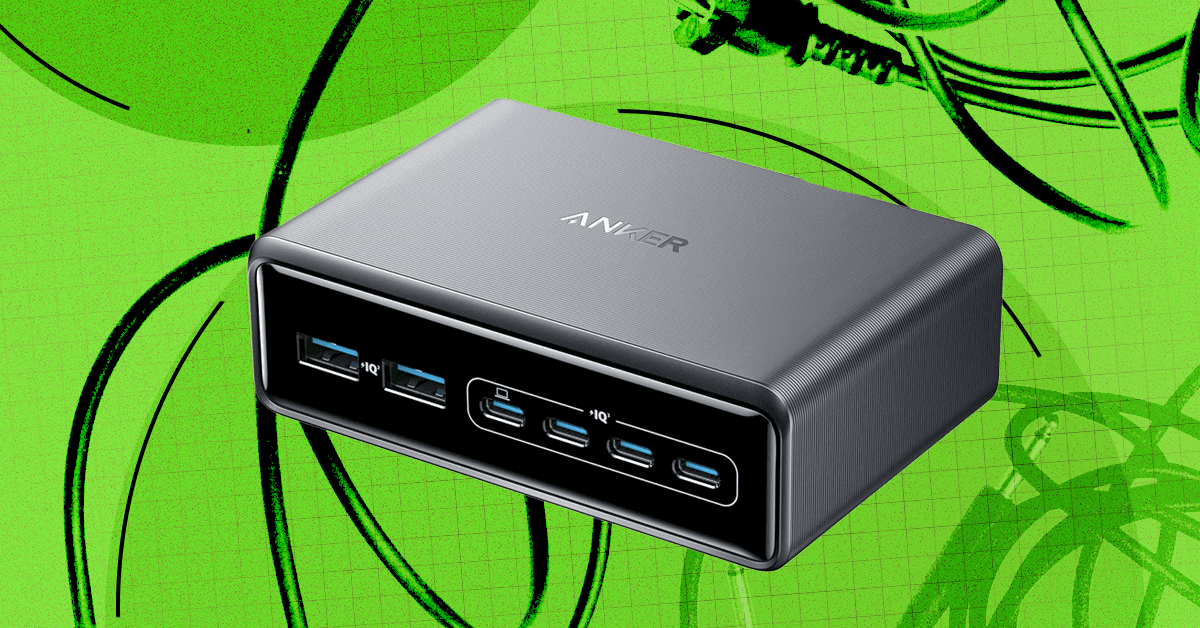
There’s a reason we’re called WIRED. If there’s one thing most of today’s gadgets have in common, it’s that they typically need to be plugged in from time to time. But all those cables, cords, and wires can be tough to manage. They don’t have to end up in a tangled nest under your desk; you can bring order to the cable chaos.
As a gadget reviewer, I have more cords than most people, which is why I also have a regimented cable management strategy to keep everything orderly. Here are my tips and product recommendations for hiding those cords and power strips, and keeping your desktop tidy.
Jump To:
Planning and Prep
Start by surveying the scene, unplugging and untangling everything, and removing anything that doesn’t need to be there. You might be surprised to find a stray USB-B or Micro-USB you haven’t used in years in the mix. Before you get started on cable management, take a slightly damp microfiber cloth and wipe down all the surfaces and cables. Now, you can start planning routes and figuring out which cables it would make sense to bundle together.
Ideally, cables will be the exact required length, so if you have spares or you don’t mind snagging some new cables, it’s worth switching and getting as close as possible to exact lengths to reduce the excess cable you have to hide. If you have a standing desk, remember to take into account the cable length required for a standing position (trust me, dear reader, it’s no fun when you hit stand on the desk and it pulls your PC tower into the air by a DisplayPort cable that is now forever stuck in that port).
Cable Management
Tidying your tech often comes back to cable management, but there are several ways to keep those cords neatly out of sight. Many desks have channels, grommets, and power strip trays built-in, so have a quick look to make sure you’re using what’s available. Some monitor arms also have built-in cable management. You also likely have a bunch of cable ties in your junk drawer or toolbox, so gather them together.

Ikea
Trixig 150-Piece Cable Management Set
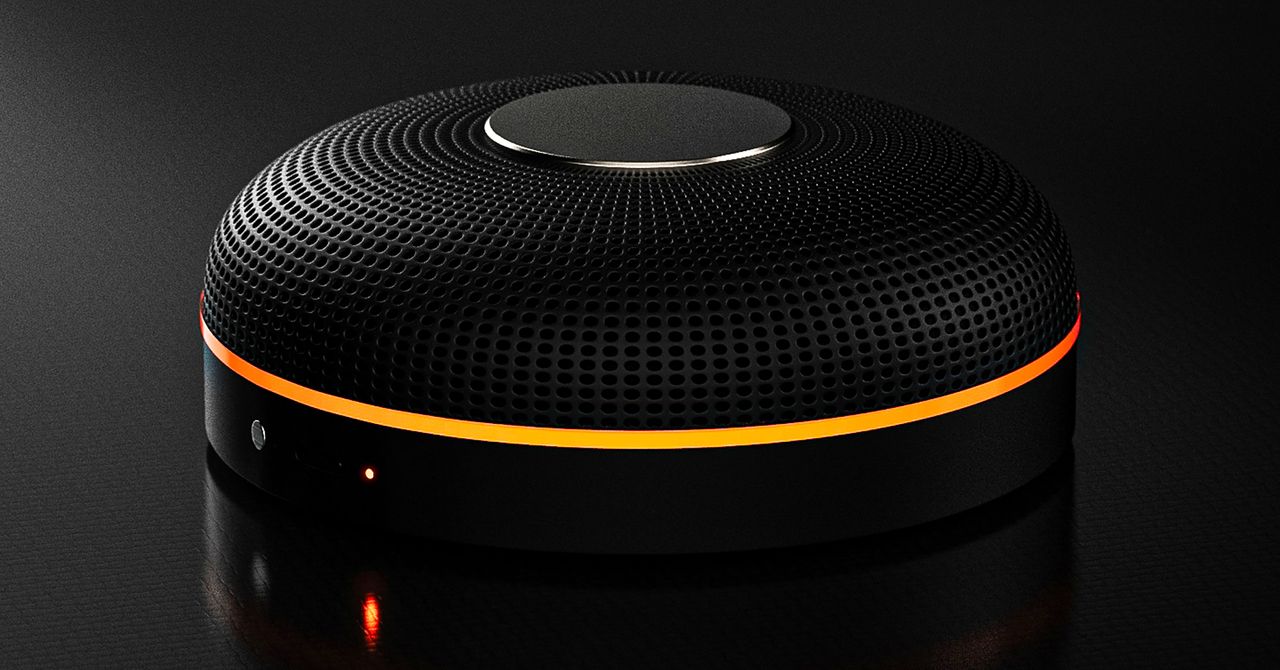
Deveillance also claims the Spectre can find nearby microphones by detecting radio frequencies (RF), but critics say finding a microphone via RF emissions is not effective unless the sensor is immediately beside it.
“If you could detect and recognize components via RF the way Spectre claims to, it would literally be transformative to technology,” Jordan wrote in a text to WIRED after he built a device to test detecting RF signatures in microphones. “You’d be able to do radio astronomy in Manhattan.”
Deveillance is also looking at ways to integrate nonlinear junction detection (NLJD), a very high-frequency radio signal used by security professionals to find hidden mics and bugs. NLJD detectors are expensive and used primarily in professional contexts like military operations.
Even if a device could detect a microphone’s exact location, objects around a room can change how the frequencies spread and interact. The emitted frequencies could also be a problem. There haven’t been adequate studies to show what effects ultrasonic frequencies have on the human ear, but some people and many pets can hear them and find them obnoxious or even painful. Baradari acknowledges that her team needs to do more testing to see how pets are affected.
“They simply cannot do this,” engineer and YouTuber Dave Jones (who runs the channel EEVblog) wrote in an email to WIRED. “They are using the classic trick of using wording to imply that it will detect every type of microphone, when all they are probably doing is scanning for Bluetooth audio devices. It’s totally lame.” Baradari reiterates that the Spectre uses a combination of RF and Bluetooth low energy to detect microphones.
WIRED asked Baradari to share any evidence of the Spectre’s effectiveness at identifying and blocking microphones in a person’s vicinity. Baradari shared a few short videoclips of people putting their phones to their ears listening to audioclips—which were presumably jammed by the Spectre—but these videos do little to prove that the device works.
Future Imperfect
Baradari has taken the critiques in stride, acknowledging that the tech is still in development. “I actually appreciate those comments, because they’re making me think and see more things as well,” Baradari says. “I do believe that with the ideas that we’re having and integrating into one device, these concerns can be addressed.”
People were quick to poke fun at the Spectre I online, calling the technology the cone of silence from Dune. Now, the Deveillance website reads, “Our goal is to make the cone of silence become reality.”
John Scott-Railton, a cybersecurity researcher at Citizen Lab, who is critical of the Spectre I, lauded the device’s virality as an indication of the real hunger for these kinds of gadgets to win back our privacy.
“The silver lining of this blowing up is that it is a Ring-like moment that highlights how quickly and intensely consumer attitudes have shifted around pervasive recording devices,” says Scott-Railton. “We need to be building products that do all the cool things that people want but that don’t have the massive privacy- and consent-violation undertow. You need device-level controls, and you need regulations of the companies that are doing this.”
Cooper Quintin, a senior staff technologist at the Electronic Frontier Foundation, echoed those sentiments, even if critics believe Deveillance’s efforts to be flawed.
“If this technology works, it could be a boon for many,” Quintin wrote in an email to WIRED. “It is nice to see a company creating something to protect privacy instead of working on new and creative ways to extract data from us.”


India forms inter-ministerial group to assess export disruptions

Special loan facility for Feb wages in Bangladesh’s export units

Let girls fly

India Us Trade Deal: Fresh look at India-US trade deal? May be ‘rebalanced’ if circumstances change, says Piyush Goyal – The Times of India

LPGA legend shares her feelings about US women’s Olympic wins: ‘Gets me really emotional’

Pakistan’s semi-final qualification scenario after England defeat New Zealand

-
Business1 week ago
India Us Trade Deal: Fresh look at India-US trade deal? May be ‘rebalanced’ if circumstances change, says Piyush Goyal – The Times of India
-
 Sports1 week ago
LPGA legend shares her feelings about US women’s Olympic wins: ‘Gets me really emotional’
-
 Entertainment1 week ago
Pakistan’s semi-final qualification scenario after England defeat New Zealand
-

 Fashion1 week ago
South Korea’s Misto Holdings completes planned leadership transition
-

 Entertainment1 week ago
Bobby J. Brown, “The Wire” and “Law & Order: SUV” actor, dies of smoke inhalation after reported fire
-
 Business1 week ago
Greggs to reveal trading amid pressure from cost of living and weight loss drugs
-
 Business1 week ago
CNBC To Merge TV And Digital News Operations, Nearly A Dozen Jobs To Be Cut: Report
-

 Entertainment1 week ago
What’s new in Pokémon? Every game, update, surprise from 30th anniversary event