

Tech
The Best GoPro and Camera Deals for Black Friday

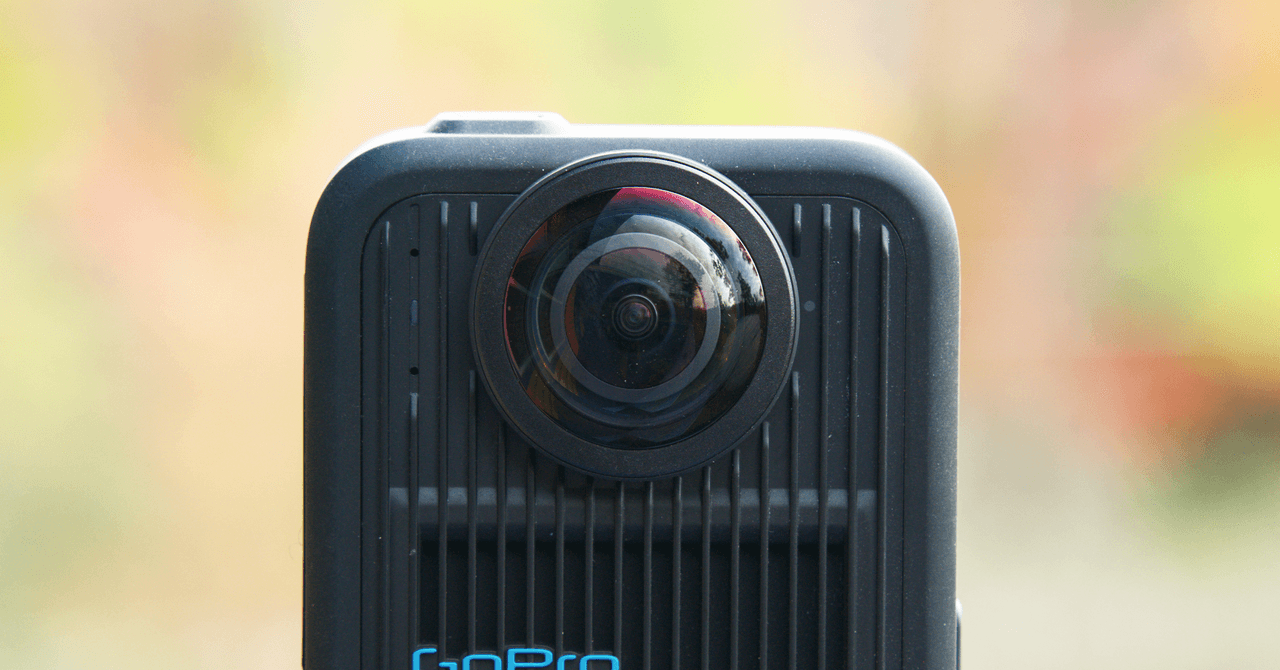
If you’re in the market for a new camera, this holiday season is the time to buy. There are some great Black Friday camera deals available right now, including one on our favorite GoPro, the GoPro Hero 13 Black. There are plenty of other GoPro camera deals, along with some good buys on cameras from Insta360, DJI, Fujifilm, and more.
For more info about action cams, check out our complete guide. Also, be sure to read our guide to the Best GoPros, Best 360 Cameras, Best Instax Cameras, Best Travel Cameras, and Best Mirrorless Cameras. Head to our full roundup for more Black Friday deals.
Updated November 28: We’ve added a new section of mirrorless camera deals, along with a deal on Polaroid’s latest Now camera.
Do You Need a New Camera?
Probably not. Probably what you need to do is spend a lot more time with the one you have, but if buying a new camera makes you feel like maybe you’re getting better at photography, far be it for me to stop you. Hitting too close to home? I feel you. I mean I want a new camera. I want the Sony A7C R, which is an amazing camera. The autofocus is light year’s ahead of my A7R II, the sensor is bigger, the dynamic range is better, and it’s smaller and lighter. What’s not to love? But it isn’t going to instantly make me take better pictures.
To make better images you have to spend time at it. It takes practice, shooting everyday, even if you only have 10 minutes. Walk around the neighborhood and play with different compositions, try shooting in ways you normally don’t. Experiment with different light at different times of the day. Just get out an shoot more. Most of it will be garbage, but you’ll be learning.
If you need a new camera to get you to do that, then carry on, there are some truly great deals to be had right now.
The Best Action Camera Deal
-
Photograph: Scott Gilbertson
-
Photograph: Scott Gilbertson
-
Photograph: Scott Gilbertson
-
Photograph: Scott Gilbertson


GoPro did not release a new model of its Hero action camera this year. Last year’s Hero 13 is still the latest, but it’s on sale for Black Friday anyway. Last year’s GoPro Hero 13 was the first significant change for GoPro’s flagship action camera in many years. The company added an interchangeable lens system, along with Macro, Ultra Wide, and Anamorphic lenses, plus a set of four neutral density filters. The new interchangeable lens system opens up shooting possibilities that simply don’t exist with other action cameras. For some reason, this camera often gets overlooked. It’s just fun to shoot with.
I think the slickest part of the Hero 13’s new lens and filter system is that the Hero 13 Black autodetects which lens is attached and changes the Hero 13’s settings accordingly. This is especially nice for those who don’t want to fiddle with fine-tuning their camera settings every time they change lenses or pop on a neutral density filter. I’ve been using all three lenses for over a year now, and they’re all nice, but the Ultra Wide is my favorite. I mainly use my GoPro to shoot from the handlebars of my bike, so the wider the shot, the better and more immersive the footage becomes, hence my love of the Ultra Wide. The Hero Black ultrawide edition is also on sale.
Everything that made GoPro a household name is here as well, with industry-leading hypersmooth stabilization, all kinds of helpful shooting modes, and support for GoPro’s Quik app. Also note that if you buy through gopro.com, the company includes a year’s worth of GoPro Premium, the company’s subscription cloud storage service. If the GoPro has a shortcoming, it’s the battery life. It’s OK, but not great. I suggest grabbing an extra battery.
So, given that there was no Hero 14 this year, how future-proof is the Hero 13? I would say very future-proof. I will admit, the newly announced DJI Action 6, which has a variable aperture lens, is very interesting, but it’s still an automated aperture rather than giving you a full aperture priority mode. I’m also a little leery of DJI products, given the ban on imports that starts December 23, 2025. The Insta360 Ace Pro 2 below is also on sale, and I do love that camera as well, especially with the new accessories that turn it into something more like a point-and-shoot. But in the end, when I head out the door for a ride, or a paddle, or, right now, some snowshoeing, the action camera I reach for remains the GoPro Hero 13 Black.
Other Great Action Camera Deals
Deals on Action Camera Accessories
The Best 360 Camera Deal
-
Photograph: Scott Gilbertson
-
Photograph: Scott Gilbertson


The GoPro Max 2 is the best 360 camera you can buy, and it’s currently $100 off. The dual 14 mm (35 mm equivalent) lenses of the Max 2 each record to a 1/2.3-inch chip, the largest available in a 360 camera. This gives what GoPro calls “True 8K” video, by which the company means that the actual recorded area of the sensor is 8K, whereas other 360 cameras have an 8K sensor, but only record about 6K or 7K worth of that sensor as the actual image. The short story is that the Max 2’s video is sharper and clearer. Couple this with support for 10-bit color in Log files, and you have footage that the competition just can’t match.
Other 360 Camera Deals
A Fun, Screen-Free Digital Camera
-Reviewer-Photo-SOURCE-Nena-Farrell.jpg)
Photograph: Nena Farrell
What if there were a film camera that captured digital images? That’s what the Camp Snap camera is, the screen-free aspect means that, like film, you don’t know how your images look until later— you can keep photographing without getting pulled out of the moment as much. The Camp Snap can hold up to 2,000 photos on the preinstalled memory card, and it comes with a USB-C cable to download the photos onto your computer. This one is a fun gift to give too.
The Best Deals on Instant Cameras

Photograph: B&H Photo
Fujifilm’s Instax Mini 99 is the best Instax camera for those who love manual controls and creative effects. The Mini 99 offers some manual focus and exposure controls, as well as some fun color effects, like the ability to simulate light leaks just like those thrift store cameras collecting dust on your shelf. There are two dials on top of the Mini 99. One acts like an exposure compensation dial, allowing you to adjust exposure value (EV) two stops brighter and two stops darker. I found the L (Lighten) and L+ useful when shooting against snow, which has a tendency to overwhelm small sensors like this one. It’s also good for strongly backlit scenes, though those are still not Instax’s strong suit. The Mini 99 has a 60-mm lens made of plastic. It works out to roughly the same field of view as a 35-mm lens in 35-mm format (or if you prefer, somewhere between 1x and 2x on your iPhone). The shutter is fixed at f/12.7, which means you’ll be relying on the flash in all but bright, sunny, outdoor shots. That said, unlike quite a few other Instax models, with the Mini 99 you can turn off the flash for those well-lit shots, and that means far fewer washed-out images.

Courtesy of Polaroid
Polaroid’s standard Now camera is close enough to the classic Polaroid that you probably won’t notice the difference. The Gen 3 version is an incremental update of the Gen 2, bringing better auto focus and improved flash. Otherwise, it’s the same basic design we love, with a nice chunky body and easy-to-find buttons.
Other Instant Camera Deals
Deals on Mirrorless Cameras

Photograph: Scott Gilbertson
Nikon
Zf Mirrorless Camera
The Nikon Zf is the camera I would buy if I were in the market for a new camera. It’s all about the knobs and dials. Every setting you need to make an image is accessible on a dial or knob: ISO, aperture, shutter speed, and exposure compensation. There’s also a switch to change shooting modes and another to change to black-and-white mode or video mode. Pair that with a great 24-MP sensor and reasonably fast autofocus speeds, and you have a fantastic, reasonably priced camera. The best deal of the bunch here is Adorama’s lens bundle, which comes with a charger, memory card, lens filters, and cleaning kit.
Other Mirrorless Camera Deals
The Best Deals on Our Favorite Photo Printing Services
A photograph isn’t a photograph until you print it. Strong words, but I’ll stand by them. Luckily, there are some great deals right now that will let you print your images without spending a fortune.

Photograph: Mpix
Our favorite place to print photos is holding a 30 percent off sale on its print services. Mpix makes high-quality prints at a reasonable price, even when it’s full price, which makes this a great deal. Mpix prints on Kodak Endura paper and offers a variety of paper options. I tested the E-surface, which renders rich, deep blacks and true-to-life colors. It holds up well over time; the images we printed in 2013 look exactly like they did when we got them. We also like Mpix’s books and calendars.
If you need to print gifts for your family, Shutterfly is having a sitewide 50 percent off sale. We’re fans of Shutterfly’s book printing service, which had the best results so far in our testing of photo printing services. We also like the calendars. The printing is good enough, especially for the price, and shipping is generally speedy.
The highest-quality prints in our testing came from Adorama’s Printique service. It would be the top pick in our print services guide if it were a bit cheaper, which, with this deal, it is. You can choose from a range of papers, and they’re listed by their actual names, like Kodak Endura or Fujifilm Matte. I also like the option to print the date and file name on the back of each image.
Power up with unlimited access to WIRED. Get best-in-class reporting and exclusive subscriber content that’s too important to ignore. Subscribe Today.












A national housing shortage is straining finances and communities across the United States. In Massachusetts, at least 222,000 homes will have to be built in the next 10 years to meet the population’s needs. At the same time, there are numerous challenges in traditional construction. There’s a shortage of skilled construction workers. Most projects involve multiple contractors and subcontractors, adding complexity and lag time. And the construction process, as well as the buildings themselves, can be a major source of emissions that contribute to climate change.
Reframe Systems, co-founded by Vikas Enti SM ’20, uses robotics, software, and high-performance materials to address these problems. Founded in 2022, the company deploys microfactories that bring housing fabrication and production closer to the regions where the homes are needed. The first homes designed and manufactured in Reframe’s first microfactory have been fully built in Arlington and Somerville, Massachusetts.
Enti’s experiences in MIT System Design and Management (SDM) shaped the company from its start. “Learning how to navigate the system and finding the optimal value for each stakeholder has been a key part of the business strategy,” he says, “and that’s rooted in what I learned at SDM.”
Better tools for system-level problems
Enti applied to SDM’s master of science in engineering and management while he was working at Kiva Systems, overseeing its acquisition by Amazon and transformation into Amazon Robotics. He found that the SDM program’s fundamentals of systems engineering, system architecture, and project management provided him with the tools he needed to address system-level problems in his work.
While he was at MIT, Enti also served as an associate director for the MIT $100K Entrepreneurship Competition, which offers students and researchers mentorship, feedback, and potential funding for their startup ideas. He realized that “there isn’t a single formula for how businesses start, or how long it takes to get them started,” he says, which helped shape his plans to start his own business.
Enti took a leave of absence from MIT to oversee the expansion of Amazon Robotics in Europe. He returned and completed his degree in 2020, writing his thesis on developing technology that could mitigate falls for elderly people. This instinct to use his education for a good cause resurfaced when his daughters were born. He wanted his future business to address a real-world problem and have a social impact, while also reducing carbon emissions.
Growing housing, shrinking emissions
Enti concluded that housing, with immediate real-world impact and a significant share of global carbon emissions, was the right problem to work on. He reached out to his colleagues Aaron Small and Felipe Polido from Amazon Robotics to share his idea for advanced, low-cost factories that could be deployed quickly and close to where they were needed. The two joined him as co-founders.
Currently, the microfactory in Andover, Massachusetts, produces structural panels, with robotics completing wall and ceiling framing and people completing the rest of the work, including wiring and plumbing. Eventually, Reframe hopes to automate more of the building process through further use of robotics. The modular construction process allows for reduced waste and disruption on the eventual home site. And the finished homes are designed to be energy-efficient and ready for solar panel installation. The company is set to start work soon on a group of homes in Devens, Massachusetts.
In addition to the Andover location, Reframe is setting up in southern California to help rebuild homes that were destroyed in the area’s January 2025 wildfires. The company’s software-assisted design process and the adjustability of the microfactories allows them to meet local zoning and building codes and align with the local architectural aesthetic. This means that in Somerville, Reframe’s completed buildings look like modernized versions of the neighboring three-story buildings, known locally as “triple-deckers.” On the other side of the country, Reframe’s design offerings include Spanish-style and craftsman homes.
“Housing is a complex systems problem,” Enti says, explaining the impact SDM has had on his work at Reframe. The methods and tools taught in the integrated core class EM.412 (Foundations of System Design and Management) help him tackle systems-level problems and take the needs of multiple stakeholders into account. The Reframe team used technology roadmapping as they devised their overall business plan, inspired by the work of Olivier de Weck, associate head of the MIT Department of Aeronautics and Astronautics. And lectures on project management from Bryan Moser, SDM’s academic director, remain relevant.
“Embracing the fact that this is a systems problem, and learning how to navigate the system and the stakeholders to make sure we’re finding the optimal value, has been a key part of the business strategy,” Enti says.
Reframe Systems is set to continue learning through iteration as they plan to expand their network of microfactories. The company remains committed to the core vision of sustainably meeting the country’s need for more housing. “I’m grateful we get to do this,” Enti says. “Once you strip away all the robotics, the advanced algorithms, and the factories, these are high-quality, healthy homes that families get to live in and grow.”
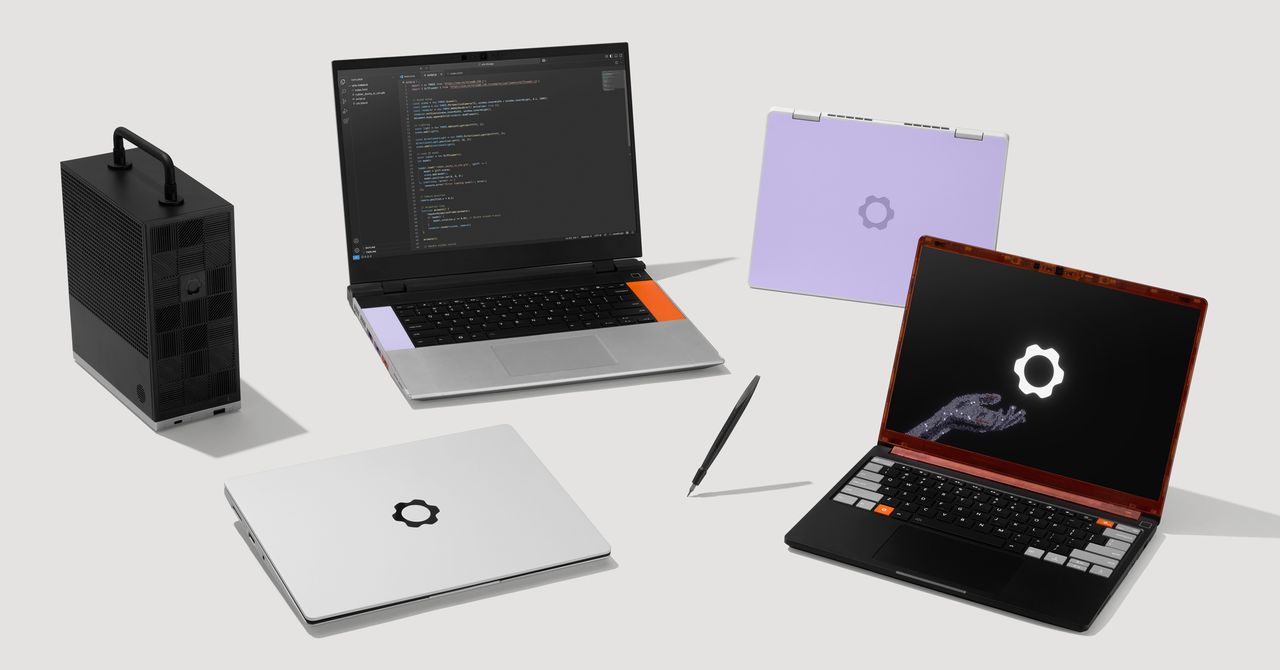
Framework, the company that makes laptops designed for optimal repairability, announced a new version of its main product, a 13-inch screen laptop. It’s called the Framework Laptop 13 Pro, and it has far better battery life, a touchscreen, a haptic touchpad, and is fitted with Intel processors.
At an event in San Francisco today, Framework CEO Nirav Patel showed off the company’s new tech, opening with a joke about making Framework AI—something the company is very much not doing. Framework’s whole thing, after all, is aiming to give users control over the physical tech they use.
“That industry is fighting for you to own nothing, and they own everything,” Patel said about the AI industry. “We’re fighting for a future where you can own everything and be free.”
Framework used the event to detail other updates coming to its 16-inch laptop. It also showed off previews of an official developer kit and a wireless keyboard for controlling your rig from the couch.
Framework 13 Pro
As the name implies, the 13 Pro is a step up from the company’s last version, the Framework 13. It’s also pricier, starting at $1,199 for a DIY Edition that requires assembling the computer yourself. Pre-built units start at $1,499 but can be upgraded with more features. Framework says it will start shipping the 13 Pro in June.
Framework’s signature move for its products is the ability to take the thing apart. The 13 Pro is made with that ethos in mind, so its parts can be easily swapped out, upgraded, or replaced. Four Thunderbolt 4 interfaces let you pick which ports (USB-C, HDMI, etc.) you want and then choose where to place them. Framework says it planned the laptop with cross-generation compatibility in mind, so current Framebook 13 laptop owners will be able to use new 13 Pro parts like the mainboard, display, and battery, and put them into their existing machine.
The big changes in the guts of the 13 Pro come from Framework’s shift away from using an AMD processor to Intel’s Core Ultra Series 3 processors, which Framework described in its press release as “just insanely efficient.” That efficiency, along with a bigger battery, translates to more than 20 hours of battery life while streaming 4K Netflix videos, at least that’s the claim. That’s almost 12 hours longer than the Framework 13.

Courtesy of Framework

Courtesy of Framework

OpenAI launched a new image generation AI model on Tuesday, dubbed ChatGPT Images 2.0. This model can generate more than one image from a single prompt, like an entire study booklet, as well as output text, including in non-English languages, like Chinese and Hindi. This release is available globally for ChatGPT and Codex users, with a more powerful version available for paying subscribers.
When any major AI company releases a new image model, it can revive interest and boost usage, especially if social media users adopt a meme-able trend, transforming images of themselves. Last year, Google’s launch of the Nano Banana model was a major moment for the company, especially when users started posting hyperrealistic figurines of themselves online. Earlier this year, ChatGPT Images made waves on social media as users shared AI-generated caricatures.
What’s Different?
Since the new model can tap into ChatGPT’s “reasoning” capabilities, Images 2.0 can search the internet for recent information and generate more than one image at a time. In essence, the bot can use additional steps to output more thorough generations from a single prompt. Images 2.0 also has a more recent knowledge cutoff date: December 2025.
This also means that outputs from the new model are more granular. For example, I generated an infographic with San Francisco’s weather forecast for the next day, as well as activities worth doing. The image ChatGPT generated included accurate weather details for the rainy day, along with accurate-looking drawings of the Ferry Building, Castro Theater, Painted Ladies houses, and Transamerica Pyramid.
Additionally, Images 2.0 is more customizable for users who want unique aspect ratios for image outputs. The new model can generate images, ranging from 3:1 wide to 1:3 tall, and users can adjust the image’s size as part of their prompt to the AI tool.
First Impressions
After a few hours of generating images with the new model, I was generally impressed with the text rendering capabilities, in English at least. Not that long ago, image outputs featuring text, from any of the major models, often included numerous malformed characters or words with errant extra letters. ChatGPT struggled to label images accurately two years prior, so the cleaner, more complex outputs from Images 2.0 are a sign of continued improvement. Google has also focused on improving image outputs featuring text in its recent iterations of Nano Banana.



Trump repeats call for Congress to rein in college sports

Reese Witherspoon breaks silence after AI support controversy

Duke lands John Blackwell, top guard in transfer portal

-

 Fashion6 days ago
France’s LVMH Q1 revenue falls 6%, shows resilience amid Iran war
-

 Sports1 week ago
The case for Man United’s Fernandes as Premier League’s best
-

 Entertainment1 week ago
Palace left in shock as Prince William cancels grand ceremony
-
 Business1 week ago
UK could adopt EU single market rules under new legislation
-

 Entertainment6 days ago
Is Claude down? Here’s why users are seeing errors
-

 Fashion1 week ago
Energy emerges as biggest cost driver in textile margins
-
 Business1 week ago
Delta Air Lines unveils first new Delta One suite in premium cabin arms race
-

 Fashion1 week ago
Asia claims largest share of markets on Kearney FDI Confidence Index