

Tech
The Information Networks That Connect Venezuelans in Uncertain Times

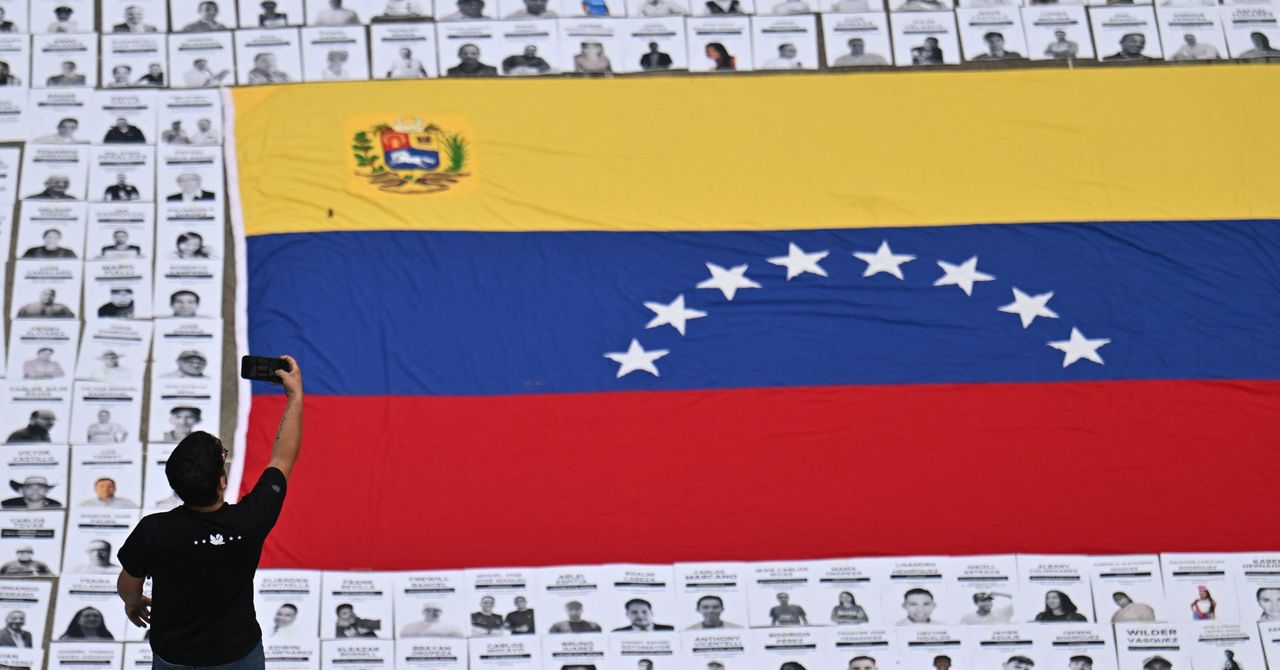
In the early morning hours of Saturday, January 3, the roar of bombs dropping from the sky announced the US military attack on Venezuela, waking the sleeping residents of La Carlota, in Caracas, a neighborhood adjacent to the air base that was a target of Operation Absolute Resolve.
Marina G.’s first thought, as the floors, walls, and windows of her second-story apartment shook, was that it was an earthquake. Her cat scrambled and hid for hours, while the neighbors’ dogs began to bark incessantly. But the persistence of the strange hum of engines (military aircraft flying low over the city, she would later learn), as well as seeing a group of cadets in T-shirts and shorts fleeing the Army headquarters, were signs that this was not an earthquake.
Marina couldn’t rely on the typical media outlets that are easily accessible in most other countries to learn more. She didn’t bother to turn on the television or radio in search of information about the attacks that began simultaneously at 11 military installations in Caracas and three other states. The government-run television station Venezolana de Televisión (VTV) was broadcasting a report on the minister of culture’s visit to Russia as the attack was taking place. Her cell phone, however, still had a signal and she began to receive dozens of messages on WhatsApp: “They’re bombing Caracas!”
During the darkest moments of that confusing morning, there was no team of independent reporters able to go out and record what was happening on the streets. After years of harassment, censorship, and imprisonment of journalists by the government, there were instead only empty newsrooms, decimated resources, and a complete lack of security, which made it impossible to keep the public informed as the crisis was unfolding.
The fears felt by journalists were shared by many Venezuelans: the fears of arbitrary detention, of being imprisoned without cause, tortured, and extorted. These are fears that have led citizens in Venezuela to adopt some digital safeguards in order to survive. They have learned to restrict chats, move sensitive material to hidden folders, and automatically delete any “compromising” messages. Whenever possible, they leave their cell phones at home. If they have to take their phones with them, then before going out, they delete all photos, stickers, and memes that could possibly be interpreted as subversive. This state of collective paranoia has also, however, allowed Venezuelans to stay informed and not succumb to the dictatorship.
It is, largely, ordinary citizens who have created this information network. Soon after the bombs fell on January 3, the first videos began to circulate, recorded by people who had witnessed the explosions from their windows and balconies, or from the beach, where some were still celebrating the New Year. Even hikers camping at the summit of Cerro Ávila, in Waraira Repano National Park, managed to capture panoramic shots of the bombs exploding over the Caracas Valley. Shortly afterwards, international networks confirmed the news.
In the interior of the country, connectivity is even more complicated. In San Rafael de Mucuchíes, a peaceful village in the Andes in the state of Mérida, a group of hikers tried to keep up with the frantic pace of events with intermittent internet access at 10,300 feet above sea level. They learned the news from telephone calls via operators such as Movistar (Telefónica) and Digitel, not from the instant messaging app WhatsApp. They also overcame the challenges of the information desert they were in by using a portable Starlink satellite internet antenna that one of the travelers had in their luggage. During the crisis, the service developed by SpaceX was provided free to Venezuelans.










After three people died on a cruise ship struck by a hantavirus, authorities are actively tracking down 29 people who had left the ship. They’re trying to trace the spread of the virus. It’s a long, arduous, global process to find and notify people who might be at risk of infection.
Hey, wasn’t there supposed to be an app for that?
Contact-tracing apps were a global effort starting in 2020 during the Covid-19 pandemic. Enabled by phone companies like Apple and Google, contact tracing was designed to use Bluetooth connections to detect when people had come in contact with someone who had or would later test positive for Covid and report as much. It didn’t do much to solve the spread of the pandemic, but tracking the virus became more effective at least. The same process wouldn’t go well for the hantavirus problem.
“There is no use of apps for this hantavirus outbreak,” Emily Gurley, an epidemiologist at Johns Hopkins University, wrote in an email response to WIRED. “The number of cases are small, and it’s important to trace all contacts exactly to stop transmission.”
On a smaller scale of infection like this, officials have to start at the source (an infected individual), then go person-by-person, confirming where they went and who they might have come into contact with. Data collected by apps from a broad swath of devices would not be anywhere close to accurate enough to give a good idea of where the virus might have hitchhiked to next.
Contact tracing on a wider scale, like, say, a global pandemic, is less about tracking the individual infections and more about understanding what parts of the population might be affected, giving people the opportunity to self-quarantine after exposure. But that depends on how people choose to respond, and how the technology is utilized by public emergency systems. During the Covid pandemic, contact-tracing via apps tended to work better in more carefully managed European countries, but did not slow the spread in the US.
Making devices accessible to that kind of proximity information has also brought all sorts of concerns about privacy, given that the technology would require always-on access to work properly. Contact tracing also struggled to maintain accuracy, and in some cases could be providing false negatives or positives that don’t help further real information about the spread of the virus.
Especially in the case of something like the Hantavirus, where every person on that cruise ship can theoretically be directly tracked and contacted, it’s better to do that process the hard way.
“During small but highly fatal outbreaks, more precision is required,” Gurley wrote.
There’s another type of digital scam to be aware of, as per the BBC. It’s called “reservation hijacking.”
The name gives you a clue as to how it works. Essentially, scammers use details about a booking you’ve placed (perhaps with a hotel or airline) to trick you into sending money somewhere you shouldn’t.
While this type of scam isn’t brand new, a recent data breach at Booking.com has raised the risk of people being caught out. With data about you and your reservation, a far more convincing setup can be put in place—why wouldn’t you believe that someone purporting to be an employee from a spa you’ve got a reservation with is telling the truth about who they are, especially if they know the dates of your trip, your phone number, and your email address?
According to Booking.com, no financial information was exposed in the April 2026 hack. However, names, email addresses, phone numbers, and booking details have been leaked. The travel portal says affected customers have been emailed about the heightened risk of scams, so that’s the first thing to check for when it comes to staying safe.
Minimizing the risk of getting scammed by a reservation hijack involves many of the same security precautions you may already be following, and just being aware that this is a way you might be targeted will make a difference.
How Reservation Hijacks Work
We’ve already outlined the basics of a reservation hijack, but it can take several forms. As with other types of scams, it tends to evolve over time. The basic premise is that someone will get in touch with you claiming to be from a place you have a reservation with, whether it’s a car rental company or a hotel.
The scammers will try to pull together as much information as they can on you and your booking. Sometimes they’ll target employees of the place you’ve got the reservation with in order to get access to their systems, and other times they may take advantage of a wider data breach (as with the recent Booking.com hack).
They might also get information through other means. Maybe they’ve somehow got access to your email, or to some of your social media posts (where you’ve shared your next vacation destination and a countdown of how many days are left to go). Don’t be caught out if you find yourself speaking to someone who knows a lot about your travel plans.

Unlike the other glasses I tested, Even doesn’t sell a subscription plan; everything’s included out of the box.
The only downside I could find with the G2 is that it is largely devoid of offline features, so the glasses have to be connected to the internet to do much of anything. Considering the G2’s capabilities, it’s a trade-off I am more than happy to make.
Other Captioning Glasses I Tested
There are plenty of capable captioning eyeglasses on the market, but they are surprisingly similar in both looks and features. While many are quite capable, none had the combination of power and affordability that I got with Even’s G2. Here’s a rundown of everything else I tested.
-
Photograph: Christopher Null
-
Photograph: Christopher Null
-
Photograph: Christopher Null


Leion’s Hey 2 is the price leader in this market, and even its prescription lenses ($90 to $299) are pretty affordable. The hardware, however, is heavy: 50 grams without lenses, 60 grams with them. A full charge gets you six to eight hours of operation; the case adds juice for up to 12 recharges.
I like the Leion interface, which lays out caption, translation, “free talk” (two-way translation), and a teleprompter feature on its clean app. You get access to nine languages; using Pro minutes expands that to 143. Leion sells its premium plan by the minute, not the month, so you need to remember to toggle this mode off when you don’t need it. Pricing is $10 for 120 minutes, $50 for 1,200 minutes, and $200 for 6,000 minutes. There’s no offline use supported, and I often struggled to get AI summaries to show up in English instead of Chinese (regardless of the recorded language).
-
Photograph: Christopher Null
-
Photograph: Christopher Null


You’re not seeing double: XRAI and Leion use the same manufacturer for their hardware, and the glasses weigh the same. The battery spec is also similar, with up to eight hours on the frames and another 96 hours when recharging with the case. XRAI claims its display is significantly brighter than competitors’, but I didn’t see much of a difference in day-to-day use.
The features and user experience are roughly the same, though Leion’s teleprompter feature isn’t implemented in XRAI’s app, and it doesn’t offer AI summaries of conversations. I also didn’t find XRAI’s app as user-friendly as Leion’s version, particularly when trying to switch among the admittedly exhaustive 300 language options. Only 20 of these are included without ponying up for a Pro subscription, which is sold both by the month and minute: $20/month gets you a max of 600 upgraded transcription minutes and 300 translation minutes; $40/month gets you 1,800 and 1,200 minutes, respectively. On the plus side, XRAI does have a rudimentary offline mode that works better than most. For prescription lenses, add $140 to $170.
-
Photograph: Christopher Null
-
Photograph: Christopher Null


AirCaps
AirCaps Smart Glasses
AirCaps does not make its own prescription lenses. Instead, you must purchase a pair of $39 “lens holders” and take them to an optician if you want prescription inserts. I was unable to test these with prescription lenses and ultimately had to try them out over my regular glasses, which worked well enough for short-term testing. Frames weigh a hefty 53 grams without add-on lenses; the company couldn’t tell me how much extra weight prescription lenses would add to that, but it’s safe to say these are the bulkiest and heaviest captioning glasses on the market. Despite the weight, they only carry two to four hours of battery life, with 10 or so recharges packed into the comically large case. Another option is to clip one of AirCaps’ rechargeable 13-gram Power Capsules ($79 for two) to one of the arms, which can provide 12 to 18 extra hours of juice.
The AirCaps feature list and interface make it perhaps the simplest of all these devices, with just a single button to start and stop recording. Transcriptions and translations are available for free in nine languages. For $20/month, you can add the Pro package, which offers better accuracy, access to more than 60 languages, and the option to generate AI summaries on demand (though only if recordings are long enough). As a bonus: Five hours of Pro features are free each month. Offline mode works pretty well, too. The only bad news is that these bulky frames just aren’t comfortable enough for long-term wear.
-
Photograph: Christopher Null
-
Photograph: Christopher Null


The most expensive option on the market (up to $1,399 with prescription lenses!) weighs a relatively svelte 40 grams (52 grams with lenses) and offers about four hours of battery life. There’s no charging case; the glasses must be charged directly using the included USB-connected dongle.
The glasses are extremely simple, offering transcription and translation features—with support for about 80 languages, which is impressive. I unfortunately found the prescription lenses Captify sent to be the blurriest of the bunch, making the captions comparatively hard to read. And while the device supports offline transcription, performance suffered badly when disconnected from the internet. I couldn’t get translations to work at all when offline. For $15/month, you get better accuracy and speaker differentiation, and access to AI summaries of conversations. Prescription lenses cost between $99 and $600.


Princess Kate shares emotional message on ‘complex motherhood’ for Mother’s Day

Pakistan takes major step with floating solar power project at Keenjhar Lake, Sindh – SUCH TV

Ukraine, Russia trade accusations of violating US-backed ceasefire

-

 Politics7 days ago
Iran weighs US reply delivered via Pakistan as Trump signals opposition to deal terms
-

 Fashion1 week ago
AAFA pushes for swift US House passage of key anti-counterfeiting law
-

 Fashion1 week ago
US’ J.Jill, Inc. appoints Kimberly Wallengren as CMO
-

 Sports1 week ago
Sajid Ali Sadpara summits world’s fifth-highest peak
-

 Fashion1 week ago
US cotton export sales show strong recovery, Upland rise 36%
-
 Tech6 days ago
DHS Demanded Google Surrender Data on Canadian’s Activity, Location Over Anti-ICE Posts
-

 Fashion1 week ago
ICE cotton witnesses sharp rise on weaker dollar, strong exports
-
 Business7 days ago
Heineken to invest £44.5m in hundreds of pubs creating 850 jobs