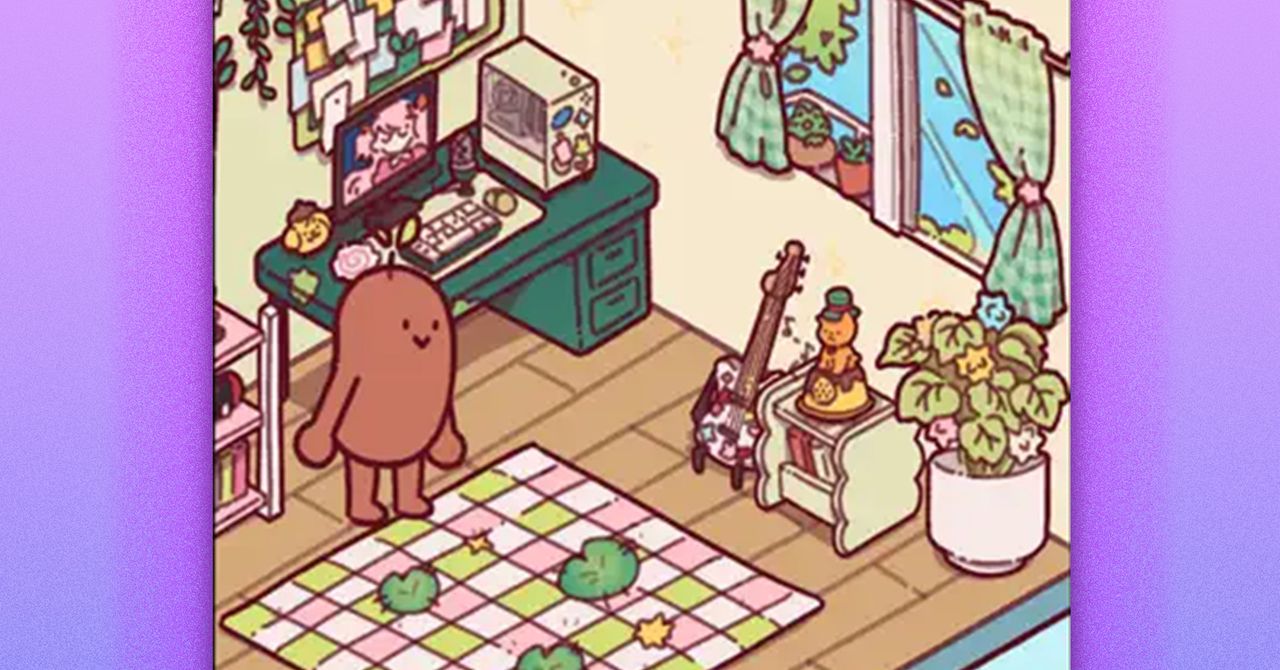
With their back to me, Poe, the name I gave the animated brown bean in the Focus Friend app, is stitching up a little storm that will eventually become socks—if I can leave them alone. Unfortunately, I need to check my texts. I cancel the timer after six minutes, which warns me that Poe’s knitting will unravel and “they’ll be really sad.” Their shoulders slump as their work falls apart and a little bubble appears over their head. “It’s ok, we tried,” they reassure me. It turns out the text I was so desperate to see was spam.
Focus Friend, a productivity timer app designed to keep your off your phone by essentially taking it over to knit, has climbed the mobile charts over the last few days, and as of this writing sits at No. 2 on Google Play and No. 3 on the App Store. The brainchild of developer Bria Sullivan and YouTuber and author Hank Green, it briefly beat out apps like ChatGPT, TikTok and the now infamous Tea.
Focus Friend isn’t the first of its kind, but rather the latest in a growing movement of apps, including Forest, Focus Traveler, Exocus, and Focus Tree, designed to keep users from doomscrolling or dawdling on their phones. Like the Pomodoro method, the time management technique that breaks work into periods of focus and rest, these apps use a timer to encourage users to lock in and tune out everything else. Unlike the traditional, analog Pomodoro, apps have gamified the experience with rewards. For every successful chunk of time I allow the bean to knit uninterrupted, it makes me socks I can then broker for decorations. These go straight into the bean’s living space, a tiny brown room with wood floors that feels woefully empty of any life. I have the power to make the bean’s life better, if only I can keep myself from scrolling.
Sullivan has smartly designed the app in a way that instills a little bit of guilt and a little bit of love for this legume with a Hank Hill ass. (Green, she says, dictated this specific design: “He said the character should be a bean, and it should have a butt crack,” Sullivan says.) Users are asked to name their bean, which wanders around its room making puns (“Beenage Mutant Ninja Turtles,” “Beanage Wasteland”) and wondering in little speech bubbles about “if beans have parents.” Sullivan says it was important to make sure the bean had not only a personality but also a point of view. It gets a little nostalgic about its own past, or wonders about who it is now. “That makes people more emotionally invested in what’s happening,” Sullivan says.
McKenna, a 19-year-old Focus Friend user who declined to give their last name, agrees with that sentiment, crediting the bean’s persona with making the app more “fun” and approachable. Although they’ve found the Pomodoro method and productivity timers to be helpful in general, McKenna says they previously haven’t been able to find one they liked until now. “I have also been using Focus Friend to set a timer for myself in the morning so I am more motivated to be off of my phone and get out of bed,” they add.
Still, even the bean isn’t immune from the siren song of a phone. Sullivan made sure to include them enjoying a little scroll, tongue out, when the app is placed into a break between focus sessions. When we talk on the phone, Sullivan herself is multitasking. She’s busy changing a diaper. “I feel like I use my phone against my will, most of the time,” she says. “I feel kind of addicted to it.” Instead of being present, Sullivan says, she’s always scrolling. “There’s times where I feel like I should be focusing on my baby while she’s, like, eating, or meditating and just being present,” she says, adding that “there’s a lot of guilt that comes with owning a phone and participating in technology these days.”
No doubt looking to find some breathing space after the hubbub of Watches and Wonders last week, TAG Heuer has dropped an update to its 2025 revamped collection of the brand’s iconic plastic-cased 1980s watch, the “Formula 1.”
The five new pieces are called the “pastel collection” by TAG, and all are built on the same solar-powered Formula 1 Solargraph 38 mm that launched in March last year. Two models feature a sandblasted stainless steel case, while the remaining three have cases made from TAG’s proprietary bio-polamide plastic, Polylight.
It’s these Polylight versions that, for WIRED, are the stars of the new mini collection. Coming in pastel blue, beige, and pink, and sporting case-matching rubber straps and bidirectional-rotating Polylight bezels, they reference classic F1 designs that made the line iconic in the first place.
The new Polylight beige.
Courtesy of TAG Heuer
The “pastel green” steel F1 Solargraphs.
Courtesy of TAG Heuer
The stainless steel models have a 3-link sandblasted steel bracelet and either a “pastel green” or “lavender blue” dial with matching Polylight bezels. The dials on both watches also see eight diamonds replace the circular hour markers. TAG says these models add “a touch of refinement for those seeking sophistication,” but considering these “luxury” F1s will retail at $2,800, as opposed to the already punchy $1,950 full Polylight versions, our pick is most definitely the plastic pieces.
Not only do these blue, beige, and pink versions pleasingly hark back to vintage F1 designs—though now 38 mm in size instead of the original 35 mm—but also, just like all F1 Solargraphs, they come equipped with screw-down crowns and casebacks, making for 100 meters of water resistance and ensuring these will serve well as dive and sports watches. My recommendation? Go for the pink, it looks superb on the wrist. The beige is a very close second.
Pretty in pink: The new Polylight pink F1 is limited to 1,110 pieces for the 110th anniversary of the Indy 500.
Now, there’s another class of high-end gaming laptop that focuses more on performance than being thin or portable. The Lenovo Legion 7i Gen 10 is one of my favorites in this class, featuring a beautiful white chassis and glossy OLED display. Unlike some OLED displays, the Legion 7i’s screen can be cranked up to over 1,000 nits of brightness. The result is some really splendid HDR performance that brings games to life. HDR is a powerful way of improving the visuals of your games without a performance cost. The Legion 7i Gen 10 is one of the very best in this regard.
It’s still fairly thin at 0.7 inches thick too, while a lot of the ports are found on the back. It’s the definition of a “clean” gaming laptop. It’s no slouch when it comes to performance either, offering either the RTX 5070 Ti or RTX 5080 for graphics.
Cheap Gaming Laptops That Are Worth It
No gaming laptops worth buying are actually cheap. High-refresh rate displays and discrete graphics will always make them more expensive than standard laptops. But as you get closer to $1,000, there is one laptop I always come back to: the Lenovo LOQ 15. Pronounced “Lock,” this Lenovo subbrand is known for cutting the fluff and focusing on giving gamers the performance they need at an affordable price. No laptop does that better than the LOQ 15. Many laptop manufacturers sell their RTX 5060 configurations for hundreds of dollars more. In reality, if you’re shopping around $1,000, there’s no reason to not buy the LOQ 15. Just do it.
If you do want to save some extra cash, there is another option that is cheaper than the LOQ 15 with a few compromises in key areas. The Acer Nitro V 16 is that laptop, which comes with an RTX 5050. This was as affordable as $600 at one point last year—before prices on laptops have risen due to the ongoing memory shortage—but it remains the only laptop cheaper than the Lenovo LOQ 15 that’s actually worth it. It’s fairly powerful for the RTX 5050, and while the screen is pretty shoddy, it’s not a bad-looking laptop. The one big caveat is that the 135-watt power supply it comes with doesn’t deliver quite enough power to keep it charged in Performance mode. Read more about this issue in my review, as it’s important to know about if you’re planning to buy it.
There are other cheap gaming laptops out there I’ve tested, such as the MSI Cyborg A15, but either the Acer Nitro V 16 or Lenovo LOQ 15 are better, cheaper options. You will also find lots of gaming laptops under $1,000 that use older graphics cards, such as the RTX 4050 or 3050. In general, I’d recommend staying away from these. They’re only one or two generations back, but remember: Nvidia only releases new laptop graphics cards every couple of years. So, an RTX 4050 laptop may be well over two years old already, and an RTX 3050 is over five years old. Not only do you get worse graphics performance, these laptops are much more likely to need to be replaced sooner.
Experimental Stuff
One of the exciting things about the world of gaming laptops right now is the experimentation. While clamshell gaming laptops with a conventional Nvidia GPU are the most standard way to go, there’s a few different ways to take your PC games on the go that stretch the boundaries. You might consider a gaming handheld, for example, like the Steam Deck or Xbox Ally X. These handhelds have their fans, and while you can’t also do your homework on these devices, they’re great on couches, trains, and planes.
The Sans Institute, one of the world’s pre-eminent cyber security certification and training bodies, is to play a key role in the annual Nato Cooperative Cyber Defence Centre of Excellence (CCDCOE) Locked Shields exercise, held in Tallinn, Estonia, through the provision of a fully functional power generation system that participating teams will attempt to defend during the game.
This year marks the 16th running of the Locked Shields live fire security defence exercise, which unites blue teams from across Nato’s 32 member states, as well as other allies and observers.
This year, however, Sans has been entrusted with the task of building a genuine, operational cyber range, as opposed to creating a simulation. It is using real industrial control systems (ICSs) and physical equipment that 16 teams of defenders will have to protect while under live cyber attack, with the decisions they make having an immediate physical impact on a national-scale power grid.
Nato and Sans said the aim of the game is to close the gap between sandboxed, classroom-based cyber security training and real-world operational readiness, which, amid the cyber dimension to the energy crisis precipitated by the war in Iran and spillover from the ongoing war in Ukraine, has never been more important.
“We are putting teams in an environment where cyber decisions directly impact physical operations,” said Felix Schallock, who leads the initiative at the Sans Institute. “If you lose visibility, if you lose control, the power generation can be affected. That’s the reality operators face every day. That’s what we’re training for.”
Nato CCDCOE director Tõnis Saar added: “Locked Shields is a technically advanced exercise that challenges participants to defend the critical infrastructure systems modern societies depend on. As much of this critical infrastructure is owned and operated by the private sector, strong public-private collaboration is essential. Industry partners such as Sans Institute play a vital role in making the exercise as realistic and impactful as possible.”
Hybrid architecture
The Sans Institute’s cyber range comprises close to 70 physical ICS devices, with programmable logic controllers (PLCs), human-machine interfaces (HMIs), operator and engineering workstations, 100 virtual machines (VMs) and interconnected systems within the wider CCDCOE environment, all supported by live network infrastructure, the whole forming a hybrid information and operational technology (IT/OT) architecture.
During the exercise, blue teamers will be set the task of defending the “energy provider” while coming under sustained attack from opposing red teams.
The goal is to effectively demonstrate how maintaining a reliable generation system isn’t some metric on a scorecard, but rather the core mission, so success will entail more than just spotting and arresting threats – it will also demand operational discipline, maintaining uninterrupted power generation, preserving comms between IT and OT networks, guaranteeing visibility and control of ICS technology, and avoiding any destabilising disruptions.
The people defending our critical infrastructure deserve training that takes the threat as seriously as they do James Lyne, Sans Institute
Actions will be visible, rippling through the systems in real time, so participants won’t just see alerts, they will see turbines being throttled, breakers being opened or closed, and generation capacity being affected. As such, failure will be immediate and visible – missteps will degrade system performance, disrupt or halt power generation, or simulate national-level consequences.
Tim Conway, Sans Institute fellow and ICS curriculum lead, explained: “We’re showing teams how to defend infrastructure that can’t simply be rebooted or patched on the fly. You have to think like an operator, not just a defender. That mindset shift is what makes this environment so powerful.”
Sans Institute CEO James Lyne expressed great pride in what the Sans team has built for Locked Shields this year. “The scenarios these critical initiatives prepare for are playing out in the world – national espionage, cyber integrated to kinetic attacks and warfare, and retaliation attacks,” he said.
“Throw in AI or machine speed attackers and the need for defenders to adapt, and you have the most disruptive period in cyber security in 20 years. We are privileged to help our allies be ready and continuously improving to secure the future. The people defending our critical infrastructure deserve training that takes the threat as seriously as they do,” he added.
Schallock said the exercise was about preparing teams for protecting the systems that matter most. “Cyber security training must reflect the environment defenders are protecting. We’re not just teaching cyber security, we’re showing how to defend a nation’s infrastructure when it counts.”

























 Fashion5 days ago
 Sports1 week ago
 Entertainment1 week ago
 Entertainment6 days ago
 Fashion1 week ago

 Fashion1 week ago