

Tech
Underwear Is Emergency Gear! How to Prep for This Weekend’s Extreme Winter Weather

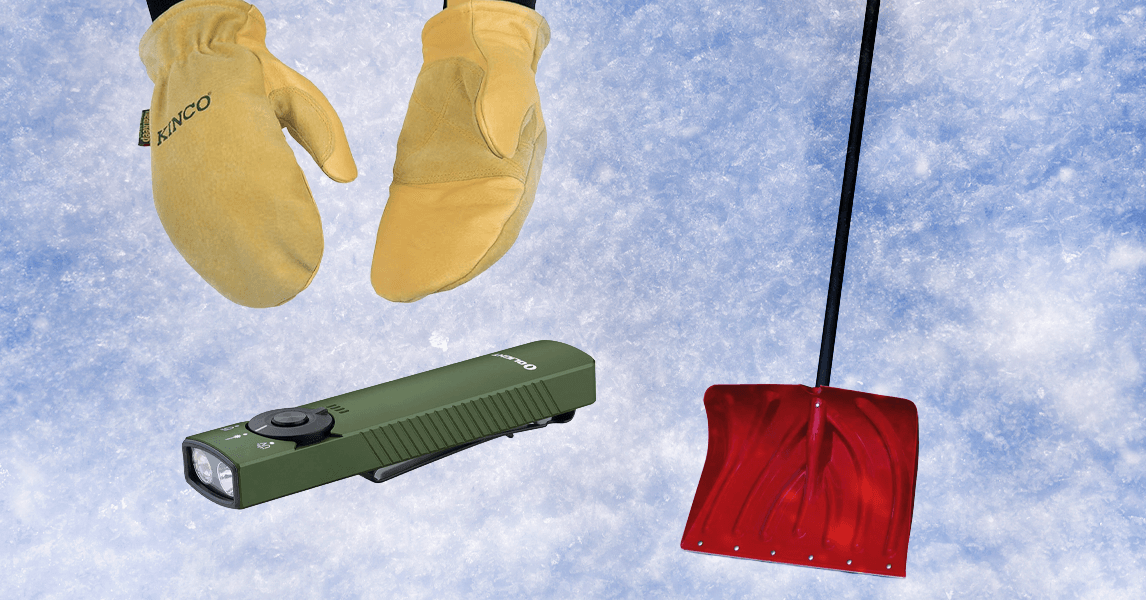
The Winter storm has no name. But a storm is coming, An extreme winter weather system is expected to move eastward from New Mexico to Georgia and Maine beginning Friday, and affect anywhere from a third to half the country’s population by the end of the weekend. This will likely bring snow, ice accumulation, and biting cold to parts of the country unaccustomed to harsh winter weather.
The best thing to do is bunker in. But doing so requires preparation. Extreme winter weather can cause a nest of difficulties that combine into a crisis, especially if you live in an area without infrastructure and experience handling a foot of snow and single-digit temperatures. Ice buildup and high winds, and the high energy use that comes with extreme cold, cause power outages that disable the electric home heating systems commonly used in places with normally mild weather. Roads may be impassable for days in cities without a fleet of plows.
You’ll want to be prepared to shelter in place until travel is safe, with warm clothing and blankets, and plenty of water and nonperishable food. Ideally, you won’t have to leave your house or even look at your car until the acute crisis is past. WIRED offers a broader guide to home emergency preparedness, which we created in consultation with Columbia University’s National Center for Disaster Preparedness.
But winter storms bring specific challenges and needs. I’ve spent months as a reporter piecing together the many small tragedies that led to 41 deaths during a historic 2022 blizzard in Buffalo, New York, where one of the most common causes of death was simply being outside at all. I’ve also witnessed the mix of overconfidence and underpreparedness that leads to casual mayhem when a mere inch of snow and ice befalls my hometown of Portland, Oregon, where snow is rare.
I consulted National Weather Service preparedness lead Charlie Woodrum and our team of product testers for advice on how to prepare for extreme winter weather. “You have to think in that mindset of, ‘We could have power out,’” Woodrum said. “We could lose it for a couple days, or up to even a week, and we also could lose water if pipes freeze or water mains break. You have to plan for both power outages and for the loss of water going into these events.”
Here’s how to stay warm if a power outage hits during extreme winter weather, and the essential items you’ll need—and definitely don’t need—ahead of a winter storm.
What You Need: Drinkable Water or Water Purifiers
In any emergency, securing potable water is always among the first priorities. Humans don’t live long without it. One of the most common risks during an extreme winter storm is that water pipes will freeze or break, disrupting your supply of fresh water. To stop your home’s pipes from freezing, keep your taps running at a slight drip. In an interview last year, Jonathan Sury, a senior staff associate at Columbia University’s National Center for Disaster Preparedness, cited the standard advice to keep a gallon of water per person per day, for personal hydration and food prep. Sury keeps a week’s supply of water at the ready, which can be purified with simple household bleach in emergency situations. (If you go this route, follow the Environmental Protection Agency’s advice on dosing.)
But ideally, you have a water purification kit or a good water filter on hand so you are able to purify water that’s been sitting a while. I like the flexibility of filtered water bottles like the Clearly Filtered stainless steel bottle, which can filter any liquid as you suck through it. (You may need to use extra suction, but Clearly’s bottle filters a much broader array of potentially harmful substances than most similar filters.) Woodrum at the National Weather Service notes that you can also fill a bathtub with usable water in advance of a storm, or fill up jugs or buckets.
What You Should Not Do: Drink Unfiltered Snow
Woodrum cautioned against trusting that snow is a source of clean water, even if you’ve gathered it directly from the sky. “Just like any other precipitation, like rain, there’s chemicals and pollution in the atmosphere that make snow unsafe to melt and drink,” he said. Ground snow is, needless to say, probably even dirtier.
That said, as a last resort, you can melt snow that looks mostly clean and then purify it. Woodrum referred us to an advisory from the Louisiana Department of Health, issued during a rare winter storm there, that advised boiling snow if possible. Otherwise, it’s possible to melt snow in the sun by placing it in a ziplock bag. From there, it can be purified. (Your purification drops won’t work on frozen snow or slushy water. Melt it first.)
What You Need: A Good Base Layer
Your best emergency gear for staying warm is warm clothing, whether great slippers or a classic down puffer jacket. But in truly cold weather, warmth starts with a good base layer. We have a whole guide to the best base layers, which is almost exclusively wool. There are a few reasons you want to have wool long underwear in an emergency. First, obviously, it’s warm when it needs to be—wool is exceptionally good at thermoregulation—and dressing in layers is always the best way to stay warm because heat gets trapped in the space between each garment.
But the other reason you want wool in the event of an emergency is that it can be worn for days (even a week) without getting stinky from sweat, because its proteins naturally neutralize the bacteria that make your clothes smell. If the power is out or your water main bursts and you can’t run your washing machine, wool will stay relatively fresh for a few days. See also WIRED’s advice on effectively layering clothing.
What You Also Need: Warm Work Mitts
Your biggest risk of frostbite is to your extremities, especially exposed hands. You’ll probably have to do some work outside, such as salting the walk or shoveling out your car. If you already have a favored pair of snow gloves, by all means, just use those. But nothing is as warm as mittens. Kinco mitts, with their flexible index finger, started as gear for chopping wood before being embraced by snowboarders in terrain parks. They offer the best of both worlds: a functional work glove that keeps your tender extremities warm, and will also be just as useful on the ski slopes. These mitts have developed a serious following among serious snow people.
What You Probably Do Not Need: Heated Clothing
Clothing that has built-in electric heat has its place, and WIRED writers have enjoyed its benefits in the past, but if you’re in a situation where power may be tough to come by, you’d be better served using it to charge your cell phone or flashlight.
What You Need: A Good Flashlight or Two

Photograph: Martin Cizmar
Olight
Arkfeld Pro Flashlight
We keep recommending this waterproof Arkfeld Pro to anyone who’ll listen. But WIRED also has a whole guide to the best flashlights and headlamps. Candles are also nice, for steady light that does not require electricity and provides a tiny flame of warmth. To use candles, you’ll need to remember to keep lighters or matches on hand.
What You Need: A Good Power Bank
The more common and practical modern solution to a power outage is lithium-ion power packs. This can be a somewhat volatile technology, so you don’t want to just buy the cheapest ones on Amazon. Among portable power banks and larger-capacity power stations, WIRED testers recommend any of multiple portable devices from Jackery. The smaller 300 model includes solar options and is good for powering small devices. The big 62-pound Explorer 2000 offers enough amperage to boil water, and it can be outfitted with extra batteries.
Where Caution Is Warranted: A Fuel-Based Generator
Note that no power station, not even the 2000-Plus, has enough storage to power even a small space heater for very long, so it’s not a viable heating solution if your home uses electricity for heat. A generator, even a smaller one like a 4,000-watt, gas-powered Westinghouse ($769), is able to power a space heater. But fuel-powered generators like this are not safe to operate indoors, notes NWS preparedness lead Woodrum, nor even in a garage. People can and do die from carbon monoxide buildup from using generators indoors. Generators should be operated 20 feet from an indoor space, if this is possible in your living setup.
A built-in generator is the best and most expensive solution to possible power outages. Keep any fuel-based generators 20 feet from your house, Woodrum told us, in order to avoid carbon monoxide buildup. And pay close attention to safety ratings on any long cords you use to power higher-wattage devices. But unless you need a generator to maintain medical equipment, there’s a good chance you don’t have one.
What You Need: A Portable Jump-Starter
For the most part, don’t drive your car in the snow if you’re not used to driving in the snow. But you still want your car to be available as an option. If you have an older and weaker car battery that still fires up but is losing juice, it may fail when zapped by extreme cold. And in a power outage, the heater in your car may be the only reliable way to get your body temperature back up, even if you don’t need to use it to drive. A portable jump starter is a necessity in cases like this. I’ve been testing jump starters this winter, and WIRED testers have had excellent luck with devices from Noco and Gooloo. (Each will require charging in advance of use.)
Just note two very important safety precautions if you’re going to use your car as a personal heater. Never do so in an enclosed space, such as a home garage. And in true blizzards, make sure your tailpipe is clear, or carbon monoxide will back up into your car. For this reason also, don’t fall asleep in a running car while snow is falling.
What You Probably Do Not Need: An Emergency Ice scraper
I’m not saying I don’t keep a little car ice scraper like this $10 compact scraper from Mallory in my glove box. If you live in cold weather, you likely also have a scraper already because it saves time before your morning commute. But if you’re in a place without regular snow, you probably don’t need an emergency scraper just for this one time you have a snowstorm. If your car is running, so is your car’s heater. It’ll heat the windshield and melt ice. Just wait until your car’s heat has normalized temperatures, and you’re not going to have foggy windows. (But a note, if you need it? Don’t use anything metallic to scrape ice off your rear view or other mirrors. Metal scrapes glass. Use a plastic or silicone spatula.)
What You Might Need: A Good Space Heater
Assuming your power is on (or you’ve got a home generator), you’ll want a good space heater on hand for extreme cold weather that can tax the electrical grid. This’ll let you stay warmer wherever you are in the house, during extreme cold events when heating the whole house up to toasty temps may require a great deal of electricity. City grids can get dodgy.
The Dreo Whole Room Heater is the best compact resistance heater I’ve tested: safe, efficient, and quiet. But during a winter storm, I also like oil-filled radiators like the De’Longhi Dragon because they build up heat and keep radiating warmth even when you’ve turned them off. This makes them excellent for sleeping, so you don’t leave a space heater running while unconscious. Fires can still start in the snow. The fire department can’t reach you easily in the snow.
Where Extreme Caution Is Warranted: Indoor Kerosene Heaters
Kerosene heaters don’t require electricity, which means they work even during a power outage. They’re also more commonly used in some other countries as a form of indoor heat. But US fire and safety authorities are pretty leery about using them indoors, because they suck up oxygen and create carbon monoxide that can build up in unventilated spaces—and, obviously, cracking a window in extreme cold events kind of defeats the purpose of using a heater. This makes them a last resort, when it comes to keeping warm. As an additional caution, go outside to pour fuel into devices like this, and be sure not to store kerosene canisters indoors.
What You Need: A Shovel. Any Shovel.

Suncast
18-Inch Snow Shovel
This cheap, no-nonsense snow shovel is what WIRED reviews director Martin Cizmar has for the occasional Kansas City snowstorm. And if you live in a winter zone, chances are you’ve got some version of shovel to clear the occasional walk. Rock salt is also an essential winter tool for melting ice. Sand or kitty litter can help your car gain traction if its wheels are spinning in place, as well. But honestly, any version of shovel will do in a pinch, to dig out your car when you need to use it.
What You Do Not Need: A Snow Shovel You’ll Use Only Once
If you live in a latitude that only snows once every three years? You don’t need a specialized snow shovel. Just use a square-edged spade if you have one or whatever shovel is available if you don’t. Stores in warm weather locales are unlikely to have snow shovels in stock anyway, noted the National Weather Service’s Woodrum.
But in general, your best advice in a truly extreme winter storm is decidedly not to spend your time out in the cold shoveling the walk. And if you do decide to spend a lot of time shoveling, make sure you take plenty of breaks and don’t overexert yourself, Woodrum cautioned. One of the sad facts I’ve learned covering winter storms as a reporter is that one of the ways people die or find themselves in acute medical distress is through coronary events that occur while working too hard shoveling snow. In the early hours after a blizzard, emergency medical care is not always accessible or able to reach you. Exercise caution.
What You Might Need: A Cooler

This is a little counterintuitive because when there’s a power outage during a winter storm, you can theoretically put any perishable food you need to keep cold outside where it’s colder than you’d like it to be. The problem is that you don’t want to freeze your gallon of milk and fend off neighborhood raccoons eyeing your fresh fruit. So have a cooler handy, and use it to keep the contents of your fridge chilly but not too chilly (fresh ice available outside!) in a power outage.
What You Also Need: Nonperishable Food Rations

Maruchan
Instant Chicken Ramen (24 Ct.)
FEMA recommends always keeping a few days’ nonperishable food ready at hand. Chances are, you do this already by instinct, whether it’s cereal or granola or a lot of ramen. Canned fish is especially nutritious, noted Columbia University disaster expert Jonathan Sury when I spoke with him in late 2025. So are beans. Cold weather is more forgiving than hot weather when the power’s out, in terms of food that needs freezing or refrigeration. But one way or the other, if a storm’s coming, make sure you’ve got nonperishable food stores you’re able to prepare or eat even without heat.
What You Probably Do Not Need: MREs
If you’re backpacking or riding out the apocalypse, nothing is as durable and lightweight as dehydrated food. But in a winter storm, you’re likely bunkering in. I’m not saying you shouldn’t pick up survival food like those from Oregon-based Mountain House, which offers portable, 3-day emergency meal kits ($70), or a 14-day emergency food kit ($200) with lasagna from Nutrient Survival. I’m just saying it’s expensive, and you probably can just hang out with canned and dry goods, peanut butter, and a big bag of granola for the few days to a week you might be housebound in a storm.
What You Might Need: A Camping Stove

Coleman
2-Burner Propane Camping Stove
As my colleague Adrienne So likes to note, outdoor gear is already emergency gear. In a pinch, if your power is off and you don’t have cooking capability, a camping stove will do. Most emergency experts don’t recommend using gas-fueled equipment indoors, because of the carbon monoxide risk from burning fuel. But unlike fuel-based lamps and heaters, you’re likely to only be using cooking equipment for a limited period of time, and you can also ideally do your cooking in a ventilated garage.
Anyway, WIRED outdoor expert Scott Gilbertson likes a basic two-burner Coleman stove. Pretty much every living generation of my family has used a Coleman just like it on camping trips since before I even formed lasting memories. Note that because these things tend to last a long time, the Coleman models we’ve tested are earlier models than the current one I’ve linked here.For even more compact options and spirit burners, see WIRED’s guide to the best backpacking stoves.
What You Should Not Do: Use a Gas Stove to Heat Your Home
I’ve said it so often in this guide it’s likely tiresome. But, while gas stoves designed for your home are better than equipment designed for outdoor use, they still emit carbon monoxide and other pollutants. And so they’re not a great solution to home heat that involves leaving them on constantly. Aside from the very real fire risk of a pilot light blowing out in an oven door you’ve left open, gas and other pollutants can build up in your home. And a lot of American homes and apartments sadly don’t have a true oven hood that ventilates air to the outside.
What You Might Need: A Log-Splitting Wedge

Estwing
Sure Split 5-Pound Wood-Splitting Wedge
If you are planning to chop wood for a fireplace or a cooking bonfire (it’s one source of heat anyone outside very urban areas should be able to lay their hands on without too much effort), a hammer and a wedge splitter are the easy, low-cost, compact tools we recommend for splitting logs in a pinch.
What You Definitely Do Not Need: An Axe
No one who isn’t very experienced swinging an axe to chop wood should be using one, and that’s extra true when roads are hard to traverse for emergency personnel. It’s way too easy to hurt yourself swinging a big, heavy, sharp object, and that’s not limited to cutting yourself. You might just as easily end up sending a giant splinter airborne.
Additional Helpful Advice

Download Emergency Phone Apps
Before an anticipated major storm, take a moment and download emergency phone apps. As of January 2026, FEMA has an app. But also, your municipal or state government probably also has opt-in emergency push notifications. Opt in. Also check out WIRED’s catalog of personal safety apps, including a subscription service called Rescu that connects you directly to first responders.
A Battery-Powered Radio Is Also Helpful

Radio is still how local authorities will put out emergency information. And so it’s good to have one, for weather updates and updates about local warming stations. Preppers love to recommend a handcrank radio. But for a storm whose impact is likely measured in days, I tend to prefer batteries over hand power.
Power Up Your Devices in Advance
Stock up on batteries. And spend the day before any anticipated storm charging your phones, your power banks and power stations, your jump starters, and anything else that you think you might want to use during a power outage of unknown length.
Gas Up Your Car
Fill up an extra gas can, while you’re at it. You don’t want to drive your car in bad conditions, if it can be avoided. But in the worst-case scenario, with power out and no reliable source of heat, a running car may be your best and fastest way to warm up. Just make sure you do not ever run your car in a closed garage or with a snow-blocked tailpipe: That’s how people die.
Don’t Forget Games and Activities

A constant refrain among emergency experts we consult? Don’t forget how bored you’ll be. Have a great board game, or a good building kit. A small gaming device like the Nintendo Switch 2, plus a power bank like WIRED’s top-pick Nimble, can also be a sanity saver if you’ve got a kid running around.
Power up with unlimited access to WIRED. Get best-in-class reporting and exclusive subscriber content that’s too important to ignore. Subscribe Today.











Wednesday’s episode of the Musk v. Altman trial kicked off on Wednesday with a unique proposition: OpenAI wanted to bring its ass into the courtroom, and lay it bare before the jury. It’s a good thing lady justice wears that blindfold.
A lawyer for Sam Altman’s AI behemoth, Bradley Wilson, approached US district judge Yvonne Gonzalez Rogers and handed her a small gold statue with a white stone base. It depicted the rear end of a donkey—with two legs, a butt, and a tail—and was inscribed with the message, “Never stop being a jackass for safety.”
OpenAI lawyers claim a small group of employees presented the gift to chief futurist Joshua Achiam, who started at the company as an intern in 2017 and now leads its work studying how society is changing in response to AI. Wilson said that Achiam interrupted Elon Musk’s parting speech from OpenAI in 2018 to warn that the billionaire’s desire to develop AGI at Tesla could come at the expense of safety. Wilson added that the trophy commemorates some “strong language” that Musk used toward Achiam in response—allegedly, calling him a jackass.
OpenAI requested to present the physical object during Achiam’s testimony on Wednesday, arguing that it adds to their case. While Musk’s team said the statue was irrelevant, Judge Gonzalez Rogers said she will consider allowing it when it’s referenced to corroborate the story. However, she seemed less than thrilled about accepting it as official evidence, which would put it in the court’s possession. “I don’t want it,” she said.
Representatives for Musk and OpenAI did not immediately respond to a request for comment about the ass.
Musk’s lawsuit accuses OpenAI of effectively stealing a charity, misusing his $38 million in donations to build an $850 billion business. In response, OpenAI has argued that Musk has always cared more about controlling a top-tier AGI lab than funding a nonprofit.
Earlier in the trial, Musk lawyer Steven Molo asked him if he ever called an OpenAI employee a “jackass.” Musk said “it’s possible” he did at some point, but that he didn’t mean for it to be offensive. “Sometimes you have to use language that gets people out of their comfort zone, if we’re going in the wrong direction,” Musk said.
OpenAI has long been proud of its jackass. When The Wall Street Journal asked about the statue in 2023, Altman told them, “You’ve got to have a little fun … This is the stuff that culture gets made out of.”

Anxiety over the 2028 presidential election and the Republican ticket has officially hit the White House.
On Monday night, Trump informally polled guests at a dinner held in the White House’s Rose Garden on their preferred candidate. “Who likes JD Vance? Who likes Marco Rubio?” he said, before suggesting a Vance-Rubio ticket would be a “dream team.”
Trump’s Apprentice-style crowdwork was a moment of levity that masked the fact that over the last few days, White House aides have been confronting the difficult—and still faraway—question of who will be the Republican nominee.
The president has actually done several snap polls in recent weeks, a source familiar with the matter tells WIRED. The results have been notable, they say: When Trump polled donors at Mar-a-Lago, they favored Rubio. But when Trump recently polled a group of law enforcement officers that the White House thinks are perhaps more representative of regular voters, they favored Vance.
Vance remains the presumptive nominee, White House sources tell me, but he has not been taking anything for granted. In fact, the vice president’s top advisers started the week huddled at a retreat to discuss political strategy, the sources said.
He has also taken steps to bolster his political team, which has remained largely the same since his days as a US senator, ahead of what could be a bruising midterms for Republicans as they grapple with the politically toxic fallout of the Iran war and a House GOP spending package that earmarks $1 billion for Trump’s ballroom project, among other issues.
Vance started discussing changes to his team, including the addition of Cliff Sims as his new national security adviser and elevating Will Martin to be his deputy chief of staff, back in January, according to two sources familiar with the matter.
Sims, whose new position was announced yesterday, is widely regarded in Washington as a ruthless political operator who could bolster the vice president through his long experience in Trumpworld and close relationships with a crop of top administration officials.
Chief among them are his ties to CIA director John Ratcliffe—for whom Sims has spent the past year as an external adviser, according to multiple sources familiar with the arrangement. The sources tell me they expect Vance and Ratcliffe to work more closely together and thereby dramatically increase the vice president’s influence on national security policy.
Sims, who is not expected to start for several weeks, is also likely to start shaping the vice president’s political messaging. He previously served as a White House press aide and, later, as communications director for the office of the director of national intelligence.
Of course, the person heading up the National Security Council is none other than Rubio, who holds the title of Trump’s national security adviser in addition to secretary of state.
Chatter about Rubio’s potential as a 2028 candidate was turbocharged last week when he filled in for press secretary Karoline Leavitt to brief reporters on the Iran war. His appearance reignited a slew of news stories about whether he might run for the presidency.
“There is no secret plan to make Rubio president,” said one Rubio ally who spoke on the condition of anonymity, adding that the secretary of state did not volunteer to do the briefing, which instead came at the behest of the White House.
Still, Rubioworld has been quietly pleased about the positive coverage his briefing generated, according to people familiar with the matter. The White House then posted a clip of Rubio describing his vision for America on X, which almost resembled a presidential stump speech.

As passengers return to the US from the cruise that saw a rare hantavirus outbreak, much of the country is lacking a basic public health tool: a test to diagnose the illness in the earliest stages of infection. Nebraska may be the first state with the ability to do so.
In just a few days, a lab at the University of Nebraska Medical Center in Omaha developed its own diagnostic test for the Andes virus in anticipation of receiving 16 American passengers from the ship.
“I believe we might be the only lab in the nation that has this test available at the moment,” Peter Iwen, director of the Nebraska Public Health Laboratory tells WIRED, referring to polymerase chain reaction (PCR) testing, which was important during the Covid-19 pandemic. Its ability to detect tiny quantities of the virus before patients have full-blown symptoms makes it crucial for identifying cases quickly, getting patients prompt medical treatment, and preventing the spread of disease.
The university’s medical center is home to a highly specialized biocontainment unit designed to care for patients with severe infectious diseases that lack vaccines or treatments. Staff members previously treated patients during the 2014 Ebola outbreak and cared for some of the first Americans diagnosed with Covid in 2020.
When Nebraska was notified that it would be receiving some of the passengers, Iwen contacted the US Centers for Disease Control and Prevention to see if it had tests on hand. He learned that the CDC has the ability to run a serological test, which looks for the presence of hantavirus antibodies. But people don’t develop antibodies until they are actively sick and their body has had time to mount an immune response.
Andrew Nixon, a spokesperson for the US Department of Health and Human Services, told WIRED that the CDC has a PCR test for the Andes virus but that it’s a research test that cannot be used for patient management. Research tests are used in scientific experiments, while diagnostic tests that are meant to confirm or rule out a disease in patients need to be rigorously tested, or validated, to make sure they are capable of producing consistent results. Nixon said the agency is working on validating its PCR test.
Iwen’s lab mobilized quickly to track down the materials needed to build and validate a PCR test from scratch. They called a lab in California—a state that has previously seen hantavirus cases—but their test was for a specific strain found in the US. Andes virus has previously only been detected in South America and isn’t found in rodents native to the US.
“Tests that we have available in the US will not detect that virus that’s found in South America,” he says, noting that the Andes virus is very different genetically from the primary hantavirus strain found in the US, known as the Sin Nombre virus.
The Nebraska team reached out to Steven Bradfute, a hantavirus scientist at the University of New Mexico. Frannie Twohig, a graduate student in Bradfute’s lab, had developed an Andes virus PCR test for research purposes as part of her PhD work. Bradfute’s lab also has genetic material of the Andes virus that’s not capable of causing disease which the Nebraska lab would need to validate its test.
On Friday, Bradfute shipped the genetic material and a box of chemical reagents needed to detect the virus in blood samples overnight to Nebraska. By Saturday morning, Iwen’s team had what it needed to start assembling and validating its test.
It was enough to run about 300 tests, which took all day Saturday and Sunday, Iwen says. His team added Andes genetic material in various concentrations to samples of healthy human blood to see if their test could detect it. Then, they compared the results to control samples. The team used up about a third of its tests on the validation process and now has the capacity to conduct a few hundred tests on patient samples.


OpenAI Brings Its Ass to Court

Christopher Nolan explained Travis Scott casting in ‘The Odyssey’

Gunshots fired in standoff at Philippine Senate over ICC suspect

-

 Tech5 days ago
A new frontier: Identity stack evolves for agentic systems | Computer Weekly
-

 Tech5 days ago
‘Orbs,’ ‘Saucers,’ and ‘Flashes’ on the Moon: Pentagon Drops New UFO Files
-
 Business1 week ago
India among most resilient large EMs, better placed for future global shocks; policy reforms & strong buffers help: Moody’s – The Times of India
-

 Tech5 days ago
Nick Bostrom Has a Plan for Humanity’s ‘Big Retirement’
-

 Tech6 days ago
What Microsoft Executives Really Thought About OpenAI in 2018
-

 Sports5 days ago
Shaheen Afridi achieves landmark feat during opening Test against Bangladesh
-

 Fashion5 days ago
New orders in German manufacturing up 5% MoM in Mar 2026: Destatis
-

 Tech6 days ago
The Canvas Hack Is a New Kind of Ransomware Debacle