

Tech
A Week With Skylight’s Calendar 2 Has Me Converted

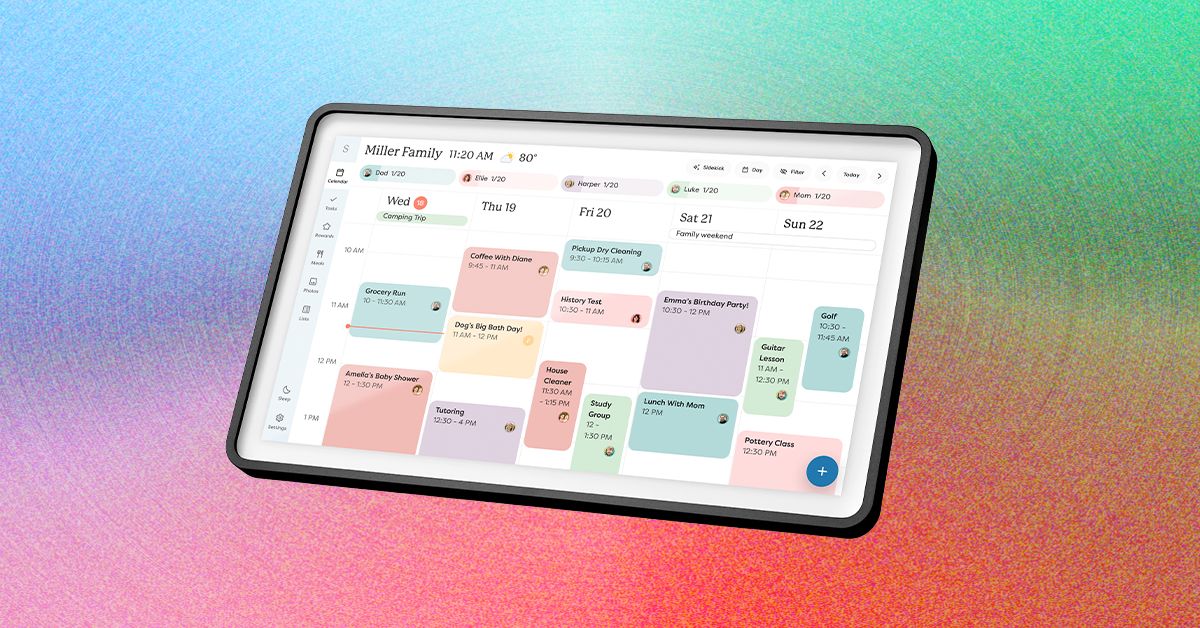
Your calendars is the default page Calendar 2 shows you, but it’s not all this device can do. There are several tabs you can click through: Lists, Tasks, Rewards, Meals, Recipes, and Photos, then Sleep and Settings. Besides Sleep and Settings, which both relate to different settings on your device, these pages will take some work to become truly useful. Some of these features are also blocked by a paywall. You’ll need a Plus Plan subscription, which costs $79 a year or $8 a month, to get access to Rewards, Meals, and Skylight’s in-app AI tool, Sidekick.
Photograph: Nena Farrell
Meals is easy to start casually using to plan out your meals for the week, but if you have a bunch of homemade recipes you love, you can manually add them to the Recipes tab. Why bother with adding an entire recipe? Because then, when you add that recipe to your meal list for the week, the Skylight will ask if it should also add the ingredients to your grocery list over on the Lists tab. I didn’t love that every time I added one of my recipes manually it would ask if I wanted to add the ingredients to my shopping list, but it’s a reasonable flow of actions and one that could be more useful if I converted to Skylight being my sole grocery shopping list.
I really like the visual aspect of both my family’s calendar and the Meals page. I quickly typed in “Giant Meatball” for one of our dinners to represent a Costco dinner in our fridge and was able to assign it to Friday’s dinner. You can either add items to your meal plan on Calendar 2 itself or in the Skylight app, which provides access to all the same pages you see on the device. The Calendar 2 doesn’t seem to memorize any quick meals I write in, though; I’d have to save them to Recipes to use continually or mark them as a repeating meal on a specific day. I also love that if there’s an event on both my husband’s calendar and mine, the Skylight will only have it on the screen once and will put both colors for our calendars to indicate it’s a shared event.
The Tasks page also works fine if you want a list of tasks for each family member, but even for tasks I set a certain time for, I didn’t see any alerts on the device or my phone. Once I opened the Tasks page, I could see that I was two days late to “Bring Form to Dentist Appointment,” but I think these pages would be easy to ignore. It’s something you’d have to build as a habit and shouldn’t be relied on for a timed task you’d like to complete. Meanwhile, Rewards is linked to tasks, letting you set how many stars you need to earn by completing tasks to earn a reward you’ll set for yourself or other members of your house, such as your kids.
The Paywalled Garden

Photograph: Nena Farrell
My biggest complaint with Skylight is its paywall. Its calendar devices require the Plus Plan ($79 a month or $8 a year) to use all features, including the photo screen saver, which I think is a huge bonus for the device. While Skylight isn’t my favorite digital photo frame, and the 15-inch frame doesn’t have the perfect orientation for showing photos, having the screen saver option turns the device into a great multiuse screen that the entire family can enjoy.













Unlike the other glasses I tested, Even doesn’t sell a subscription plan; everything’s included out of the box.
The only downside I could find with the G2 is that it is largely devoid of offline features, so the glasses have to be connected to the internet to do much of anything. Considering the G2’s capabilities, it’s a trade-off I am more than happy to make.
Other Captioning Glasses I Tested
There are plenty of capable captioning eyeglasses on the market, but they are surprisingly similar in both looks and features. While many are quite capable, none had the combination of power and affordability that I got with Even’s G2. Here’s a rundown of everything else I tested.
-
Photograph: Christopher Null
-
Photograph: Christopher Null
-
Photograph: Christopher Null


Leion’s Hey 2 is the price leader in this market, and even its prescription lenses ($90 to $299) are pretty affordable. The hardware, however, is heavy: 50 grams without lenses, 60 grams with them. A full charge gets you six to eight hours of operation; the case adds juice for up to 12 recharges.
I like the Leion interface, which lays out caption, translation, “free talk” (two-way translation), and a teleprompter feature on its clean app. You get access to nine languages; using Pro minutes expands that to 143. Leion sells its premium plan by the minute, not the month, so you need to remember to toggle this mode off when you don’t need it. Pricing is $10 for 120 minutes, $50 for 1,200 minutes, and $200 for 6,000 minutes. There’s no offline use supported, and I often struggled to get AI summaries to show up in English instead of Chinese (regardless of the recorded language).
-
Photograph: Christopher Null
-
Photograph: Christopher Null


You’re not seeing double: XRAI and Leion use the same manufacturer for their hardware, and the glasses weigh the same. The battery spec is also similar, with up to eight hours on the frames and another 96 hours when recharging with the case. XRAI claims its display is significantly brighter than competitors’, but I didn’t see much of a difference in day-to-day use.
The features and user experience are roughly the same, though Leion’s teleprompter feature isn’t implemented in XRAI’s app, and it doesn’t offer AI summaries of conversations. I also didn’t find XRAI’s app as user-friendly as Leion’s version, particularly when trying to switch among the admittedly exhaustive 300 language options. Only 20 of these are included without ponying up for a Pro subscription, which is sold both by the month and minute: $20/month gets you a max of 600 upgraded transcription minutes and 300 translation minutes; $40/month gets you 1,800 and 1,200 minutes, respectively. On the plus side, XRAI does have a rudimentary offline mode that works better than most. For prescription lenses, add $140 to $170.
-
Photograph: Christopher Null
-
Photograph: Christopher Null


AirCaps
AirCaps Smart Glasses
AirCaps does not make its own prescription lenses. Instead, you must purchase a pair of $39 “lens holders” and take them to an optician if you want prescription inserts. I was unable to test these with prescription lenses and ultimately had to try them out over my regular glasses, which worked well enough for short-term testing. Frames weigh a hefty 53 grams without add-on lenses; the company couldn’t tell me how much extra weight prescription lenses would add to that, but it’s safe to say these are the bulkiest and heaviest captioning glasses on the market. Despite the weight, they only carry two to four hours of battery life, with 10 or so recharges packed into the comically large case. Another option is to clip one of AirCaps’ rechargeable 13-gram Power Capsules ($79 for two) to one of the arms, which can provide 12 to 18 extra hours of juice.
The AirCaps feature list and interface make it perhaps the simplest of all these devices, with just a single button to start and stop recording. Transcriptions and translations are available for free in nine languages. For $20/month, you can add the Pro package, which offers better accuracy, access to more than 60 languages, and the option to generate AI summaries on demand (though only if recordings are long enough). As a bonus: Five hours of Pro features are free each month. Offline mode works pretty well, too. The only bad news is that these bulky frames just aren’t comfortable enough for long-term wear.
-
Photograph: Christopher Null
-
Photograph: Christopher Null


The most expensive option on the market (up to $1,399 with prescription lenses!) weighs a relatively svelte 40 grams (52 grams with lenses) and offers about four hours of battery life. There’s no charging case; the glasses must be charged directly using the included USB-connected dongle.
The glasses are extremely simple, offering transcription and translation features—with support for about 80 languages, which is impressive. I unfortunately found the prescription lenses Captify sent to be the blurriest of the bunch, making the captions comparatively hard to read. And while the device supports offline transcription, performance suffered badly when disconnected from the internet. I couldn’t get translations to work at all when offline. For $15/month, you get better accuracy and speaker differentiation, and access to AI summaries of conversations. Prescription lenses cost between $99 and $600.

Started more than 50 years ago, data storage company Western Digital is one of the world’s largest computer hard disk drive manufacturers, and produces solid-state drives (SSDs) and flash memory devices. Western Digital makes all the essentials for home office and business digital storage, whether you want to back up via cloud storage, easily take your presentation on a USB flash drive to your next important meeting, or upgrade your home security surveillance’s storage system, Western Digital has what you need—and we have promo codes to help you save.
Recycle and Save 15% Off With Western Digital Promo
One of the biggest issues of our modern life is how to responsibly recycle e-waste. That’s why Western Digital makes it easier to recycle your old, broken, or defunct electronics. With Western Digital’s Easy Recycle program, you can safely dispose of NAS systems and internal or external HDDs and SSDs. Plus, they recycle devices from any manufacturer—not just Western Digital products. And when you go green and recycle through their program, you’ll get a 15% off Western Digital promo code that counts towards your next purchase of $50 or more when you shop online at Western Digital.
Get 10% Off With a Western Digital Coupon Code
Right now, you can save 10% on your first order when you sign up to receive emails from Western Digital. All you need to do is head to Western Digital’s promo page, where you’ll input your email to sign up for special offers, promotions, and that Western Digital promo code for 10% off. The code will be sent to your inbox where you can use it to save on tech essentials.
Does Western Digital Have Free Shipping?
Western Digital has even more ways to save, with free standard shipping on eligible orders of $50 or more for non-members. Western Digital members receive free standard shipping on all eligible orders in the lower 48.
Additional Western Digital Deals
Western Digital has education discounts, where students and teachers can get up to 15% off purchases after verifying their status with Youth Discount. Once their identity is verified, they’ll get a voucher code sent to their inbox to use at checkout. Western Digital also has a 15% discount for seniors 55 years or older. Seniors just need to verify their status with Senior Discount. Once age is verified, folks will get a Western Digital promo code sent to their email to save.
In a commitment to sustainability, Western Digital has a program with Easy Recycle, where you can safely dispose of NAS systems and internal or external HDDs and SSDs. (They’ll also recycle devices from any manufacturer, not just Western Digital). As a token of appreciation for participating in their initiative for a greener future, participants can get 15% off their next purchase of $50 or more.
Choosing the Right Western Digital Product
It’s hard to know which is the right digital storage system for you—in fact, we even made a handy guide on How to Back Up Your Digital Life, and have a whole roundup of some of our favorite WIRED-tested external hard drives. In a similar vein, Western Digital created a FAQ webpage on how to choose the right storage drive for your needs, like budget and data. A Western Digital Hardrive is a budget-friendly option that delivers the capacity needed to store years of photos, videos, backups, workloads, and archives. While a Western Digital SSD offers fast and reliable responsiveness for more large-scale operating systems and active projects.

The red-light therapy market shows no signs of slowing down. According to Fortune Business Insights, the industry is projected to grow from $1.21 billion in 2026 to $1.76 billion by 2034. Riding that wave is Hong Kong-based Megelin, which is currently running its largest Mother’s Day sale yet, offering major discounts on most of its LED devices and select electrical muscle stimulation (EMS) tools.
I’ve been testing the Duo Lux Laser & LED Light Therapy Mask for the past two weeks as part of a six-week trial. While I’m still forming my final verdict, I already have some early thoughts (more on that below). In the meantime, check out the standout deals because some of these discounts might be too good to pass up while they’re live.
This Laser & LED Light Therapy Mask Is $270 Off
The Megelin Duo Lux Laser & LED Light Therapy Mask combines 660-nanometer (nm) and 1,064-nm lasers with a 660-nm LED light for a more intensive treatment. The brand claims it can help smooth wrinkles, soothe inflammation, reduce pigmentation, and minimize redness. After two weeks of testing, I haven’t noticed any visible changes in my skin just yet, though to its credit, I also haven’t experienced any irritation or adverse reactions.
My biggest issue was the initial unboxing experience: The mask had a strong chemical odor that reminded me of formaldehyde. For a device that sits against your face and doesn’t have a mouth opening, that’s not exactly reassuring. Wiping it down and letting it air out significantly reduced the smell, but it definitely made for a less-than-ideal first impression.
That said, the mask itself is extremely comfortable. The soft, flexible silicone contours well to the face, and the dual-strap design keeps it secure without feeling restrictive. Treatments are quick and easy to customize thanks to four different modes, all controlled through an attached remote. And because it’s cordless, you’re free to move around while using it.
At full price, it’s a steep investment compared to its competitors. But with the current $270 discount, it becomes a much more compelling option, especially given the added laser therapy component, which isn’t as common at this price point. I’ll continue testing through the full six-week period before sharing my final verdict, but if you’re tempted to take advantage of the sale now, Megelin does offer a 60-day money-back guarantee and a one-year warranty.

[CinePlex360] Please moderate: “Indonesia lands

FPI May trade: Foreign portfolio investiors withdrew Rs 14,231 crore from Indian equities – The Times of India

Iran’s Guards threaten US Mideast sites as Trump awaits Tehran response

-

 Politics6 days ago
Iran weighs US reply delivered via Pakistan as Trump signals opposition to deal terms
-

 Fashion1 week ago
Canada’s Lululemon appoints Esi Eggleston Bracey to board of directors
-

 Fashion1 week ago
US’ J.Jill, Inc. appoints Kimberly Wallengren as CMO
-

 Fashion1 week ago
US’ Gap partners with Victoria Beckham on timeless wardrobe essentials
-

 Fashion1 week ago
AAFA pushes for swift US House passage of key anti-counterfeiting law
-

 Fashion1 week ago
US cotton export sales show strong recovery, Upland rise 36%
-
 Business1 week ago
Apollo Sports Capital and Tom Dundon make landmark $225 million investment in pickleball
-

 Sports1 week ago
Sajid Ali Sadpara summits world’s fifth-highest peak