

Tech
Pair Your Mac Mini With One of These Great Monitors

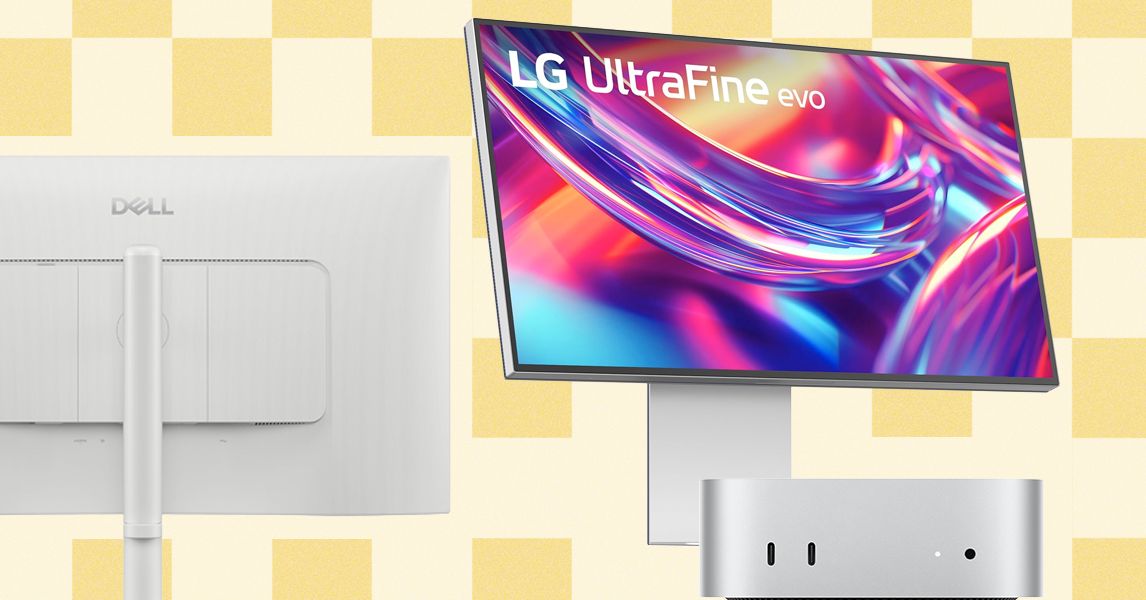
Just about any monitor can work with a Mac Mini. It doesn’t need to be made by Apple or have any official certification. There’s a case to be made for using a cheap 1080p monitor with the Mac Mini, but most Mac users will want something a bit more premium. As you can see by options like the Dell 27 Plus 4K, that doesn’t have to mean overly expensive. Either way, here are the four elements to consider when shopping for a good monitor to go with your Mac Mini.
Size and resolution: 27-inch and 32-inch monitors are the most common sizes these days, and there are larger options. I would also consider a 34-inch ultrawide monitor if you like the wider, 21:9 aspect ratio with the curved shape. With Apple, resolution is king. There’s a reason it invests so much in high pixel density for every screen it sells, even down to the entry-level options like the MacBook Air. Pixel density is what gives a screen its sharpness, and you need a lot more pixels when they’re stretched out across a large, external monitor. If you want to keep the fidelity up, I wouldn’t buy anything under 4K, and bumping up to 5K or 6K on a 32-inch monitor can be helpful. You also want to consider the refresh rate here. A 120-Hz refresh rate is what the MacBook Pro has, offering smoother animation, especially in games.
Adjustability: Apple monitors and iMacs aren’t exactly known for adjustability. They often have none at all, and cost more when they do. That isn’t the best for your posture and ergonomics. Famously, the Pro Display XDR charges an extra $1,000 to add a Pro Stand with proper adjustability. For ergonomic purposes, the top of the screen you’re working on should be as close to eye level as possible, and that ranges depending on someone’s height. If a monitor doesn’t have height adjustability, you’ll have to depend on a separate monitor stand or arm. Other than height adjustment, many monitors also have a stand that can swivel, tilt, and rotate, all of which are important when using multiple monitors together. This is also needed if you want to use a second monitor vertically, which has become increasingly popular.
Ports: Even the cheapest monitors will always have HDMI as a connection, which is all you need to connect directly to the back of the Mac Mini. Some monitors have USB-C that support display, which will let you connect to one of the Mac Mini’s Thunderbolt ports. The M4 Mac Mini comes with three Thunderbolt 4 ports, HDMI, and an Ethernet jack. The M4 Pro model has the same ports, except the ports are Thunderbolt 5 instead of 4. You’ll need to use at least one of these Thunderbolt ports if you want to connect more than one external monitor. These monitors also tend to have other ports, such as USB-A. These can be useful, as the Mac Mini doesn’t have any on its own.
Image quality: Apple prides itself on the image quality of its Macs, so in the case of the Mac Mini, you’ll likely want to get something worthy of your Mac. This is especially important for content creators, photographers, and designers. So, you’ll want to consider a monitor’s brightness, color accuracy, color coverage, and contrast. While some IPS displays offer decent color and contrast, mini-LED or OLED displays will guarantee better image quality. These also have significantly higher peak brightness in HDR content, which really brings games and movies to life.








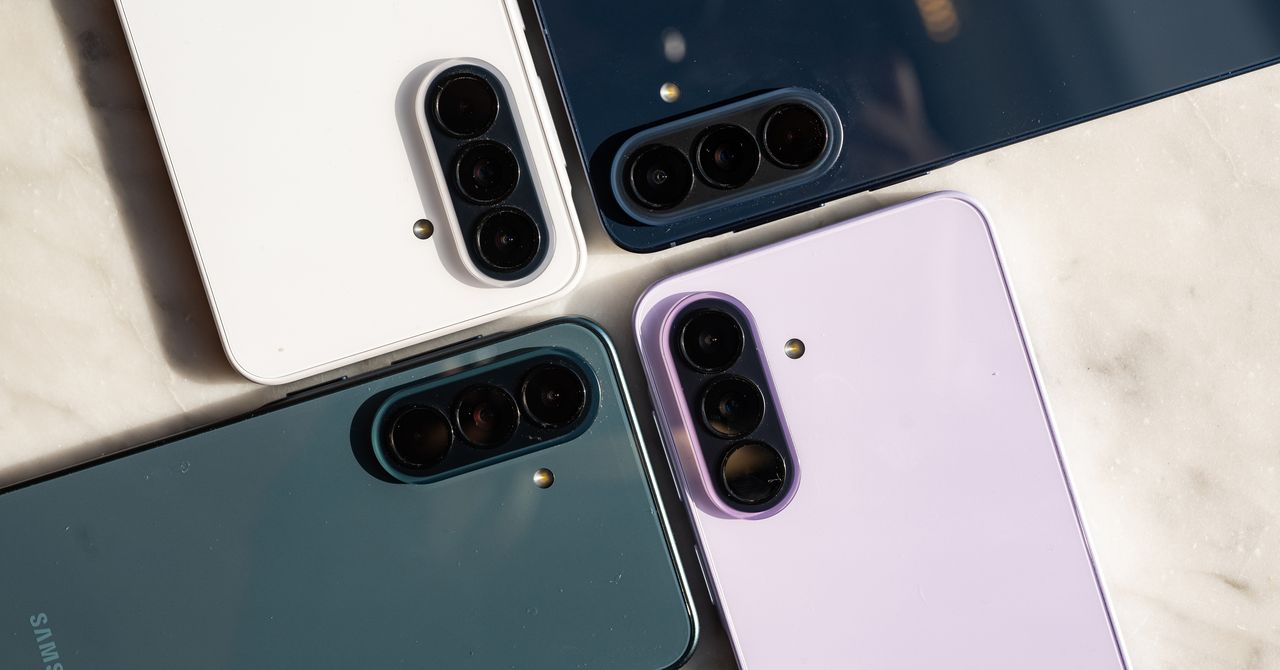
Last month, Samsung jacked up the price of two of its flagship smartphones by $100. Now, its two new midrange models—the Galaxy A37 5G and Galaxy A57 5G—are getting $50 price bumps, despite minor hardware updates over last year’s Galaxy A36 and A56. Samsung has also trimmed the lineup—there’s no successor to the Galaxy A26 this year, at least not yet.
These price increases may be indicative of the economic climate, what with tariffs, higher oil prices due to the war in Iran, and the memory shortage that has driven up RAM and storage costs across the board. If a phone’s price doesn’t go up, it could still mean fewer meaningful hardware upgrades to keep costs down, very much like the recent Google Pixel 10a. (The outlier is the iPhone 17e, which managed to add features like MagSafe and a new processor, along with a few other upgrades, without a change to the price over the iPhone 16e.)
“Price increases or ‘down‑speccing’ have become the norm,” writes Jitesh Ubrani, research manager at IDC, in an email to WIRED. “Unfortunately, consumers will need to adjust to this new reality. The biggest bottleneck for brands right now is memory, with suppliers facing tight availability and significantly higher costs than in past years.” Ubrani says that while geopolitical factors haven’t yet affected hardware pricing, they are adding uncertainty that could increase costs in the future.
Samsung did not comment on exactly what is driving the price bump. However, it says consumers eyeing its A-series phones prioritize upgrading out of necessity—maybe their current phone just broke or is really old—and they don’t care much for AI features. Value for money is the number one purchase driver, above performance and battery life. So it’s a little odd to see the company raise prices, though Samsung hopes the improvements are compelling.
The Galaxy A57 5G costs $550 with 8 GB of RAM and 128 GB of storage, and $610 if you bump storage to 256 GB. Meanwhile, the Galaxy A37 5G starts at $450 for 6 GB of RAM and 128 GB of storage, or $540 for 8 GB of RAM and 256 GB of storage. They both officially go on sale on April 9.
Small Updates
Processor upgrades are the main highlight for these phones. The Galaxy A37 is powered by Samsung’s Exynos 1480, which should offer 14 percent better CPU performance, 24 percent better graphics, and, perhaps shockingly, 167 percent better neural processing performance—helpful for AI tasks. That’s compared to the Qualcomm Snapdragon 6 Gen 3 chip in last year’s Galaxy A36.
The Galaxy A57 sports the Exynos 1680, which isn’t a huge leap over the Exynos 1580 in the Galaxy A56, but still offers a nice lift: 10 percent better CPU performance, 7 percent faster graphics, and 42 percent improved neural processing. Both of these phones still have the same 5,000-mAh battery capacity and charging speeds. (There’s no wireless charging, despite competing phones like the iPhone 17e or Google Pixel 10a offering the feature.)
The next time you’re scrolling your phone, take a moment to appreciate the feat: The seemingly mundane act is possible thanks to the coordination of 34 muscles, 27 joints, and over 100 tendons and ligaments in your hand. Indeed, our hands are the most nimble parts of our bodies. Mimicking their many nuanced gestures has been a longstanding challenge in robotics and virtual reality.
Now, MIT engineers have designed an ultrasound wristband that precisely tracks a wearer’s hand movements in real-time. The wristband produces ultrasound images of the wrist’s muscles, tendons, and ligaments as the hand moves, and is paired with an artificial intelligence algorithm that continuously translates the images into the corresponding positions of the five fingers and palm.
The researchers can train the wristband to learn a wearer’s hand motions, which the device can communicate in real-time to a robot or a virtual environment.
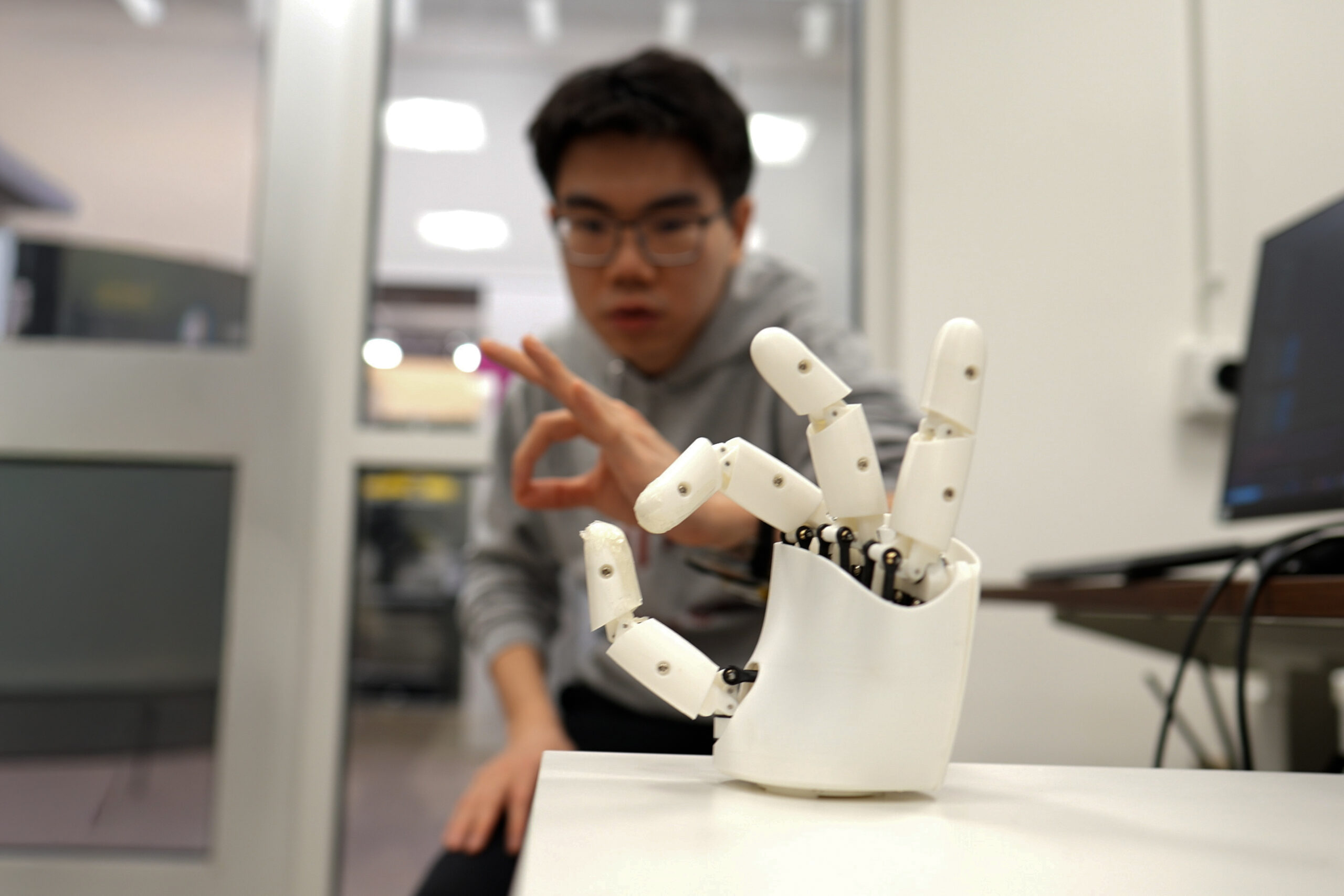
In demonstrations, the team has shown that a person wearing the wristband can wirelessly control a robotic hand. As the person gestures or points, the robot does the same. In a sort of wireless marionette interaction, the wearer can manipulate the robot to play a simple tune on the piano and shoot a small basketball into a desktop hoop. With the same wristband, a wearer can also manipulate objects on a computer screen, for instance pinching their fingers together to enlarge and minimize a virtual object.
The team is using the wristband to gather hand motion data from many more users with different hand sizes, finger shapes, and gestures. They envision building a large dataset of hand motions that can be plumbed, for instance, to train humanoid robots in dexterity tasks, such as performing certain surgical procedures. The ultrasound band could also be used to grasp, manipulate, and interact with objects in video games, design applications, or other virtual settings.
“We think this work has immediate impact in potentially replacing hand tracking techniques with wearable ultrasound bands in virtual and augmented reality,” says Xuanhe Zhao, the Uncas and Helen Whitaker Professor of Mechanical Engineering at MIT. “It could also provide huge amounts of training data for dexterous humanoid robots.”
Zhao, Gengxi Lu, and their colleagues present the wristband’s new design in a paper appearing today in Nature Electronics. Their MIT co-authors are former postdocs Xiaoyu Chen, Shucong Li, and Bolei Deng; graduate students SeongHyeon Kim and Dian Li; postdocs Shu Wang and Runze Li; and Anantha Chandrakasan, MIT provost and the Vannevar Bush Professor of Electrical Engineering and Computer Science. Other co-authors are graduate students Yushun Zheng and Junhang Zhang, Baoqiang Liu, Chen Gong, and Professor Qifa Zhou from the University of Southern California.
Seeing strings
There are currently a number of approaches to capturing and mimicking human hand dexterity in robots. Some approaches use cameras to record a person’s hand movements as they manipulate objects or perform tasks. Others involve having a person wear a glove with sensors, which records the person’s hand movements and transmits the data to a receiving robot. But erecting a complex camera system for different applications is impractical and prone to visual obstacles. And sensor-laden gloves could limit a person’s natural hand motions and sensations.
A third approach uses the electrical signals from muscles in the wrist or forearm that scientists then correlate with specific hand movements. Researchers have made significant advances in this approach, however these signals are easily affected by noise in the environment. They are also not sensitive enough to distinguish subtle changes in movements. For instance, they may discern whether a thumb and index finger are pinched together or pulled apart, but not much of the in-between path.
Zhao’s team wondered whether ultrasound imaging might capture more dexterous and continuous hand movements. His group has been developing various forms of ultrasound stickers — miniaturized versions of the transducers used in doctor’s offices that are paired with hydrogel material that can safely stick to skin.
In their new study, the team incorporated the ultrasound sticker design into a wearable wristband to continuously image the muscles and tendons in the wrist.
“The tendons and muscles in your wrist are like strings pulling on puppets, which are your fingers,” Lu says. “So the idea is: Each time you take a picture of the state of the strings, you’ll know the state of the hand.”
Mapping manipulation
The team designed a wristband with an ultrasound sticker that is the size of a smartwatch, and added onboard electronics that are about as small as a cellphone. They attached the wristband to a volunteer’s wrist and confirmed that the device produced clear and continuous images of the wrist as the volunteer moved their fingers in various gestures.
The challenge then was to relate the black and white ultrasound images of the wrist to specific positions of the hand. As it turns out, the fingers and thumb are capable of 22 degrees of freedom, or different ways of extending or angling. The researchers found that they could identify specific regions in their ultrasound images of the wrist that correlate to each of these 22 degrees of freedom. For instance, changes in one region relate to thumb extension, while changes in another region correlate with movements of the index finger.
To establish these connections, a volunteer wearing the wristband would move their hand in various positions while the researchers recorded the gestures with multiple cameras surrounding the volunteer. By matching changes in certain regions of the ultrasound images with hand positions recorded by the cameras, the team could label wrist image regions with the corresponding degree of freedom in the hand. But to do this translation continuously, and in real-time, would be an impossible task for humans.
So, the team turned to artificial intelligence. They used an AI algorithm that can be trained to recognize image patterns and correlate them with specific labels and, in this case, the hand’s various degrees of freedom. The researchers trained the algorithm with ultrasound images that they meticulously labeled, annotating the image regions associated with a specific degree of freedom. They tested the algorithm on a new set of ultrasound images and found it correctly predicted the corresponding hand gestures.
Once the researchers successfully paired the AI algorithm with the wristband, they tested the device on more volunteers. For the new study, eight volunteers with different hand and wrist sizes wore the wristband while they formed various hand gestures and grasps, including making the signs for all 26 letters in American Sign Language. They also held objects such as a tennis ball, a plastic bottle, a pair of scissors, and a pencil. In each case, the wristband precisely tracked and predicted the position of the hand.
To demonstrate potential applications, the team developed a simple computer program that they wirelessly paired with the wristband. As a wearer went through the motions of pinching and grasping, the gestures corresponded to zooming in and out on an object on the computer screen, and virtually moving and manipulating it in a smooth and continuous fashion.
The researchers also tested the wristband as a wireless controller of a simple commercial robotic hand. While wearing the wristband, a volunteer went through the motions of playing a keyboard. The robot in turn mimicked the motions in real-time to play a simple tune on a piano. The same robot was also able to mimic a person’s finger taps to play a desktop basketball game.
Zhao is planning to further miniaturize the wristband’s hardware, as well as train the AI software on many more gestures and movements from volunteers with wider ranging hand sizes and shapes. Ultimately, the team is building toward a wearable hand tracker that can be worn by anyone, to wirelessly manipulate humanoid robots or virtual objects with high dexterity.
“We believe this is the most advanced way to track dexterous hand motion, through wearable imaging of the wrist,” Zhao says. “We think these wearable ultrasound bands can provide intuitive and versatile controls for virtual reality and robotic hands.”
This research was supported, in part, by MIT, the U.S. National Institutes of Health, the U.S. National Science Foundation, the U.S. Department of Defense, and Singapore National Research Foundation through the Singapore-MIT Alliance for Research and Technology.

Since Donald Trump’s war on Iran started more than three weeks ago, United States military forces have allegedly attacked more than 9,000 sites, creating a climate of fear and constant uncertainty for Iranians in Tehran and across the country. Without an advanced warning system from the government, and amid the longest internet shutdown in Iran’s history, Iranians are left in an information void.
Even before Israel and the United States began dropping bombs, Iran’s lack of a public emergency alert tool and severe state-controlled digital oppression has impacted tens of millions of citizens. Since the 12-day Israel-Iran war last year, though, a group of Iranian digital rights activists and volunteers has been working to fill the gap with a dynamic, regularly updated mapping platform called Mahsa Alert. The project can’t replace real-time early alerts that could come from a coordinated government service, but the tool sends push notifications when Israeli forces warn about attacks, details some confirmed strike locations, and offers offline mapping capabilities.
“There is no emergency alert in Iran,” says Ahmad Ahmadian, the president and CEO of US-based digital rights group Holistic Resilience, which is behind Mahsa Alert and has been developing the platform since last summer. “This was where we saw the traction, we saw the need, and we continued working on it with the volunteers, with some [open source intelligence] experts, and used this to map the repression machinery ecosystem of Iran and surveillance.”
Mahsa Alert is a website but also has Android and iOS apps, which were intentionally designed to be lightweight and easy to use on any device. Given the heavy government connectivity control inside Iran and erratic access to the internet, volunteers also prioritized engineering the platform for offline use. And it can be easily updated if a user does get connectivity for a brief period by downloading APK files that contain new data. The team works to keep these updates extremely small; a recent release was 60 kilobytes, and Ahmadian says they are typically no more than 100 kilobytes.
One overlay on Mahsa Alerts plots the locations of “confirmed attacks” that Ahmadian says his team or other OSINT investigators have verified, using video footage or images that are submitted to a Telegram bot or shared on social media. There are also warnings about areas where Israeli forces have issued evacuation alerts, along with the crucial component of people submitting reports on what is happening around them.
“We have to go through a due diligence and verification process and tag them before putting them on the map,” Ahmadian says of the reported attacks and incidents, adding that the team has a backlog of more than 3,000 reports that it is working through or is unable to verify. Along with attempting to map strikes, the team behind Mahsa Alert have also plotted “danger zones” that could be at risk of attack—such as sites linked to Iran’s nuclear program or military—so ordinary citizens can stay away from them. Ahmadian claims 90 percent of attacks it has confirmed were at sites that were already present on the map. “Some of them that we can confirm, we do it because [a user] has shared a photo or they have shared some details that makes them verifiable,” he says.
The map also includes locations of thousands of CCTV cameras, suspected government checkpoints, and other domestic infrastructure. Medical facilities, such as hospitals and pharmacies, are included on the map along with other resources like the locations of religious sites and past protests.
Mahsa Alert has become more visible on global social media feeds as Iranians around the world share details from the map, encouraging people to look into the service and flagging it for friends and family who could use it as a resource. “The app went from near zero to over 100,000 daily active users in a matter of days,” Ahmadian says, adding that in total there have been around 335,000 users this year, with people first turning to the app during the Iranian regime’s brutal crackdown on anti-government protesters in January. Through the limited user information the app collects, Ahmadian claims there are signs that 28 percent of users are accessing the platform from inside Iran.


USMNT players speak up about what Pochettino the coach is like

Ho Chi Minh City bizs adjust production plans, seek new supply chains

Samsung’s 2 New Midrange Phones Get Price Hikes and Small Updates

-

 Fashion1 week ago
Sales at US apparel, clothing accessories stores up 4% YoY in Jan 2026
-
 Business1 week ago
Peloton is launching bikes and treadmills for gyms, accelerating commercial strategy
-

 Tech1 week ago
Justice Department Says Anthropic Can’t Be Trusted With Warfighting Systems
-

 Fashion1 week ago
Trump signs order to combat fraudulent ‘Made in America’ labels
-
 Business1 week ago
Stocks and pound rise as US rate call approaches
-

 Sports7 days ago
March Madness 2026 – How to watch in SA, start time, schedule, TV channel for NCAA championship basketball tournament
-

 Entertainment7 days ago
Val Kilmer revived 1 year after death through AI
-

 Sports1 week ago
PCB files complaint over allowing Bangladesh to take review on penultimate ball – SUCH TV