

Tech
“Wait, we have the tech skills to build that”


Students can take many possible routes through MIT’s curriculum, which can zigag through different departments, linking classes and disciplines in unexpected ways. With so many options, charting an academic path can be overwhelming, but a new tool called NerdXing is here to help.
The brainchild of senior Julianna Schneider and other students in the MIT Schwarzman College of Computing Undergraduate Advisory Group (UAG), NerdXing lets students search for a class and see all the other classes students have gone on to take in the past, including options that are off the beaten track.
“I hope that NerdXing will democratize course knowledge for everyone,” Schneider says. “I hope that for anyone who’s a freshman and maybe hasn’t picked their major yet, that they can go to NerdXing and start with a class that they would maybe never consider — and then discover that, ‘Oh wait, this is perfect for this really particular thing I want to study.’”
As a student double-majoring in artificial intelligence and decision-making and in mathematics, and doing research in the Biomimetic Robotics Laboratory in the Department of Mechanical Engineering, Schneider knows the benefits of interdisciplinary studies. It’s a part of the reason why she joined the UAG, which advises the MIT Schwarzman College of Computing’s leadership as it advances education and research at the intersections between computing, engineering, the arts, and more.
Through all of her activities, Schneider seeks to make people’s lives better through technology.
“This process of finding a problem in my community and then finding the right technology to solve that — that sort of approach and that framework is what guides all the things I do,” Schneider says. “And even in robotics, the things that I care about are guided by the sort of skills that I think we need to develop to be able to have meaningful applications.”
From Albania to MIT
Before she ever touched a robot or wrote code, Schneider was an accomplished young classical pianist in Albania. When she discovered her passion for robotics at age 13, she applied some of the skills she had learned while playing piano.
“I think on some fundamental level, when I was a pianist, I thought constantly about my motor dynamics as a human being, and how I execute really complex skills but do it over and over again at the top of my ability,” Schneider says. “When it came to robotics, I was building these robotic arms that also had to operate at the top of their ability every time and do really complex tasks. It felt kind of similar to me, like a fun crossover.”
Schneider joined her high school’s robotics team as a middle schooler, and she was so immediately enamored that she ended up taking over most of the coding and building of the team’s robot. She went on to win 14 regional and national awards across the three teams she led throughout middle and high school. It was clear to her that she’d found her calling.
NerdXing wasn’t Schneider’s first experience building new technology. At just 16, she built an app meant to connect English-speaking volunteers from her international school in Tirana, Albania, to local charities that only posted jobs in Albanian. By last year, the platform, called VoluntYOU, had 18 ambassadors across four continents. It has enabled volunteers to give out more than 2,000 burritos in Reno, Nevada; register hundreds of signatures to support women’s rights legislation in Albania; and help with administering Covid-19 vaccines to more than 1,200 individuals a day in Italy.
Schneider says her experience at an international school encouraged her to recognize problems and solutions all around her.
“When I enter a new community and I can immediately be like, ‘Oh wait, if we had this tool, that would be so cool and that would help all these people,’ I think that’s just a derivative of having grown up in a place where you hear about everyone’s super different life experiences,” she says.
Schneider describes NerdXing as a continuation of many of the skills she picked up while building VoluntYOU.
“They were both motivated by seeing a challenge where I thought, ‘Wait, we have the tech skills to build that. This is something that I can envision the solution to.’ And then I wanted to actually go and make that a reality,” Schneider says.
Robotics with a positive impact
At MIT, Schneider started working in the Biomimetic Robotics Laboratory of Professor Sangbae Kim, where she has now participated in three research projects, one of which she’s co-authoring a paper on. She’s part of a team that tests how robots, including the famous back-flipping mini cheetah, move, in order to see how they could complement humans in high-stakes scenarios.
Most of her work has revolved around crafting controllers, including one hybrid-learning and model-based controller that is well-suited to robots with limited onboard computing capacity. It would allow the robot to be used in regions with less access to technology.
“It’s not just doing technology for technology’s sake, but because it will bridge out into the world and make a positive difference. I think legged robotics have some of the best potential to actually be a robotic partner to human beings in the scenarios that are most high-stakes,” Schneider says.
Schneider hopes to further robotic capabilities so she can find applications that will service communities around the world. One of her goals is to help create tools that allow a surgeon to operate on a patient a long distance away.
To take a break from academics, Schneider has channeled her love of the arts into MIT’s vibrant social dancing scene. This year, she’s especially excited about country line dancing events where the music comes on and students have to guess the choreography.
“I think it’s a really fun way to make friends and to connect with the community,” she says.
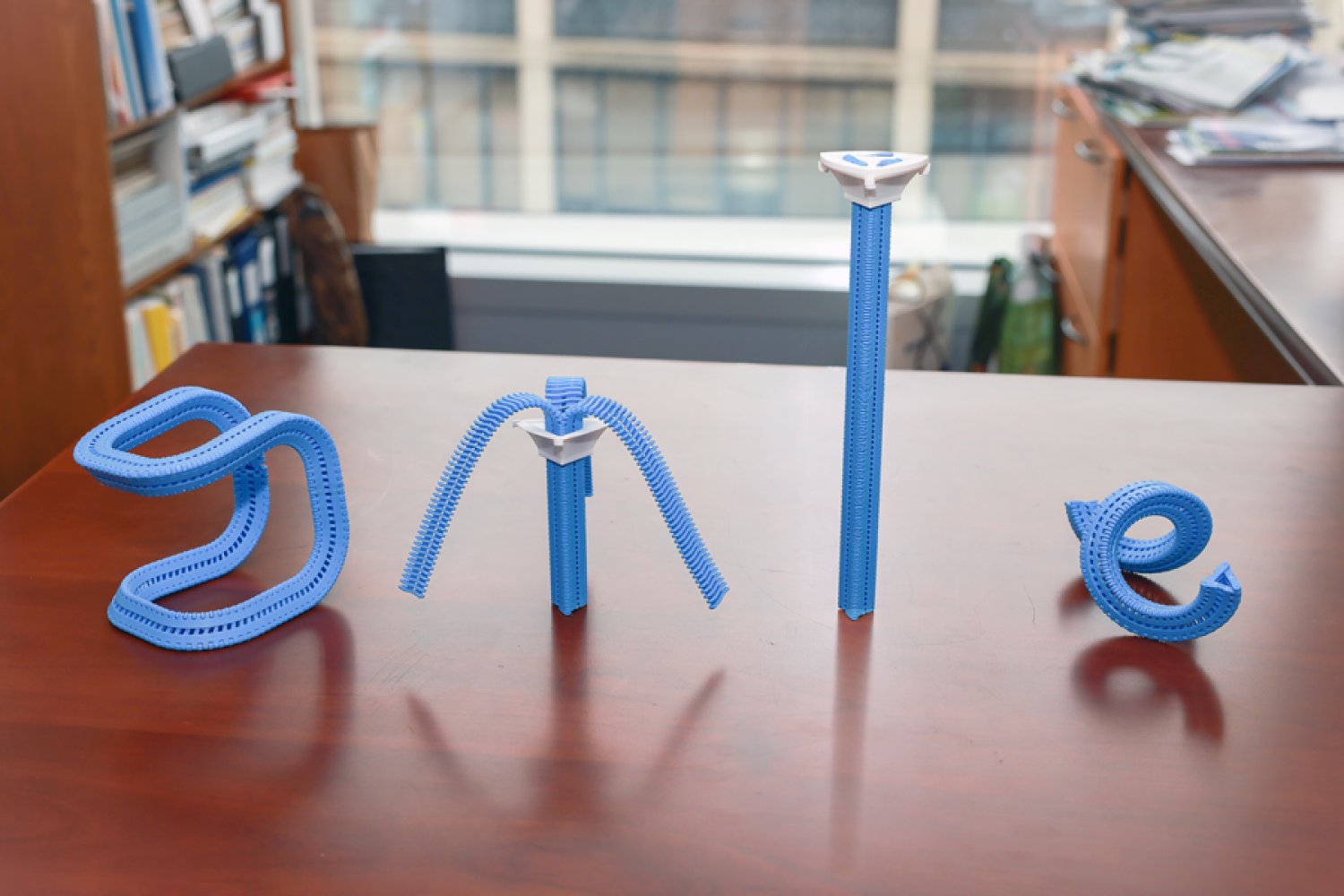
In 1985, the Innovative Design Fund placed an ad in Scientific American offering up to $10,000 to support clever prototypes for clothing, home decor, and textiles. William Freeman PhD ’92, then an electrical engineer at Polaroid and now an MIT professor, saw it and submitted a novel idea: a three-sided zipper. Instead of fastening pants, it’d be like a switch that seamlessly flips chairs, tents, and purses between soft and rigid states, making them easier to pack and put together.
Freeman’s blueprint was much like a regular zipper, except triangular. On each side, he nailed a belt to connect narrow wooden “teeth” together. A slider wrapping around the device could be moved up to fasten the three strips into place, straightening them into a triangular tube. His proposal was rejected, but Freeman patented his prototype and stored it in his garage in the hopes it might come in handy one day.
Nearly 40 years later, MIT Computer Science and Artificial Intelligence Laboratory (CSAIL) researchers wanted to revive the project to create items with “tunable stiffness.” Prior attempts to adjust that weren’t easily reversible or required manual assembly, so CSAIL built an automated design tool and adaptable fastener called the “Y-zipper.” The scientists’ software program helps users customize three-sided zippers, which it then builds on its own in a 3D printer using plastics. These devices can be attached or embedded into camping equipment, medical gear, robots, and art installations for more convenient assembly.
“A regular zipper is great for closing up flat objects, like a jacket, but Freeman ideated something more dynamic. Using current fabrication technology, his mechanism can transform more complex items,” says MIT postdoc and CSAIL researcher Jiaji Li, who is a lead author on an open-access paper presenting the project. “We’ve developed a process that builds objects you can rapidly shift from flexible to rigid, and you can be confident they’ll work in the real world.”
Why zippers?
Users can customize how the fasteners look when they’re zipped up in CSAIL’s software program; they can select the length of each strip, as well as the direction and angle at which they’ll bend. They can also choose from one of four motion “primitives” to select how the zipper will appear when it’s zipped up: straight, bent (similar to an arch), coiled (resembling a spring), or twisted (looks like screws).
The Y-zipper that results will appear to “shape-shift” in the real world. When unzipped, it can look like a squid with three sprawling tentacles, and when you close it up, it becomes a more compact structure (like a rod, for instance). This flexibility could be useful when you’re traveling — take pitching a tent, for example. The process can take up to six minutes to do alone, but with the Y-zipper’s help, it can be done in one minute and 20 seconds. You simply attach each arm to a side of the tent, supporting the structure from the top so that the zipper seemingly pops the canopy into place.
This seamless transition could also unlock more flexible wearables, often useful in medical scenarios. The team wrapped the Y-zipper around a wrist cast, so that a user could loosen it during the day, and zip it up at night to prevent further injuries. In turn, a seemingly stiff device can be made more comfortable, adjusting to a patient’s needs.
The system can also aid users in crafting technology that moves at the push of a button. One can attach a motor to the Y-zipper after fabrication to automate the zipping process, which helps build things like an adaptive robotic quadruped. The robot could potentially change the size of its legs, tightening up into taller limbs and unzipping when it needs to be lower to the ground. Eventually, such rapid adjustments could help the robot explore the uneven terrain of places like canyons or forests. Actuated Y-zippers can also build dynamic art installations — for example, the team created a long, winding flower that “bloomed” thanks to a static motor zipping up the device.
Mastering the material
While Li and his colleagues saw the creative potential of the Y-zipper, it wasn’t yet clear how durable it would be. Could they sustain daily use?
The team ran a series of stress tests to find out. First, they evaluated the strength and flexibility of polylactic acid (PLA) and thermoplastic polyurethane (TPU), two plastics commonly used in 3D printing. Using a machine that bent the Y-zippers down, they found that PLA could handle heavier loads, while TPU was more pliable.
In another experiment, CSAIL researchers used an actuator to continuously open and close the Y-zipper to see how long it’d take to snap. Some 18,000 cycles of zipping and unzipping later, they finally broke. Y-zipper’s secret to durability, according to 3D simulations: its elastic structure, which helps distribute the stress of heavy loads.
Despite these findings, Li envisions an even more durable three-sided zipper using stronger materials, like metal. They may also make the zippers bigger for larger-scale projects, but that’s not yet possible with their current 3D printing platform.
Jiaji also notes that some applications remain unexplored, like space exploration, wherein Y-zipper’s tentacles could be built into a spacecraft to grab nearby rock samples. Likewise, the zippers could be embedded into structures that can be assembled rapidly, helping relief workers quickly set up shelters or medical tents during natural disasters and rescues.
“Reimagining an everyday zipper to tackle 3D morphological transitions is a brilliant approach to dynamic assembly,” says Zhejiang University assistant professor Guanyun Wang, who wasn’t involved in the paper. “More importantly, it effectively bridges the gap between soft and rigid states, offering a highly scalable and innovative fabrication approach that will greatly benefit the future design of embodied intelligence.”
Li and Freeman wrote the paper with Tianjin University PhD student Xiang Chang and MIT CSAIL colleagues: PhD student Maxine Perroni-Scharf; undergraduate Dingning Cao; recent visiting researchers Mingming Li (Zhejiang University), Jeremy Mrzyglocki (Technical University of Munich), and Takumi Yamamoto (Keio University); and MIT Associate Professor Stefanie Mueller, who is a CSAIL principal investigator and senior author on the work. Their research was supported, in part, by a postdoctoral research fellowship from Zhejiang University and the MIT-GIST Program.
The researchers’ work was presented at the ACM’s Computer-Human Interaction (CHI) conference on Human Factors in Computing Systems in April.

The Department of Homeland Security tried to obtain a Canadian man’s location information, activity logs, and other identifying information from Google after he criticized the Trump administration online following the killings of Renee Good and Alex Pretti by federal immigration agents in Minneapolis early this year.
Lawyers for the man, who has not been named, are alarmed in part because they say that the man has not entered the United States in more than a decade. “I don’t know what the government knows about our client’s residence, but it’s clear that the government isn’t stopping to find out,” says Michael Perloff, a senior staff attorney at the American Civil Liberties Union of the District of Columbia who is representing the man in a lawsuit against Markwayne Mullin, the secretary of DHS, over the summons. The lawsuit alleges that DHS violated the customs law that gives the agency the power to request records from businesses and other parties.
Perloff argues that the government is using the fact that big tech companies are based in the US to request information it would not otherwise be able to get. “It’s using that geographic fact to get information that otherwise would be totally outside of its jurisdiction,” he says. “I mean, we’re talking about the physical movements of a person who lives in Canada.”
DHS and Google did not immediately respond to a request for comment.
The demand for the man’s location data was included in a request DHS issued to Google called a customs summons, which is supposed to be used to investigate issues related to importing goods and collecting customs duties.
“It says right in the statute, it’s for records and testimony about the correctness of an entry, the liability of a person for duties, taxes, and fees, you know, compliance with basic customs laws,” says Chris Duncan, a former assistant chief counsel for US Customs and Border Protection who now works as a private-practice attorney representing importers and exporters. “And that’s all it was ever envisioned to be used for.”
A customs summons is a type of administrative subpoena and is not reviewed by a judge or grand jury before being sent out. According to the complaint, Google alerted the man about the request on February 9, despite an ask included in the summons “not to disclose the existence of this summons for an indefinite period of time.”
Through his attorneys, the man told WIRED he initially mistook the notification for a joke or scam before realizing it was real.
The summons, which is included in the complaint, does not give a specific reason for why the man was under investigation beyond citing the Tariff Act of 1930. The man’s lawyers contend that he did not export or import anything from the United States between September 1, 2025, to February 4, 2026, the time frame the government requested information about.
Instead, the man’s lawyers allege, the summons was filed in response to the man’s online activities, including posts that he made condemning immigration enforcement agents after the killings of Good and Pretti in January.
The man tells WIRED that watching members of the Trump administration “smear these two souls as terrorists was absolutely disgusting and enraging. People were being asked to disbelieve our own eyes so that the men responsible for killing two good Americans would go free.”
The man says of his online activity, “I felt I needed to do something that would stand out and be seen by despairing Americans to show them they had support and that they were not alone.”

Whether or not Anthropic’s Claude Mythos frontier AI model is going to be a game changer for software vulnerability discovery, or whether it is a load of hot air, remains to be seen, but the broader subject is of gathering concern to the UK’s National Cyber Security Centre (NCSC), which has warned that a tsunami of costly and time-consuming technical issues is bearing down on all organisations.
Writing on the NCSC’s website, the agency’s chief technology officer Ollie Whitehouse said the industry has prioritised short-term gains over building resilient products and services, and that with the advent of AI-driven vulnerability discovery, their chickens are about to come home to roost.
“Artificial intelligence, when used by sufficiently-skilled and knowledgeable individuals, is showing the ability to exploit this technical debt at scale and at pace across the technology ecosystem,” wrote Whitehouse.
“As a result, the NCSC expect[s] there will be a ‘forced correction’ to address this technical debt across all types of software, including open source, commercial, proprietary and software as a service.”
Added Whitehouse: “This is why we are encouraging all organisations to prepare now for when a ‘patch wave’ arrives; a rush of software updates that will need to be applied across the technology stack to address the disclosure of new vulnerabilities.”
Considering how chief information security officers (CISOs), security leaders and teams should respond to this sea-change, the NCSC has publicised guidance centred on three core pillars.
Prioritise external surfaces
The first of these pillars is the prioritisation of external attack surfaces. Security teams should work to identify any attack surfaces that are exposed to the public internet as soon as possible. Teams should start with technology on the perimeter of the network, and then work their way inwards, via cloud instances, to on-prem environments.
When vulnerabilities come to light, in instances where updates cannot be applied across the entire environment, security teams should prioritise external attack surfaces, and where capacity extends beyond external surfaces, they should lead with critical security systems.
This said it is important to remember that patching by itself will not always be enough. There may – indeed there very probably is – still technical debt in end-of-life or legacy systems that can’t be patched. If these cannot be brought back within support then they need to be replaced.
Prepare to patch faster and more regularly
The second pillar concerns patch management. Here, organisations should plan to deploy vital software updates quicker, more often, and at scale, including within their supply chains. The NCSC said it is expecting an influx of updates to address flaws at varying levels of severity – many of them are likely to be critical.
The agency recommends organisations priorities activating supplier-provided automatic, secure hot-patching features that don’t involve service disruption – this will have the pleasant side-effect of reducing the security team’s workload.
But if automated patching is not available, security leaders will need to plan to ensure processes and risk appetites support frequent, scaled updates, accounting for the inevitable trade-offs around disruption. Risk-based approaches, such as the Stakeholder Specific Vulnerability Categorisation (SSVC) system can be used to prioritise installing the updates.
Of course, this assumes that critical flaws aren’t under active exploitation – those that do present as zero-days, especially those affecting external-facing systems, will need to have their update schedules brought forward.
Prioritise the basics
The third and final pillar is to look beyond simply updating vulnerable software. Patching alone won’t address the systemic cyber security problems faced by the overwhelming majority of organisations.
The NCSC renewed its appeal to technology firms to ensure systemic technical debt is minimised through memory safety and containment technologies where appropriate.
At end-user organisations, CISOs should keep focus on the fundamentals of cyber security to improve their overall resilience and reduce the impact of breaches through whatever means they originate – whether that be through a vulnerable product or something else. Such an approach should include seeking Cyber Essentials certification, or running the Cyber Assessment Framework for essential services operators.
“[The] NCSC advise[s] all organisations, irrespective of size, to plan and prepare for the vulnerability patch wave. A good place to start is by reading the NCSC’s updated Vulnerability Management guidance,” said Whitehouse.
“For larger organisations, we also recommend working to gain assurance from your supply chains both commercial and open source, so that they are prepared to navigate any required response.”
Lionel Litty, CISO at Menlo Security, said: “This is a timely update from the NCSC. It makes two important points: the external attack surface needs to be prioritised and we need to go beyond software updates and look at containment technologies to reduce the impact of breaches.
“For the majority of users, the web browser is where most of the external attack surface exists. To make this more concrete: just last week, Mozilla announced that it fixed 271 vulnerabilities in the Firefox browser. These vulnerabilities were found using Claude Mythos, Anthropic’s latest AI model. This is up from 22 vulnerabilities found by the previous iteration of Claude.
“This highlights the need not only to ensure that your organisation can rapidly and comprehensively deploy browser updates, but also to fundamentally reduce the risk,” said Litty. “Technology such as remote browser isolation can move the attack surface off the user’s endpoint, minimising the damage if a user is exposed before their browser is patched.”


Met Gala 2026 “Costume Art” red carpet pictures from New York City

Jack Brooksbank opts for intimate celebration as new baby brings fresh focus

Tarik Skubal to undergo elbow surgery, sidelining Tigers ace for months ahead of free agency

-

 Tech1 week ago
A Brain Implant for Depression Is About to Be Tested in Humans
-

 Tech1 week ago
Almost 90% of women leave tech industry within 10 years | Computer Weekly
-
 Business1 week ago
Pakistan’s oil market is fuelling the crisis | The Express Tribune
-
 Business7 days ago
‘I had £20,000 stolen and had to fight a 13-month fraud reporting rule to get it back’
-

 Sports6 days ago
Pro wrestling star Steph De Lander reveals how colleague’s advice helped lead her to title triumph at ACW
-

 Entertainment1 week ago
Melania Trump says ABC should ‘take a stand’ on late-night host Kimmel
-

 Tech7 days ago
This Ambitious Laptop Doesn’t Leave Much Room for Your Hands
-

 Entertainment1 week ago
Norway joins Type 26 Frigate Programme to boost NATO naval power