

Tech
Want to Start a Website? These Are the Best Website Builders

Top Website Builders


Publishing a website is still more complicated than it has any right to be, but the best website builders streamline the process. Instead of juggling a bunch of files on a server and learning the ins and outs of networking, website builders do exactly what’s written on the tin. Piece by piece, using a drag-and-drop interface, you can design your website the way you want with immediate feedback, rather than spending time buried in code and hoping it comes out on the other end.
There are dozens of website builders, and most of them range from decent to straight-up bad. Any web host with a bit of ambition has a website builder floating around, even if it’s slow, clunky, and lacking features. I focused on finding the best tools for building your website that go beyond just an add-on, and these are my favorites. If you’re after something simpler than a full-blown website, check out our list of the Best Portfolio Websites.
Table of Contents
Best Website Builder for Most

Squarespace via Jacob Roach
You’ve heard of Squarespace over and over again, I’m sure, and that’s not an accident. It’s an inviting website builder that made a name for itself with bold, striking templates. Beneath the veneer of attractive, but seemingly simple, websites, you’ll find one of the most capable website builders on the market. That balance of power and usability is what sets Squarespace apart.
It feels like a creative tool. Where other website builders lag and stutter to get a new element on your page, Squarespace feels fluid. Your dashboard gives you quick access to edit your site, and around every corner, Squarespace feels designed so you never have to look up a tutorial. I started a simple photography website, and within an hour, I had a custom course page set up, an appointment schedule with automated confirmation emails, and services (with pricing and the ability to accept payments) configured.
Squarespace isn’t cheap, but it also doesn’t meddle in restrictive, low-cost plans. Even on the Basic plan, you have access to ecommerce tools and space for multiple contributors.
Squarespace Pricing and Plans
Best Cheap Website Builder
Hostinger via Jacob Roach
Hostinger is better known as a web hosting provider, but it has a surprisingly robust website builder that you can use on its own or for free as part of a hosting package. You don’t get the same world-class template design and dense feature-set of a more expensive builder like Squarespace, but that’s OK. Hostinger’s website builder will run you just a few bucks a month, and based on my testing, it feels heavily angled toward newcomers.
You sacrifice some power for convenience, but there’s an awful lot you can accomplish with Hostinger. Integrations with PayPal, Stripe, and Square allow you to quickly set up e-commerce. Add-ons with WhatsApp give you live chat capabilities, and Printful support means you can sell print-on-demand merchandise. And, if you outgrow the website builder, Hostinger allows you to export your website’s content to WordPress.
Where Hostinger wins for me is through its AI tools. Just about every website builder these days has AI integrated in some way, but it’s around every corner at Hostinger. You need to pay extra for some of these AI features—the logo generator, for example, requires credits—but they give you a great starting point for mocking up the look, feel, and tone of your website.
Hostinger Pricing and Plans
Best for Small Businesses
Wix via Jacob Roach
Wix is undoubtedly the biggest competitor to Squarespace, and I had a hard time putting one above the other. Ultimately, Wix ended up in the backseat due to higher prices and a slightly less intuitive interface. That’s partly because of how powerful Wix is. Rather than corral you in an elegant (if restrictive) website-building workflow, Wix gives you a ton of options.
First, templates. You get a few hundred elsewhere, but Wix offers over 2,000 templates. At the time of writing, there are 223 pages of them on Wix’s website. They aren’t all winners, but I was able to mock up a quick photography portfolio website within a few minutes by browsing the templates and uploading a few photos.











L.L. Bean is infamous for its outdoorsy appeal, ranging from outerwear and supplies to withstand the elements to laid-back lifestyle products. The company was established in 1912 by Leon Leonwood Bean in Maine. It remains headquartered there today, continually rolling out revered classics and updated essentials for today’s nature lovers. Take the Bean Boots: what started as L.L. Bean’s premier product ultimately helped shape the brand into what it is today. This definitive shoe, which can be worn on hiking trails and rain-slicked city streets alike, has remained true to the original version. If you’ve ever wanted to capture the essence of being a rugged Mainer or recreate a cozy cabin at home, here are plenty of L.L. Bean promo code options at your fingertips.
Get 10% Off Your First Order With an L.L.Bean Promo Code
You may bemoan email updates, but in terms of sales, this L.L. Bean coupon is a pretty low lift. Sign up for email updates from the company, and you get 10% off your first order. This offer is valid only once per email address, so choose your purchase wisely.
Take Up to 75% Off Outdoor Gear in the L.L.Bean Sale Section
Sales mean stocking up, especially on outdoor equipment and camping supplies ahead of your next adventure. Whether you’re about to take up fishing and need supplies, or have Noah Kahan concert tickets in sight and want extras from his L.L. Bean collaboration collection for the event, all of that is available to you. You can save 75% off these L.L. Bean sale items, no promo code needed.
This is a different sort of two-for-one special: twice a day, L.L. Bean posts new sales at 6 AM and 2 PM sharp, Eastern time. While the two-a-day daily markdown is not super expansive in terms of inventory up for grabs, what is posted for sale usually comes at a heavily discounted price akin to deals you’d see on Black Friday.
This L.L. Bean sale is like an online treasure hunt. The daily markdown sale involves a new deal posted daily from 6 AM to midnight Eastern time. Inventory leans toward gear, such as backpacks, blankets, and shoes.
Score Free Shipping on Orders Over $75
We’ve all abandoned our online shopping carts at one point or another once we saw how much shipping was going to cost. Shipping usually costs $8 for a standard L.L. Bean order—that is, if you are under $75. If you hit that threshold or more, you immediately score free shipping on your order.
Military, First Responders, Medical Workers, and Students Can Save an Additional 10%
Being in the medical field or a first responder can often be a tough, thankless job. But, there’s a special L.L. Bean sale for medical workers and first responders so that you can stock up on supplies for when you rest and recharge in your down time. Use the L.L. Bean first responder discount for 10% off—be sure to verify your license status through SheerID.
L.L. Bean military discount offers 10% for military personnel, current or former. This discount also applies to family members—if you or a family member would like to partake, verify your status via SheerID.
Teachers deserve their (wild)flowers. To make sure you have what you need for your next outdoor adventure and say thanks, you can get 10% off with the special L.L. Bean teacher discount. College students, there’s also the L.L. Bean student discount where you 10% off, too. To redeem either of these discounts, make sure to verify your teaching or student (or both!) status via SheerID.
Earn 20% Off With the L.L.Bean Mastercard
If you’re hunting for a potential credit card candidate, and already are an avid L.L. Bean fan, this is the opportunity for you. You can earn 20% off once approved for an L.L. Bean Mastercard, along with free shipping on all orders when you use it—no minimum purchase necessary.

Joe Gebbia, cofounder of Airbnb and the US Chief Design Officer appointed by Trump, was spotted in San Francisco today using a mysterious metallic device. In a social media post on X viewed over 500,000 times, a man who looks like Gebbia sits with an espresso at a coffee shop. He’s wearing metallic buds that bisect his ears, with a matching clamshell-shaped disc in front of him on the counter.
After the video was posted Monday morning, social media users were quick to suggest that this could be some kind of prototype from OpenAI’s upcoming line of hardware devices designed in partnership with famed Apple designer Jony Ive. An OpenAI spokesperson declined to comment on the potential Gebbia video after WIRED reached out. Gebbia also did not respond to a request for comment.
The device Gebbia appears to be wearing looks quite similar to the hardware seen in a fake OpenAI ad that was widely circulated on Reddit and social media in February. That video from last month seemingly showed Pillion actor Alexander Skarsgård interacting with an AI device that had a similar-looking pair of earbuds and a circular disc. At the time, OpenAI denounced the widely seen video as not real. “Fake news,” wrote OpenAI President Greg Brockman at the time, responding to a social media post.
The earbuds seen in the video of Gebbia also look quite similar in shape to the Huawei FreeClip 2, a pair of open earbuds released earlier this year. However, the clamshell seen on the coffee counter next to Gebbia is different from Huawei’s most recent headphone case. It would also be quite surprising if a government official were seen using Huawei tech, considering the Chinese company is effectively banned from selling its phones in the US due to security concerns.
WIRED’s audio experts say he’s most likely wearing open earbuds, as Gebbia’s pair share some similarities with Soundcore’s AeroClips or Sony’s LinkBuds Clip, though the cases for those buds don’t match what’s on the table in front of Gebbia. WIRED also ran the photo and video through software that attempts to identify AI-generated outputs and other deepfakes. The detection software, from a company called Hive, says the odds are low that this imagery of Gebbia was generated by AI. Still, AI detectors are not always reliable and can include false outputs. It’s possible that the entire post could be a synthetic hoax.
Could this be some kind of soft launch teaser for OpenAI’s hardware? The timing of this trickle out would make sense, since the company may ship devices to consumers sometime early in 2027. Still, OpenAI denied any involvement with the previous pseudo-ad for the metallic AI hardware, with its shiny earbuds and matching disc.
“There are Chinese components as well—we are totally open about it—but the key is that as we compile the software ourselves and install it in Finland, we protect the integrity of the product,” Pienimäki says.
What makes Sailfish OS unique over competitors like GrapheneOS or e/OS is that it’s not based on the Android Open Source Project, but Linux. That means it has no ties to Google—no need for the company to “deGoogle” the software; meaning there’s a greater sense of sovereignty over the software (and now the hardware). Still, it’s able to run Android apps, though the implementation isn’t perfect. Another common criticism is that it’s not as secure as options like GrapheneOS, where every app is sandboxed.
There’s a good chance some Android apps on Sailfish OS will run into issues, which is why in the startup wizard, the phone will ask if you want to install services like MicroG—open source software that can run Google services on devices that don’t have the Google Play Store, making it an easier on-ramp for folks coming from traditional smartphones without a technical background. You don’t even need to create a Sailfish OS account to use the Jolla Phone.
Jolla’s effort is hardly the first to push the anti-Big Tech narrative. A wave of other hardware and software companies offer a “deGoogled” experience, whether that’s Murena from France and its e/OS privacy-friendly operating system, or the Canadian GrapheneOS, which just announced a partnership with Motorola. At CES earlier this year, the Swiss company Punkt also teamed up with ApostrophyOS to deploy its software on the new MC03 smartphone. Jolla is following a broader European trend of reducing reliance on US companies, like how French officials ditched Zoom for French-made video conference software earlier this year.
The Phone
A common problem with these niche smartphones is that they inevitably end up costing a lot of money for the specs. Take the Light Phone III, for example, a fairly low-tech anti-smartphone that doesn’t enjoy the benefits of economies of scale, resulting in an outlandish $699 price. The Jolla Phone is in a similar boat, though the specs-to-value ratio is a little more respectable.
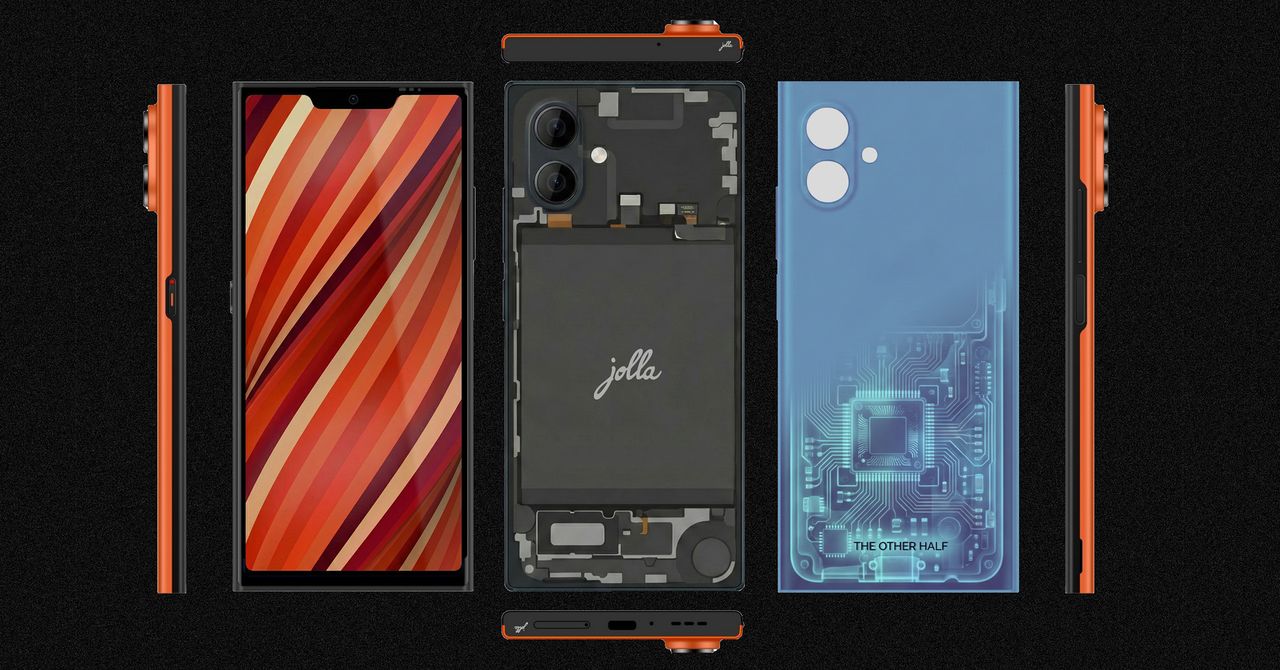
It’s powered by a midrange MediaTek Dimensity 7100 5G chip with 8 GB of RAM, 256 GB of storage, plus a microSD card slot and dual-SIM tray. There’s a 6.36-inch 1080p AMOLED screen, the two main cameras, and a 32-megapixel selfie shooter. The 5,500-mAh battery cell is fairly large considering the phone’s size, though the phone’s connectivity is a little dated, stuck with Wi-Fi 6 and Bluetooth 5.4.
Uniquely, the Jolla Phone brings back “The Other Half” functional rear covers from the original. These swappable back covers have pogo pins that interface with the phone, allowing people to create unique accessories like a second display on the back of the phone or even a keyboard attachment. There’s an Innovation Program where the community can cocreate functional covers together and 3D print them. And yes, a removable rear cover means the Jolla Phone’s battery is user-replaceable.

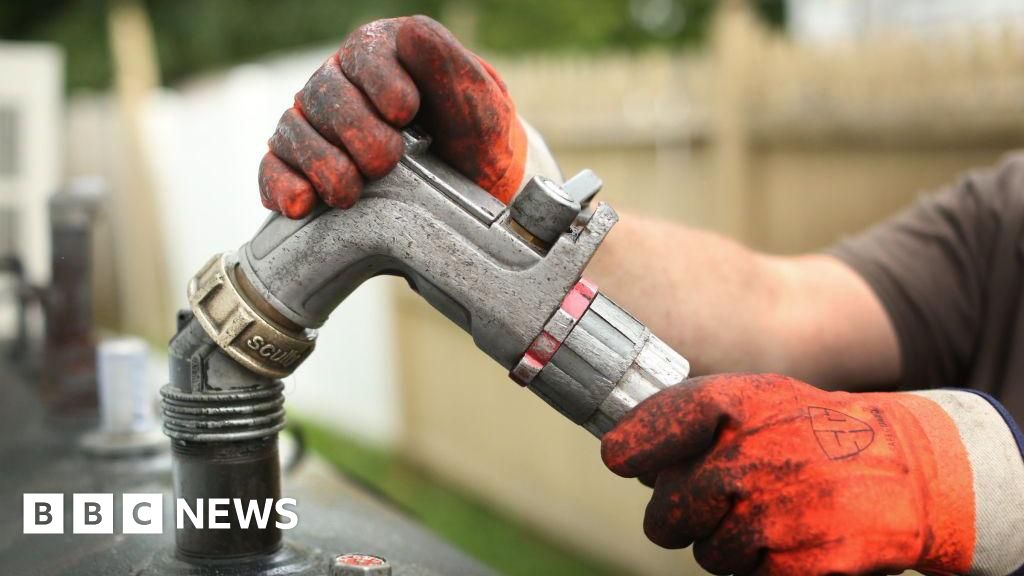
Prices for home heating oil in NI rise as Middle East conflict escalates

India, Canada negotiating CEPA to double trade by 2030: PM Carney

US’ Gap Inc. president & CEO Richard Dickson to be honoured by FIT

-

 Politics5 days ago
What are Iran’s ballistic missile capabilities?
-
 Business6 days ago
Households set for lower energy bills amid price cap shake-up
-

 Sports5 days ago
Sri Lanka’s Shanaka says constant criticism has affected players’ mental health
-
 Business6 days ago
Lucid widely misses earnings expectations, forecasts continued EV growth in 2026
-

 Sports1 week ago
Top 50 USMNT players of 2026, ranked by club form: USMNT Player Performance Index returns
-
 Business5 days ago
Attock Cement’s acquisition approved | The Express Tribune
-

 Tech6 days ago
Here’s What a Google Subpoena Response Looks Like, Courtesy of the Epstein Files
-
 Business6 days ago
Income Tax Draft Rules 2026: Key Changes On How And When Pan Card Will Be Required?