

Tech
Multitasking raises risk of phishing, study finds


In the information age, multitasking is often worn as a badge of honor. But according to new research led by Xuecong Lu, assistant professor of information security and digital forensics in UAlbany’s Massry School of Business, multitasking may also blind us to hidden threats, thereby increasing our chances of falling victim to cybercrime.
Published in the European Journal of Information Systems, Lu’s study centers on phishing—fraudulent emails designed to steal login credentials, personal information or money.
“Much of the existing research assumes that people are sitting quietly and focused when a phishing email arrives,” said Lu. “In reality, we are constantly multitasking—switching between messages, meetings and documents. That divided attention makes us more vulnerable.”
According to Forbes, criminals send an estimated 3.4 billion phishing emails every day. IBM has found that phishing-related breaches now cost businesses nearly $5 million per incident.
Cognitive load and phishing
The study used two experiments with nearly 1,000 participants to test how memory load affects phishing detection. When participants had to juggle complex memory tasks, their accuracy plummeted.
According to the research:
- High memory load reduces detection: When people were asked to juggle challenging memory tasks, they were far more likely to miss the warning signs of phishing emails
- Divided attention weakens judgment: Participants who split focus between multiple tasks struggled to separate legitimate messages from scams
- Simpler tasks improve accuracy: When the mental load was lighter, participants caught phishing attempts more consistently
“This shows that cognitive load is a critical factor,” said Lu, who teaches in the Department of Information Security and Digital Forensics at UAlbany’s Massry School of Business. “When your brain is already busy, you are more likely to miss red flags in an email.”
Prompts and framing cues
The study also tested whether reminders could help people stay alert. A short warning, such as “Be cautious, some messages may be phishing attempts,” improved detection, especially for emails that promised rewards.
The authors found that:
- Reminders refocus attention: A simple prompt was enough to offset some of the negative effects of multitasking
- Reward-style scams need extra caution: Gain-framed emails offering prizes or perks were easier to fall for unless participants were reminded to be careful
- Threatening messages drew scrutiny naturally: Loss-framed emails warning of penalties or account lockouts triggered more vigilance even without prompts
“These findings suggest that training and warning systems need to be context-aware,” Lu said. “We need interventions that reach people in the moment, when they are distracted and least able to spot danger.”
Smarter defenses
The financial stakes underscore why the research matters. According to IBM, the average cost of a phishing-related data breach is $4.88 million—a reminder that even a single click in a moment of distraction can be enormously expensive.
To reduce that risk, the study points to several practical strategies:
- Train under real-world conditions: Cybersecurity training should include scenarios that mimic the distractions employees face in daily work
- Build in just-in-time alerts: Pop-up reminders or security nudges can help users pause and reconsider before clicking
- Recognize emotional manipulation: Teaching people how scammers exploit urgency or the promise of rewards makes them less likely to fall victim
“Our research underscores that people are the last line of defense,” Lu said. “Technology can filter out many threats, but attackers know that humans are the weak link. By understanding how attention and memory work, we can build smarter systems that protect users even when they are not fully focused.”
More information:
Xuecong Lu et al, Phishing detection in multitasking contexts: the impact of working memory load, goal activation, and message framing cue on detection performance, European Journal of Information Systems (2025). DOI: 10.1080/0960085x.2025.2548543
Citation:
Multitasking raises risk of phishing, study finds (2025, September 26)
retrieved 26 September 2025
from https://techxplore.com/news/2025-09-multitasking-phishing.html
This document is subject to copyright. Apart from any fair dealing for the purpose of private study or research, no
part may be reproduced without the written permission. The content is provided for information purposes only.












Tech
The Catastrophic Swatch x Audemars Piguet Launch Was Entirely Predictable and Utterly Avoidable
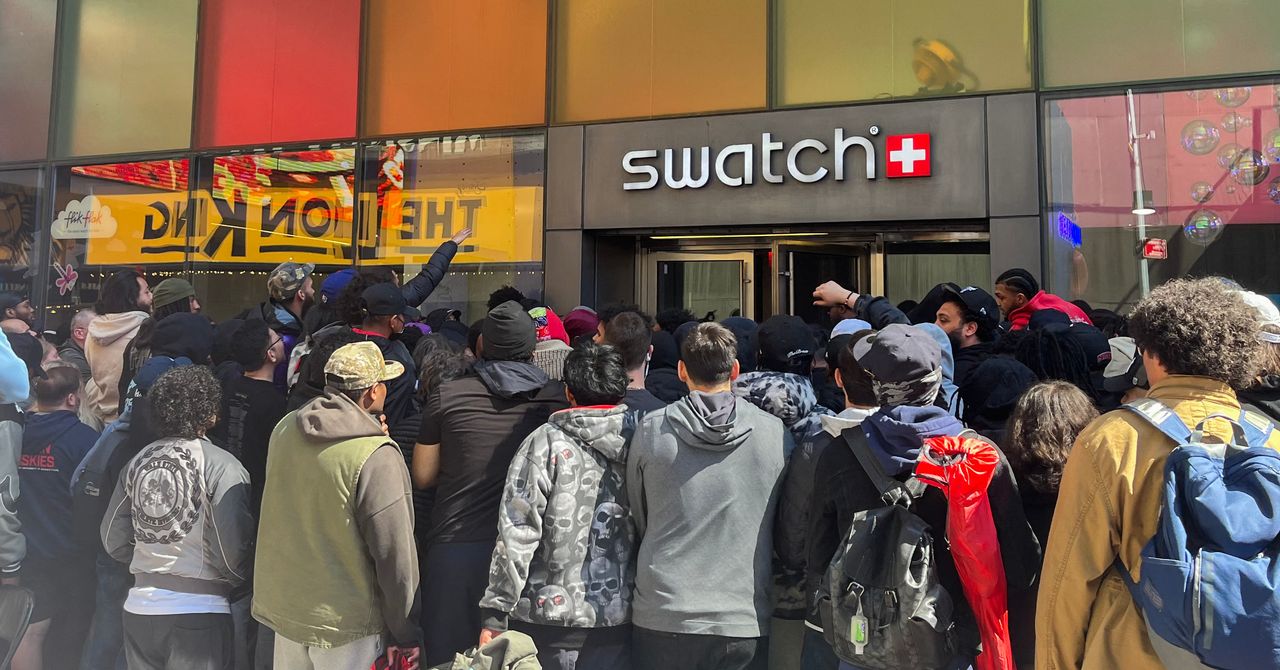
The note from the communications team then, quite remarkably, lists some stats in an attempt to paint the launch in a positive light, as opposed the retail bin-fire it seemingly was: “We have received millions of clicks on our website. This new collaboration is literally making social media explode, with over 6 billion views within one week; by now, it is already 11 billion. All in all, the Royal Pop Collection is captivating the entire world, not least because the Royal Pop is, quite surprisingly, not a wristwatch.”
Audemars Piguet seems unhappy with how Swatch has handled the launch of its collaboration on the Royal Pop. AP told WIRED that “we understand the questions around the Royal Pop launch experience. As retail operations are handled by Swatch and their local teams, Swatch is best placed to comment on the operational handling of the launch. From AP’s perspective, safety and a positive experience for clients and teams remain the priority.” The brand did not respond when asked if it considered Swatch’s handling of the Royal Pop launch a “safe and positive experience”.
The madness of the Royal Pop launch is that, considering all that could have been learned from the MoonSwatch release in 2022, Swatch decided to repeat the playbook that went so badly wrong four years ago. This is a move, according to experts, that was entirely avoidable and utterly unnecessary.
Hype With No Control
“Luxury drops cannot rely on surprise, scarcity and social frenzy as the strategy, then act surprised when human behaviour follows,” says Kate Hardcastle, author of The Science of Shopping and advisor to brands including Disney, Mastercard, Klarna and American Express. “Retailers are already dealing with heightened tensions around theft, aggression and crowd management globally. Add a highly restricted product, long queues, resale economics, social media amplification and the emotional intensity attached to luxury access, and the environment can escalate very quickly if not expertly managed.”
Hardcastle confirms that what is particularly difficult for Swatch here is that the MoonSwatch launch already provided a live blueprint of the risks. “Once a brand has experienced scenes involving crowd surges, disappointment and policing,” she says, “the obligation shifts from reacting to proactively engineering a safer customer experience. Successful luxury houses increasingly control the experience with far greater precision.”
Neil Saunders, managing director of retail at Global Data, is even more candid. “The chaos does not reflect well on Swatch, and it probably makes Audemars Piguet wonder what on Earth it has gotten itself into,” he says. “Wanting to create some hype is understandable, but not being able to control it becomes damaging both commercially and for the brand image. Swatch should understand this better than most as it has been through this before with MoonSwatch.”
Not only Saunders and Hardcastle, but scores of commenters on Swatch’s Instagram post, point out well-known and obvious solutions that would have mitigated or entirely avoided the Royal Pop’s shambolic release.
“We have seen other premium or limited launches use staggered collection windows, verified appointment systems, geo-ticketing, VIP allocation tiers, timed QR access, private client previews and controlled queue technology to reduce volatility while preserving excitement,” says Hardcastle, adding that some combine digital ballots with curated in-store experiences so consumers feel part of an occasion rather than participants in a scramble.

Anyone who has had chickenpox shares one distinct memory: the relentless, all-consuming itch.
Ciara DiVita was only 3 years old when she caught the virus, but she remembers it well—along with the oven mitts she was made to wear to stop herself scratching. She also recalls being taken to hang out with her cousin while covered in blisters, in the hopes of deliberately infecting them.
DiVita, now 30, was actually the second in the chain, having been taken by her parents to catch chickenpox from an infectious friend. “I imagine the chain continued and my cousin gave it to someone else at a chickenpox play date,” she says.
A lot has changed over the past three decades, most notably the development of a chickenpox vaccine, meaning the virus is no longer the childhood rite of passage it once was.
Thanks to the vaccine’s success, children today are much less likely to be exposed to the infection at school or on the playground.
Chickenpox parties are also largely considered a relic of the past—a strategy many Gen X and millennial children were subjected to before vaccines became routine. But much like the virus itself—latent, opportunistic—they haven’t disappeared entirely.
Before a vaccine existed, chickenpox, which is caused by the varicella-zoster virus, felt unavoidable. In temperate countries like the UK and the US, around 90 percent of children caught the virus before adolescence (in tropical countries the average age of infection is higher).
It’s nothing to do with chickens. The splotchy, scratchy, highly contagious disease is possibly named after the French word for chickpea, pois chiche, according to one theory, because the round bumps caused by the virus resemble their size and shape. While most infant cases are mild, adolescents and adults are more likely to develop severe complications.
This is where the idea of “getting it over and done with” emerged from, according to Maureen Tierney, associate dean of clinical research and public health at Creighton University in Omaha, Nebraska.
“You were trying to have your child get the disease when they were at the greatest chance of not having complications,” Tierney says, explaining that, generally speaking, the older the patient, the more severe the infection can be.
While varicella-zoster is usually a mild, self-limiting disease in children, it can be much more severe—and sometimes life-threatening—in adults.
“I had an otherwise healthy adult patient who died of chickenpox pneumonia when I was first practicing,” Tierney says. “You never forget those scenarios.”
The virus spreads rapidly through respiratory droplets and contact with fluid from its characteristic blisters, meaning if one child contracts it, siblings and classmates are likely to be next, if unvaccinated.
Before the existence of social media, the idea that children should deliberately infect each other spread just as rapidly around communities—in conversations in the school yard, church groups, and pediatric waiting rooms—leading to the popularity of so-called chickenpox parties.
Parents swapped advice about oatmeal baths and calamine lotion and arranged to bring children together when one was thought to be infectious—despite the practice never being an official medical recommendation.
“They thought, well, if it’s going to happen to my kid anyway, it might as well happen in a controlled environment,” says Monica Abdelnour, a pediatric infectious disease specialist at Phoenix Children’s Hospital. “The families were ready to encounter this infection, deal with it, and then move on.”
While the majority of children who develop chickenpox feel well again within a week or two, around three in every 1,000 infected experience a severe complication such as pneumonia, serious bacterial skin infections, encephalitis (inflammation of the brain), or meningitis.
In 1996, Guinea-Bissau seemed like an ideal research post for budding pediatrician Lone Graff Stensballe. Her supervisor, a fellow Dane named Peter Aaby, had spent nearly two decades collecting data on 100,000 people living in the mud brick homes of the West African country’s capital.
Aaby and his partner, Christine Stabell Benn, believed that the years of research in the impoverished country had yielded a major discovery about vaccines—and what they described as “non-specific effects”: The measles and tuberculosis vaccines, which were derived from live, weakened viruses and bacteria, they said, boosted child survival beyond protecting against those particular pathogens.
But, the scientists said, shots made from deactivated whole germs, or pieces of them, such as the diphtheria-tetanus-pertussis (DTP) shot, caused more deaths—especially in little girls—than getting no vaccine at all.
The World Health Organization repeatedly and inconclusively examined these astonishing findings. They tended to elicit shrugs from other global health researchers, who found Aaby’s research techniques unusual and his results generally impossible to replicate.
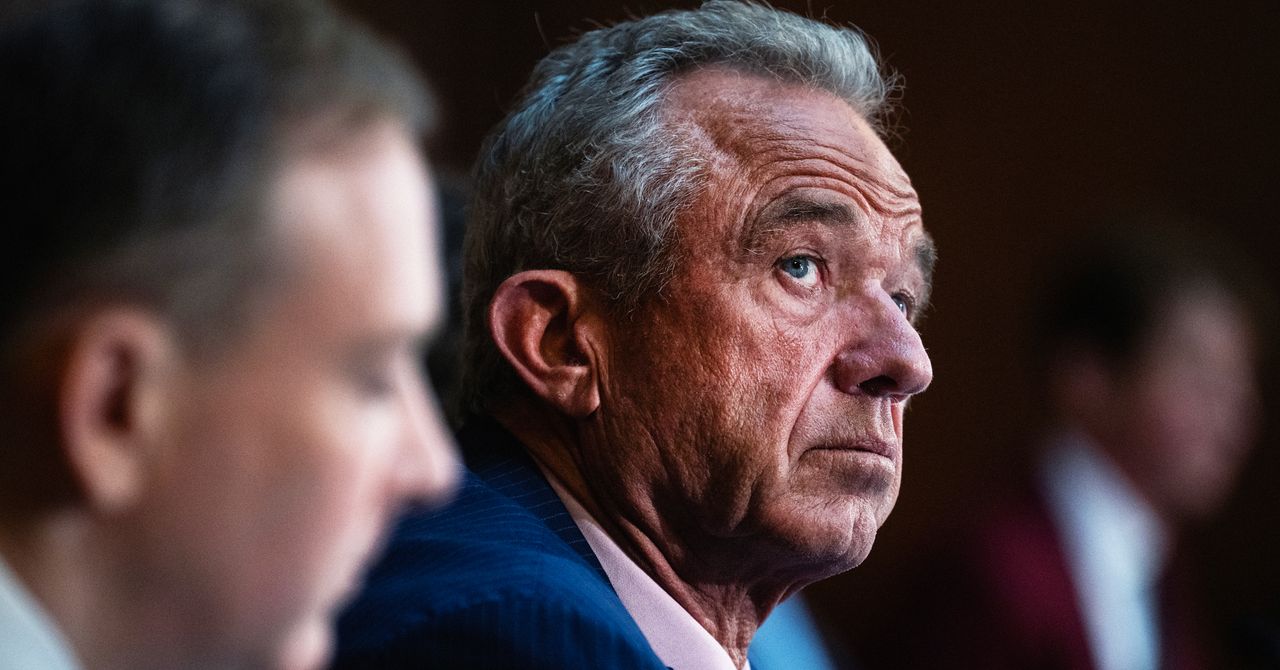
Then came Donald Trump, Covid, and the administrative reign of anti-vaccine advocate Robert F. Kennedy Jr.
Suddenly, Aaby and Benn weren’t just sending up distant smoke signals from a far corner of the planet. They were confidently voicing their views and policy prescriptions online and in medical journals. The “framework” for “testing, approving, and regulating vaccines needs to be updated to accommodate non-specific effects,” their team wrote in a 2023 review.
And the Trump administration has taken notice.
“They became more strident in saying that their findings were real and that the world needed to do something about it,” said Kathryn Edwards, a Vanderbilt University vaccinologist who has been aware of Aaby’s work since the 1990s. “And they became more aligned with RFK.”
Kennedy, as secretary of the Department of Health and Human Services, cited one of Aaby’s papers to justify slashing $2.6 billion in US support for Gavi, a global alliance of vaccination initiatives. The cut could result in 1.2 million preventable deaths over five years in the world’s poorest countries, the nonprofit agency has estimated. Kennedy has frozen $600 million in current Gavi funding over largely debunked vaccine safety claims.
Kennedy described the 2017 paper as a “landmark study” by “five highly regarded mainstream vaccine experts” that found that girls who received a diphtheria-tetanus-pertussis, or DTP, shot were 10 times more likely to die from all causes than unvaccinated children.
In fact, the study was far too small to confidently make such assertions, as Benn acknowledged. In a study of historical data that included 535 girls, four of those vaccinated against DTP in a three-month period of infancy died of unrelated causes, while one unvaccinated girl died during that period. A follow-up published by the same group in 2022 found that the DTP shot by itself had no effect on mortality. Critics say the 2017 study, rather than being a landmark, exemplified the troubling shortfalls they perceive in the Danish team’s research.
As Aaby and Benn’s US profile has risen, scientists in Denmark have set upon the work of their compatriots. In news and journal articles published over the past 18 months, Danish statisticians and infectious disease experts have said the duo’s methods were unorthodox, even shoddy, and were structured to support preconceived views. A national scientific board is investigating their work.
Stensballe, who worked with Aaby and Benn for 20 years, has been among those voicing doubts.
“It took years to see what I see clearly today, that there is a strange concerning pattern in their work,” Stensballe said in a phone interview from Copenhagen, where she treats children at Rigshospitalet, the city’s largest teaching hospital. She said their work is full of confirmation bias—favoring interpretations that fit their hypotheses.


Thomas Massie faces Trump-backed challenger in GOP primary: Can he win?

What to expect from "Survivor 50" finale

FTSE 100 up amid calmer bonds but oil rises again

-

 Entertainment6 days ago
Conan O’Brien hat tricks as Oscar host
-
 Tech1 week ago
Could Contact-Tracing Apps Help With the Hantavirus? Not Really
-

 Fashion5 days ago
Italy’s Zegna Group’s Q1 growth boosted by strong organic performance
-

 Entertainment1 week ago
Martin Short: Facing tragedy with joy
-

 Entertainment1 week ago
Tom Brady gets back at Kevin Hart during Netflix roast
-
 Sports1 week ago
Jacob Fatu unleashes vicious assault on Roman Reigns after World Heavyweight Championship loss at WWE Backlash
-

 Entertainment1 week ago
Martha Stewart: How to make an omelet
-

 Tech1 week ago
Papa Johns Is Getting Into Drone Delivery—but Not for Pizza