

Tech
The Lenovo IdeaPad 5i 2-in-1 Is a Budget 16-Inch Laptop That Barely Squeaks By


The keyboard and touchpad are often compromises made on budget laptops, and the same is true here. The keys feel like they take a lot of effort to push through, as if the actuation force is too high. It can feel a bit tiring to type, which led to a lot of ghost typing where I was missing letters. It does have a number pad, but I don’t prefer them, as they force the touchpad to be off-center.
Speaking of the touchpad, this isn’t the worst I’ve used. The click feels nice, as it’s not overly loud or difficult to press—a common problem with cheap touchpads. The issue here, as per usual, is the tracking. It feels choppy to glide your finger across the surface, and precise actions like text selection feel clumsy. It’s certainly not a unique problem to the IdeaPad 5i, but it’s one of the things that makes cheap laptops feel low quality.
A Rough Display
Photograph: Luke Larsen
You buy a laptop of this size for its screen. But with the IdeaPad 5i 2-in-1, you’re not getting a high-quality panel. It’s a 1920 x 1200 resolution display with a 60-Hz refresh rate. That’s not bad per se, but stretched out on a 16-inch laptop, you can definitely see the pixels. That’s why I often recommend smaller laptops if you’re on a tighter budget. Like many laptops at this price, the IdeaPad uses a crummy panel. It’s IPS, but it has a strong green tint that makes colors look off. It’s noticeable right away, and once I measured it with a colorimeter, it proved true, covering just 63 percent of the sRGB color space.
It is, however, glossy. That’s the one positive trait about it, as many budget laptops use a matte display that makes the screen look even more washed out. It also means the display doesn’t have those really ugly plastic bezels that come with matte displays. That goes a long way toward improving the look of the IdeaPad 5i. One of the reasons these cheap laptops opt for matte is because their displays aren’t very bright. This one maxes out at 334 nits, and yes, that means you will be fighting glare and reflections if you are near light sources.
But let’s be clear: No 16-inch laptop under $800 has a better display. There are smaller laptops like the M1 MacBook Air or the Dell 14 Plus that have far better screens, but nothing in this size range.









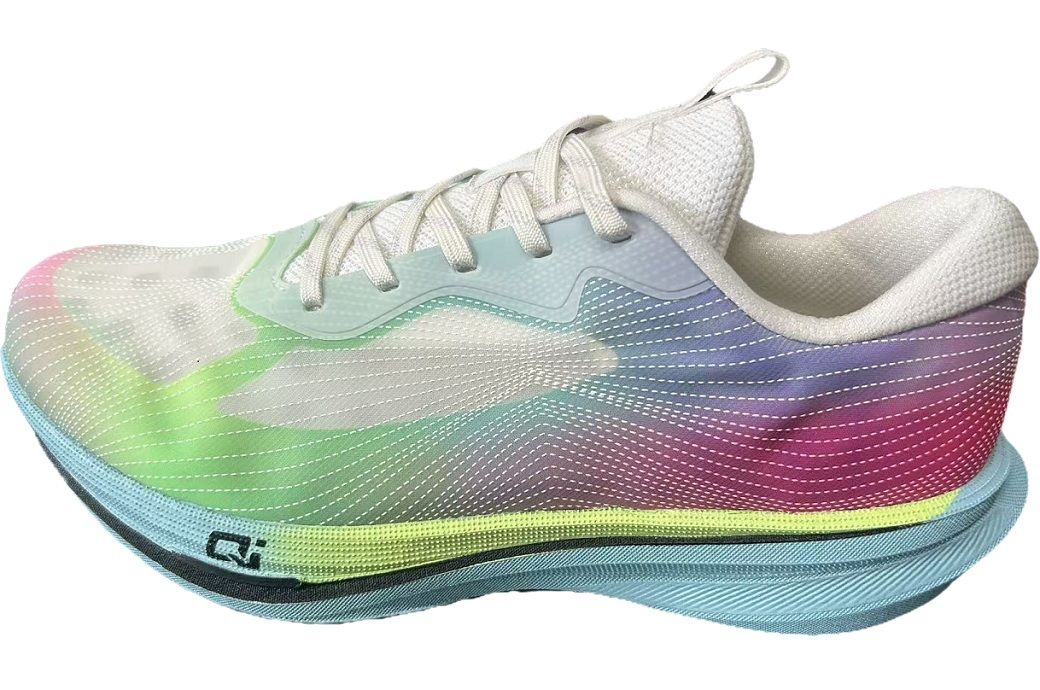
After two years of intensive development and close collaboration with leading global brands, together with its customers, the company is unveiling its complete footwear solution at ITMA Asia + CITME Singapore 2025, marking a turning point for digital production in footwear. For the first time, Kornit technology has crossed the milestone of more than one million pairs of sports shoes sold globally under leading brands, proving that digital footwear manufacturing has moved beyond concept and is now a fully scaled commercial reality.
Kornit Digital has launched its revolutionary digital footwear solution at ITMA Asia + CITME Singapore 2025, marking a major step in sustainable, on-demand footwear production.
The solution allows direct digital printing on technical fabrics, combining design flexibility, precision, and durability.
The company is exhibiting at Hall 6 Stand C204 at the event.
A Massive Market Opportunity for Digital Transformation, and Kornit is Just Getting Started
The addressable market Kornit is targeting represents roughly one billion decorated shoe uppers each year across the global sports and athleisure footwear industry. This is a massive and fast-growing segment shaped by consumer demand for variety, innovation, and personalization. Kornit’s technology directly addresses the key challenges of this market, including design limitations, long development cycles, and overproduction, by replacing complex analog decoration with a single-step digital workflow that delivers durability, flexibility, and limitless design freedom. Kornit’s patented technology enables high-quality, durable prints directly on technical fabrics used in footwear, combining precision, sustainability, and performance in one streamlined process. This innovation redefines how footwear is designed and produced, shifting from traditional mass-production methods to agile, efficient, and creative digital workflows that allow brands to create on demand.
Following successful deployments with two leading footwear manufacturers in China, Kornit is expanding globally with additional customers in Vietnam and in Germany, setting a new standard for agility, creativity, and sustainability across the world’s leading footwear hubs. Ronen Samuel, Chief Executive Officer at Kornit Digital said:
“The footwear industry is undergoing a profound transformation. Through close collaboration with visionary partners and relentless innovation, we have developed a fully digital solution that redefines how shoes are designed, produced, and delivered. What started as a concept is now being adopted at scale, with leading global brands. Kornit has always been about pushing boundaries, and this milestone marks a new era for digital manufacturing and sustainable growth.”
Customer feedback highlights that Kornit’s digital solution has dramatically accelerated footwear development and unlocked creative freedom. What took months now happens in days, enabling brands to respond faster to trends and deliver distinctive, high-performance products with consistency and efficiency.
Kornit’s footwear solution also sets new standards for sustainability. The process requires no water, uses minimal energy, and enables local, near-shore production—reducing waste, inventory, and carbon footprint while allowing brands to produce only what is sold.
Looking ahead, Kornit’s next-generation patented footwear technology will be introduced at Techtextil 2026 in Frankfurt, showcasing new specialized polymers and expanded material compatibility that will further enhance performance and scalability.
Visit Kornit at ITMA Asia + CITME Singapore 2025, Hall 6 Stand C204, to experience how creativity is replacing complexity and digital is replacing analog, empowering the footwear industry to move at the speed of imagination, with Kornit leading the way.
Note: The headline, insights, and image of this press release may have been refined by the Fibre2Fashion staff; the rest of the content remains unchanged.
Fibre2Fashion News Desk (KD)
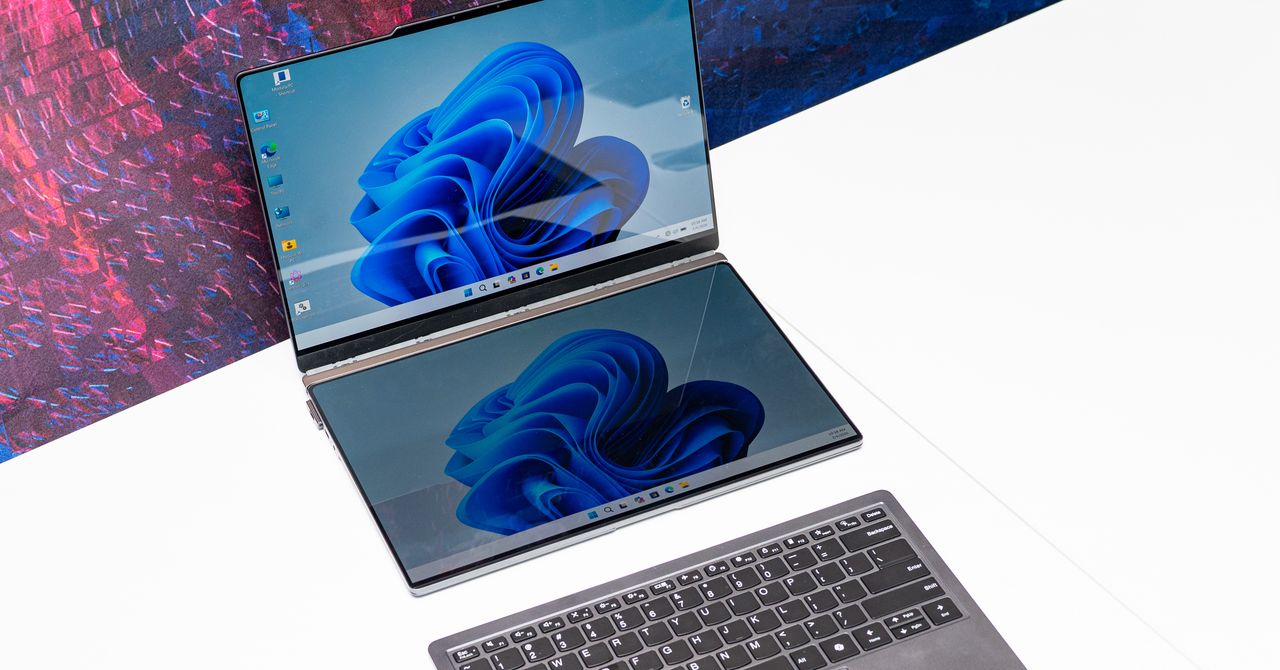
Do you like having a second screen with your computer setup? What if your laptop could carry a second screen for you? That’s the idea behind Lenovo’s latest proof of concept, the ThinkBook Modular AI PC, announced at Mobile World Congress in Barcelona.
Lenovo is never shy to show off wacky, weird concept laptops. We’ve seen a PC with a transparent screen, one with a rollable OLED screen, a swiveling screen, and another with a flippy screen. At CES earlier this year, the company showed off a gaming laptop with a display that expands at the push of a button. Sometimes, these concepts turn into real products that go on sale (often in limited quantities).
At MWC 2026, Lenovo trotted out three concepts. While it’s unclear whether any of them will become real, purchasable products, there’s some unique utility here, and a peek at how computing experiences could change in the future.
A Laptop With a Built-In Portable Screen

As someone with a multi-screen setup at home and a fondness for portable monitors, the ThinkBook Modular AI PC appeals to me the most. At first glance, it looks like a normal laptop. Take a look behind, and you’ll notice there’s a second screen magnetically hanging off the back of the laptop, like a koala carrying a baby on its back.
The screen is connected to the laptop using pogo-pin connectors, so you can use it in this state to display content to people in front of you, say, if you were making a presentation during a meeting. Alternatively, you can pop this second screen off, remove a hidden kickstand resting under the laptop, and magnetically attach it to the 14-inch screen so that you have a traditional portable monitor experience. (You’ll need to connect this to the laptop via a USB-C cable in this orientation.)
If you don’t have the desk space for that orientation, you can always remove the keyboard from the base and pop the second screen there—it’ll auto-connect to the laptop via the pogo pins, and you’ll be able to use the Bluetooth keyboard to type on a dual-screen setup that resembles the Asus ZenBook Duo. The whole system is a fantastically portable method of improving productivity on the go, and the laptop isn’t too thick or cumbersome.
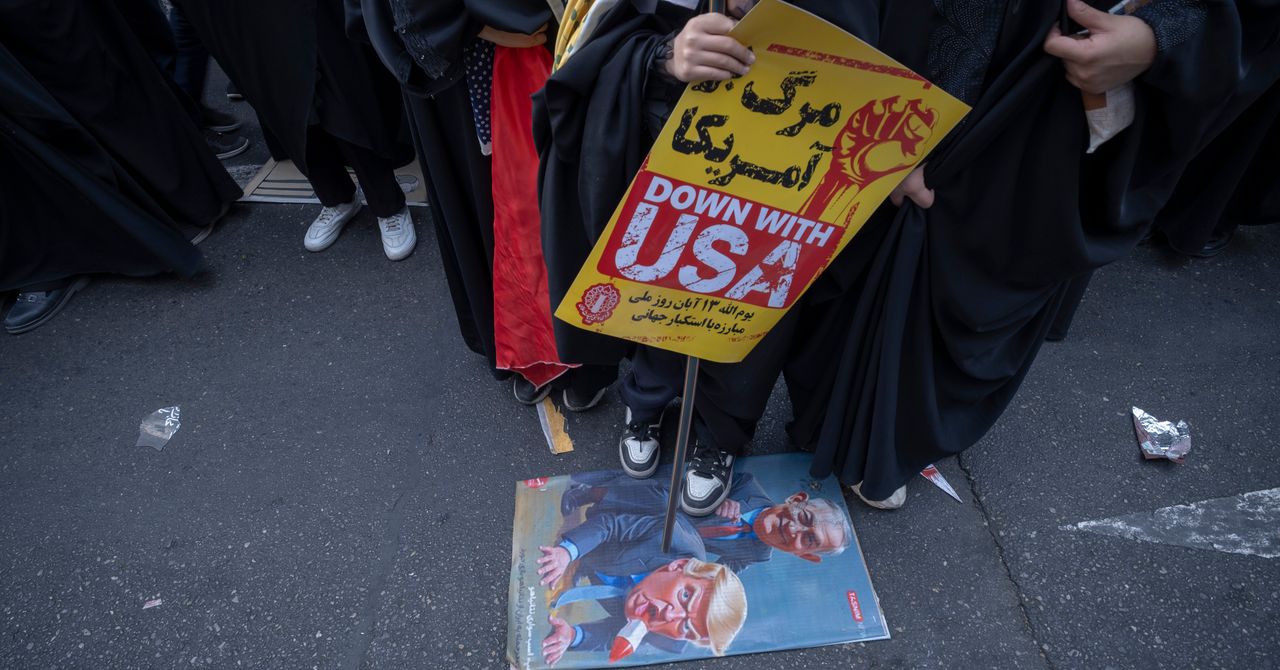
More recently, Iran has been a regular adversary in cyberspace—and while it hasn’t demonstrated quite the acuity of Russia or China, Iran is “good at finding ways to maximize the impact of their capabilities,” says Jeff Greene, the former executive assistant director of cybersecurity at CISA. Iran, in particular, famously was responsible for a series of distributed-denial-of-service attacks on Wall Street institutions that worried financial markets, and its 2012 attack on Saudi Aramco and Qatar’s Rasgas marked some of the earliest destructive infrastructure cyberattacks.
Today, surely, Iran is weighing which of these tools, networks, and operatives it might press into a response—and where, exactly, that response might come. Given its history of terror campaigns and cyberattacks, there’s no reason to think that Iran’s retaliatory options are limited to missiles alone—or even to the Middle East at all.
Which leads to the biggest known unknown of all:
5. How does this end? There’s an apocryphal story about a 1970s conversation between Henry Kissinger and a Chinese leader—it’s told variously as either Mao-Tse Tung or Zhou Enlai. Asked about the legacy of the French revolution, the Chinese leader quipped, “Too soon to tell.” The story almost surely didn’t happen, but it’s useful in speaking to a larger truth particularly in societies as old as the 2,500-year-old Persian empire: History has a long tail.
As much as Trump (and the world) might hope that democracy breaks out in Iran this spring, the CIA’s official assessment in February was that if Khamenei was killed, he would be likely replaced with hardline figures from the Islamic Revolutionary Guard Corps. And indeed, the fact that Iran’s retaliatory strikes against other targets in the Middle East continued throughout Saturday, even after the death of many senior regime officials—including, purportedly, the defense minister—belied the hope that the government was close to collapse.
The post-World War II history of Iran has surely hinged on three moments and its intersections with American foreign policy—the 1953 CIA coup, the 1979 revolution that removed the shah, and now the 2026 US attacks that have killed its supreme leader. In his recent bestselling book King of Kings, on the fall of the shah, longtime foreign correspondent Scott Anderson writes of 1979, “If one were to make a list of that small handful of revolutions that spurred change on a truly global scale in the modern era, that caused a paradigm shift in the way the world works, to the American, French, and Russian Revolutions might be added the Iranian.”
It is hard not to think today that we are living through a moment equally important in ways that we cannot yet fathom or imagine—and that we should be especially wary of any premature celebration or declarations of success given just how far-reaching Iran’s past turmoils have been.
Defense Secretary Pete Hegseth has repeatedly bragged about how he sees the military and Trump administration’s foreign policy as sending a message to America’s adversaries: “F-A-F-O,” playing off the vulgar colloquialism. Now, though, it’s the US doing the “F-A” portion in the skies over Iran—and the long arc of Iran’s history tells us that we’re a long, long way from the “F-O” part where we understand the consequences.
Let us know what you think about this article. Submit a letter to the editor at mail@wired.com.


Kornit Digital launches footwear solution at ITMA Asia + CITME 2025

Vin Diesel shares exciting news on 25th anniversary of ‘Fast & Furious’

Create Garment Trading Adjudicator: Researchers tell UK govt

Eye-popping rise in one year: Betting on just gold and silver for long-term wealth creation? Think again! – The Times of India

These Cheap Noise-Cancelling Sony Headphones Are Even Cheaper Right Now

Pakistan carries out precision strikes on seven militant hideouts in Afghanistan

-
Business1 week ago
Eye-popping rise in one year: Betting on just gold and silver for long-term wealth creation? Think again! – The Times of India
-
 Tech1 week ago
These Cheap Noise-Cancelling Sony Headphones Are Even Cheaper Right Now
-
 Politics1 week ago
Pakistan carries out precision strikes on seven militant hideouts in Afghanistan
-

 Sports1 week ago
Kansas’ Darryn Peterson misses most of 2nd half with cramping
-

 Sports1 week ago
How James Milner broke Premier League’s appearances record
-

 Entertainment1 week ago
Viral monkey Punch makes IKEA toy global sensation: Here’s what it costs
-
Sports1 week ago
Mike Eruzione and the ‘Miracle on Ice’ team are looking for some company
-

 Entertainment1 week ago
Saturday Sessions: Say She She performs "Under the Sun"