

Tech
Three-layer microfluidic cooling device can remove heat from small electronics more efficiently

As electronic devices become increasingly powerful and compact, they can generate denser heat fluxes, or in other words, produce more heat in a smaller area. These heat fluxes raise the temperature of a device and can damage its underlying components, causing them to malfunction and, in time, even contributing to their failure.
To prevent this from happening, electronics engineers rely on thermal management systems and cooling strategies. A promising strategy to dissipate heat in smaller electronics is known as microfluidic cooling. This technique prompts the flow of fluids through microscopic channels that are built into or in the proximity of integrated circuits, to remove heat and reduce the temperature inside a device.
Researchers at Peking University, the National Key Laboratory of Advanced Micro and Nano Manufacture Technology recently introduced a new microfluidic cooling approach that could remove heat from devices more effectively and efficiently than many previously introduced strategies. This approach, outlined in a paper published in Nature Electronics, relies on a newly developed three-layer microfluidic cooling device etched into a silicon substrate.
“The miniaturization of advanced electronics can lead to high heat fluxes, which must be dissipated before they cause device degradation or failure,” Zhihu Wu, Wei Xiao and their colleagues wrote in their paper. “Embedded microfluidic cooling is of potential value in such systems, but devices are typically limited to heat fluxes below 2,000 W cm−2. We report a microfluidic cooling strategy that can dissipate heat fluxes up to 3,000 W cm−2 at a pumping power of only 0.9 W cm−2 using single-phase water as the coolant.”
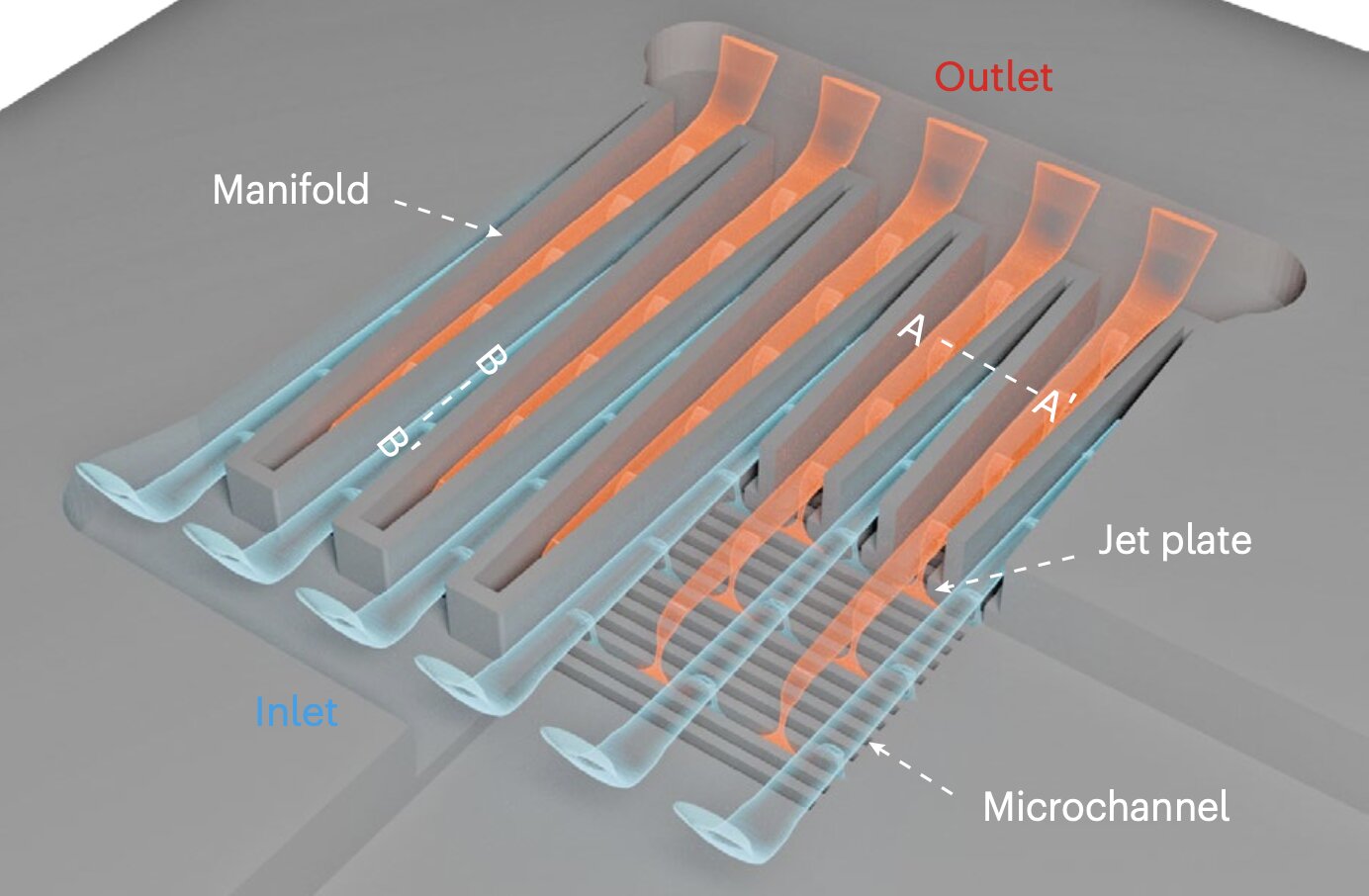
The cooling device developed by Wu, Xiao and their colleagues has a three-layer structure. The first layer is comprised of a tapered manifold, which distributes water across the surface of a chip and ensures that each microchannel receives an equal amount of coolant so that a device is uniformly cooled.
The middle layer, known as the microjet layer, consists of tiny nozzles that form microjets (i.e., high-speed streams of fluid that shoot directly onto a chip’s surface), improving the transfer of heat in devices by targeting the thermal boundary (i.e., the region where heat builds up). The third and final layer is comprised of microchannels, tiny grooves etched into silicon that carry the warm coolant out of an integrated chip.
“Our approach is based on a three-tier structure that consists of a tapered manifold layer on the top, a microjet layer in the middle and a microchannel layer with sawtooth-shaped sidewalls at the bottom,” Wu, Xiao and their colleagues wrote. “The structures are etched directly into the backside of the silicon substrate using standard microelectromechanical system technology. Moreover, the coefficient of performance can reach 13,000 and dissipate a heat flux of 1,000 W cm−2 at a maximum chip temperature rise of 65 K.”
In initial tests, the new microfluidic cooling approach proposed by these researchers was found to remove heat significantly more effectively than most previously introduced strategies. In addition, the team’s three-layered device requires little pumping power (0.9 W/cm²) to cool chips and could be fabricated on a large-scale using existing manufacturing processes.
In the future, the recent work by Wu, Xiao and his colleagues could support the development of smaller electronic devices that are also durable, highly performing and energy efficient. Moreover, their proposed cooling device could soon be improved and evaluated further in tests with a wider range of small electronics.
Written for you by our author Ingrid Fadelli, edited by Gaby Clark, and fact-checked and reviewed by Robert Egan—this article is the result of careful human work. We rely on readers like you to keep independent science journalism alive.
If this reporting matters to you,
please consider a donation (especially monthly).
You’ll get an ad-free account as a thank-you.
More information:
Zhihu Wu et al, Jet-enhanced manifold microchannels for cooling electronics up to a heat flux of 3,000 W cm−2, Nature Electronics (2025). DOI: 10.1038/s41928-025-01449-4.
© 2025 Science X Network
Citation:
Three-layer microfluidic cooling device can remove heat from small electronics more efficiently (2025, October 26)
retrieved 26 October 2025
from https://techxplore.com/news/2025-10-layer-microfluidic-cooling-device-small.html
This document is subject to copyright. Apart from any fair dealing for the purpose of private study or research, no
part may be reproduced without the written permission. The content is provided for information purposes only.













Design Within Reach carries some of the best and coolest home decor you can find, from modern couches to fantastic office chairs and fun designers like Herman Miller and Dusen Dusen. It’s not a cheap store to shop at, though, which is what makes these coupons something to jump on. Unlock online-exclusive discounts of up to 50%, free shipping, plus 20% off featured brands and 15% off office furniture bundles with Design Within Reach promo codes and Summer 2025 sale events. Save on hundreds of stylish items, including our favorite Design Within Reach office chairs, plus some other fantastic home gear we’ve earmarked for testing.
Extra 25% Off at Design Within Reach
Upgrade your digs to sleek Eames-esque mid-century modern design for up to 25% off furniture with Design Within Reach promo code EXTRA25. Head to Design Within Reach’s sale page for huge markdowns of live-proof, luxe furniture and household items like storage furniture, bar stools, chairs, couches, cabinetry, accessories, and more. And don’t forget to use that Design Within Reach promo code for even more savings.
Get 15% Off Furniture With Design Within Reach Promo Codes
On Design Within Reach’s website, you’ll see an expansive catalogue with a huge range of furniture to revamp any room—from couches and credenzas to coffee tables and bar stools for way less than normal designer prices. Flos lamps, known for mixing functionality and style, are now 20% off for a limited time. These colorful table lamps start at $255, with wall sconces, pendants, and more on sale.
Summer’s here, and it’s better late than never to get some great outdoor furniture. During Design Within Reach’s outdoor sale event, you can get up to 30% off great outdoor furniture essentials, like outdoor sectionals, chaise lounge chairs, benches, and outdoor tables. You can get bonus savings with sitewide Design Within Reach promo codes during this time. But you can still save thousands of dollars, on top of 50% off markdowns. If you’ve been eyeing the Eames Lounge Chair, Aeron Chair, or Noguchi table, this is your chance to save over $1,500.
One of the easiest ways to get a design within reach coupon is by signing up for their emails. When you sign up for DWR’s email list, you’ll get 15% off your first order, plus, you’ll be the first to know of flash sale events and discount codes when the updates are sent straight to your inbox.
You can ditch the delivery fees with Quick-Ship free shipping offers. You can save up to $699 and get complimentary shipping sitewide on orders of $2,000 or more. Explore the many items with quick-ship and free shipping offers, including sofas, storage pieces, coffee tables, and more iconic furniture. Check out their New to Sale deals too, with 40% off select bar stools, 20% off sectionals, and decor for 50% off. Design Within Reach’s end-of-season sales are some of the best times to save big on those pricier purchases, but you’ll be surprised to find that many new arrivals will go on sale too. While you’re browsing the Sale section, you can use the filter button to organize by category, specific designers, brands, and even price. Unleash your inner interior designer and go wild.
Shop up to 50% Off Design Within Reach Clearance Sale Deals
Buying furniture and other household items can be one of the biggest purchases one makes in their life. Luckily, Design Within Reach has some great furniture deals, with clearance deals that are even steeper than their usual sale discounts. These deals include last-chance furniture discounts, with up to 50% off on all home categories and decor—including light fixtures, tables, ottomans, furniture cushions, and more. Check out Design Within Reach clearance deals and take advantage of the final sale prices, where furniture items are at their lowest prices yet—before they go out of stock.
More Ways to Save on Design Within Reach Furniture
Design Within Reach is also here for small business owners and design industry professionals, to help them jumpstart and elevate their businesses in style. They can apply to the free DWR Trade program, where they will receive sitewide discounts every day, a dedicated Account Executive, exclusive promotions only available to Trade members, and exclusive and discounted Trade pricing across Design Within Reach’s 200 premium design brands in one place.
Our Favorite Design Within Reach Gear
Design Within Reach has a huge range of designers and home pieces, from massive couches to decor and chargers. They carry Herman Miller pieces we love from our guide to the Best Office Chairs, plus chargers from Courant that we recommend in our Best Wireless Chargers guide. We’ve also got our eye on couches and sheets from designers like Hay and Dusen Dusen to test too that you can find at Design Within Reach.

As the Trump administration phases out the use of animal experimentation across the federal government, a biotech startup has a bold idea for an alternative to animal testing: nonsentient “organ sacks.”
Bay Area-based R3 Bio has been quietly pitching the idea to investors and in industry publications as a way to replace lab animals without the ethical issues that come with living organisms. That’s because these structures would contain all of the typical organs—except a brain, rendering them unable to think or feel pain. The company’s long-term goal, cofounder Alice Gilman says, is to make human versions that could be used as a source of tissues and organs for people who need them.
For Immortal Dragons, a Singapore-based longevity fund that’s invested in R3, the idea of replacement is a core strategy for human longevity. “We think replacement is probably better than repair when it comes to treating diseases or regulating the aging process in the human body,” says CEO Boyang Wang. “If we can create a nonsentient, headless bodyoid for a human being, that will be a great source of organs.”
For now, R3 is aiming to make monkey organ sacks. “The benefit of using models that are more ethical and are exclusively organ systems would be that testing can be meaningfully more scalable,” Gilman says. (R3’s name comes from the philosophy in animal research known as the three R’s—replacement, reduction, and refinement—developed by British scientists William Russell and Rex Burch in 1959 to promote humane experimentation.)
New drugs are often tested in monkeys before they’re given to human participants in clinical trials. For instance, monkeys were critical during the Covid-19 pandemic for testing vaccines and therapeutics. But they’re also an expensive resource, and their numbers are dwindling in the US after China banned the export of nonhuman primates in 2020.
Animal rights activists have long pushed to end research on monkeys, and one of the seven federally funded primate research facilities across the country has signaled it would consider shutting down and transitioning into a sanctuary amid growing pressure. The US Centers for Disease Control and Prevention is also winding down monkey research, part of a bigger trend across the government to reduce reliance on animal testing.
As a result, Gilman says, there aren’t enough research monkeys left in the US to allow for necessary research if another pandemic threat emerges. Enter organ sacks.
Organ sacks would in theory offer advantages over existing organs-on-chips or tissue models, which lack the full complexity of whole organs, including blood vessels.
Gilman says it’s already possible to create mouse organ sacks that lack a brain, though she and cofounder John Schloendorn deny that R3 has made them. (For the record, Gilman doesn’t like the term “brainless” to describe the organ sacks. “It’s not missing anything, because we design it to only have the things we want,” she says.) Gilman and Schloendorn would not say how exactly they plan to create the monkey and human organ sacks, but said they are exploring a combination of stem-cell technology and gene editing.
It’s plausible that organ sacks could be grown from induced pluripotent stem cells, says Paul Knoepfler, a stem cell biologist at the University of California, Davis. These stem cells come from adult skin cells and are reprogrammed to an embryonic-like state. They have the potential to form into any cell or tissue in the body and have been used to create embryo-like structures that resemble the real thing. By editing these stem cells, scientists could disable genes needed for brain development. The resulting embryo could then be incubated until it grows into organized organ structures.
“Tavajoh! Tavajoh! Tavajoh!” a man’s voice announces, before going on to narrate a string of numbers in no apparent order, slowly and rhythmically. After nearly two hours, the calls of “Attention!” in Persian stop, only to resume again hours later.
The broadcast has been playing twice a day on a shortwave frequency since the start of the US-Israel attack on Iran on February 28.
According to Priyom, an organization which tracks and analyses global military and intelligence use of shortwave radio, using established radio-location techniques, the broadcast was first heard as the US bombing of Iran began. It has since played on the 7910 kHz shortwave frequency like clockwork—at 02.00 UTC and again at 18.00 UTC.
Over the weekend, Priyom said it had identified the likely origin of the broadcast. Using multilateration and triangulation techniques, the group traced the signal to a shortwave transmission facility inside a US military base in Böblingen, southwest of Stuttgart, Germany.
The site lies within a restricted training area between Panzer Kaserne and Patch Barracks, with technical operations possibly linked to the US army’s 52nd Strategic Signal Battalion, headquartered nearby.
That identification narrows the field, but it does not reveal who is behind the transmissions or who they are meant for.
The two-hour-long transmission is divided into five to six segments, each lasting up to 20 minutes. Each opens with “Tavajoh!” before shifting into a string of numbers in Persian, sometimes punctuated with an English word or two. Five days into the broadcast, radio jammers were heard attempting to block the frequency. The following day, the transmission shifted to a different frequency—7842 kHz.
Radio communication experts believe the broadcast is likely part of a Cold War–era system known as number stations.
The Return of the Numbers
Number stations are shortwave radio broadcasts that play strings of numbers or codes that sound random—like the one now heard in Iran. “It is an encrypted radio message used by foreign intelligence services, often as part of a complex operation by intelligence agencies and militaries,” says Maris Goldmanis, a Latvian historian and avid numbers stations researcher.
Number stations are most commonly associated with espionage. “For intelligence agencies, it is important to communicate with their spies to gather intelligence,” says John Sipher, a former US intelligence officer who served 28 years in the CIA’s National Clandestine Service. “This is not always possible in person due to political constraints or conflict. This is where number stations come in.”
While the use of number stations can be traced back to the First World War, they gained prominence during the US-Soviet Cold War. As espionage grew more sophisticated, governments used automated voice transmissions of coded numbers to communicate with agents, Goldmanis says. Citing declassified KGB and CIA documents, he adds that number stations were widely used during this period, often as Morse code transmissions and, in many cases, as two-way communications, with agents reporting back using their own shortwave transmitters.
“Nowadays, you have various satellite and encrypted communications technologies,” Sipher says. “But during the Cold War and even before that, governments had to find ways to do this without being noticed, and broadcasting coded messages was one way to communicate with your assets discreetly.”
The apparent randomness of the numbers means they can be understood only with a codebook, Sipher adds. “Nobody can make heads or tails of it or understand what it says unless you have the codebook that can give you hints to decrypt the code,” he says, noting that such systems must be set up and coordinated in advance.
A Signal Without a Sender
While the likely origin of the signal may now be clearer, its purpose and intended recipient remain unknown.
Because the broadcasts are encrypted and designed to be covert, those details may remain unclear for years, Goldmanis says. The structured nature of the transmission—its fixed schedule and consistent use of frequencies—further suggests it is part of a planned operation.


South Korea’s Misto Holdings’ 2025 profit jumps 31.6% on steady growth

Australia and EU agree sweeping trade deal in face of global uncertainty

How Jaxon Smith-Njigba’s contract extension impacts Seahawks

Strategic oil stocks to be released ‘immediately’ in Asia and Oceania: IEA

New Income Tax Act 2025 To Take Effect From April 1: 10 Key Changes That Will Affect Your Money

Transfer rumors, news: Real Madrid open to Camavinga exit, as Premier League clubs circle

-
 Entertainment1 week ago
Strategic oil stocks to be released ‘immediately’ in Asia and Oceania: IEA
-
Business1 week ago
New Income Tax Act 2025 To Take Effect From April 1: 10 Key Changes That Will Affect Your Money
-
 Sports1 week ago
Transfer rumors, news: Real Madrid open to Camavinga exit, as Premier League clubs circle
-

 Tech1 week ago
Early Deals From the Amazon Spring Sale That Passed Our BS Test
-

 Tech1 week ago
Our Favorite Red Light Hair Growth Device Is Currently on Sale
-

 Sports1 week ago
PCB files complaint over allowing Bangladesh to take review on penultimate ball – SUCH TV
-
 Business7 days ago
Stocks and pound rise as US rate call approaches
-

 Tech6 days ago
Justice Department Says Anthropic Can’t Be Trusted With Warfighting Systems