

Tech
Tragedy has struck Lisbon’s funicular railway. Transport expert explains how these old-fashioned trains work

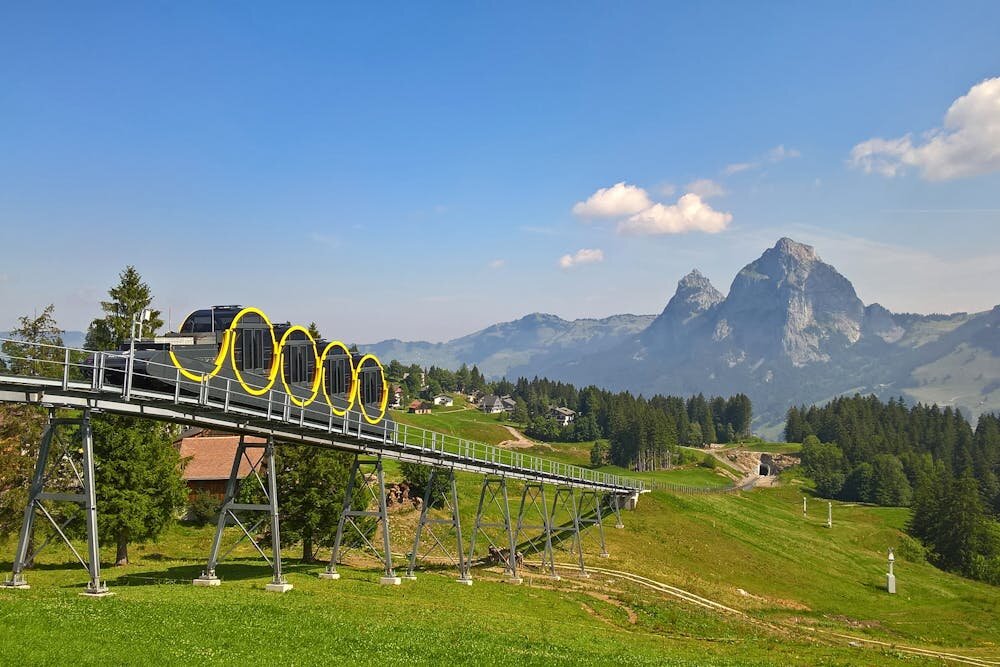
Some 15 people have died after the Gloria funicular railway car in Lisbon, Portugal, derailed and crashed on Wednesday local time.
Emergency services have also confirmed that more than 18 people were also injured, five of them seriously, in the tragedy, which occurred at the start of the evening rush hour.
It follows another accident on the same line in May 2018, when one of the cars derailed due to flaws in the maintenance of its wheels. No one was killed in that incident.
The exact cause of the most recent accident is not yet known. Witnesses have reported that the yellow-and-white tram appeared out of control as it sped downhill, before derailing as it rounded a bend and crashing into a building. Photos of the aftermath show a crumpled heap of cables and steel.
These cable car–like transport systems are rare relics of the 19th century, found in only a few very hilly places around the world. So how do they work? And why are they still in use?
How do funicular railways work?
Trains and trams typically only work on flat terrain. That’s because their steel wheels can’t get enough traction on steel rails on steep hills. As a workaround, railroad engineers often build tunnels through steep mountainsides.
Funicular railways, however, can go up very steep hills.
They usually feature two counterbalanced cars that are attached via a haulage cable.
As one car descends, it helps pull the ascending car up the hillside. The weight of the ascending car also prevents the descending one from careening out of control. Some now have electric motors to help power them and some are able to engage a one-way mechanical drive just for steep hills.
Even though funicular systems are typically quite slow and clunky, they are still popular with both tourists and residents in the places where they’re found.
Where are they found?
The Gloria funicular railway line in Lisbon opened in 1885. One of three funicular lines in Lisbon, it connects the city’s downtown area with the Bairro Alto (Upper Quarter).
But there are other examples of these transport relics around the world.
Switzerland has several funicular railways. The most notable is the Stoosbahn—the steepest funicular in the world. It covers a total ascent of around 744 meters, reaching a gradient of 47 degrees. It is a very popular tourist trip.
In Hong Kong, the Peak Tram is a funicular railway that has operated since 1888 and takes people to near the top of Hong Kong Island.
Last year, there was also some discussion about installing a new funicular railway system in the Blue Mountains in New South Wales, Australia, that would travel 14 meters every second.
The rise of trackless trams
Funicular railways still serve a purpose for people living in—or visiting—steep areas where they’re found. However, newer technology means more conventional forms of rail transport are now far less limited in traveling up and down hills.
For example, trackless trams are kind of a combination between a tram and a bus. They use GPS and digital sensors to move precisely along an invisible track and have rubber wheels, enabling them to ascend gradients of up to 15%. However, these have not yet been built for steeper hills.
I have enjoyed riding such funicular trams in a range of hilly cities, but this crash is likely to take the shine off the tourist experience. It’s about time we had a 21st-century option that is clearly safer.
This article is republished from The Conversation under a Creative Commons license. Read the original article.
Citation:
Tragedy has struck Lisbon’s funicular railway. Transport expert explains how these old-fashioned trains work (2025, September 4)
retrieved 4 September 2025
from https://techxplore.com/news/2025-09-tragedy-struck-lisbon-funicular-railway.html
This document is subject to copyright. Apart from any fair dealing for the purpose of private study or research, no
part may be reproduced without the written permission. The content is provided for information purposes only.













Coffee is the original office biohack and the nation’s most popular productivity tool. As we lose sleep to the changeover to daylight saving time, the caffeine-addicted WIRED Reviews team is writing about our favorite coffee brewing routines and devices that’ll keep us alert and maybe even happy in the morning. Today, reviewer Matthew Korfhage expounds on his lasting love for drip coffee—and why the Ratio Four never leaves his counter. In the days after, we’ll add other Java.Base stories about other WIRED writers’ favorite brewing methods.
As with any vice worth having, a morning coffee routine can take on the character of religion. And like a lot of religion, it’s often born as much accident as moral conviction. My denomination is good, old-fashioned drip coffee. That’s what I drink first thing, before I even think about crafting a shot of espresso.
I’m WIRED’s lead coffee writer and I’ve developed a deep fondness for coffee’s many variations, from espresso to Aeropress to cold brew. But “coffee” to me, in my deepest soul, still means a steaming mug of unadulterated drip. Luckily, that’s also the coffee arena that has been transformed the most by technology in recent years. The drip coffee from the Ratio Four coffee maker (now quietly on its second generation) feels to me like coffee’s purest form, the liquid distillation of what my coffee beans smell like fresh off the grinder.
-
Photograph: Matthew Korfhage
-
Photograph: Matthew Korfhage
-
Photograph: Matthew Korfhage


Ratio
Four Small-Batch Brewer (Series 2)
My love of filter coffee began as a teenager traveling and studying in India—perhaps my first glimpse of adult freedom. This is where I drank the first full cup of coffee I remember finishing. In Jaipur, filter coffee was an intense, jet-black gravity brew typically mixed with milk and sugar. I decided that if I was going to drink coffee, I would take it straight and learn to like it on its own terms. A newfound friend, tipping jaggery into his own brew, laughed at my insistence I didn’t want sweetened milk. I then downed a cup so thick and strong and caffeinated it made my hairs stand at perpendicular. If I’d made a mistake, I refused to admit it.
I carried this preference back to Oregon, drinking unadulteratedly black, terrible drip coffee at all-night diners and foul office breakrooms. Black coffee had become a morality clause, though it was hardly a matter of taste.
It wasn’t until years later that I discovered that drip coffee could actually be an indulgence every bit as refined as pinkies-up espresso.
Upping the Drip
In part, this was a problem of technology. Aside from a classic Moccamaster, it’s only very recently that home drip coffee makers have been able to produce a truly excellent cup. For years, I didn’t keep one at my home.
What woke me up to drip’s possibilities was a new wave of cafes in Portland, first third-wave coffee pioneer Stumptown Coffee and then especially Heart Coffee Roasters in Portland. Heart’s Norwegian owner-roaster, Wille Yli-Luoma, expounded to me at length about the aromatic purity of light-roast immersion coffee—the fruity aromatics of a first-crack Ethiopian that could smack of peach or nectarine or blueberry. Scandinavians had long prized this, he told me, and had evolved light-roast coffee into pure craft. America was finally catching up.
Still, I could never quite get that same flavor or clarity on a home brewer. Not until recently. To get the best version, I still had to walk up the street to Heart and get my coffee from the guy who roasted it. Or I had to spend way too long drizzling water over coffee in a conical filter. I rarely wanted to do this while still bleary from sleep, already late for work.
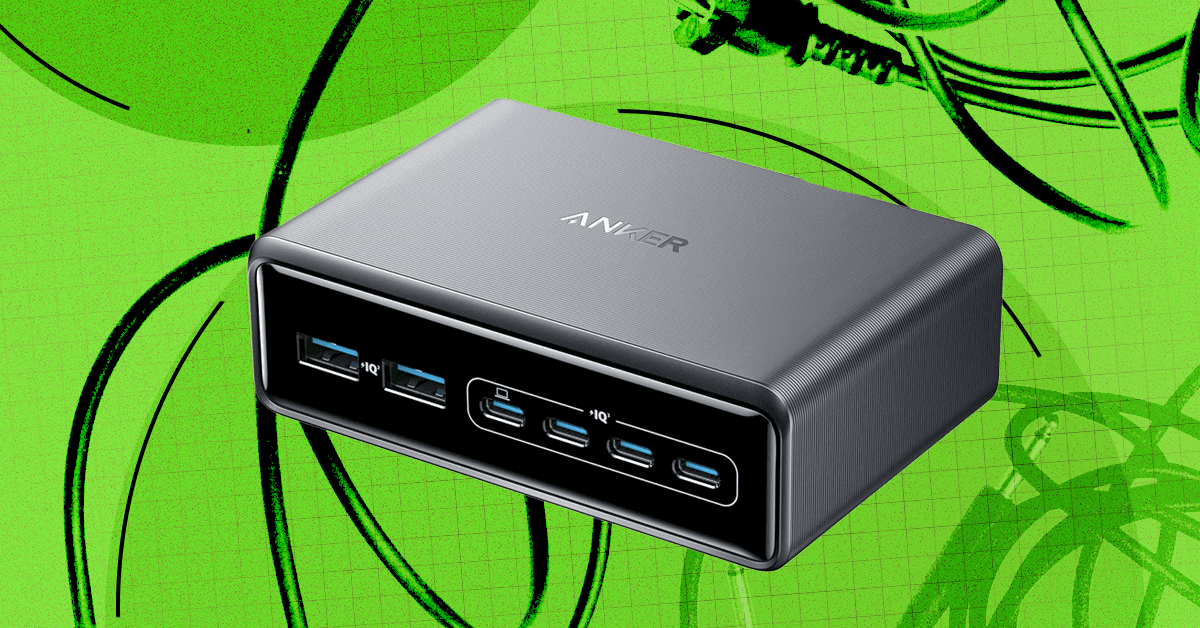
There’s a reason we’re called WIRED. If there’s one thing most of today’s gadgets have in common, it’s that they typically need to be plugged in from time to time. But all those cables, cords, and wires can be tough to manage. They don’t have to end up in a tangled nest under your desk; you can bring order to the cable chaos.
As a gadget reviewer, I have more cords than most people, which is why I also have a regimented cable management strategy to keep everything orderly. Here are my tips and product recommendations for hiding those cords and power strips, and keeping your desktop tidy.
Jump To:
Planning and Prep
Start by surveying the scene, unplugging and untangling everything, and removing anything that doesn’t need to be there. You might be surprised to find a stray USB-B or Micro-USB you haven’t used in years in the mix. Before you get started on cable management, take a slightly damp microfiber cloth and wipe down all the surfaces and cables. Now, you can start planning routes and figuring out which cables it would make sense to bundle together.
Ideally, cables will be the exact required length, so if you have spares or you don’t mind snagging some new cables, it’s worth switching and getting as close as possible to exact lengths to reduce the excess cable you have to hide. If you have a standing desk, remember to take into account the cable length required for a standing position (trust me, dear reader, it’s no fun when you hit stand on the desk and it pulls your PC tower into the air by a DisplayPort cable that is now forever stuck in that port).
Cable Management
Tidying your tech often comes back to cable management, but there are several ways to keep those cords neatly out of sight. Many desks have channels, grommets, and power strip trays built-in, so have a quick look to make sure you’re using what’s available. Some monitor arms also have built-in cable management. You also likely have a bunch of cable ties in your junk drawer or toolbox, so gather them together.

Ikea
Trixig 150-Piece Cable Management Set
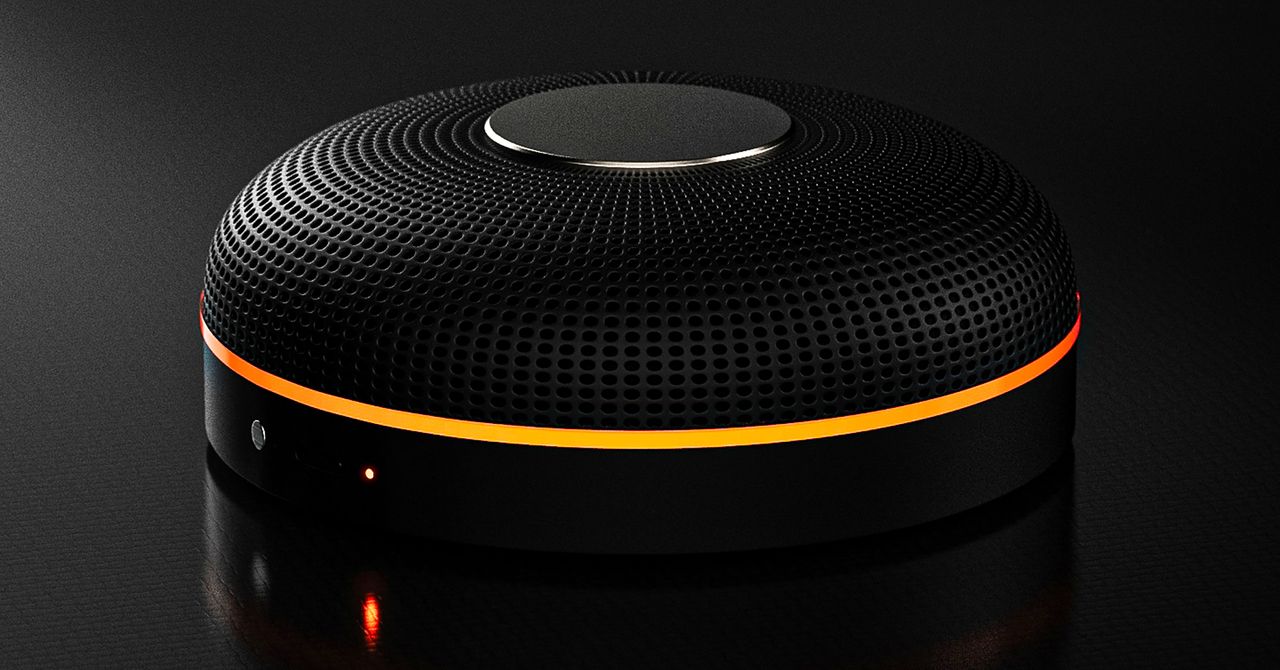
Deveillance also claims the Spectre can find nearby microphones by detecting radio frequencies (RF), but critics say finding a microphone via RF emissions is not effective unless the sensor is immediately beside it.
“If you could detect and recognize components via RF the way Spectre claims to, it would literally be transformative to technology,” Jordan wrote in a text to WIRED after he built a device to test detecting RF signatures in microphones. “You’d be able to do radio astronomy in Manhattan.”
Deveillance is also looking at ways to integrate nonlinear junction detection (NLJD), a very high-frequency radio signal used by security professionals to find hidden mics and bugs. NLJD detectors are expensive and used primarily in professional contexts like military operations.
Even if a device could detect a microphone’s exact location, objects around a room can change how the frequencies spread and interact. The emitted frequencies could also be a problem. There haven’t been adequate studies to show what effects ultrasonic frequencies have on the human ear, but some people and many pets can hear them and find them obnoxious or even painful. Baradari acknowledges that her team needs to do more testing to see how pets are affected.
“They simply cannot do this,” engineer and YouTuber Dave Jones (who runs the channel EEVblog) wrote in an email to WIRED. “They are using the classic trick of using wording to imply that it will detect every type of microphone, when all they are probably doing is scanning for Bluetooth audio devices. It’s totally lame.” Baradari reiterates that the Spectre uses a combination of RF and Bluetooth low energy to detect microphones.
WIRED asked Baradari to share any evidence of the Spectre’s effectiveness at identifying and blocking microphones in a person’s vicinity. Baradari shared a few short videoclips of people putting their phones to their ears listening to audioclips—which were presumably jammed by the Spectre—but these videos do little to prove that the device works.
Future Imperfect
Baradari has taken the critiques in stride, acknowledging that the tech is still in development. “I actually appreciate those comments, because they’re making me think and see more things as well,” Baradari says. “I do believe that with the ideas that we’re having and integrating into one device, these concerns can be addressed.”
People were quick to poke fun at the Spectre I online, calling the technology the cone of silence from Dune. Now, the Deveillance website reads, “Our goal is to make the cone of silence become reality.”
John Scott-Railton, a cybersecurity researcher at Citizen Lab, who is critical of the Spectre I, lauded the device’s virality as an indication of the real hunger for these kinds of gadgets to win back our privacy.
“The silver lining of this blowing up is that it is a Ring-like moment that highlights how quickly and intensely consumer attitudes have shifted around pervasive recording devices,” says Scott-Railton. “We need to be building products that do all the cool things that people want but that don’t have the massive privacy- and consent-violation undertow. You need device-level controls, and you need regulations of the companies that are doing this.”
Cooper Quintin, a senior staff technologist at the Electronic Frontier Foundation, echoed those sentiments, even if critics believe Deveillance’s efforts to be flawed.
“If this technology works, it could be a boon for many,” Quintin wrote in an email to WIRED. “It is nice to see a company creating something to protect privacy instead of working on new and creative ways to extract data from us.”


Gold On Sale In Dubai? Here’s Why Prices Have Dropped By $30 Per Ounce

King Charles crucial trip comes to screeching halt amid new conflict

Removing NTBs could boost trade with US: Bangladesh commerce minister

LPGA legend shares her feelings about US women’s Olympic wins: ‘Gets me really emotional’

India Us Trade Deal: Fresh look at India-US trade deal? May be ‘rebalanced’ if circumstances change, says Piyush Goyal – The Times of India

South Korea’s Misto Holdings completes planned leadership transition

-
 Sports1 week ago
LPGA legend shares her feelings about US women’s Olympic wins: ‘Gets me really emotional’
-
Business1 week ago
India Us Trade Deal: Fresh look at India-US trade deal? May be ‘rebalanced’ if circumstances change, says Piyush Goyal – The Times of India
-
 Fashion1 week ago
South Korea’s Misto Holdings completes planned leadership transition
-

 Entertainment1 week ago
Pakistan’s semi-final qualification scenario after England defeat New Zealand
-

 Entertainment1 week ago
Bobby J. Brown, “The Wire” and “Law & Order: SUV” actor, dies of smoke inhalation after reported fire
-
 Business1 week ago
Greggs to reveal trading amid pressure from cost of living and weight loss drugs
-
 Business1 week ago
CNBC To Merge TV And Digital News Operations, Nearly A Dozen Jobs To Be Cut: Report
-
 Business1 week ago
Data tool to spot Cambridgeshire families due financial support