

Tech
Ultra-thin 3D display delivers wide-angle, highly-detailed images

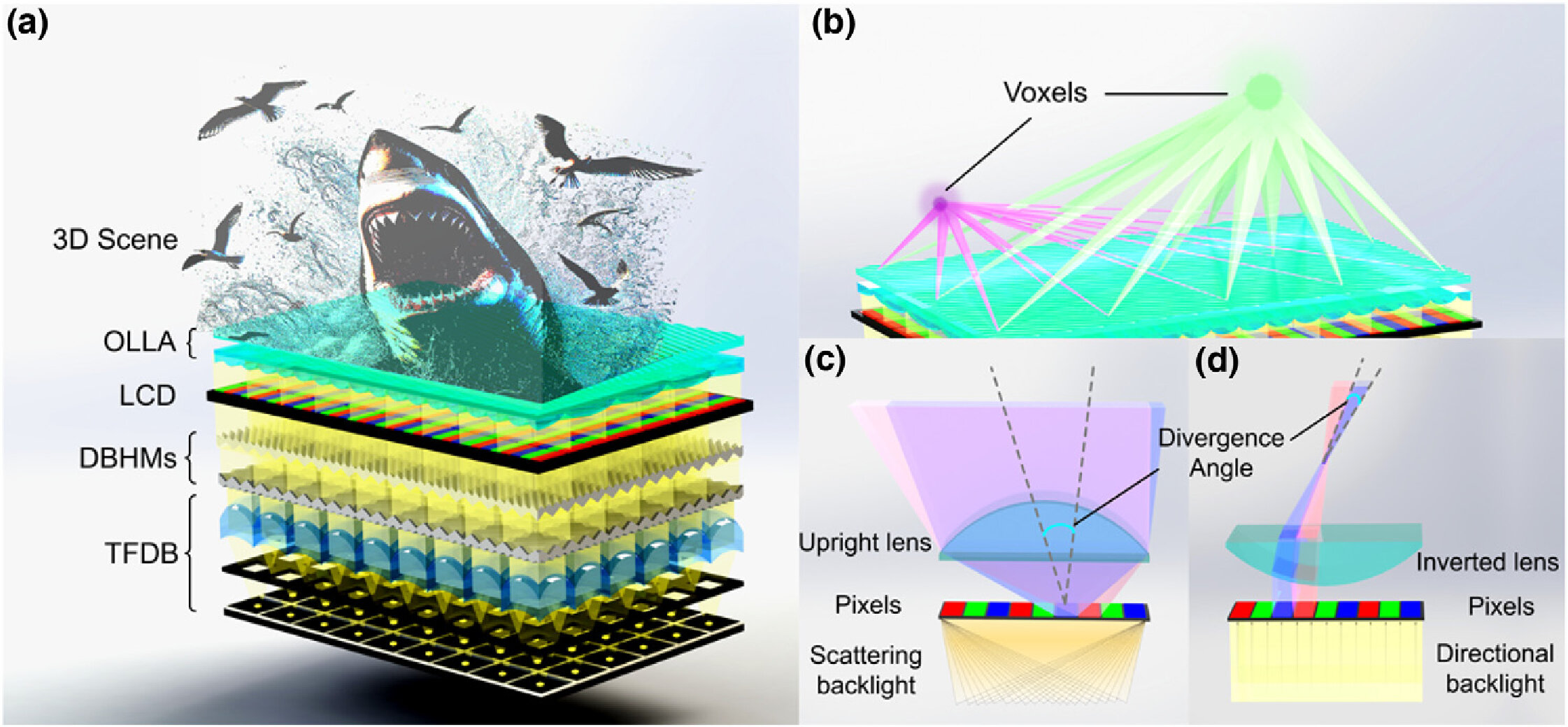
Researchers have developed an ultra-thin 3D display with a wide viewing angle, clear image quality and vivid display depth. By overcoming tradeoffs that typically limit glasses-free 3D displays, the advance could open new possibilities for highly detailed interactive experiences in health care, education and entertainment.
“The new display is just 28 mm thick, dramatically slimmer than conventional directional backlight systems, which typically exceed 500 mm,” said research team leader Xu Liu, from Zhejiang University in China. “This level of compactness, combined with the substantial boost in resolution we achieved, represents an important step toward making the technology practical for real-world products.”
In Optica, the researchers demonstrate an ultra-slim 32-inch directional backlight-based prototype based on the new display design. The prototype is roughly the size of a large computer monitor, has a wide viewing angle of over 120° and a large 3D display volume of 28 × 16 × 39 inches.
“The 3D display maintains crisp image quality across the entire imaging depth, which can help users visualize depth and spatial relationships for tasks requiring precise spatial understanding,” said Rengmao Wu from Zhejiang University, corresponding author of the paper. “This could, for example, help doctors easily see complex anatomical structures such as tumors or fractures in real time.”
Seeing 3D without glasses
3D light field displays create a scene by using a directional backlight to direct light in a highly controlled manner. This design allows each eye to see a slightly different image, creating a natural sense of depth without requiring the viewer to wear 3D glasses. The quality of the rendered 3D effect depends on how accurately the voxels—the 3D pixels that make up the image—are constructed, as well as on their number and size, since smaller, well-constructed voxels enable finer detail and more realistic depth.
“In light field displays employing diffraction gratings or cylindrical lens arrays, voxel size is fundamentally constrained by the angular spread of backlight illumination,” said Xinzhu Sang from Beijing University of Posts and Telecommunications in China, who made key contributions to the work. “Our system significantly improves voxel construction accuracy compared to existing scattering backlight-based 3D displays, achieving highly miniaturized voxels and substantial resolution enhancement.”
Freeform optics—advanced optical elements that use freeform surfaces to precisely control light—provided the design flexibility needed to create the ultra-slim yet expansive directional backlight system. Each beam-shaping channel of the display integrates an LED source, an aperture and a freeform lens that precisely redirects incident light to generate uniform illumination with precise directionality. The researchers tiled these beam-shaping channels to create a tailored large-area directional backlight system. The display also uses a module consisting of two layers of micro-triangular prisms to significantly improve backlight irradiance uniformity while preserving the directionality.

Clear gains over conventional displays
After making a 32-inch prototype based on the new design, the researchers evaluated its performance using a 50-mm fixed-focus lens with an f/2.8 aperture, a setup often used to simulate how the human eye perceives depth and clarity.
In one experiment, they used the ultra-thin 3D light-field display to render images of an astronaut floating outside a space station. The display exhibited a continuous depth range of 1 m and a viewing angle of more than 120°, providing an immersive and realistic visual experience.
They also compared the new design with conventional scattering backlight displays, finding that it produced six times smaller voxels and maintained resolution even when viewed from farther away. The display was also about 100-fold more efficient at using visual information to generate images than scattering backlight displays.
The researchers are now working to further reduce the thickness and weight of the device while improving its optical efficiency. For commercialization, they point out that more work is needed to develop smaller pixel structures, increase pixel density and optimize pixel shape to enhance compatibility with 3D display technology.
More information:
Zijun Zhang et al, Miniaturized-voxel light field panel displaybased on an ultra-slim and large-area freeform directional backlight, Optica (2025). DOI: 10.1364/optica.571647
Citation:
Ultra-thin 3D display delivers wide-angle, highly-detailed images (2025, November 5)
retrieved 5 November 2025
from https://techxplore.com/news/2025-11-ultra-thin-3d-display-wide.html
This document is subject to copyright. Apart from any fair dealing for the purpose of private study or research, no
part may be reproduced without the written permission. The content is provided for information purposes only.













After three people died on a cruise ship struck by a hantavirus, authorities are actively tracking down 29 people who had left the ship. They’re trying to trace the spread of the virus. It’s a long, arduous, global process to find and notify people who might be at risk of infection.
Hey, wasn’t there supposed to be an app for that?
Contact-tracing apps were a global effort starting in 2020 during the Covid-19 pandemic. Enabled by phone companies like Apple and Google, contact tracing was designed to use Bluetooth connections to detect when people had come in contact with someone who had or would later test positive for Covid and report as much. It didn’t do much to solve the spread of the pandemic, but tracking the virus became more effective at least. The same process wouldn’t go well for the hantavirus problem.
“There is no use of apps for this hantavirus outbreak,” Emily Gurley, an epidemiologist at Johns Hopkins University, wrote in an email response to WIRED. “The number of cases are small, and it’s important to trace all contacts exactly to stop transmission.”
On a smaller scale of infection like this, officials have to start at the source (an infected individual), then go person-by-person, confirming where they went and who they might have come into contact with. Data collected by apps from a broad swath of devices would not be anywhere close to accurate enough to give a good idea of where the virus might have hitchhiked to next.
Contact tracing on a wider scale, like, say, a global pandemic, is less about tracking the individual infections and more about understanding what parts of the population might be affected, giving people the opportunity to self-quarantine after exposure. But that depends on how people choose to respond, and how the technology is utilized by public emergency systems. During the Covid pandemic, contact-tracing via apps tended to work better in more carefully managed European countries, but did not slow the spread in the US.
Making devices accessible to that kind of proximity information has also brought all sorts of concerns about privacy, given that the technology would require always-on access to work properly. Contact tracing also struggled to maintain accuracy, and in some cases could be providing false negatives or positives that don’t help further real information about the spread of the virus.
Especially in the case of something like the Hantavirus, where every person on that cruise ship can theoretically be directly tracked and contacted, it’s better to do that process the hard way.
“During small but highly fatal outbreaks, more precision is required,” Gurley wrote.
There’s another type of digital scam to be aware of, as per the BBC. It’s called “reservation hijacking.”
The name gives you a clue as to how it works. Essentially, scammers use details about a booking you’ve placed (perhaps with a hotel or airline) to trick you into sending money somewhere you shouldn’t.
While this type of scam isn’t brand new, a recent data breach at Booking.com has raised the risk of people being caught out. With data about you and your reservation, a far more convincing setup can be put in place—why wouldn’t you believe that someone purporting to be an employee from a spa you’ve got a reservation with is telling the truth about who they are, especially if they know the dates of your trip, your phone number, and your email address?
According to Booking.com, no financial information was exposed in the April 2026 hack. However, names, email addresses, phone numbers, and booking details have been leaked. The travel portal says affected customers have been emailed about the heightened risk of scams, so that’s the first thing to check for when it comes to staying safe.
Minimizing the risk of getting scammed by a reservation hijack involves many of the same security precautions you may already be following, and just being aware that this is a way you might be targeted will make a difference.
How Reservation Hijacks Work
We’ve already outlined the basics of a reservation hijack, but it can take several forms. As with other types of scams, it tends to evolve over time. The basic premise is that someone will get in touch with you claiming to be from a place you have a reservation with, whether it’s a car rental company or a hotel.
The scammers will try to pull together as much information as they can on you and your booking. Sometimes they’ll target employees of the place you’ve got the reservation with in order to get access to their systems, and other times they may take advantage of a wider data breach (as with the recent Booking.com hack).
They might also get information through other means. Maybe they’ve somehow got access to your email, or to some of your social media posts (where you’ve shared your next vacation destination and a countdown of how many days are left to go). Don’t be caught out if you find yourself speaking to someone who knows a lot about your travel plans.
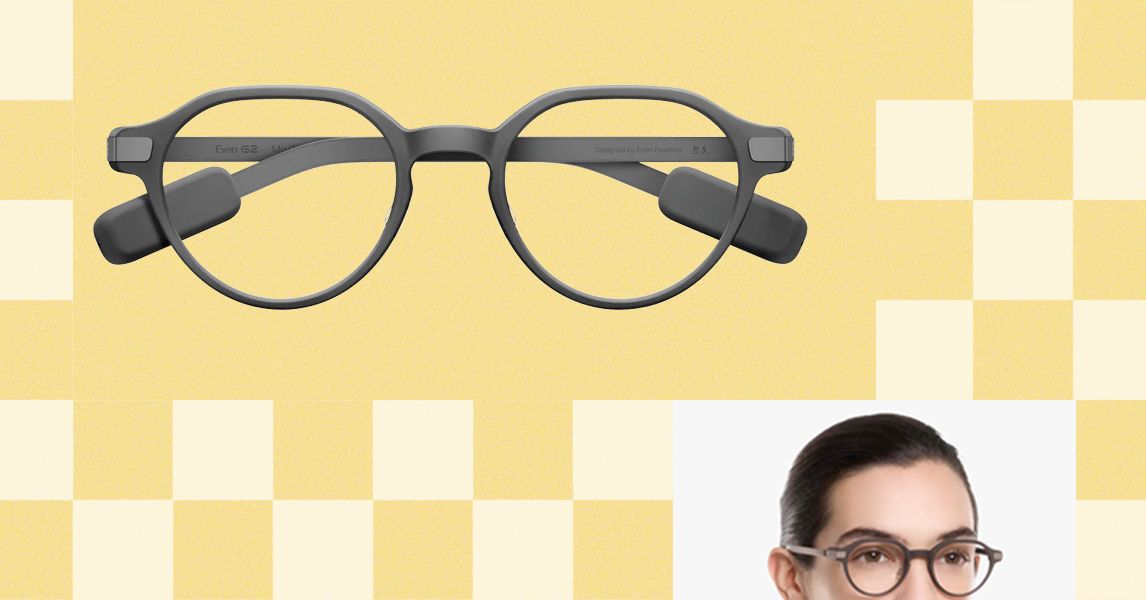
Unlike the other glasses I tested, Even doesn’t sell a subscription plan; everything’s included out of the box.
The only downside I could find with the G2 is that it is largely devoid of offline features, so the glasses have to be connected to the internet to do much of anything. Considering the G2’s capabilities, it’s a trade-off I am more than happy to make.
Other Captioning Glasses I Tested
There are plenty of capable captioning eyeglasses on the market, but they are surprisingly similar in both looks and features. While many are quite capable, none had the combination of power and affordability that I got with Even’s G2. Here’s a rundown of everything else I tested.
-
Photograph: Christopher Null
-
Photograph: Christopher Null
-
Photograph: Christopher Null


Leion’s Hey 2 is the price leader in this market, and even its prescription lenses ($90 to $299) are pretty affordable. The hardware, however, is heavy: 50 grams without lenses, 60 grams with them. A full charge gets you six to eight hours of operation; the case adds juice for up to 12 recharges.
I like the Leion interface, which lays out caption, translation, “free talk” (two-way translation), and a teleprompter feature on its clean app. You get access to nine languages; using Pro minutes expands that to 143. Leion sells its premium plan by the minute, not the month, so you need to remember to toggle this mode off when you don’t need it. Pricing is $10 for 120 minutes, $50 for 1,200 minutes, and $200 for 6,000 minutes. There’s no offline use supported, and I often struggled to get AI summaries to show up in English instead of Chinese (regardless of the recorded language).
-
Photograph: Christopher Null
-
Photograph: Christopher Null


You’re not seeing double: XRAI and Leion use the same manufacturer for their hardware, and the glasses weigh the same. The battery spec is also similar, with up to eight hours on the frames and another 96 hours when recharging with the case. XRAI claims its display is significantly brighter than competitors’, but I didn’t see much of a difference in day-to-day use.
The features and user experience are roughly the same, though Leion’s teleprompter feature isn’t implemented in XRAI’s app, and it doesn’t offer AI summaries of conversations. I also didn’t find XRAI’s app as user-friendly as Leion’s version, particularly when trying to switch among the admittedly exhaustive 300 language options. Only 20 of these are included without ponying up for a Pro subscription, which is sold both by the month and minute: $20/month gets you a max of 600 upgraded transcription minutes and 300 translation minutes; $40/month gets you 1,800 and 1,200 minutes, respectively. On the plus side, XRAI does have a rudimentary offline mode that works better than most. For prescription lenses, add $140 to $170.
-
Photograph: Christopher Null
-
Photograph: Christopher Null


AirCaps
AirCaps Smart Glasses
AirCaps does not make its own prescription lenses. Instead, you must purchase a pair of $39 “lens holders” and take them to an optician if you want prescription inserts. I was unable to test these with prescription lenses and ultimately had to try them out over my regular glasses, which worked well enough for short-term testing. Frames weigh a hefty 53 grams without add-on lenses; the company couldn’t tell me how much extra weight prescription lenses would add to that, but it’s safe to say these are the bulkiest and heaviest captioning glasses on the market. Despite the weight, they only carry two to four hours of battery life, with 10 or so recharges packed into the comically large case. Another option is to clip one of AirCaps’ rechargeable 13-gram Power Capsules ($79 for two) to one of the arms, which can provide 12 to 18 extra hours of juice.
The AirCaps feature list and interface make it perhaps the simplest of all these devices, with just a single button to start and stop recording. Transcriptions and translations are available for free in nine languages. For $20/month, you can add the Pro package, which offers better accuracy, access to more than 60 languages, and the option to generate AI summaries on demand (though only if recordings are long enough). As a bonus: Five hours of Pro features are free each month. Offline mode works pretty well, too. The only bad news is that these bulky frames just aren’t comfortable enough for long-term wear.
-
Photograph: Christopher Null
-
Photograph: Christopher Null


The most expensive option on the market (up to $1,399 with prescription lenses!) weighs a relatively svelte 40 grams (52 grams with lenses) and offers about four hours of battery life. There’s no charging case; the glasses must be charged directly using the included USB-connected dongle.
The glasses are extremely simple, offering transcription and translation features—with support for about 80 languages, which is impressive. I unfortunately found the prescription lenses Captify sent to be the blurriest of the bunch, making the captions comparatively hard to read. And while the device supports offline transcription, performance suffered badly when disconnected from the internet. I couldn’t get translations to work at all when offline. For $15/month, you get better accuracy and speaker differentiation, and access to AI summaries of conversations. Prescription lenses cost between $99 and $600.


5/10: Sunday Morning – CBS News

Us Iran War: How US-Iran war is making life more expensive for Indians – The Times of India

Martin Short: Facing tragedy with joy

-

 Politics7 days ago
Iran weighs US reply delivered via Pakistan as Trump signals opposition to deal terms
-

 Fashion1 week ago
US’ J.Jill, Inc. appoints Kimberly Wallengren as CMO
-

 Fashion1 week ago
AAFA pushes for swift US House passage of key anti-counterfeiting law
-

 Fashion1 week ago
US cotton export sales show strong recovery, Upland rise 36%
-

 Sports1 week ago
Sajid Ali Sadpara summits world’s fifth-highest peak
-
 Business1 week ago
UK airlines to be allowed to cancel flights in advance over fuel shortages
-

 Politics1 week ago
Two women die on migrant boat seeking to reach UK
-

 Fashion1 week ago
ICE cotton witnesses sharp rise on weaker dollar, strong exports