

Tech
What lies in store for the security world in 2026? | Computer Weekly


If 2024 and 2025 were the years organisations felt the strain of tightening budgets, 2026 is the year those decisions will fully manifest in their cyber risk exposure. Across both the private and public sectors, years of belt-tightening have led to reduced headcount, ageing infrastructure and postponed modernisation. Analyst reports show growth in cyber security spending has slowed markedly and many security teams are operating with fewer specialists than they had three years ago. The cumulative effect of this means fewer defenders, slower detection and weakening resilience at a time when adversaries are escalating in both ambition and sophistication.
The past year has provided irrefutable proof of how these gaps translate directly into risk. A major supply-chain compromise of Oracle Cloud reportedly exposed millions of records and impacted more than 140,000 tenants. The Salesloft/Drift breach illustrated how attackers can exploit interconnected SaaS ecosystems to cascade access across multiple organisations. Meanwhile, Jaguar Land Rover’s cyber incident halted vehicle production and disrupted supply chains for weeks, demonstrating how even relatively mature, well-funded industries can be brought to a standstill by a single compromise. These incidents reveal a systemic weakening of defensive capacity and third-party oversight.
This is the backdrop against which 2026 begins, and the legacy of recent budget cuts will continue to degrade the defensive posture of many organisations. With smaller teams and constrained resources, adversaries will enjoy longer dwell times, greater freedom to move laterally and more opportunities to exploit unpatched systems. Supply-chain compromise and zero-day exploitation will remain primary attack vectors, especially in environments where patch cycles have slowed or asset inventories are incomplete. Compounding this is the fact that several national cyber bodies have themselves faced funding and workforce reductions, limiting their ability to coordinate incident response at scale. In short, the high-impact attacks of 2025 should not be viewed as peaks, unfortunately, but as early indicators of a worsening trend.
However, budget pressure is not the only factor reshaping the threat landscape. A parallel shift is emerging that is driven by a rise in what might be termed casual cyber aggression, outside the more predictable threats such as nation states or organised crime threat actors. Across the UK, several high-profile incidents in 2025 have been traced back to loosely affiliated individuals, often teenagers, wielding commodity hacking tools, rented botnets and downloadable exploit kits. These attackers are not motivated by complex financial schemes or geopolitical goals, instead drawn by curiosity, frustration, social validation or the mere thrill of notoriety.
This behaviour is being fuelled by two converging forces. First, the accessibility of attack tooling has increased dramatically. Automated scripts, ransomware-as-a-service platforms and AI-driven reconnaissance tools require minimal technical expertise, lowering the barrier to entry. Second, the volume of open source intelligence, from corporate data leaks to overshared social media profiles, has exploded. Executives, public figures and organisations leave digital footprints that can be assembled into highly persuasive social engineering campaigns. For would-be attackers, the pathway from idea to impact has never been shorter.
What appears to be eroding at the same time – maybe due to the frequency of attacks or complacency – is the perceived risk of consequence. Arrests and prosecutions for cyber offences remain rare relative to the scale of attacks; and within online communities where many of these individuals operate, reputation and bravado often outweigh caution. Combined with social disaffection and worsening economic pressures, hacking is becoming, for some, a form of digital expression by offering an accessible outlet with very real-world repercussions and very little perceived consequence.
In 2026 that will translate into an expectation of more erratic and attention-grabbing attacks by small groups or individuals using widely-available tools. While these incidents may lack technical sophistication, their public visibility and collateral impact, particularly when they target public services, transportation networks or major consumer brands, will make them strategically significant. They also risk eroding public trust in digital services at a moment when that trust is already fragile.
Of course, it wouldn’t be a look ahead without the mention of the rapid evolution of artificial intelligence in cyber security on top of everything. Back in 2020, predictions that AI would reshape defensive strategies seemed optimistic; today, they look understated. By 2025, an IBM report revealed more than two-thirds of organisations reported using AI in their cyber security programmes and nearly a third rely on it extensively. AI now underpins anomaly detection, automated response, threat-hunting and vulnerability management. But cyber criminals have adopted it just as aggressively. Research suggests that the majority of email-based attacks now incorporate AI, and AI-assisted ransomware campaigns are becoming the norm.
Generative AI has made it far easier to craft targeted phishing emails, credible social-engineering scripts and realistic deepfake impersonations. For high-value targets such as CEOs, the oversharing of personal and professional information online materially increases risk. And the growing maturity of agentic AI, those autonomous systems capable of multi-step tasks, introduces both powerful defensive opportunities and new avenues for attack.
Taking all of this into account, three trends stand out.
First, the knock-on effects of underinvestment will continue; i.e. fewer breaches overall, but those that do occur will be larger, more complex and more damaging due to longer dwell times and interconnected supply chains.
Second, casual cyber aggression will become more visible, testing societal resilience and challenging policymakers to rethink digital accountability.
Third, the AI arms race will accelerate on both sides, with defenders and attackers deploying increasingly autonomous systems, driving the next stage of the cat-and-mouse dynamic.
It’s fair to say that 2026 will not necessarily be the most catastrophic year in cybersecurity but it could be one of the most telling. The choices organisations make now, in restoring investment, rebuilding cyber skills and governing AI responsibly, will determine whether the curve bends towards resilience or further fragility.
Anthony Young is CEO at Bridewell, a managed security services provider working in the UK and US.
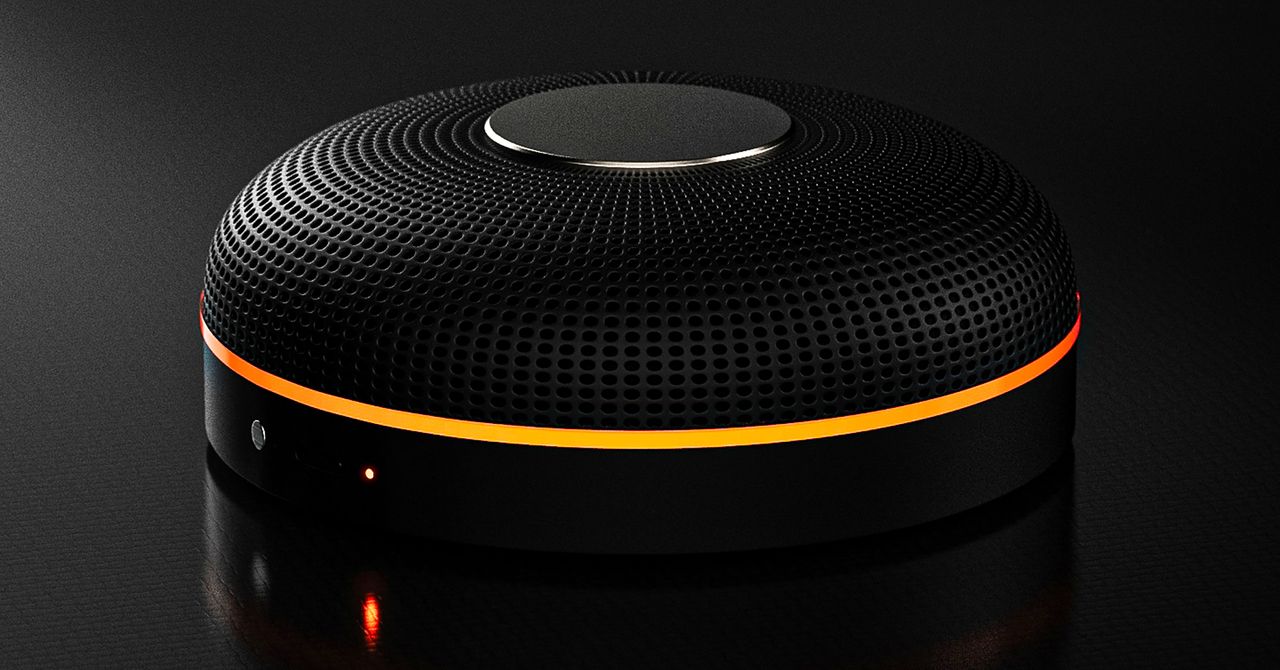
Deveillance also claims the Spectre can find nearby microphones by detecting radio frequencies (RF), but critics say finding a microphone via RF emissions is not effective unless the sensor is immediately beside it.
“If you could detect and recognize components via RF the way Spectre claims to, it would literally be transformative to technology,” Jordan wrote in a text to WIRED after he built a device to test detecting RF signatures in microphones. “You’d be able to do radio astronomy in Manhattan.”
Deveillance is also looking at ways to integrate nonlinear junction detection (NLJD), a very high-frequency radio signal used by security professionals to find hidden mics and bugs. NLJD detectors are expensive and used primarily in professional contexts like military operations.
Even if a device could detect a microphone’s exact location, objects around a room can change how the frequencies spread and interact. The emitted frequencies could also be a problem. There haven’t been adequate studies to show what effects ultrasonic frequencies have on the human ear, but some people and many pets can hear them and find them obnoxious or even painful. Baradari acknowledges that her team needs to do more testing to see how pets are affected.
“They simply cannot do this,” engineer and YouTuber Dave Jones (who runs the channel EEVblog) wrote in an email to WIRED. “They are using the classic trick of using wording to imply that it will detect every type of microphone, when all they are probably doing is scanning for Bluetooth audio devices. It’s totally lame.” Baradari reiterates that the Spectre uses a combination of RF and Bluetooth low energy to detect microphones.
WIRED asked Baradari to share any evidence of the Spectre’s effectiveness at identifying and blocking microphones in a person’s vicinity. Baradari shared a few short videoclips of people putting their phones to their ears listening to audioclips—which were presumably jammed by the Spectre—but these videos do little to prove that the device works.
Future Imperfect
Baradari has taken the critiques in stride, acknowledging that the tech is still in development. “I actually appreciate those comments, because they’re making me think and see more things as well,” Baradari says. “I do believe that with the ideas that we’re having and integrating into one device, these concerns can be addressed.”
People were quick to poke fun at the Spectre I online, calling the technology the cone of silence from Dune. Now, the Deveillance website reads, “Our goal is to make the cone of silence become reality.”
John Scott-Railton, a cybersecurity researcher at Citizen Lab, who is critical of the Spectre I, lauded the device’s virality as an indication of the real hunger for these kinds of gadgets to win back our privacy.
“The silver lining of this blowing up is that it is a Ring-like moment that highlights how quickly and intensely consumer attitudes have shifted around pervasive recording devices,” says Scott-Railton. “We need to be building products that do all the cool things that people want but that don’t have the massive privacy- and consent-violation undertow. You need device-level controls, and you need regulations of the companies that are doing this.”
Cooper Quintin, a senior staff technologist at the Electronic Frontier Foundation, echoed those sentiments, even if critics believe Deveillance’s efforts to be flawed.
“If this technology works, it could be a boon for many,” Quintin wrote in an email to WIRED. “It is nice to see a company creating something to protect privacy instead of working on new and creative ways to extract data from us.”
Portrait Light: You can change up the lighting in your portrait selfies after you take them by opening them up in Google Photos, tapping the Edit button, and heading to Actions > Portrait Light. This adds an artificial light you can place anywhere in the photo to brighten up your face and erase that 5 o’clock shadow. Use the slider at the bottom to tweak the strength of the light. It also works on older Portrait mode photos you may have captured. It works only on faces.
Health and Accessibility Features
Cough & Snore Detection (Tensor G2 and newer): On the Pixel 7 and newer, you can have your Pixel detect if you cough and snore when sleeping, provided you place your Pixel near your bed before you nod off. This will work only if you use Google’s Bedtime mode function, which you can turn on by heading to Settings > Digital Wellbeing & Parental Controls > Bedtime Mode.
Guided Frame (Tensor G2 and newer): For blind or low-vision people, the camera app can now help take a selfie with audio cues (it works with the front and rear cameras). You’ll need to enable TalkBack for this to work (Settings > Accessibility > TalkBack). Then open the camera app. It will automatically help you frame the shot.
Simple View: This mode makes the font size bigger, along with other elements on the screen, like widgets and quick-settings tiles. It also increases touch sensitivity, all of which hopefully makes it easier to see and use the screen. You can enable it by heading to Settings > Accessibility > Simple View.
Safety and Security Features
Theft Protection: This is a broader Android 15 feature, but essentially, Google’s algorithms can figure out if someone snatches your Pixel out of your hands. If they’re trying to get away, the device automatically locks. Additionally, with another device, you can use Remote Lock to lock your stolen Pixel with your phone number and a security answer. To toggle these features on, go to Settings > Security & privacy > Device unlock > Theft protection.
Identity Check: If your Pixel detects you’re in a new location, Identity Check will require your fingerprint or face authentication before you can make any changes to sensitive settings, offering extra peace of mind in case you lose your phone or if it’s stolen. You can enable this in Settings > Security & privacy > Device unlock > Theft protection > Identity Check.
Courtesy of Google
Private Space: Another Android 15 addition, Pixel phones finally have a feature that lets you hide and lock select apps. You can use a separate Google account, set a lock, and install any app to hide away. To set it all up, head to Settings > Security & privacy > Private space.
Satellite eSOS (Pixel 9 and Pixel 10 series, excluding Pixel 9a): Like Apple’s SOS feature on iPhones, you can now reach emergency contacts or emergency services even when you don’t have cell service or Wi-Fi connectivity. It’s not just available in the continental US, but also in Hawaii, Alaska, Canada, and even Europe.
Portrait Light: You can change up the lighting in your portrait selfies after you take them by opening them up in Google Photos, tapping the Edit button, and heading to Actions > Portrait Light. This adds an artificial light you can place anywhere in the photo to brighten up your face and erase that 5 o’clock shadow. Use the slider at the bottom to tweak the strength of the light. It also works on older Portrait mode photos you may have captured. It works only on faces.
Health and Accessibility Features
Cough & Snore Detection (Tensor G2 and newer): On the Pixel 7 and newer, you can have your Pixel detect if you cough and snore when sleeping, provided you place your Pixel near your bed before you nod off. This will work only if you use Google’s Bedtime mode function, which you can turn on by heading to Settings > Digital Wellbeing & Parental Controls > Bedtime Mode.
Guided Frame (Tensor G2 and newer): For blind or low-vision people, the camera app can now help take a selfie with audio cues (it works with the front and rear cameras). You’ll need to enable TalkBack for this to work (Settings > Accessibility > TalkBack). Then open the camera app. It will automatically help you frame the shot.
Simple View: This mode makes the font size bigger, along with other elements on the screen, like widgets and quick-settings tiles. It also increases touch sensitivity, all of which hopefully makes it easier to see and use the screen. You can enable it by heading to Settings > Accessibility > Simple View.
Safety and Security Features
Theft Protection: This is a broader Android 15 feature, but essentially, Google’s algorithms can figure out if someone snatches your Pixel out of your hands. If they’re trying to get away, the device automatically locks. Additionally, with another device, you can use Remote Lock to lock your stolen Pixel with your phone number and a security answer. To toggle these features on, go to Settings > Security & privacy > Device unlock > Theft protection.
Identity Check: If your Pixel detects you’re in a new location, Identity Check will require your fingerprint or face authentication before you can make any changes to sensitive settings, offering extra peace of mind in case you lose your phone or if it’s stolen. You can enable this in Settings > Security & privacy > Device unlock > Theft protection > Identity Check.
Courtesy of Google
Private Space: Another Android 15 addition, Pixel phones finally have a feature that lets you hide and lock select apps. You can use a separate Google account, set a lock, and install any app to hide away. To set it all up, head to Settings > Security & privacy > Private space.
Satellite eSOS (Pixel 9 and Pixel 10 series, excluding Pixel 9a): Like Apple’s SOS feature on iPhones, you can now reach emergency contacts or emergency services even when you don’t have cell service or Wi-Fi connectivity. It’s not just available in the continental US, but also in Hawaii, Alaska, Canada, and even Europe.


Kanye ‘Ye’ West trips during trial: ‘Is he asleep?’

‘Indians been good actors’: Why US ‘agreed to let’ India resume buying Russian oil temporarily – The Times of India

Winners and losers of the 2026 NHL trade deadline

-
 Business1 week ago
Attock Cement’s acquisition approved | The Express Tribune
-

 Politics1 week ago
US arrests ex-Air Force pilot for ‘training’ Chinese military
-

 Fashion1 week ago
Policy easing drives Argentina’s garment import surge in 2025
-

 Politics1 week ago
What are Iran’s ballistic missile capabilities?
-
 Business1 week ago
India Us Trade Deal: Fresh look at India-US trade deal? May be ‘rebalanced’ if circumstances change, says Piyush Goyal – The Times of India
-

 Sports1 week ago
Sri Lanka’s Shanaka says constant criticism has affected players’ mental health
-

 Entertainment1 week ago
Bobby J. Brown, “The Wire” and “Law & Order: SUV” actor, dies of smoke inhalation after reported fire
-

 Sports1 week ago
LPGA legend shares her feelings about US women’s Olympic wins: ‘Gets me really emotional’