

Tech
Does AI really boost productivity at work? Research shows gains don’t come cheap or easy


Artificial intelligence (AI) is being touted as a way to boost lagging productivity growth.
The AI productivity push has some powerful multinational backers: the tech companies who make AI products and the consulting companies who sell AI-related services. It also has interest from governments.
Next week, the federal government will hold a roundtable on economic reform, where AI will be a key part of the agenda.
However, the evidence AI actually enhances productivity is far from clear.
To learn more about how AI is working and being procured in real organizations, we are interviewing senior bureaucrats in the Victorian Public Service. Our research is ongoing, but results from the first 12 participants are showing some shared key concerns.
Our interviewees are bureaucrats who buy, use and administer AI services. They told us increasing productivity through AI requires difficult, complex, and expensive organizational groundwork. The results are hard to measure, and AI use may create new risks and problems for workers.
Introducing AI can be slow and expensive
Public service workers told us introducing AI tools to existing workflows can be slow and expensive. Finding time and resources to research products and retrain staff presents a real challenge.
Not all organizations approach AI the same way. We found well-funded entities can afford to test different AI uses for “proofs of concept.” Smaller ones with fewer resources struggle with the costs of implementing and maintaining AI tools.
In the words of one participant: “It’s like driving a Ferrari on a smaller budget […] Sometimes those solutions aren’t fit for purpose for those smaller operations, but they’re bloody expensive to run, they’re hard to support.”
‘Data is the hard work’
Making an AI system useful may also involve a lot of groundwork.
Off-the-shelf AI tools such as Copilot and ChatGPT can make some relatively straightforward tasks easier and faster. Extracting information from large sets of documents or images is one example, and transcribing and summarizing meetings is another. (Though our findings suggest staff may feel uncomfortable with AI transcription, particularly in internal and confidential situations.)
But more complex use cases, such as call center chatbots or internal information retrieval tools, involve running an AI model over internal data describing business details and policies. Good results will depend on high-quality, well-structured data, and organizations may be liable for mistakes.
However, few organizations have invested enough in the quality of their data to make commercial AI products work as promised.
Without this foundational work, AI tools won’t perform as advertised. As one person told us, “data is the hard work.”
Privacy and cybersecurity risks are real
Using AI creates complex data flows between an organization and servers controlled by giant multinational tech companies. Large AI providers promise these data flows comply with laws about, for instance, keeping organizational and personal data in Australia and not using it to train their systems.
However, we found users were cautious about the reliability of these promises. There was also considerable concern about how products could introduce new AI functions without organizations knowing. Using those AI capabilities may create new data flows without the necessary risk assessments or compliance checking.
If organizations handle sensitive information or data that could create safety risks if leaked, vendors and products must be monitored to ensure they comply with existing rules. There are also risks if workers use publicly available AI tools such as ChatGPT, which don’t guarantee confidentiality for users.
How AI is really used
We found AI has increased productivity on “low-skill” tasks such as taking meeting notes and customer service, or work done by junior workers. Here AI can help smooth the outputs of workers who may have poor language skills or are learning new tasks.
But maintaining quality and accountability typically requires human oversight of AI outputs. The workers with less skill and experience, who would benefit most from AI tools, are also the least able to oversee and double-check AI output.
In areas where the stakes and risks are higher, the amount of human oversight necessary may undermine whatever productivity gains are made.
What’s more, we found when jobs become primarily about overseeing an AI system, workers may feel alienated and less satisfied with their experience of work.
We found AI is often used for questionable purposes, too. Workers may use AI to take shortcuts, without understanding the nuances of compliance within organizational guidelines.
Not only are there data security and privacy concerns, but using AI to review and extract information can introduce other ethical risks, such as magnifying existing human bias.
In our research, we saw how those risks prompted organizations to use more AI—for enhanced workplace surveillance and forms of workplace control. A recent Victorian government inquiry recognized that these methods may be harmful to workers.
Productivity is tricky to measure
There’s no easy way for an organization to measure changes in productivity due to AI. We found organizations often rely on feedback from a few skilled workers who are good at using AI, or on claims from vendors.
One interviewee told us:
“I’m going to use the word ‘research’ very loosely here, but Microsoft did its own research about the productivity gains organizations can achieve by using Copilot, and I was a little surprised by how high those numbers came back.”
Organizations may want AI to facilitate staff cuts or increase throughput.
But these measures don’t consider changes in the quality of products or services delivered to customers. They also don’t capture how the workplace experience changes for remaining workers, or the considerable costs that primarily go to multinational consultancies and tech firms.
This article is republished from The Conversation under a Creative Commons license. Read the original article.
Citation:
Does AI really boost productivity at work? Research shows gains don’t come cheap or easy (2025, August 15)
retrieved 15 August 2025
from https://techxplore.com/news/2025-08-ai-boost-productivity-gains-dont.html
This document is subject to copyright. Apart from any fair dealing for the purpose of private study or research, no
part may be reproduced without the written permission. The content is provided for information purposes only.












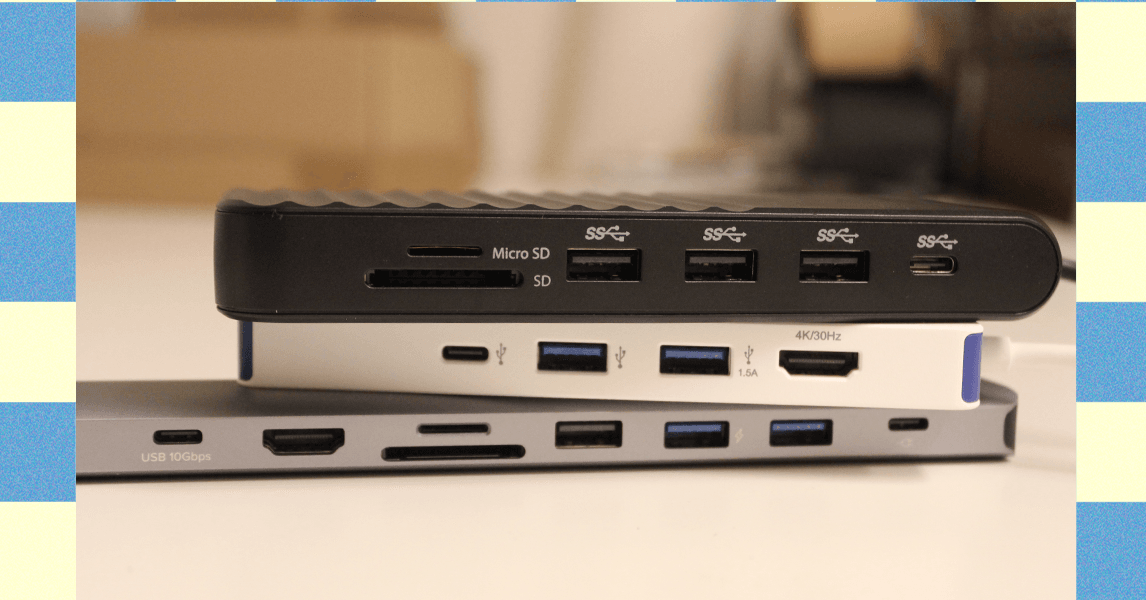
Other Good USB Hubs to Consider
Ugreen Revodok Pro 211 Docking Station for $64: Most laptop docking stations are bulky gadgets that often require a power source, but this one from Ugreen straddles the line between dock and hub. It has a small, braided cable running to a relatively large aluminum block. It’s a bit hefty but still compact, and it packs a lot of extra power. It has three USB ports (one USB-C and two USB-A) that each reached up to 900 MB/s of data-transfer speeds in my testing. That was enough to move large amounts of 4K video footage in minutes. The only problem is that using dual monitors on a Mac is limited to only mirroring.
Photograph: Luke Larsen
Hyper HyperDrive Next Dual 4K Video Dock for $150: This one also straddles the line between dock and USB hub. Many mobile docks lack proper Mac support, only allowing for mirroring instead of full extension. The HyperDrive Next Dual 4K fixes that problem, though, making it a great option for MacBooks (though it won’t magically give an old MacBook Air dual-monitor support). Unfortunately, you’ll be paying handsomely for that capability, as this one is more expensive than the other options. The other problem is that although this dock has two HDMI ports that can support 4K, though only one will be at 60 Hz and the other will be stuck at 30 Hz. So, if you plan to use it with multiple displays, you’ll need to drop the resolution 1440p or 1080p on one of them. I also tested this Targus model, which is made by the same company, which gets you two 4K displays at 60 Hz but not on Mac.
.png)
Anker USB-C Hub 5-in-1 for $20: This Anker USB hub is the one I carry in my camera bag everywhere. It plugs into the USB-C port on your laptop and provides every connection you’d need to offload photos or videos from camera gear. In our testing, the USB 3.0 ports reached transfer speeds over 400 MB/s, which isn’t quite as fast as some USB hubs on this list, but it’s solid for a sub-$50 device. Similarly, the SD card reader reached speeds of 80 MB/s for reading and writing, which isn’t the fastest SD cards can get, but adequate for moving files back and forth.—Eric Ravenscraft
Kensington Triple Video Mobile Dock for $83: Another mobile dock meant to provide additional external support, this one from Kensington can technically power up to three 1080p displays at 60 Hz using the two HDMI ports and one DisplayPort. It’s a lot of ports in a relatively small package, though the basic plastic case isn’t exactly inspiring.
Power up with unlimited access to WIRED. Get best-in-class reporting and exclusive subscriber content that’s too important to ignore. Subscribe Today.

Global oil and gas prices have skyrocketed following the US attack on Iran last weekend. But another key global supply chain is also at risk, one that may directly impact American farmers who have already been squeezed for months by tariff wars. The conflict in the Middle East is choking global supplies of fertilizer right before the crucial spring planting season.
“This literally could not be happening at a worse time,” says Josh Linville, the vice president of fertilizer at financial services company StoneX.
The global fertilizer market focuses on three main macronutrients: phosphates, nitrogen, and potash. All of them are produced in different ways, with different countries leading in exports. Farmers consider a variety of factors, including crop type and soil conditions, when deciding which of these types of fertilizer to apply to their fields.
Potash and phosphates are both mined from different kinds of natural deposits; nitrogen fertilizers, by contrast, are produced with natural gas. QatarLNG, a subsidiary of Qatar Energy, a state-run oil and gas company, said on Monday that it would halt production following drone strikes on some of its facilities. This effectively took nearly a fifth of the world’s natural gas supply offline, causing gas prices in Europe to spike.
That shutdown puts supplies of urea, a popular type of nitrogen fertilizer, particularly at risk. On Tuesday, Qatar Energy said that it would also stop production of downstream products, including urea. Qatar was the second-largest exporter of urea in 2024. (Iran was the third-largest; it’s also a key exporter of ammonia, another type of nitrogen fertilizer.) Prices on urea sold in the US out of New Orleans, a key commodity port, were up nearly 15 percent on Monday compared to prices last week, according to data provided by Linville to WIRED. The blockage of the Strait of Hormuz is also preventing other countries in the region from exporting nitrogen products.
“When we look at ammonia, we’re looking at almost 30 percent of global production being either involved or at risk in this conflict,” says Veronica Nigh, a senior economist at the Fertilizer Institute, a US-based industry advocacy organization. “It gets worse when we think about urea. Urea is almost 50 percent.”
Other types of fertilizer are also at risk. Saudi Arabia, Nigh says, supplies about 40 percent of all US phosphate imports; taking them out of the equation for more than a few days could create “a really challenging situation” for the US. Other countries in the region, including Jordan, Egypt, and Israel, also play a big role in these markets.
“We are already hearing reports that some of those Persian Gulf manufacturers are shutting down production, because they’re saying, ‘I have a finite amount of storage for my supply,’” Linville says. “‘Once I reach the top of it, I can’t do anything else. So I’m going to shut down my production in order to make sure I don’t go over above that.’”
Conflict in the strait has intensified in the early part of this week, as the Islamic Revolutionary Guard Corps have reportedly threatened any ship passing through the strait. Traffic has slowed to a crawl. The Trump administration announced initiatives on Tuesday meant to protect oil tankers traveling through the strait, including providing a naval escort. Even if those initiatives succeed—which the shipping industry has expressed doubt about—much of the initial energy will probably go toward shepherding oil and gas assets out of the region.
“Fertilizer is not going to be the most valuable thing that’s gonna transit the strait,” says Nigh.
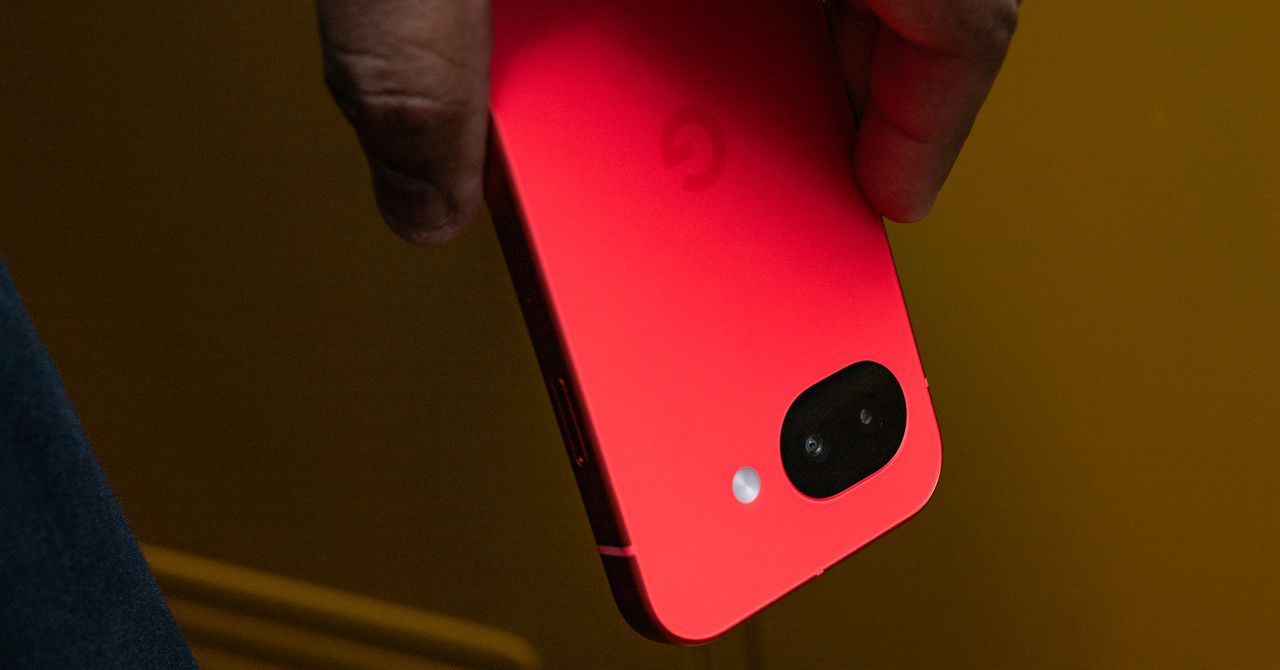
The screen is brighter now, reaching a peak brightness of 3,000 nits, and I haven’t had any trouble reading it in sunny conditions (though it hasn’t been as sunny as I’d like it to be these past few weeks). I appreciate the glass upgrade from Gorilla Glass 3 to Gorilla Glass 7i. It should be more protective, and anecdotally, I don’t see a single scratch on the Pixel 10a’s screen after two weeks of use. (I’d still snag a screen protector to be safe.)
Photograph: Julian Chokkattu
Another notable upgrade is in charging speeds—30-watt wired charging and 10-watt wireless charging. I’ll admit I haven’t noticed the benefits of this yet, since I’m often recharging the phone overnight. You can get up to 50 percent in 30 minutes of charging with a compatible adapter, and that has lined up with my testing.
My biggest gripe? Google should have taken this opportunity to add its Pixelsnap wireless charging magnets to the back of this phone. That would help align the Pixel 10a even more with the Pixel 10 series and bring Qi2 wireless charging into a more affordable realm—actually raising the bar, which wouldn’t be a first for the A-series. After all, Apple did exactly that with the new iPhone 17e, adding MagSafe to the table. Or heck, at least make the Pixel 10a Qi2 Ready like Samsung’s smartphones, so people who use a magnetic case can take advantage of faster wireless charging speeds.
Battery life has been OK. With average use, the Pixel 10a comfortably lasts me a full day, but it still requires daily charging. With heavier use, like when I’m traveling, I’ve had to charge the phone in the afternoon a few times to make sure it didn’t die before I got into bed. This is a fairly big battery for its size, but I think there’s more Google could do to extend juice, akin to Motorola’s Moto G Power 2026.


Legendary football coach, commentator Lou Holtz dies at 89

Jake Cannavale shares his bit on Bobby Cannavale, Rose Byrne’s viral pet

Judge sets May retrial date in Miami football murder case

India Us Trade Deal: Fresh look at India-US trade deal? May be ‘rebalanced’ if circumstances change, says Piyush Goyal – The Times of India

Households set for lower energy bills amid price cap shake-up

What are Iran’s ballistic missile capabilities?

-
Business6 days ago
India Us Trade Deal: Fresh look at India-US trade deal? May be ‘rebalanced’ if circumstances change, says Piyush Goyal – The Times of India
-
Business1 week ago
Households set for lower energy bills amid price cap shake-up
-
 Politics6 days ago
What are Iran’s ballistic missile capabilities?
-

 Politics7 days ago
US arrests ex-Air Force pilot for ‘training’ Chinese military
-

 Sports1 week ago
Top 50 USMNT players of 2026, ranked by club form: USMNT Player Performance Index returns
-
 Business6 days ago
Attock Cement’s acquisition approved | The Express Tribune
-

 Fashion6 days ago
Policy easing drives Argentina’s garment import surge in 2025
-
 Business5 days ago
Greggs to reveal trading amid pressure from cost of living and weight loss drugs