

Tech
I’ve Tried Every Smart Speaker From Amazon, Google, and Apple. These Are the Ones Worth Buying

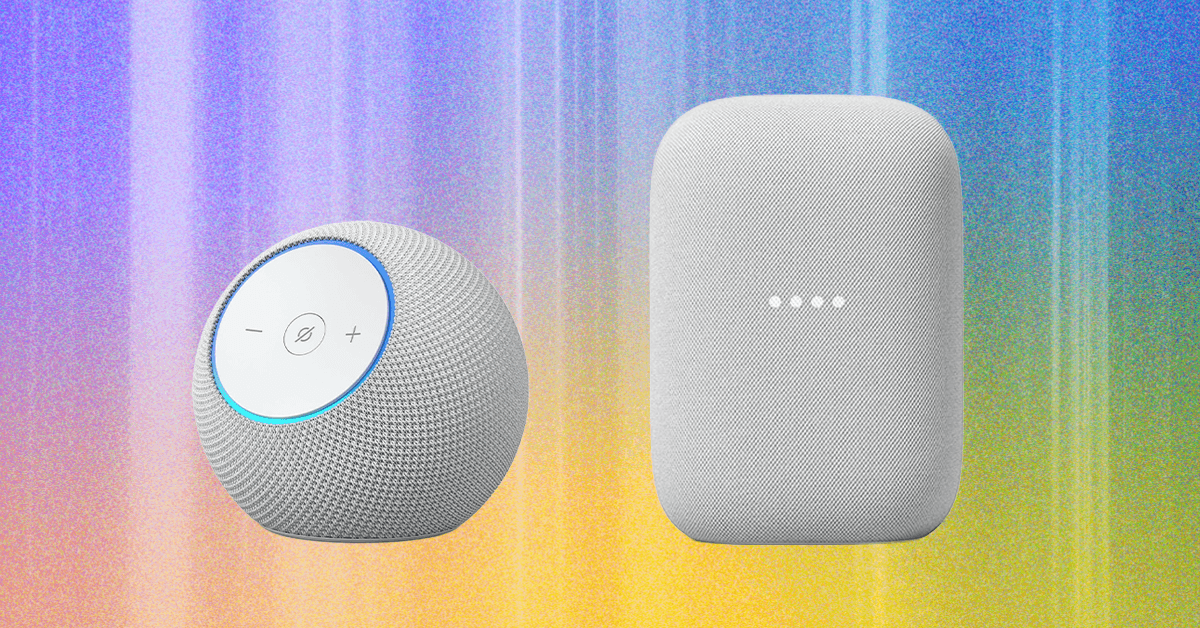
The Google Nest Hub for $100 is a great bedside speaker for Google Assistant users. The 7-inch screen feels like a smartphone propped up on its side rather than a massive smart display, and it has sleep tracking technology built into it to track your sleep without needing any accessories on your body. Handy! Plus, no camera.
What About Alexa+?
Amazon has started rolling out the new and improved Alexa, named Alexa+, after announcing it in February, though it’s still not yet available to all users. This second generation of the Alexa voice assistant is more conversational, similar to an experience with AI assistants like ChatGPT, which isn’t a surprise since Alexa+ was built on generative AI. It does a better job answering a variety of different questions and responds quickly to all kinds of requests. Check out more in my hands-on with Alexa+.
It’s free in early access right now on many devices, including the Echo Show. Once it officially rolls out, Alexa+ will be available for $20 a month, or free if you have an Amazon Prime membership. While you likely have a membership if you added an Alexa device to your home, it’s a big jump from the previously free assistant (and both versions will have less privacy).
Alexa+ will also require that all voice recordings be sent to Amazon to be processed, and Amazon’s changing its features for recordings with regular Alexa to go to Amazon, too. There was a “Do Not Send Voice Recordings” privacy feature that you could select to have voice requests processed locally, but that feature was killed in March. The privacy change will affect all users, whether or not you sign up for Alexa+ and no matter if you’re using a compatible device or not.
What About Gemini for Google Home?
Google announced that Gemini for Home, the new version of its voice assistant, is rolling out in early access to existing Google Home users. It’ll eventually replace the current Google Assistant entirely, and is currently slated to roll out to almost all of Google’s devices. One of the notable exceptions is the Pixel Tablet; otherwise, Google’s existing hardware is pretty well reflected for what Gemini for Home will reach.
Unlike Alexa+, this new assistant will always be free. However, Google is changing its camera subscription, Nest Aware, to become a subscription for Gemini for Home that will have two tiers, Standard ($10 a month) and Advanced ($20 a month), to replace the Nest Aware and Nest Aware Plus subscription. This new subscription model will extend beyond cameras and include some advanced smart assistant features, including Gemini Live, which is a more conversational chat mode you can activate on a smart speaker, and automation features you won’t get on the base assistant. The Advanced mode will also let you ask Gemini for video history, get AI notifications and descriptions, and a customized summary at the end of the day called Home Brief. The Standard Plan will have 30 days of video event history plus intelligent alerts for its cameras, while the Advanced plan will have 60 days and 24/7 video history.











More recently, Iran has been a regular adversary in cyberspace—and while it hasn’t demonstrated quite the acuity of Russia or China, Iran is “good at finding ways to maximize the impact of their capabilities,” says Jeff Greene, the former executive assistant director of cybersecurity at CISA. Iran, in particular, famously was responsible for a series of distributed-denial-of-service attacks on Wall Street institutions that worried financial markets, and its 2012 attack on Saudi Aramco and Qatar’s Rasgas marked some of the earliest destructive infrastructure cyberattacks.
Today, surely, Iran is weighing which of these tools, networks, and operatives it might press into a response—and where, exactly, that response might come. Given its history of terror campaigns and cyberattacks, there’s no reason to think that Iran’s retaliatory options are limited to missiles alone—or even to the Middle East at all.
Which leads to the biggest known unknown of all:
5. How does this end? There’s an apocryphal story about a 1970s conversation between Henry Kissinger and a Chinese leader—it’s told variously as either Mao-Tse Tung or Zhou Enlai. Asked about the legacy of the French revolution, the Chinese leader quipped, “Too soon to tell.” The story almost surely didn’t happen, but it’s useful in speaking to a larger truth particularly in societies as old as the 2,500-year-old Persian empire: History has a long tail.
As much as Trump (and the world) might hope that democracy breaks out in Iran this spring, the CIA’s official assessment in February was that if Khamenei was killed, he would be likely replaced with hardline figures from the Islamic Revolutionary Guard Corps. And indeed, the fact that Iran’s retaliatory strikes against other targets in the Middle East continued throughout Saturday, even after the death of many senior regime officials—including, purportedly, the defense minister—belied the hope that the government was close to collapse.
The post-World War II history of Iran has surely hinged on three moments and its intersections with American foreign policy—the 1953 CIA coup, the 1979 revolution that removed the shah, and now the 2026 US attacks that have killed its supreme leader. In his recent bestselling book King of Kings, on the fall of the shah, longtime foreign correspondent Scott Anderson writes of 1979, “If one were to make a list of that small handful of revolutions that spurred change on a truly global scale in the modern era, that caused a paradigm shift in the way the world works, to the American, French, and Russian Revolutions might be added the Iranian.”
It is hard not to think today that we are living through a moment equally important in ways that we cannot yet fathom or imagine—and that we should be especially wary of any premature celebration or declarations of success given just how far-reaching Iran’s past turmoils have been.
Defense Secretary Pete Hegseth has repeatedly bragged about how he sees the military and Trump administration’s foreign policy as sending a message to America’s adversaries: “F-A-F-O,” playing off the vulgar colloquialism. Now, though, it’s the US doing the “F-A” portion in the skies over Iran—and the long arc of Iran’s history tells us that we’re a long, long way from the “F-O” part where we understand the consequences.
Let us know what you think about this article. Submit a letter to the editor at mail@wired.com.
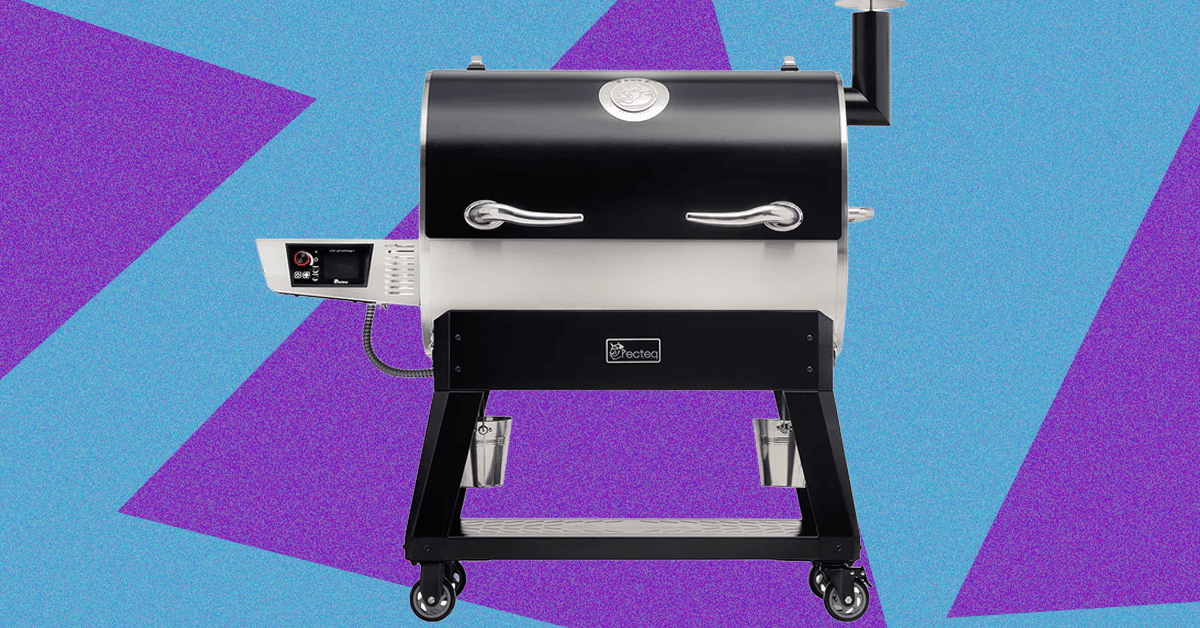
While my love of smoked meats is well-documented, my own journey into actually tending the fire started just last spring when I jumped at the opportunity to review the Traeger Woodridge Pro. When Recteq came calling with a similar offer to check out the Flagship 1600, I figured it would be a good way to stay warm all winter.
While the two smokers have a lot in common, the Recteq definitely feels like an upgrade from the Traeger I’ve been using. Not only does it have nearly twice the cooking space, but the huge pellet hopper, rounded barrel, and proper smokestack help me feel like a real pitmaster.
The trade-off is losing some of the usability features that make the Woodridge Pro a great first smoker. The setup isn’t as quite as simple, and the larger footprint and less ergonomic conditions require a little more experience or patience. With both options, excellent smoked meat is just a few button presses away, but speaking as someone with both in their backyard, I’ve been firing up the Recteq more often.
Getting Settled
Photograph: Brad Bourque
Setting up the Recteq wasn’t as time-consuming as the Woodridge, but it was more difficult to manage on my own. Some of the steps, like attaching the bull horns to the lid, or flipping the barrel onto its stand, would really benefit from a patient friend or loved one. Like most smokers, you’ll need to run a burn-in cycle at 400 degrees Fahrenheit to make sure there’s nothing left over from manufacturing or shipping. Given the amount of setup time and need to cool down the smoker after, I would recommend setting this up Friday afternoon if you want to smoke on a Saturday.

The main job of Google Chrome is to give you a window to the web. With so much engaging content out there on the internet, you may not have given much thought to the browser framework that serves as the container for the sites you visit.
You’d be forgiven for still using the default toolbar configuration that was in place when you first installed Chrome. But if you take a few minutes to customize it, it can make a significant difference to your browsing. You can get quicker access to the key features you need, and you may even discover features you didn’t know about.
If you’re reading this in Chrome on the desktop, you can experiment with a few customizations right now—all it takes is a few clicks. Here’s how the toolbar in Chrome is put together, and all the different changes you can make.
The Default Layout
Take a look up at the top right corner of your Chrome browser tab and you’ll see two key buttons: One reveals your browser extensions (the jigsaw piece), and the other opens up your bookmarks (the double-star icon). There should also be a button showing a downward arrow, which gives you access to recently downloaded files.
Right away, you can start customizing. If you click the jigsaw piece icon to show your browser extensions, you can also click the pin button next to any one of these extensions to make it permanently visible on the toolbar. While you don’t want your toolbar to become too cluttered, it means you can put your most-used add-ons within easy reach.
For the extension icons you choose to have on the toolbar, you can choose the way they’re arranged, too: Click and drag on any of the icons to change its position (though the extensions panel itself has to stay in the same place). To remove an extension icon (without uninstalling the extension), right-click on it and choose Unpin.
Making Changes

Click the three dots up in the top right corner of any browser window and then Settings > Appearance > Customize your toolbar to get to the main toolbar customization panel, which has recently been revamped. Straight away you’ll see toggle switches that let you show or hide certain buttons on the toolbar.


Man United up to third as Sesko’s hot streak of crucial goals continues

When We Were Young Festival announces 2026 hiatus: ‘See you in 2027’

The 5 Big ‘Known Unknowns’ of Donald Trump’s New War With Iran

Pakistan carries out precision strikes on seven militant hideouts in Afghanistan

Eye-popping rise in one year: Betting on just gold and silver for long-term wealth creation? Think again! – The Times of India

Kansas’ Darryn Peterson misses most of 2nd half with cramping

-
 Politics1 week ago
Pakistan carries out precision strikes on seven militant hideouts in Afghanistan
-
Business1 week ago
Eye-popping rise in one year: Betting on just gold and silver for long-term wealth creation? Think again! – The Times of India
-
 Sports1 week ago
Kansas’ Darryn Peterson misses most of 2nd half with cramping
-

 Tech1 week ago
These Cheap Noise-Cancelling Sony Headphones Are Even Cheaper Right Now
-

 Entertainment1 week ago
Saturday Sessions: Say She She performs "Under the Sun"
-
 Business1 week ago
Equinox chairman says ‘health is the new luxury’ as wellness spending soars
-

 Sports1 week ago
How James Milner broke Premier League’s appearances record
-

 Tech1 week ago
The Supreme Court’s Tariff Ruling Won’t Bring Car Prices Back to Earth