

Tech
OpenAI reaches new agreement with Microsoft to change its corporate structure


OpenAI has reached a new tentative agreement with Microsoft and said its nonprofit, which technically controls its business, will now be given a $100 billion equity stake in its for-profit corporation.
The maker of ChatGPT said it had reached a new nonbinding agreement with Microsoft, its longtime partner, “for the next phase of our partnership.”
The announcements on Thursday include a few details about these new arrangements. OpenAI’s proposed changes to its corporate structure have drawn the scrutiny of regulators, competitors and advocates concerned about the impacts of artificial intelligence.
OpenAI was founded as a nonprofit in 2015 and its nonprofit board has continued to control the for-profit subsidiary that now develops and sells its AI products. It’s not clear whether the $100 billion equity stake the nonprofit will get as part of this announcement represents a controlling stake in the business.
California Attorney General Rob Bonta said last week that his office was investigating OpenAI’s proposed restructuring of its finances and governance. His office said they could not comment on the new announcements but said they are “committed to protecting charitable assets for their intended purpose.”
Bonta and Delaware Attorney General Kathy Jennings also sent the company a letter expressing concerns about the safety of ChatGPT after meeting with OpenAI’s legal team earlier last week in Delaware, where OpenAI is incorporated.
“Together, we are particularly concerned with ensuring that the stated safety mission of OpenAI as a non-profit remains front and center,” Bonta said in a statement last week.
Microsoft invested its first $1 billion in OpenAI in 2019 and the two companies later formed an agreement that made Microsoft the exclusive provider of the computing power needed to build OpenAI’s technology. In turn, Microsoft heavily used the technology behind ChatGPT to enhance its own AI products.
The two companies announced on Jan. 21 that they were altering that agreement, enabling the smaller company to build its own computing capacity, “primarily for research and training of models.” That coincided with OpenAI’s announcements of a partnership with Oracle to build a massive new data center in Abilene, Texas.
But other parts of its agreements with Microsoft remained up in the air as the two companies appeared to veer further apart. Their Thursday joint statement said they were still “actively working to finalize contractual terms in a definitive agreement.” Both companies declined further comment.
OpenAI had given its nonprofit board of directors—whose members now include a former U.S. Treasury secretary—the responsibility of deciding when its AI systems have reached the point at which they “outperform humans at most economically valuable work,” a concept known as artificial general intelligence, or AGI.
Such an achievement, per its earlier agreements, would cut off Microsoft from the rights to commercialize such a system, since the terms “only apply to pre-AGI technology.”
OpenAI’s corporate structure and nonprofit mission are also the subject of a lawsuit brought by Elon Musk, who helped found the nonprofit research lab and provided initial funding. Musk’s suit seeks to stop OpenAI from taking control of the company away from its nonprofit and alleges it has betrayed its promise to develop AI for the benefit of humanity.
© 2025 The Associated Press. All rights reserved. This material may not be published, broadcast, rewritten or redistributed without permission.
Citation:
OpenAI reaches new agreement with Microsoft to change its corporate structure (2025, September 13)
retrieved 13 September 2025
from https://techxplore.com/news/2025-09-openai-agreement-microsoft-corporate.html
This document is subject to copyright. Apart from any fair dealing for the purpose of private study or research, no
part may be reproduced without the written permission. The content is provided for information purposes only.













The WIRED Reviews Team has been covering Amazon’s Big Spring Sale since it began at on Wednesday, and the overall deals have been … not great, honestly. So far, we’ve found decent markdowns on vacuums, smart bird feeders, and even an air fryer we love, but I just saw that Cadence Capsules, those colorful magnetic containers you may have seen on your social media pages, are 20 percent off. (For reference, the last time I saw them on sale, they were a measly 9 percent off.)
If you’re not familiar, they allow you to decant your full-sized personal care products you use at home—from shampoo and sunscreen to serums and pills—into a labeled, modular system of hexagonal containers that are leak-proof, dishwasher safe, and stick together magnetically in your bag or on a countertop. No more jumbled, travel-sized toiletries and leaky, mismatched bottles and tubes.

Cadence Capsules have garnered some grumbling online for being overly heavy or leaking, but I’ve been using them regularly for about a year—I discuss decanting your daily-use products in my guide to How to Pack Your Beauty Routine for Travel—and haven’t experienced any leaks. They do add weight if you’re trying to travel super-light, and because they’re magnetic, they will also stick to other metal items in your toiletry bag, like bobby pins or other hair accessories. This can be annoying, especially if you’re already feeling chaotic or in a hurry.
Otherwise, Capsules are modular, convenient, and make you feel supremely organized—magnetic, interchangeable inserts for the lids come with permanent labels like “shampoo,” “conditioner,” “cleanser,” and “moisturizer.” Maybe you love this; maybe you don’t. But at least if you buy on Amazon, you can choose which label genre you get (Haircare, Bodycare, Skincare, Daily Routine). If this just isn’t your jam, the Cadence website offers a set of seven that allows you to customize the color and lid label of each Capsule, but that set is not currently on sale.

This is the older Kindle Scribe, but the price and features are the best you’ll get, especially when it’s on sale like this. I still reach for this model even though I have the newer third generation, and keep in mind the second generation will also get some of the newer software and experiences over time. With the sale, it’s half the price of the newer model.
If you’re already a Kindle reader and looking to upgrade, it’s likely because you want a new feature like a color screen. While the Kobo above is the better buy, if you want to stay in the Kindle ecosystem but add some color to your books, both the Colorsoft and Colorsoft Signature are on sale.

Amazon
Kindle (2024, 11th Gen)
If you’re looking to spend as little as possible, the basic Kindle (11th generation) is still a great e-reader and is currently under $100. It can do almost everything the other Kindles can (except the Scribe) on a snappy black-and-white screen. It doesn’t have a warm front light either, but it’s still a great purchase for the price.
Power up with unlimited access to WIRED. Get best-in-class reporting and exclusive subscriber content that’s too important to ignore. Subscribe Today.
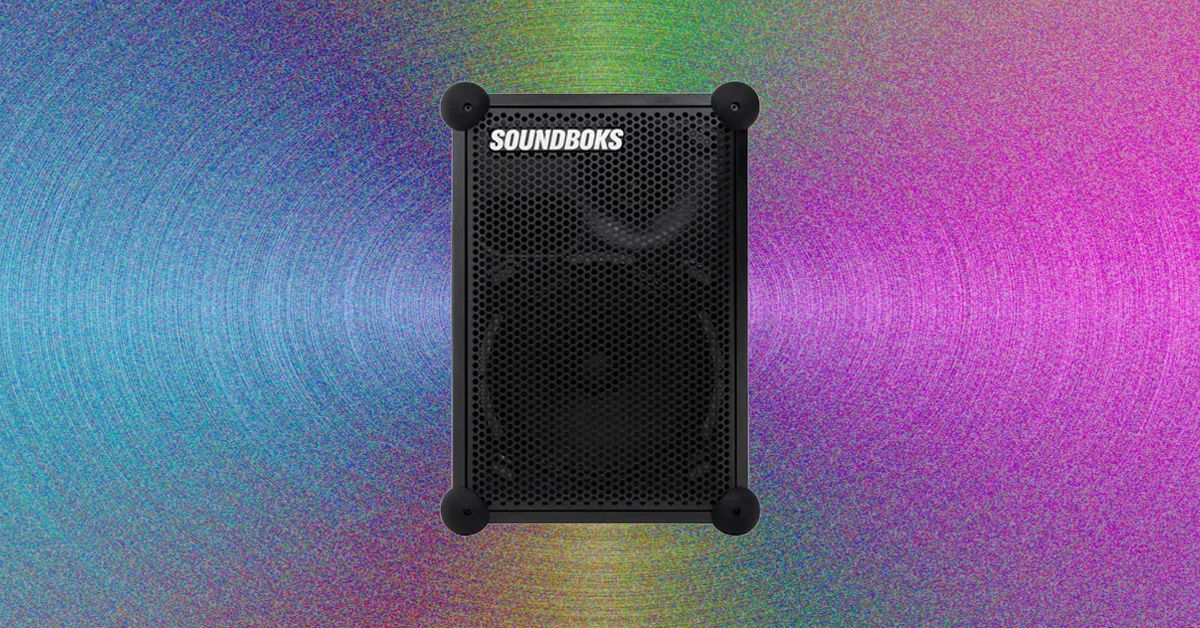
In addition to the rubber balls, there’s a nice physical interface on the side for adjusting volume and pairing multiple Mix speakers together if you have multiple on hand (I was only sent the single mono speaker). Setup involves installing the Soundboks app, pairing to the speaker via Bluetooth on your phone, and picking whatever you want to play. It’s all quick and painless, especially for my first-time pairing with a Samsung Galaxy S24 Ultra.
Otherwise, it’s all very pro audio. Everything reminds me very much of the Peavey PA system I have in my music rehearsal space. The top of the speaker features a built-in carrying handle and a place for a strap (an accessory you have to buy aftermarket, or you can fasten it with any strap you have that fits through the hole). There are also top-hat mounts for the speakers to slide onto traditional PA pole stands, if you wanted to use them in that way at a party or event.
The grill is replaceable, as is the massive internal battery, which means that these things are pretty much indestructible as long as the amp and speakers themselves still work—the battery is the weak point of most portable speakers in 2026.
I bounced it around my yard, dropped it off my patio, and generally beat the crap out of it during my two-week testing period, and the thing just needed a little wipe down and a charge when it ran out of juice. The claimed 40 hours of battery at reasonable volume is accurate, but you’ll get about eight hours at max volume (which is very good for the category). If you need to bring some walk-out music to your kid’s all-day Little League tournament, this a great way to go.
Big Sound
Photograph: Parker Hall
Soundboks calls this speaker midsize, but at 21.4 pounds and the size of a medium-size cooler, I’d still call it a large speaker. That said, the size doesn’t make it any less portable than competitors from JBL and others; you still need a car or cargo ebike to take one of these with you, so what’s a couple inches here or there? The fact that this is a rectangle actually makes it easier to strap down than many others, especially with the holes for the strap and the built-in handle to tie down through.


Amazon’s Spring Sale Is So-So, but Cadence Capsules Are a Bright Spot

Lahore Qalandars crush Hyderabad Kingsmen in PSL 11 opener – SUCH TV

The unexpected path that led Morgan and Frankie Price to Arkansas gymnastics

-

 Fashion1 week ago
Sales at US apparel, clothing accessories stores up 4% YoY in Jan 2026
-

 Tech1 week ago
Justice Department Says Anthropic Can’t Be Trusted With Warfighting Systems
-

 Fashion1 week ago
Spain’s Inditex FY25 sales rise 3.2% to $46.28 bn amid strong demand
-

 Sports1 week ago
March Madness 2026 – How to watch in SA, start time, schedule, TV channel for NCAA championship basketball tournament
-

 Politics1 week ago
Iran strikes Tel Aviv with cluster-warhead missiles in retaliation of Larijani’s martyrdom
-

 Entertainment1 week ago
With few new leads 45 days after Nancy Guthrie’s disappearance, investigation “becomes much harder,” expert says
-

 Entertainment1 week ago
Val Kilmer revived 1 year after death through AI
-
 Business1 week ago
Brits cashing in jewellery as gold price hits record high