

Tech
The networks that will turn potential into profit in 2026 | Computer Weekly


Of all the technology topics covered by industry analysts, financiers and pundits over the course of 2025, perhaps the most interesting was that of the so-called artificial intelligence (AI) bubble. Very much a dog that didn’t bark over the past 12 months – just go ask Nvidia – those supposedly in the know ended the year more or less hedging their bets, predicting that something still “may likely” happen in the general IT space in 2026.
Yet in networking and telecoms, it can be said with some certainty that, in 2026, AI will be as indispensable as it has been for the recent past. And if 2025 was the year in which the potential of AI in networking was realised, 2026 will be a year in which networks will need to be constructed to turn this potential into profit.
As businesses and connectivity providers alike know only too well, soaring AI capacity means network infrastructure is constantly having to adapt to a multitude of external pressures and unprecedented strains.
In December 2025, IT and networking giant Cisco noted that with 22.4 billion internet of things (IoT) devices generating more than 90 zettabytes of data a year, the next 12 months will see organisations tap into the vast well of telemetry, machine, IoT and industrial IoT (IIoT) data. AI is absolutely fundamental in analysing and combining these sources of business intelligence.
Growth brings challenges
As a result, AI has fuelled an unprecedented surge in network demand, with the emergence and widespread adoption of agentic AI-enabled applications further reshaping infrastructure requirements, prompting a rapid evolution in networking solutions. Keeping pace with the next wave of AI growth will require new long-haul networks to enable the rapid scaling of capacity needs in both existing and emerging enterprise setups.
This next generation of networks will have to keep pace with AI, offering extended and greater overall network capacity and capability. Assessing in April 2025 how to solve these issues, leading research firm Omdia observed in a study, The all-photonics network enables the next-gen digital economy, that to drive the continued growth of the global AI economy, networks will need to evolve significantly to deliver enhanced capabilities.
The analyst said new, advanced optical networks were necessary to meet advanced application and service requirements, and address surging capacity needs within tight capital expenditure targets. This message will ring ever truer in 2026.
As well as supporting business agility to match bandwidth supply to service utilisation, the new advanced networks that will be deployed will need to offer the opportunity to have infrastructure with lower power consumption per bit to meet sustainability goals and reduce energy costs. And to display clearly the crushing need to address the challenge, the Omdia research calculated that when measured in gigawatts, total global datacentre capacity – what the analyst called the key enabling infrastructure for AI capabilities – is set to grow by 57% from 2024 to 2027.
Next-generation optical networks will almost certainly begin to emerge during 2026, build upon advances in core optics technology to offer improved system reach capabilities, cost optimisation, enhanced optical switching and improvements in multilayer and supplier management supported by the standards community. For enterprises in particular, such infrastructure will offer benefits such as greater security, agility and return on investment for their AI and cloud adoption.
But there could be some headwinds approaching businesses. Looking ahead to the new year, networking giant Cisco noted in December 2025 that the networking industry stood at an inflection point, with an emerging trend of AI infrastructure debt. That is to say, in the race to deploy AI, firms were deploying systems on top of ageing infrastructures that were never built for the demands of the current work environment.
Analysts and tech firms alike believe that 2026 will be defined by firms that modernise their fundamental network infrastructure, building what Cisco called “a resilient, AI-ready backbone to power a safer, faster, transformative future”.
The company also predicted that manufacturing, energy and logistics teams will increasingly use IIoT data to cut downtime and improve efficiency, marking the second phase of AI’s evolution. This shift, it said, would be powered by advances in specialised AI chips, TinyML, for ultra-efficient on-device inference, while federated learning trains models across distributed edge devices without centralising sensitive data. Cisco stressed that embedding security into the infrastructure would be essential to protect these workloads as they scale.
Another area of networking to keep an eye on will be quantum. 2025 saw a number of advances in the area, both in the software and hardware domains and it’s not unreasonable to expect a lot more of both this coming year. In the hardware space, recent work has revealed chips that enable quantum communication over existing fibre without specialised infrastructure. 2026 will also see more research into networks tapping into the behaviour of quantum particles, with commercialisation around 2030.
Advancing 5G networks
As regards the telecoms arena, for the UK at least, the key theme will be advancing the roll-out of 5G networks around the country, allowing businesses to tap into infrastructures that support more complex and richer business applications.
We’ll see operators increasingly switching off 3G networks and using their allocated frequency spectrum for 5G. There is a straightforward logic to this: 3G networks were simply not built to address the demands of the modern comms industry. They were constructed to support basic web browsing, not the high-bandwidth applications that modern businesses are based on, such as video collaboration.
2026 will see a UK mobile market where all of the major operators have switched off their 3G networks and will be offering enhanced mobile coverage across the country. Better mobile means better business. What will also be seen is an increased amount of coverage upgrades, not just in major towns and cities through more masts, but also along major roads and motorways and in coastal areas. Small cells will be installed in the busiest city centres and tourist destinations, and significant 4G and 5G network upgrades will be made at major sporting venues such as the Allianz Stadium and Wembley.
In the US and Asia, 5G Advanced networks will continue their roll-out, with firms really taking advantage of the technological benefits of the new infrastructure. Critically, 5G Advanced is the first mobile infrastructure to be purpose-built for AI. The gains will be readily apparent.
Looking further out, or, to be more accurate, upwards, 2026 will almost certainly see the continuation of the satellite communications industry. A key driver in the development of the market will be the significant increase in the number of handsets about to connect to satellite services.
In 2025, non-terrestrial networks (NTN) and satellite connectivity moved very markedly from niche to mainstream, whether in rural broadband or direct-to-cell use cases. By the end of the year, there were nearly 200 publicly announced operator-satellite partnerships in almost 100 countries and territories, and of these, 34 operators have launched commercial services. This momentum will persist into 2026.
Of those leading the industry, Starlink gained the highest orbit, sealing 44 partnerships, followed by AST SpaceMobile and Lynk. The growth of the satellite IoT market will further solidify satellite’s role in the global connectivity landscape. New constellations providing wide IoT connectivity will be a key part of the satellite communications industry.
Overall, in the networking world, 2026 will be the year when the essence will move from what is possible to what can be unlocked. A year when business plans can become business realities and when coverage and capability go hand in hand. Networks of all forms will be constructed to turn potential into profit and take enterprises into new worlds.

During a summer internship at MIT Lincoln Laboratory, Ivy Mahncke, an undergraduate student of robotics engineering at Olin College of Engineering, took a hands-on approach to testing algorithms for underwater navigation. She first discovered her love for working with underwater robotics as an intern at the Woods Hole Oceanographic Institution in 2024. Drawn by the chance to tackle new problems and cutting-edge algorithm development, Mahncke began an internship with Lincoln Laboratory’s Advanced Undersea Systems and Technology Group in 2025.
Mahncke spent the summer developing and troubleshooting an algorithm that would help a human diver and robotic vehicle collaboratively navigate underwater. The lack of traditional localization aids — such as the Global Positioning System, or GPS — in an underwater environment posed challenges for navigation that Mahncke and her mentors sought to overcome. Her work in the laboratory culminated in field tests of the algorithm on an operational underwater vehicle. Accompanying group staff to field test sites in the Atlantic Ocean, Charles River, and Lake Superior, Mahncke had the opportunity see her software in action in the real world.
“One of the lead engineers on the project had split off to go do other work. And she said, ‘Here’s my laptop. Here are the things that you need to do. I trust you to go do them.’ And so I got to be out on the water as not just an extra pair of hands, but as one of the lead field testers,” Mahncke says. “I really felt that my supervisors saw me as the future generation of engineers, either at Lincoln Lab or just in the broader industry.”
Says Madeline Miller, Mahncke’s internship supervisor: “Ivy’s internship coincided with a rigorous series of field tests at the end of an ambitious program. We figuratively threw her right in the water, and she not only floated, but played an integral part in our program’s ability to hit several reach goals.”
Lincoln Laboratory’s summer research program runs from mid-May to August. Applications are now open.
Video by Tim Briggs/MIT Lincoln Laboratory | 2 minutes, 59 seconds

The snow is melting, the days are getting longer, and I can almost smell the springtime ahead. Soon, we’ll be cruising around town on ebikes and electric scooters instead of burning fossil fuels. For now, the weather hasn’t quite caught up, which is great for markdowns. Many of the best electric scooters are still seeing significant discounts. If you’ve been thinking about buying one, now’s the best time: prices are low, and sunny commuting days are just ahead.
Gear editor Julian Chokkattu has spent five years testing more than 45 electric scooters. These are his top picks that are also on sale right now.
Apollo Go for $849 ($450 Off)
This is Gear editor Julian Chokkattu’s favorite scooter. The riding experience is powerful and smooth, thanks to its dual 350-watt motors and solid front and rear suspensions. The speed maxes out at 28 miles per hour (mph), which doesn’t make it the fastest scooter on the market, but it has a good range. (Chokkattu is a very tall man and was able to travel 15 miles on a single charge at 15 mph.) Other Apollo features he appreciates: turn signals, a dot display, a bell, along with a headlight and an LED strip for extra visibility.
Apollo Phantom 2.0 for $2099 ($900 Off)
-
Photograph: Julian Chokkattu
-
Photograph: Julian Chokkattu
-
Photograph: Julian Chokkattu
.png)
.png)

The Apollo Phantom 2.0 maxes out at 44 mph, with plenty of power from its dual 1,750-watt motors. It’s a gorgeous scooter, designed with 11-inch self-healing tubeless tires and a dual-spring suspension system for a smooth riding experience. But with great power comes great weight. At 102 pounds, the Phantom 2.0 is the heaviest electric scooter Chokkattu has tested, so I would only recommend this purchase if you don’t live in a walkup and/or have a garage.
More Discounted Electric Scooters
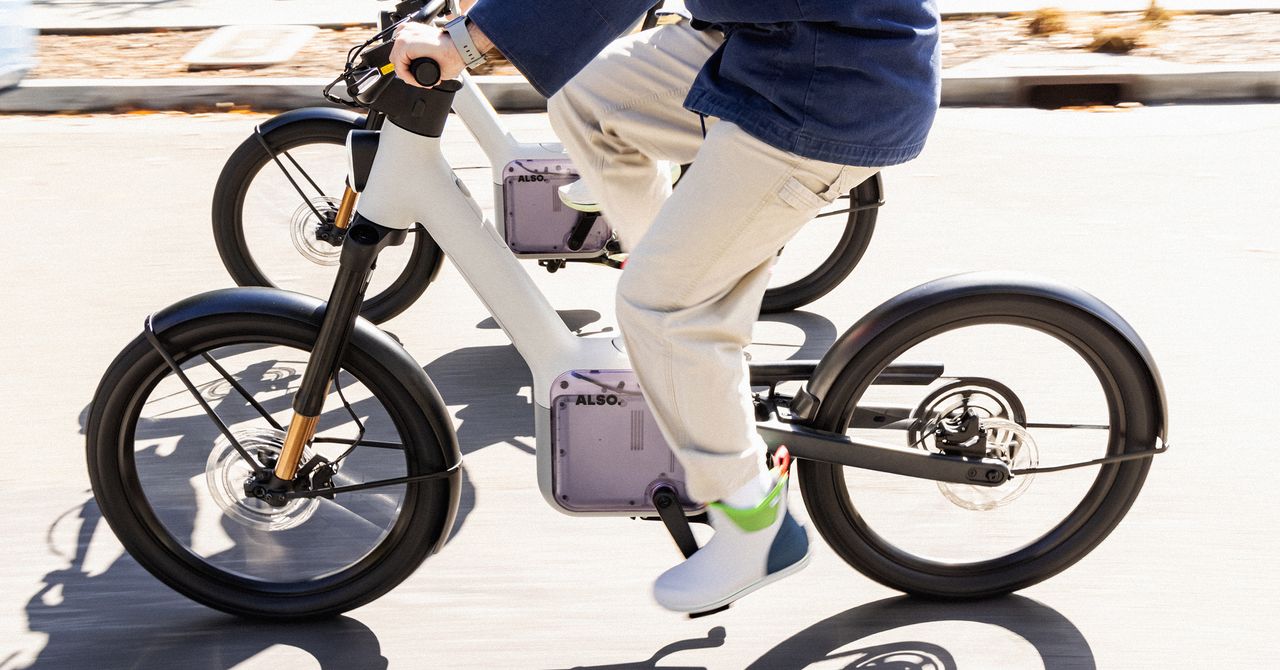
A few months ago, a family came into Pasadena Cyclery in Pasadena, California, for a repair on what they thought was their teenager’s e-bike. “I can’t fix that here,’ Daniel Purnell, a store manager and technician, remembers telling them. “That’s a motorcycle.” The mother got upset. She didn’t realize that what she thought was an e-bike could go much faster, perhaps up to 55 miles per hour.
“There’s definitely an education problem,” Purnell says. In California, bike advocates are pushing a new bill designed to clear up that confusion around what counts as an electric bicycle—and what doesn’t.
It’s a tricky balance. On one hand, backers want to allow riders access to new, faster, and more affordable non-car transportation options, ones that don’t require licenses and are emission-free. On the other hand, people, and especially kids, seem to be getting hurt. E-bike-related injuries jumped more than 1,020 percent nationwide between 2020 and 2024, according to hospital data, though it’s not clear if the stats-keepers can routinely distinguish between e-bikes and their faster, “e-moto” cousins. (Moped and powered-assisted cycle injuries jumped 67 percent in that same period.)
“We’re overdue to have better e-bike regulation,” says California state senator Catherine Blakespear, a Democrat who sponsored the bill and represents parts of North County in San Diego. “This has been an ongoing and growing issue for years.”
Senate Bill 1167 would make it illegal for retailers to label higher-powered, electric-powered vehicles as e-bikes. It would clarify that e-bikes have fully operative pedals and electric motors that don’t exceed 750 watts, enough to hit top speeds between 20 and 28 mph.
“We’re not against these devices,” says Kendra Ramsey, the executive director of the California Bicycle Coalition, which represents riders and is promoting the legislation. “People think they’re e-bikes and they’re not really e-bikes.”
Bill backers say they hope the fix, if it passes, makes a difference, especially for teenagers, who love the freedom that electric motors give them but can get into trouble if something goes wrong at higher speeds. Kids 17 and younger accounted for 20 percent of US e-bike injuries from 2020 to 2024, about in line with the share of the total population. But headlines—and the laws that follow them—have focused on teen injuries and even deaths.
There are no national laws governing e-bike riding. But bike backers spent years moving between states to pass laws that put e-bikes into three classes: Class 1, which have pedal-assist that only works when they’re actually pedaled, and goes up to 20 mph; Class 2, which have throttles that work without pedaling but still only reach 20 mph; and Class 3, which use pedal-assist to move up to 28 mph. Plenty of states and cities restrict the most powerful Class 3 bikes to people older than 16. (In a complicated twist, some e-bikes have different “modes,” allowing riders to toggle between Class 2 and Class 3.)
Last year, researchers visited 19 San Francisco Bay Area middle and high schools and found that 88 percent of the electric two-wheeled devices parked there were so high-powered and high-speed that they didn’t comply with the three-class system at all.
E-bikes have clearly struck a chord with state policymakers: At least 10 bills introduced this year deal with e-bikes, according to Ramsey.
Some bike advocates believe injuries have less to do with e-bikes than “e-motos,” a category that’s less likely to appear in retail stores or the sort of social media ads attracting teens to the tech. These have more powerful motors and can travel in excess of 30 mph. Vehicles, like the Surron Ultra Bee, which can hit top speeds of 55 mph, or Tuttio ICT, which can hit 50, are often marketed by retailers as “electric bikes.” Because so many sales happen online, it can be hard for people, and especially parents, to know what they’re getting into.


UAE makes history: Central Bank launches world’s first sovereign financial cloud with AI for secure digital finance – The Times of India

Duke of Kent marks 90 years of service with biography launch in London

USMNT’s Sargent joins Toronto after ‘unfortunate’ Norwich exit

-

 Tech1 week ago
A $10K Bounty Awaits Anyone Who Can Hack Ring Cameras to Stop Sharing Data With Amazon
-
 Business1 week ago
US Top Court Blocks Trump’s Tariff Orders: Does It Mean Zero Duties For Indian Goods?
-

 Fashion1 week ago
ICE cotton ticks higher on crude oil rally
-

 Tech1 week ago
Donald Trump Jr.’s Private DC Club Has Mysterious Ties to an Ex-Cop With a Controversial Past
-

 Entertainment1 week ago
The White Lotus” creator Mike White reflects on his time on “Survivor
-

 Politics6 days ago
Pakistan carries out precision strikes on seven militant hideouts in Afghanistan
-
 Business6 days ago
Eye-popping rise in one year: Betting on just gold and silver for long-term wealth creation? Think again! – The Times of India
-

 Sports1 week ago
Brett Favre blasts NFL for no longer appealing to ‘true’ fans: ‘There’s been a slight shift’