

Tech
This Jammer Wants to Block Always-Listening AI Wearables. It Probably Won’t Work

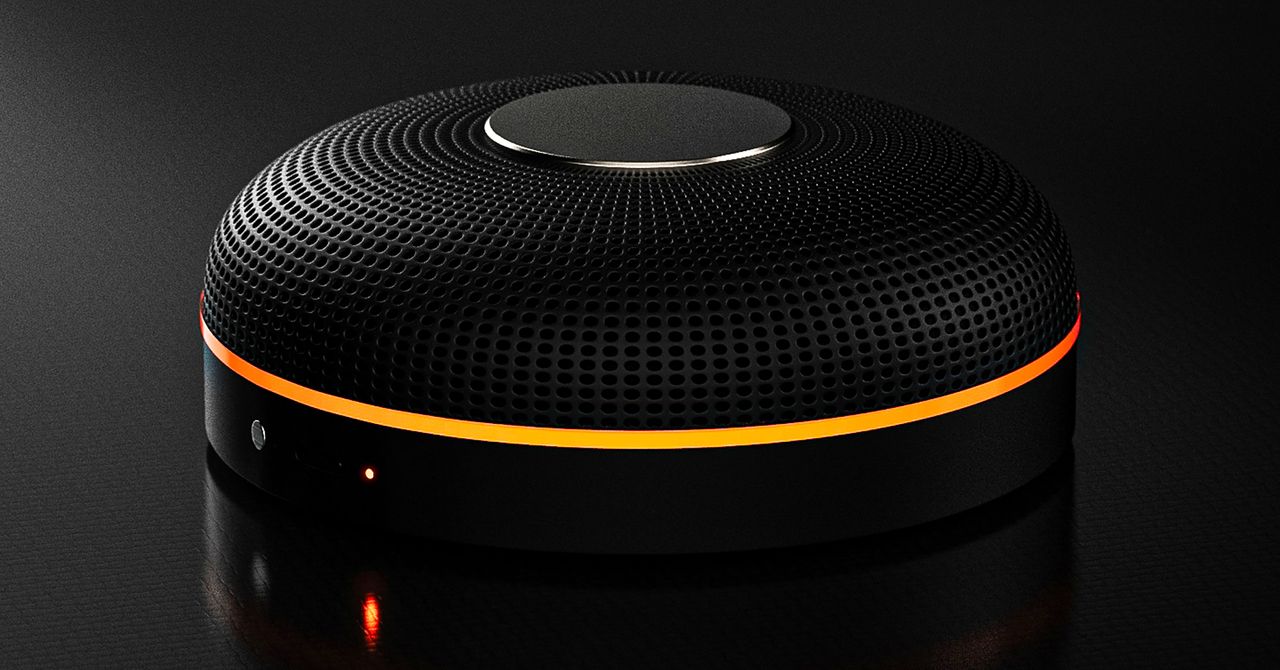
Deveillance also claims the Spectre can find nearby microphones by detecting radio frequencies (RF), but critics say finding a microphone via RF emissions is not effective unless the sensor is immediately beside it.
“If you could detect and recognize components via RF the way Spectre claims to, it would literally be transformative to technology,” Jordan wrote in a text to WIRED after he built a device to test detecting RF signatures in microphones. “You’d be able to do radio astronomy in Manhattan.”
Deveillance is also looking at ways to integrate nonlinear junction detection (NLJD), a very high-frequency radio signal used by security professionals to find hidden mics and bugs. NLJD detectors are expensive and used primarily in professional contexts like military operations.
Even if a device could detect a microphone’s exact location, objects around a room can change how the frequencies spread and interact. The emitted frequencies could also be a problem. There haven’t been adequate studies to show what effects ultrasonic frequencies have on the human ear, but some people and many pets can hear them and find them obnoxious or even painful. Baradari acknowledges that her team needs to do more testing to see how pets are affected.
“They simply cannot do this,” engineer and YouTuber Dave Jones (who runs the channel EEVblog) wrote in an email to WIRED. “They are using the classic trick of using wording to imply that it will detect every type of microphone, when all they are probably doing is scanning for Bluetooth audio devices. It’s totally lame.” Baradari reiterates that the Spectre uses a combination of RF and Bluetooth low energy to detect microphones.
WIRED asked Baradari to share any evidence of the Spectre’s effectiveness at identifying and blocking microphones in a person’s vicinity. Baradari shared a few short videoclips of people putting their phones to their ears listening to audioclips—which were presumably jammed by the Spectre—but these videos do little to prove that the device works.
Future Imperfect
Baradari has taken the critiques in stride, acknowledging that the tech is still in development. “I actually appreciate those comments, because they’re making me think and see more things as well,” Baradari says. “I do believe that with the ideas that we’re having and integrating into one device, these concerns can be addressed.”
People were quick to poke fun at the Spectre I online, calling the technology the cone of silence from Dune. Now, the Deveillance website reads, “Our goal is to make the cone of silence become reality.”
John Scott-Railton, a cybersecurity researcher at Citizen Lab, who is critical of the Spectre I, lauded the device’s virality as an indication of the real hunger for these kinds of gadgets to win back our privacy.
“The silver lining of this blowing up is that it is a Ring-like moment that highlights how quickly and intensely consumer attitudes have shifted around pervasive recording devices,” says Scott-Railton. “We need to be building products that do all the cool things that people want but that don’t have the massive privacy- and consent-violation undertow. You need device-level controls, and you need regulations of the companies that are doing this.”
Cooper Quintin, a senior staff technologist at the Electronic Frontier Foundation, echoed those sentiments, even if critics believe Deveillance’s efforts to be flawed.
“If this technology works, it could be a boon for many,” Quintin wrote in an email to WIRED. “It is nice to see a company creating something to protect privacy instead of working on new and creative ways to extract data from us.”













Two of Big Tech’s most influential billionaires, Sam Altman and Elon Musk, will go head-to-head in a highly anticipated trial beginning April 27. In Musk v. Altman, a judge, advised by a jury, will ultimately determine whether OpenAI has strayed from its founding mission to ensure that artificial general intelligence (AGI) benefits humanity, and the ruling could influence how the world’s leading AI developer controls and distributes its technology. For now, you can learn more about the trial here.
On the Panel
On May 8, a panel of WIRED experts will go live to answer your questions about this consequential case.
- Zoë Schiffer: WIRED’s director of business and industry, who oversees coverage of business and Silicon Valley.
- Maxwell Zeff: a senior writer at WIRED covering the business of artificial intelligence. He writes the weekly Model Behavior newsletter, which focuses on the people, communities, and companies behind Silicon Valley’s AI scene.
- Paresh Dave: a senior writer at WIRED covering the inner workings of Big Tech companies. He writes about how apps and gadgets are built and about their impacts while giving voice to the stories of the underappreciated and disadvantaged.
Ask a Question
Submit all your burning questions about this historic legal battle at WIRED’s next, subscriber-only livestream scheduled for May 8 at noon ET / 9 PT. To leave questions in advance as the trial unfolds, head to the comment section below.
Become a Subscriber
The event will be streamed right here. For subscribers who are not able to join, a replay of the livestream will be available after the event. Not a subscriber yet? Subscribe now to get access to this livestream, plus full access to WIRED.
In the meantime, check out past livestreams on Big Tech and the military, the future of electric vehicles, and more.

Service provider Blackbox Hosting has consolidated storage from two full racks down to just 8U of rack space following migration to Everpure FlashArray hardware. The move has allowed the provider to deliver “sovereign” cloud services with a 10:1 data reduction ratio and an 85% reduction in power utilisation.
Blackbox Hosting evolved over 14 years from a single rack to supporting more than 1,500 virtual machines (VMs), and has datacentre capacity at Canary Wharf with a secondary site in Slough.
The company operates a fully managed, sovereign (see box) model for major software suppliers including Iris Software Group, which supports payroll and financial management for approximately 60% of UK academies.
Blackbox previously relied on HPE 3PAR 8400 all-flash arrays. However, as the hardware approached end-of-life, the company faced mounting challenges.
“Support renewal costs were significant, and we had issues with HPE support,” said Matthew Burden, CEO at Blackbox Hosting. “We had a power supply failure in a DR site, and despite a four-hour SLA [service-level agreement], it took nearly two weeks to replace. They also began charging for firmware updates that were previously included.”
The 3PAR environment was cumbersome, said Burden, and required two full racks of hardware to manage the company’s near-petabyte scale.
When it looked for a more performant and dense alternative, Blackbox turned to Pure Storage, which recently rebranded as Everpure.
High density; ‘one-second’ RPO
Blackbox has deployed a range of Pure Storage FlashArray models across its two datacentres to support its active-passive high-availability design.
The deployment includes two FlashArray//X50 R3s, two X50 R4s, and two FlashArray//C20 units for file clusters.
The hardware supports predominantly Hyper-V and VMware VMs, running 90% Windows-based workloads, primarily SQL Server, plus Linux servers.
The transition from 3PAR to Pure has seen a dramatic consolidation of physical space. “We went from two entire racks filled with disks to two 4U boxes,” said Burden. “Our total provisioned storage is 998TB and we get a total reduction of 10:1. 3PAR had deduplication, but not compression on SSDs.”
Beyond space savings, the disaster recovery (DR) capabilities have seen a massive upgrade. Previously, the company’s recovery point objective (RPO) was limited to 15 minutes. “With Pure Storage, it is one second,” said Durden. “We replicate all 1,500 VMs to our backup datacentre. For a customer with 1,000 VMs, we can spin those up for quarterly testing and they are only one second out from live data.”
Performance and sustainability
The shift to non-volatile memory express-based flash has also provided a significant boost to the provider’s green credentials. Sustainability reports generated via Pure’s Evergreen dashboard show an 85% saving in power utilisation compared with the legacy HPE environment.
For the end users – which include major corporate energy, finance and transport organisations – the benefit is felt in application speed. “We’ve had clients with huge databases that were always slow with previous providers,” said Justin Field, commercial director at Blackbox. “They can pull data significantly faster now, which is a big play for us when competing against hyperscalers.”
Burden also highlighted the “zero-touch” operational simplicity of the new arrays. “The older arrays were very cumbersome; you had to know exactly what you were doing,” he said. “The Pure web interface is very simple, which makes the operational side much easier. Plus, with Evergreen, we don’t have to pull arrays out for upgrades. We can just put in new controllers as scale increases.”

A national housing shortage is straining finances and communities across the United States. In Massachusetts, at least 222,000 homes will have to be built in the next 10 years to meet the population’s needs. At the same time, there are numerous challenges in traditional construction. There’s a shortage of skilled construction workers. Most projects involve multiple contractors and subcontractors, adding complexity and lag time. And the construction process, as well as the buildings themselves, can be a major source of emissions that contribute to climate change.
Reframe Systems, co-founded by Vikas Enti SM ’20, uses robotics, software, and high-performance materials to address these problems. Founded in 2022, the company deploys microfactories that bring housing fabrication and production closer to the regions where the homes are needed. The first homes designed and manufactured in Reframe’s first microfactory have been fully built in Arlington and Somerville, Massachusetts.
Enti’s experiences in MIT System Design and Management (SDM) shaped the company from its start. “Learning how to navigate the system and finding the optimal value for each stakeholder has been a key part of the business strategy,” he says, “and that’s rooted in what I learned at SDM.”
Better tools for system-level problems
Enti applied to SDM’s master of science in engineering and management while he was working at Kiva Systems, overseeing its acquisition by Amazon and transformation into Amazon Robotics. He found that the SDM program’s fundamentals of systems engineering, system architecture, and project management provided him with the tools he needed to address system-level problems in his work.
While he was at MIT, Enti also served as an associate director for the MIT $100K Entrepreneurship Competition, which offers students and researchers mentorship, feedback, and potential funding for their startup ideas. He realized that “there isn’t a single formula for how businesses start, or how long it takes to get them started,” he says, which helped shape his plans to start his own business.
Enti took a leave of absence from MIT to oversee the expansion of Amazon Robotics in Europe. He returned and completed his degree in 2020, writing his thesis on developing technology that could mitigate falls for elderly people. This instinct to use his education for a good cause resurfaced when his daughters were born. He wanted his future business to address a real-world problem and have a social impact, while also reducing carbon emissions.
Growing housing, shrinking emissions
Enti concluded that housing, with immediate real-world impact and a significant share of global carbon emissions, was the right problem to work on. He reached out to his colleagues Aaron Small and Felipe Polido from Amazon Robotics to share his idea for advanced, low-cost factories that could be deployed quickly and close to where they were needed. The two joined him as co-founders.
Currently, the microfactory in Andover, Massachusetts, produces structural panels, with robotics completing wall and ceiling framing and people completing the rest of the work, including wiring and plumbing. Eventually, Reframe hopes to automate more of the building process through further use of robotics. The modular construction process allows for reduced waste and disruption on the eventual home site. And the finished homes are designed to be energy-efficient and ready for solar panel installation. The company is set to start work soon on a group of homes in Devens, Massachusetts.
In addition to the Andover location, Reframe is setting up in southern California to help rebuild homes that were destroyed in the area’s January 2025 wildfires. The company’s software-assisted design process and the adjustability of the microfactories allows them to meet local zoning and building codes and align with the local architectural aesthetic. This means that in Somerville, Reframe’s completed buildings look like modernized versions of the neighboring three-story buildings, known locally as “triple-deckers.” On the other side of the country, Reframe’s design offerings include Spanish-style and craftsman homes.
“Housing is a complex systems problem,” Enti says, explaining the impact SDM has had on his work at Reframe. The methods and tools taught in the integrated core class EM.412 (Foundations of System Design and Management) help him tackle systems-level problems and take the needs of multiple stakeholders into account. The Reframe team used technology roadmapping as they devised their overall business plan, inspired by the work of Olivier de Weck, associate head of the MIT Department of Aeronautics and Astronautics. And lectures on project management from Bryan Moser, SDM’s academic director, remain relevant.
“Embracing the fact that this is a systems problem, and learning how to navigate the system and the stakeholders to make sure we’re finding the optimal value, has been a key part of the business strategy,” Enti says.
Reframe Systems is set to continue learning through iteration as they plan to expand their network of microfactories. The company remains committed to the core vision of sustainably meeting the country’s need for more housing. “I’m grateful we get to do this,” Enti says. “Once you strip away all the robotics, the advanced algorithms, and the factories, these are high-quality, healthy homes that families get to live in and grow.”


Oil prices fluctuate as Trump extends Iran war ceasefire

Chaos reigns in Asian Champions League after VAR intervenes over substitution

Italy’s inflation edges up to 1.7% in March: Istat

-

 Fashion6 days ago
France’s LVMH Q1 revenue falls 6%, shows resilience amid Iran war
-

 Entertainment7 days ago
Is Claude down? Here’s why users are seeing errors
-
 Business1 week ago
Delta Air Lines unveils first new Delta One suite in premium cabin arms race
-

 Fashion1 week ago
Asia claims largest share of markets on Kearney FDI Confidence Index
-

 Tech1 week ago
The Deepfake Nudes Crisis in Schools Is Much Worse Than You Thought
-

 Sports7 days ago
PSL 11: Peshawar Zalmi win toss, opt to field first against Quetta Gladiators
-

 Tech1 week ago
Bremont Is Sending a Watch to the Moon’s Surface
-

 Tech1 week ago
Human-machine teaming dives underwater