

Tech
3D-printed microrobots adapt to diverse environments with modular design

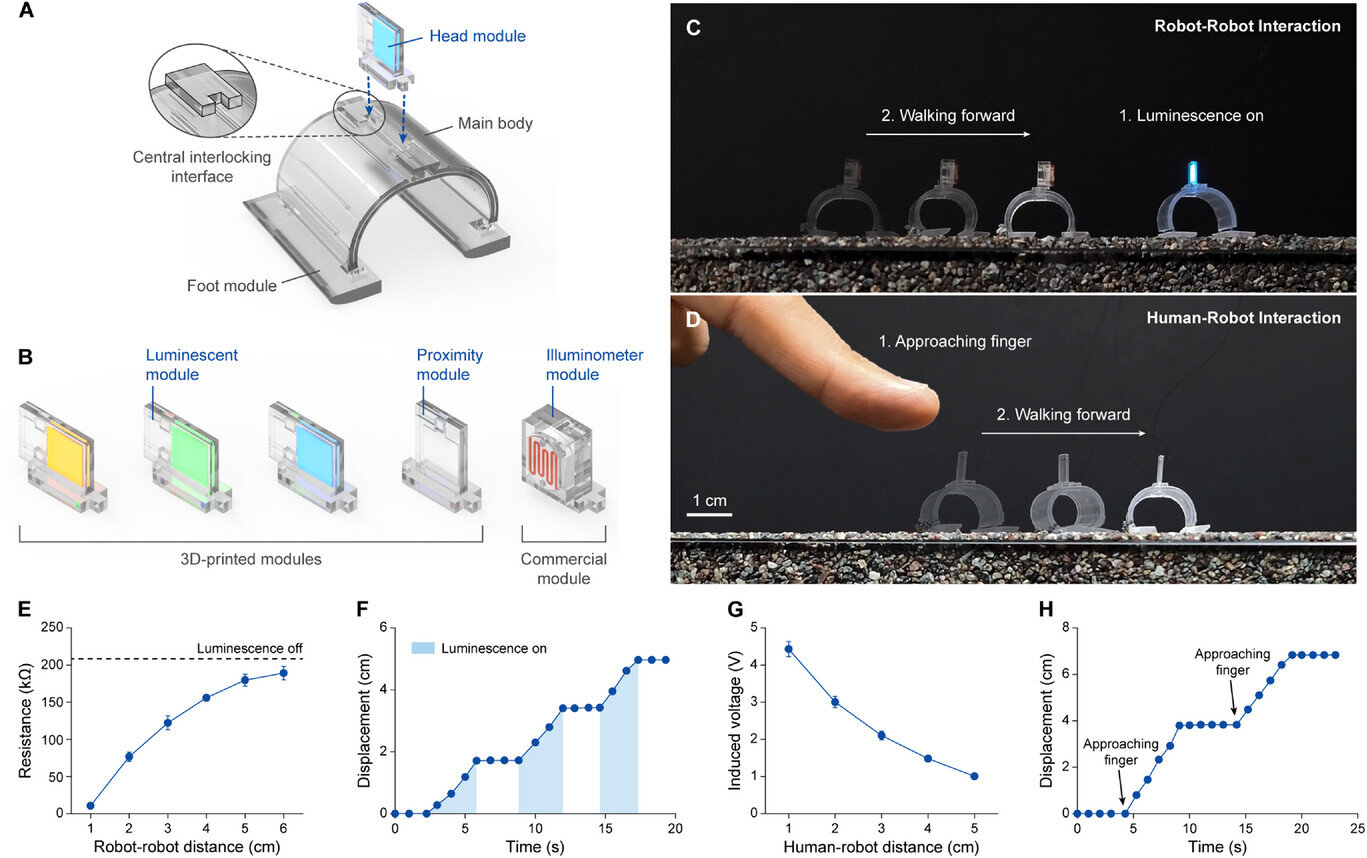
Microrobots, small robotic systems that are less than 1 centimeter (cm) in size, could tackle some real-world tasks that cannot be completed by bigger robots. For instance, they could be used to monitor confined spaces and remote natural environments, to deliver drugs or to diagnose diseases or other medical conditions.
Researchers at Seoul National University recently introduced new modular and durable microrobots that can adapt to their surroundings, effectively navigating a range of environments. These tiny robots, introduced in a paper published in Advanced Materials, can be fabricated using 3D printing technology.
“Microrobots, with their insect-like size, are expected to make contributions in fields where conventional robots have struggled to operate,” Won Jun Song, first author of the paper, told Tech Xplore. “However, most microrobots developed to date have been highly specialized, tailored for very specific purposes, making them difficult to deploy across diverse environments and applications. Our goal was to present a new approach toward creating general-purpose microrobots.”

While developing their microrobots, Song and his colleagues drew inspiration from drones—unmanned aerial vehicles (UAVs)—which can be tailored for a wide range of applications (e.g., photography/videography, package delivery, defense, etc.). Their objective was thus to develop adaptive microrobots that could be applied to different real-world problems.
“Our microrobot is composed of a main body and three types of modules,” explained Song. “The main body serves as the hub where all other modules are attached and is responsible for controlling the overall movement of the robot. The foot modules allow the microrobot to walk, not only on flat surfaces, but also on sand and even across water. The head modules enable real-time interaction with nearby robots or humans. Finally, the connecting modules make it possible for multiple microrobots to collaborate and operate together as if they were a single unit.”
To fabricate their microrobots’ individual components, the researchers used a custom-made multi-material 3D printer that they had created as part of their earlier studies. Notably, this 3D printer would enable the efficient mass-production of microrobot modules, allowing manufacturers to print up to eight identical units in a single run.
The team’s 3D-printing approach also makes it easy to tailor robots for specific tasks, by enabling the fabrication of specific modules or components on-demand to broaden their functionalities. In initial tests, the microrobots created by the researchers were found to reliably move in different settings, walking on smooth, rough and granular terrains, but also swimming in aquatic environments.
“Many researchers have focused on developing microrobots optimized for very specific purposes, and this approach has greatly contributed to creating highly efficient robots with excellent performance,” said Song. “However, for microrobots to reach commercialization—similar to how drones or Boston Dynamics’ Spot are now widely used in daily life—they must be capable of operating across a broader range of environments and applications.”
In the future, the modular microrobot design introduced by Song and his colleagues and their 3D printing strategy could contribute to the large-scale fabrication of tiny robotic systems tailored for specific purposes. Meanwhile, other research groups could draw inspiration from the team’s paper to develop other customizable microrobots that can operate in different environments.
“We now aim to use our newly developed multi-material printing technology and high-performance photocurable materials to develop other advanced robots and devices,” added Song.
Written for you by our author Ingrid Fadelli, edited by Stephanie Baum, and fact-checked and reviewed by Robert Egan—this article is the result of careful human work. We rely on readers like you to keep independent science journalism alive.
If this reporting matters to you,
please consider a donation (especially monthly).
You’ll get an ad-free account as a thank-you.
More information:
Won Jun Song et al, All‐3D‐Printed Multi‐Environment Modular Microrobots Powered by Large‐Displacement Dielectric Elastomer Microactuators, Advanced Materials (2025). DOI: 10.1002/adma.202507503
© 2025 Science X Network
Citation:
3D-printed microrobots adapt to diverse environments with modular design (2025, October 16)
retrieved 16 October 2025
from https://techxplore.com/news/2025-10-3d-microrobots-diverse-environments-modular.html
This document is subject to copyright. Apart from any fair dealing for the purpose of private study or research, no
part may be reproduced without the written permission. The content is provided for information purposes only.













Service provider Blackbox Hosting has consolidated storage from two full racks down to just 8U of rack space following migration to Everpure FlashArray hardware. The move has allowed the provider to deliver “sovereign” cloud services with a 10:1 data reduction ratio and an 85% reduction in power utilisation.
Blackbox Hosting evolved over 14 years from a single rack to supporting more than 1,500 virtual machines (VMs), and has datacentre capacity at Canary Wharf with a secondary site in Slough.
The company operates a fully managed, sovereign (see box) model for major software suppliers including Iris Software Group, which supports payroll and financial management for approximately 60% of UK academies.
Blackbox previously relied on HPE 3PAR 8400 all-flash arrays. However, as the hardware approached end-of-life, the company faced mounting challenges.
“Support renewal costs were significant, and we had issues with HPE support,” said Matthew Burden, CEO at Blackbox Hosting. “We had a power supply failure in a DR site, and despite a four-hour SLA [service-level agreement], it took nearly two weeks to replace. They also began charging for firmware updates that were previously included.”
The 3PAR environment was cumbersome, said Burden, and required two full racks of hardware to manage the company’s near-petabyte scale.
When it looked for a more performant and dense alternative, Blackbox turned to Pure Storage, which recently rebranded as Everpure.
High density; ‘one-second’ RPO
Blackbox has deployed a range of Pure Storage FlashArray models across its two datacentres to support its active-passive high-availability design.
The deployment includes two FlashArray//X50 R3s, two X50 R4s, and two FlashArray//C20 units for file clusters.
The hardware supports predominantly Hyper-V and VMware VMs, running 90% Windows-based workloads, primarily SQL Server, plus Linux servers.
The transition from 3PAR to Pure has seen a dramatic consolidation of physical space. “We went from two entire racks filled with disks to two 4U boxes,” said Burden. “Our total provisioned storage is 998TB and we get a total reduction of 10:1. 3PAR had deduplication, but not compression on SSDs.”
Beyond space savings, the disaster recovery (DR) capabilities have seen a massive upgrade. Previously, the company’s recovery point objective (RPO) was limited to 15 minutes. “With Pure Storage, it is one second,” said Durden. “We replicate all 1,500 VMs to our backup datacentre. For a customer with 1,000 VMs, we can spin those up for quarterly testing and they are only one second out from live data.”
Performance and sustainability
The shift to non-volatile memory express-based flash has also provided a significant boost to the provider’s green credentials. Sustainability reports generated via Pure’s Evergreen dashboard show an 85% saving in power utilisation compared with the legacy HPE environment.
For the end users – which include major corporate energy, finance and transport organisations – the benefit is felt in application speed. “We’ve had clients with huge databases that were always slow with previous providers,” said Justin Field, commercial director at Blackbox. “They can pull data significantly faster now, which is a big play for us when competing against hyperscalers.”
Burden also highlighted the “zero-touch” operational simplicity of the new arrays. “The older arrays were very cumbersome; you had to know exactly what you were doing,” he said. “The Pure web interface is very simple, which makes the operational side much easier. Plus, with Evergreen, we don’t have to pull arrays out for upgrades. We can just put in new controllers as scale increases.”

A national housing shortage is straining finances and communities across the United States. In Massachusetts, at least 222,000 homes will have to be built in the next 10 years to meet the population’s needs. At the same time, there are numerous challenges in traditional construction. There’s a shortage of skilled construction workers. Most projects involve multiple contractors and subcontractors, adding complexity and lag time. And the construction process, as well as the buildings themselves, can be a major source of emissions that contribute to climate change.
Reframe Systems, co-founded by Vikas Enti SM ’20, uses robotics, software, and high-performance materials to address these problems. Founded in 2022, the company deploys microfactories that bring housing fabrication and production closer to the regions where the homes are needed. The first homes designed and manufactured in Reframe’s first microfactory have been fully built in Arlington and Somerville, Massachusetts.
Enti’s experiences in MIT System Design and Management (SDM) shaped the company from its start. “Learning how to navigate the system and finding the optimal value for each stakeholder has been a key part of the business strategy,” he says, “and that’s rooted in what I learned at SDM.”
Better tools for system-level problems
Enti applied to SDM’s master of science in engineering and management while he was working at Kiva Systems, overseeing its acquisition by Amazon and transformation into Amazon Robotics. He found that the SDM program’s fundamentals of systems engineering, system architecture, and project management provided him with the tools he needed to address system-level problems in his work.
While he was at MIT, Enti also served as an associate director for the MIT $100K Entrepreneurship Competition, which offers students and researchers mentorship, feedback, and potential funding for their startup ideas. He realized that “there isn’t a single formula for how businesses start, or how long it takes to get them started,” he says, which helped shape his plans to start his own business.
Enti took a leave of absence from MIT to oversee the expansion of Amazon Robotics in Europe. He returned and completed his degree in 2020, writing his thesis on developing technology that could mitigate falls for elderly people. This instinct to use his education for a good cause resurfaced when his daughters were born. He wanted his future business to address a real-world problem and have a social impact, while also reducing carbon emissions.
Growing housing, shrinking emissions
Enti concluded that housing, with immediate real-world impact and a significant share of global carbon emissions, was the right problem to work on. He reached out to his colleagues Aaron Small and Felipe Polido from Amazon Robotics to share his idea for advanced, low-cost factories that could be deployed quickly and close to where they were needed. The two joined him as co-founders.
Currently, the microfactory in Andover, Massachusetts, produces structural panels, with robotics completing wall and ceiling framing and people completing the rest of the work, including wiring and plumbing. Eventually, Reframe hopes to automate more of the building process through further use of robotics. The modular construction process allows for reduced waste and disruption on the eventual home site. And the finished homes are designed to be energy-efficient and ready for solar panel installation. The company is set to start work soon on a group of homes in Devens, Massachusetts.
In addition to the Andover location, Reframe is setting up in southern California to help rebuild homes that were destroyed in the area’s January 2025 wildfires. The company’s software-assisted design process and the adjustability of the microfactories allows them to meet local zoning and building codes and align with the local architectural aesthetic. This means that in Somerville, Reframe’s completed buildings look like modernized versions of the neighboring three-story buildings, known locally as “triple-deckers.” On the other side of the country, Reframe’s design offerings include Spanish-style and craftsman homes.
“Housing is a complex systems problem,” Enti says, explaining the impact SDM has had on his work at Reframe. The methods and tools taught in the integrated core class EM.412 (Foundations of System Design and Management) help him tackle systems-level problems and take the needs of multiple stakeholders into account. The Reframe team used technology roadmapping as they devised their overall business plan, inspired by the work of Olivier de Weck, associate head of the MIT Department of Aeronautics and Astronautics. And lectures on project management from Bryan Moser, SDM’s academic director, remain relevant.
“Embracing the fact that this is a systems problem, and learning how to navigate the system and the stakeholders to make sure we’re finding the optimal value, has been a key part of the business strategy,” Enti says.
Reframe Systems is set to continue learning through iteration as they plan to expand their network of microfactories. The company remains committed to the core vision of sustainably meeting the country’s need for more housing. “I’m grateful we get to do this,” Enti says. “Once you strip away all the robotics, the advanced algorithms, and the factories, these are high-quality, healthy homes that families get to live in and grow.”
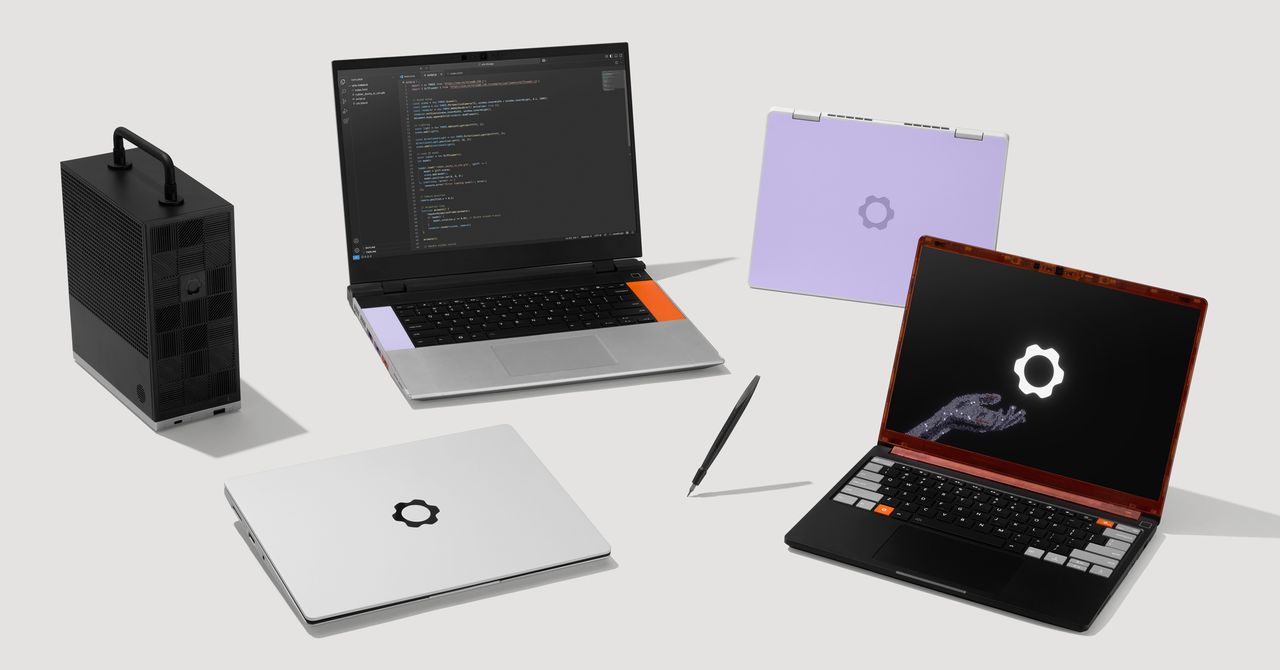
Framework, the company that makes laptops designed for optimal repairability, announced a new version of its main product, a 13-inch screen laptop. It’s called the Framework Laptop 13 Pro, and it has far better battery life, a touchscreen, a haptic touchpad, and is fitted with Intel processors.
At an event in San Francisco today, Framework CEO Nirav Patel showed off the company’s new tech, opening with a joke about making Framework AI—something the company is very much not doing. Framework’s whole thing, after all, is aiming to give users control over the physical tech they use.
“That industry is fighting for you to own nothing, and they own everything,” Patel said about the AI industry. “We’re fighting for a future where you can own everything and be free.”
Framework used the event to detail other updates coming to its 16-inch laptop. It also showed off previews of an official developer kit and a wireless keyboard for controlling your rig from the couch.
Framework 13 Pro
As the name implies, the 13 Pro is a step up from the company’s last version, the Framework 13. It’s also pricier, starting at $1,199 for a DIY Edition that requires assembling the computer yourself. Pre-built units start at $1,499 but can be upgraded with more features. Framework says it will start shipping the 13 Pro in June.
Framework’s signature move for its products is the ability to take the thing apart. The 13 Pro is made with that ethos in mind, so its parts can be easily swapped out, upgraded, or replaced. Four Thunderbolt 4 interfaces let you pick which ports (USB-C, HDMI, etc.) you want and then choose where to place them. Framework says it planned the laptop with cross-generation compatibility in mind, so current Framebook 13 laptop owners will be able to use new 13 Pro parts like the mainboard, display, and battery, and put them into their existing machine.
The big changes in the guts of the 13 Pro come from Framework’s shift away from using an AMD processor to Intel’s Core Ultra Series 3 processors, which Framework described in its press release as “just insanely efficient.” That efficiency, along with a bigger battery, translates to more than 20 hours of battery life while streaming 4K Netflix videos, at least that’s the claim. That’s almost 12 hours longer than the Framework 13.

Courtesy of Framework

Courtesy of Framework


Why Guardiola’s legacy could exceed Ferguson’s, Wenger’s, Klopp’s

UK’ John Lewis appoints Jacqui Markham as new creative head of fashion

Tori Spelling pays emotional tribute to late ex Patrick Muldoon

-

 Fashion6 days ago
France’s LVMH Q1 revenue falls 6%, shows resilience amid Iran war
-

 Sports1 week ago
The case for Man United’s Fernandes as Premier League’s best
-
 Business1 week ago
UK could adopt EU single market rules under new legislation
-

 Entertainment7 days ago
Is Claude down? Here’s why users are seeing errors
-
 Business1 week ago
Delta Air Lines unveils first new Delta One suite in premium cabin arms race
-

 Fashion1 week ago
Asia claims largest share of markets on Kearney FDI Confidence Index
-

 Sports7 days ago
PSL 11: Peshawar Zalmi win toss, opt to field first against Quetta Gladiators
-

 Tech7 days ago
The Deepfake Nudes Crisis in Schools Is Much Worse Than You Thought