

Tech
Software tool turns everyday objects into animated, eye-catching displays—without electronics

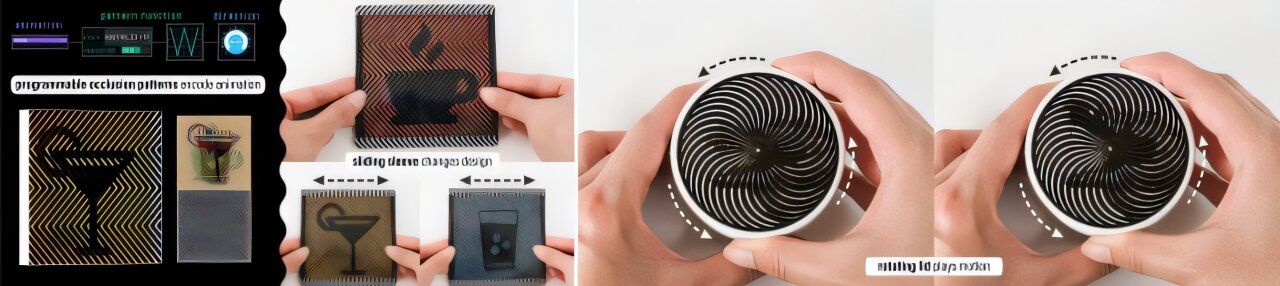
Whether you’re an artist, advertising specialist, or just looking to spruce up your home, turning everyday objects into dynamic displays is a great way to make them more visually engaging. For example, you could turn a kids’ book into a handheld cartoon of sorts, making the reading experience more immersive and memorable for a child.
But now, thanks to MIT researchers, it’s also possible to make dynamic displays without using electronics, using barrier-grid animations (or scanimations), which use printed materials instead. This visual trick involves sliding a patterned sheet across an image to create the illusion of a moving image.
The secret of barrier-grid animations lies in its name: An overlay called a barrier (or grid) often resembling a picket fence moves across, rotates around, or tilts toward an image to reveal frames in an animated sequence. That underlying picture is a combination of each still, sliced and interwoven to present a different snapshot depending on the overlay’s position.
While tools exist to help artists create barrier-grid animations, they’re typically used to create barrier patterns that have straight lines. Building off of previous work in creating images that appear to move, researchers at MIT’s Computer Science and Artificial Intelligence Laboratory (CSAIL) have developed a tool that allows users to explore more unconventional designs. From zigzags to circular patterns, the team’s “FabObscura” software turns unique concepts into printable scanimations, helping users add dynamic animations to things like pictures, toys, and decor.
MIT Department of Electrical Engineering and Computer Science (EECS) Ph.D. student and CSAIL researcher Ticha Sethapakdi, a lead author on a paper presenting FabObscura, says that the system is a one-size-fits-all tool for customizing barrier-grid animations. This versatility extends to unconventional, elaborate overlay designs, like pointed, angled lines to animate a picture you might put on your desk, or the swirling, hypnotic appearance of a radial pattern you could spin over an image placed on a coin or a Frisbee.
“Our system can turn a seemingly static, abstract image into an attention-catching animation,” says Sethapakdi. “The tool lowers the barrier to entry to creating these barrier-grid animations, while helping users express a variety of designs that would’ve been very time-consuming to explore by hand.”
Behind these novel scanimations is a key finding: Barrier patterns can be expressed as any continuous mathematical function—not just straight lines. Users can type these equations into a text box within the FabObscura program, and then see how it graphs out the shape and movement of a barrier pattern.
If you wanted a traditional horizontal pattern, you’d enter in a constant function, where the output is the same no matter the input, much like drawing a straight line across a graph. For a wavy design, you’d use a sine function, which is smooth and resembles a mountain range when plotted out. The system’s interface includes helpful examples of these equations to guide users toward their preferred pattern.
A simple interface for elaborate ideas
FabObscura works for all known types of barrier-grid animations, supporting a variety of user interactions. The system enables the creation of a display with an appearance that changes depending on your viewpoint. FabObscura also allows you to create displays that you can animate by sliding or rotating a barrier over an image.
To produce these designs, users can upload a folder of frames of an animation (perhaps a few stills of a horse running), or choose from a few preset sequences (like an eye blinking) and specify the angle your barrier will move. After previewing your design, you can fabricate the barrier and picture onto separate transparent sheets (or print the image on paper) using a standard 2D printer, such as an inkjet. Your image can then be placed and secured on flat, handheld items such as picture frames, phones, and books.
You can enter separate equations if you want two sequences on one surface, which the researchers call “nested animations.” Depending on how you move the barrier, you’ll see a different story being told. For example, CSAIL researchers created a car that rotates when you move its sheet vertically, but transforms into a spinning motorcycle when you slide the grid horizontally.
These customizations lead to unique household items, too. The researchers designed an interactive coaster that you can switch from displaying a “coffee” icon to symbols of a martini and a glass of water by pressing your fingers down on the edges of its surface. The team also spruced up a jar of sunflower seeds, producing a flower animation on the lid that blooms when twisted off.
Artists, including graphic designers and printmakers, could also use this tool to make dynamic pieces without needing to connect any wires. The tool saves them crucial time to explore creative, low-power designs, such as a clock with a mouse that runs along as it ticks. FabObscura could produce animated food packaging, or even reconfigurable signage for places like construction sites or stores that notify people when a particular area is closed or a machine isn’t working.
Keep it crisp
FabObscura’s barrier-grid creations do come with certain trade-offs. While nested animations are novel and more dynamic than a single-layer scanimation, their visual quality isn’t as strong. The researchers wrote design guidelines to address these challenges, recommending users upload fewer frames for nested animations to keep the interlaced image simple and stick to high-contrast images for a crisper presentation.
In the future, the researchers intend to expand what users can upload to FabObscura, like being able to drop in a video file that the program can then select the best frames from. This would lead to even more expressive barrier-grid animations.
FabObscura might also step into a new dimension: 3D. While the system is currently optimized for flat, handheld surfaces, CSAIL researchers are considering implementing their work into larger, more complex objects, possibly using 3D printers to fabricate even more elaborate illusions.
Sethapakdi wrote the paper with several CSAIL affiliates: Zhejiang University Ph.D. student and visiting researcher Mingming Li; MIT EECS Ph.D. student Maxine Perroni-Scharf; MIT postdoc Jiaji Li; MIT associate professors Arvind Satyanarayan and Justin Solomon; and senior author and MIT Associate Professor Stefanie Mueller, leader of the Human-Computer Interaction (HCI) Engineering Group at CSAIL. Their work will be presented at the ACM Symposium on User Interface Software and Technology (UIST) this month.
More information:
Ticha Sethapackdi et al, FabObscura: Computational Design and Fabrication for Interactive Barrier-Grid Animations (2025)
This story is republished courtesy of MIT News (web.mit.edu/newsoffice/), a popular site that covers news about MIT research, innovation and teaching.
Citation:
Software tool turns everyday objects into animated, eye-catching displays—without electronics (2025, September 10)
retrieved 10 September 2025
from https://techxplore.com/news/2025-09-software-tool-everyday-animated-eye.html
This document is subject to copyright. Apart from any fair dealing for the purpose of private study or research, no
part may be reproduced without the written permission. The content is provided for information purposes only.












Tech
I Tested Garmin Watches for a Decade While Hiking, Biking, and Climbing. Here’s What You Should Buy

Last year, Garmin introduced a Pro version that incorporates the inReach’s satellite communications savvy. Not only does it cost at least $400 more than the Apple Watch Ultra and $200 more than the regular Fenix 8, but you also have to pay for the inReach subscription plan, which has several tiers and ranges from $8/month to $50/month depending on whether you want features like unlimited texting or sending photo messages.
What you get for this mind-boggling price is a sports watch that can do anything and everything. It has best-in-class battery life (every Fenix can last for weeks on a single charge, and up to a month with solar charging) and features like the depth sensor from Garmin’s Descent line, which means this watch works as a full-on dive computer for scuba and free diving. It has a microphone and speaker for basic voice commands (although no onboard cellular connectivity), the surprisingly useful built-in LED flashlight, and Garmin’s signature built-in topographic maps, 24/7 health monitoring, and tracking for over a hundred different activities.
I’ve taken the 51-mm version on pretty much every outdoor sport—snowboarding, trail running, mountain biking, and rock climbing. Every time I use it, its capabilities far outclass my own. I have irritated many a fellow climber by attempting to track route difficulty, duration, and falls while integrating my Body Battery metrics and so on. The danger is always that you’ll spend more time fiddling with your Garmin Fenix 8 than you do with your actual sport. I have the version with the sapphire glass face and the titanium bezel, and have smashed it into rock faces with nary a scratch. If you’re up for paying the price and want a good-looking watch that will last forever (I have friends who are still wearing their Fenix 5s and 6s, and honestly, they’re fine), this is the one to get.
Best Running Watch
The Garmin Forerunner series launched in the early 2000s and has become the quintessential runner’s watch. Like all Garmins, the Forerunner comes in a range of price points, each offering different features. Last year, Garmin released the Forerunner 570 ($550), a midrange model with no LED flashlight or onboard maps, and the Forerunner 970 ($750), which is the premium version. Before I go into detail about why the Forerunner 970 is the best option, I should also say that I have tested many previous Garmin Forerunners at various price points. If you’re not a triathlete, the older Forerunners are still worth considering, and the entry-level $200 Forerunner 165 is aimed explicitly at runners, instead of including triathletes as the more expensive models do.

Acer is one of the top largest PC manufacturers in the world, perhaps best known for its gaming line and budget-friendly options. If you’ve already got your eye on an Acer product like a laptop or monitor, and are shopping at the company’s online storefront, you should be using one of these Acer promo codes and coupons to save some cash on your purchase.
Save 40% on Accessories When You Build an Acer Bundle
If you’re buying from Acer, you’re most likely shopping for either a desktop PC or laptop. With this discount, you can get a really solid deal on accessories if you bundle it with a mouse, laptop bag, or headset. When you go to purchase a PC, just click “Build Bundle” and you’ll see some of the eligible options, all of which are reduced by 40%. The Nitro Mechanical Keyboard, for example, goes from $50 to just $30. That 40% is a real discount, too, as that same keyboard costs $50 on Amazon when I checked.
Beyond peripheral add-ons, you can also save 10% off Acer Care Plus extended service plans or McAfee LiveSafe antivirus subscriptions. You can bundle up to five products together to save the most money. If you’re headed off to college (or have a kid in the family), a bundle like this can get you everything you need for a gaming or studying setup on the go.
Shop Rotating Weekly Deals on Monitors and Gaming Gear
Acer’s PC gaming offerings come in either the flagship Predator brand or the budget-tier Nitro. Acer offers rotating weekly deals on everything from monitors to gaming laptops, some of which are my favorites that I’ve tested in their given category. The Acer Nitro V 16, for example, was a budget gaming laptop that I recommended quite a lot last year because of its incredible price. The one I tested was the entry-level version with an Nvidia RTX 5050 inside, but Acer has the RTX 5060 model in its own storefront. It’s $100 off right now at $1,200, which comes with 16 GB of RAM and a terabyte of storage. In fact, it’s only $30 more than the RTX 5050 model, despite offering a significant jump in gaming performance. These discounts are reflected right on the product pages, so there’s no promo code, discount code, or coupon code required.
Acer has a wide selection of monitors available, too, whether that’s a massive 49-incher or a more modest 27-inch gaming workhorse. One of my favorite discounts I saw right now was the Acer Nitro XV2, a 27-inch 1440p display with a 300 Hz refresh rate. It’s 44% off at the time of writing, bringing the price down to just $250. Because these discounts are swapped out on a weekly basis, it’s worth checking back to see if the product you’re eyeing has a new discount.
Select Customers Can Get 15% Off Their Purchase
Acer also offers a number of added discounts at checkout, including 15% off for students. Students will need to verify through Student Beans or SheerID. Because a lot of the devices Acer offers are budget-friendly, they can be attractive for students, and the extra 15% off is the icing on the cake.
We tested the Acer Swift 16 AI last year and really enjoyed the high-resolution, OLED screen and impressively quiet performance. Acer has the smaller version of this same laptop available, the Swift 14 AI, which is currently $150 off. You also might check out the Acer Chromebook Plus 514, a laptop we liked quite a bit when we reviewed it in 2024.
Acer offers this same 15% discount for active duty military, veterans, and their families. It also applies to healthcare professionals, which can be verified through its healthcare discount portal.

The world’s top AI research conference, the Conference on Neural Information Processing Systems—better known as NeurIPS—became the latest organization this week to become embroiled in a growing clash between geopolitics and global scientific collaboration. The conference’s organizers announced and then quickly reversed controversial new restrictions for international participants after Chinese AI researchers threatened to boycott the event.
“This is a potential watershed moment,” says Paul Triolo, a partner at the advisory firm DGA-Albright Stonebridge who studies US-China relations. Triolo argues that attracting Chinese researchers to NeurIPS is beneficial to US interests, but some American officials have pushed for American and Chinese scientists to decouple their work—especially in AI, which has become a particularly sensitive topic in Washington.
The incident could deepen political tensions around AI research, as well as dissuade Chinese scientists from working at US universities and tech companies in the future. “At some level now it is going to be hard to keep basic AI research out of the [political] picture,” Triolo says.
In its annual handbook for paper submissions, issued in mid-March, NeurIPS organizers announced updated restrictions for participation. The rules stated that the event could not provide services including “peer review, editing, and publishing” to any organizations subject to US sanctions, and linked to a database of sanctioned entities. It included companies and organizations on the Bureau of Industry and Security’s entity list and those on another list with alleged ties to the Chinese military.
The new rules would have affected researchers at Chinese companies like Tencent and Huawei who regularly present work at NeurIPS. The database also includes entities from other countries such as Russia and Iran. The US places limits on doing business with these organizations, but there are no rules around academic publishing or conference participation.
The NeurIPS handbook has since been updated to specify that the restrictions apply only to Specially Designated Nationals and Blocked Persons, a list used primarily for terrorist groups and criminal organizations.
“In preparing the NeurIPS 2026 handbook, we included a link to a US government sanctions tool that covers a significantly broader set of restrictions than those NeurIPS is actually required to follow,” the event’s organizers said in a statement issued Friday. “This error was due to miscommunication between the NeurIPS Foundation and our legal team.”
Before they reversed course, the conference organizers initially said that the new rule was “about legal requirements that apply to the NeurIPS Foundation, which is responsible for complying with sanctions,” adding that it was seeking legal consultation on the issue.
Immediate Backlash
The new rule drew swift backlash from AI researchers around the world, particularly in China, which produces a large quantity of cutting-edge machine learning papers and is home to a growing share of the world’s top AI talent. Several academic groups there issued statements condemning the measure and, more importantly, discouraging Chinese academics from attending NeurIPS in the future. Some urged Chinese academics to contribute instead to domestic research conferences, potentially helping increase the country’s influence in relevant science and tech fields.
The China Association of Science and Technology (CAST), an influential government-affiliated organization for scientists and engineers, said Thursday that it would stop providing funding for Chinese scholars traveling to attend NeurIPS and would use the money instead to support domestic and international conferences that “respect the rights of Chinese scholars.”
CAST also said it will no longer count publications at the 2026 NeurIPS conference as academic achievements when evaluating future research funding. It’s unclear if the organization will reverse course now that NeurIPS has walked back the new rule.


Venezuela’s Maduro thanks supporters in first online post from US prison

Global ‘No Kings’ protests target Trump and war on Iran

Arizona beats Purdue to make first Final Four since 2001

-
 Business1 week ago
Flipkart group CFO to leave co amid IPO plans – The Times of India
-

 Sports1 week ago
Rating Adidas’ 2026 World Cup away shirts: Argentina, Spain, Mexico and more
-

 Fashion1 week ago
China’s textile & apparel exports surge 17% to $50 bn in Jan-Feb 2026
-

 Sports1 week ago
American Conference Commissioner Tim Pernetti thanks Trump for Army-Navy game executive order
-
Tech1 week ago
The Corsair 4000D RS PC Case Keeps Your System Cool
-

 Tech1 week ago
Gamers Hate Nvidia’s DLSS 5. Developers Aren’t Crazy About It, Either
-
 Business1 week ago
‘Marriage penalty’ in Washington state’s new millionaire tax stirs debate
-
 Entertainment5 days ago
UN warns migratory freshwater fish numbers are spiralling